

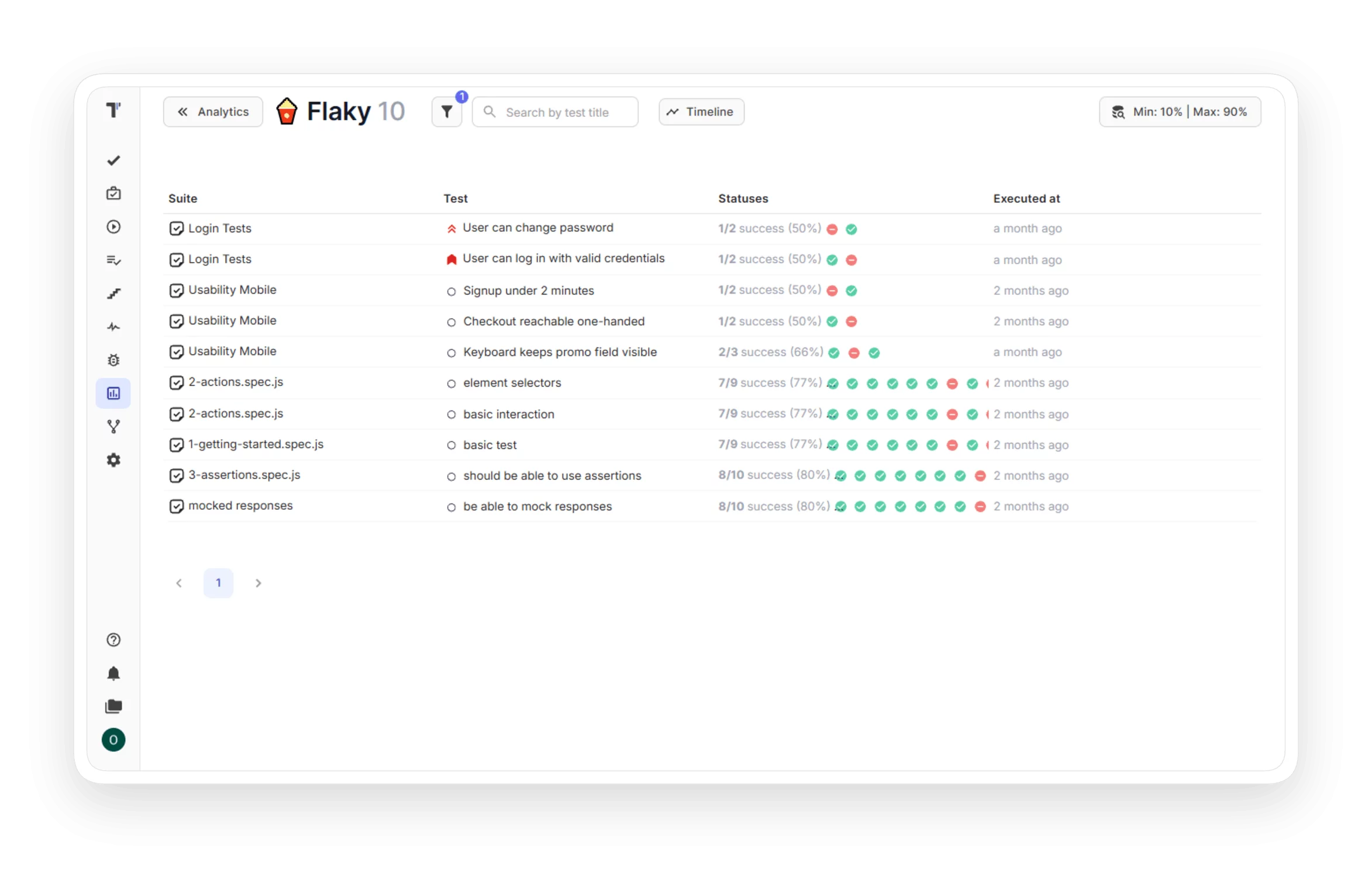
Flaky tests

Testomat.io detects flaky tests automatically and collects them on a dedicated Analytics board. You set the flakiness range yourself and decide which tests count as flaky. Unstable tests get attention before they delay a release.
Flaky tests

Trusted by over 500 forward-thinking companies

logo
logo
logo
logo
logo
logo
logo
logo
logo
logo
logo
logo
logo
logo
logo
logo
logo
logo

Benefits of flaky tests in Testomat.io

https://testomat.io/wp-content/uploads/2026/10/stable-test-suite.svg
Stable test suite
Fixes come before the release.
https://testomat.io/wp-content/uploads/2026/10/trust-in-green-results.svg
Trust in results
A passed status means a real pass.
https://testomat.io/wp-content/uploads/2026/10/less-time-on-reruns.svg
Less time on reruns
Fewer retries and fewer CI minutes.
https://testomat.io/wp-content/uploads/2026/10/visible-progress.svg
Visible progress
Timelines show how flakiness falls.
https://testomat.io/wp-content/uploads/2026/10/shared-view.svg
Shared view
The whole team sees the same data.

Testomat.io features for flaky tests

Timelines for flaky tests

The Flaky Tests widget supports timelines. You watch how the number of flaky tests changes over the selected period and share the timeline with a unique link. The trend shows whether the fixes help.

Timelines for flaky tests
Flaky tests in run reports

Every run report includes a widget with the latest five flaky tests. You notice a new flaky test in the report, without a separate check of the dashboard. The widget leads to the full Analytics page.

Flaky tests in run reports
AI agent for flaky tests

The Mark Flaky Tests agent adds a Flaky label to every test that analytics detects as unstable. You filter tests by the label and plan the fixes. The agent follows your flakiness settings.

AI agent for flaky tests
Compare runs

Select several runs and compare them by parameters such as Flaky, Reviewed, and Degraded. You see in which run the instability started. The team fixes the cause instead of the symptom.

Compare runs

How flaky tests can help?

Flaky tests waste time on reruns and hide real failures. Detection gives every team exact numbers and a clear next step.
Startups & small teams
Automatic detection
Flaky tests appear on the board automatically.
Custom flakiness range
Set the min and max success rate for your project.
Exact pass rate
The rate comes from the recent run history.
Fewer reruns
Retry the tests that need it.
Mid-sized products
Flaky widget in reports
Fresh flaky tests show in every run report.
Trend timelines
Watch flakiness change over the period.
Shared timeline link
Send the trend to the team.
Run comparison
See in which run instability started.
Enterprises projects
AI flaky labels
The agent marks unstable tests automatically.
AI failure explanation
Get the cause and a fix for failed tests.
Cross-project analytics
Track flaky tests across all projects.
PDF and XLSX exports
Save the reports for audits.
What clients say

Recent reviews

“Excellent customer support”
Customer support is always prompt and high-quality. It's also great to see that user feedback is considered when developing new features. The team makes an effort to provide overviews of new features and keeps users informed about the latest updates.
4/5
Aliona Kovalchuk
Aliona Kovalchuk
General QA
“The Best TMS for Our QA Team!”
Our 15-person QA team has used Testomat.io daily for over two years. After comparing tools like TestRail, it stood out in both features and pricing. It’s affordable yet powerful. Jenkins integration works seamlessly, even manual testers can run tests easily. The clean UI speeds onboarding, improves collaboration, and saves time. We’ve recommended it widely, and others love it too.
5/5
Vladyslav M.
Vladyslav M.
General QA
“Testomat.io makes daily testing so much easier”
I’ve used Testomat.io daily for over two years, and it’s the best TMS I’ve worked with. Compared to tools like TestRail, it offers more features at a better price. Jenkins integration is seamless, even for manual testers. The UI is clean and easy to learn. It speeds up workflows, improves transparency, and makes team collaboration much smoother.
5/5
Dmytro H.
Dmytro H.
General QA
“Very convenient platform for managing test cases”
The platform is convenient and intuitive to use. I’ve been using it long enough to say it’s very user-friendly. It’s clear that the team is constantly working on and improving the platform.
5/5
Aleksey K.
Aleksey K.
General QA
“Great tool for creating and managing manual test cases efficiently”
As a Manual QA, I use Testomat.io to create and manage test cases with ease. The interface is intuitive, making onboarding simple. Test plans, runs, and results are well-structured in one place. Tagging helps organize cases efficiently. AI features speed up test creation. It keeps workflows transparent, improves collaboration, and reduces routine work.
5/5
Oksana G.
Oksana G.
General QA
“Testomat.io has been a great tool for managing both automated and manual tests in one place”
I really like how easy it is to integrate with frameworks and CI/CD tools, and the real-time reports with screenshots and analytics save a lot of time. Overall, it makes collaboration in the team much smoother and keeps testing well-organized.
5/5
Aleksey K.
Aleksey K.
Quality Assurance Engineer

Frequently asked questions

What are flaky tests? Testomat

A flaky test passes in a single run and fails in the next, with zero changes in the code. The result depends on timing, test data, environment, or test order. Flaky tests reduce trust in the whole report.

How to detect and fix flaky tests? Testomat

Testomat.io calculates the pass rate of every test from the recent run history and collects unstable tests on the Flaky Tests board. You set the success rate range that defines flaky for your project. The result history of a test points to the cause, and after the fix the test leaves the board.

How do I find and fix flaky tests in CI? Testomat

Connect the reporter to your CI tool: GitHub, GitLab, Jenkins, Bamboo, or CircleCI. Results from every pipeline run update the Flaky Tests board, and each run report shows the fresh flaky tests. You fix the cause instead of a blind rerun of the pipeline.

How does AI detect and handle flaky tests? Testomat

The Mark Flaky Tests agent reads the analytics data and adds a Flaky label to every unstable test. AI also explains the reason behind a failure and suggests a possible fix. Both features follow the flakiness settings of your project.

How to reduce flaky tests? Testomat

Fix the common causes first: dependence on test order, old test data, timing issues, and an unstable environment. Then watch the trend on the Flaky Tests timeline: the number should fall after each fix. Run comparison shows in which run instability started.

Does flaky test detection work with Playwright, Cypress, and Selenium? Testomat

Yes. Detection works on run results, so any framework with a Testomat.io reporter fits: Playwright, Cypress, Selenium-based tools, Jest, Pytest, and more. The reporter sends the results, and analytics calculates the pass rate.
See the flaky tests of your project in Testomat.io

See the flaky tests of your project in Testomat.io







