

Test automation integrations

Connect your automation frameworks and CI/CD tools in minutes. Skip the config work and start testing.
 Test automation  integrations
Benefits of test automation integrations

https://testomat.io/wp-content/uploads/2026/06/plug-and-play-setup-type1.svg
Plug-and-play setup
One line of config.
https://testomat.io/wp-content/uploads/2026/06/wide-stack-support-type1.svg
Wide stack support
Native support across major stacks.
https://testomat.io/wp-content/uploads/2026/06/real-time-sync-type1.svg
Real-time sync
See results the moment they finish.
https://testomat.io/wp-content/uploads/2026/06/cicd-ready-type1.svg
CI/CD ready
Works with every major pipeline.
https://testomat.io/wp-content/uploads/2026/06/issue-tracker-links-type1.svg
Issue tracker links
Connect failures to Jira tickets fast.

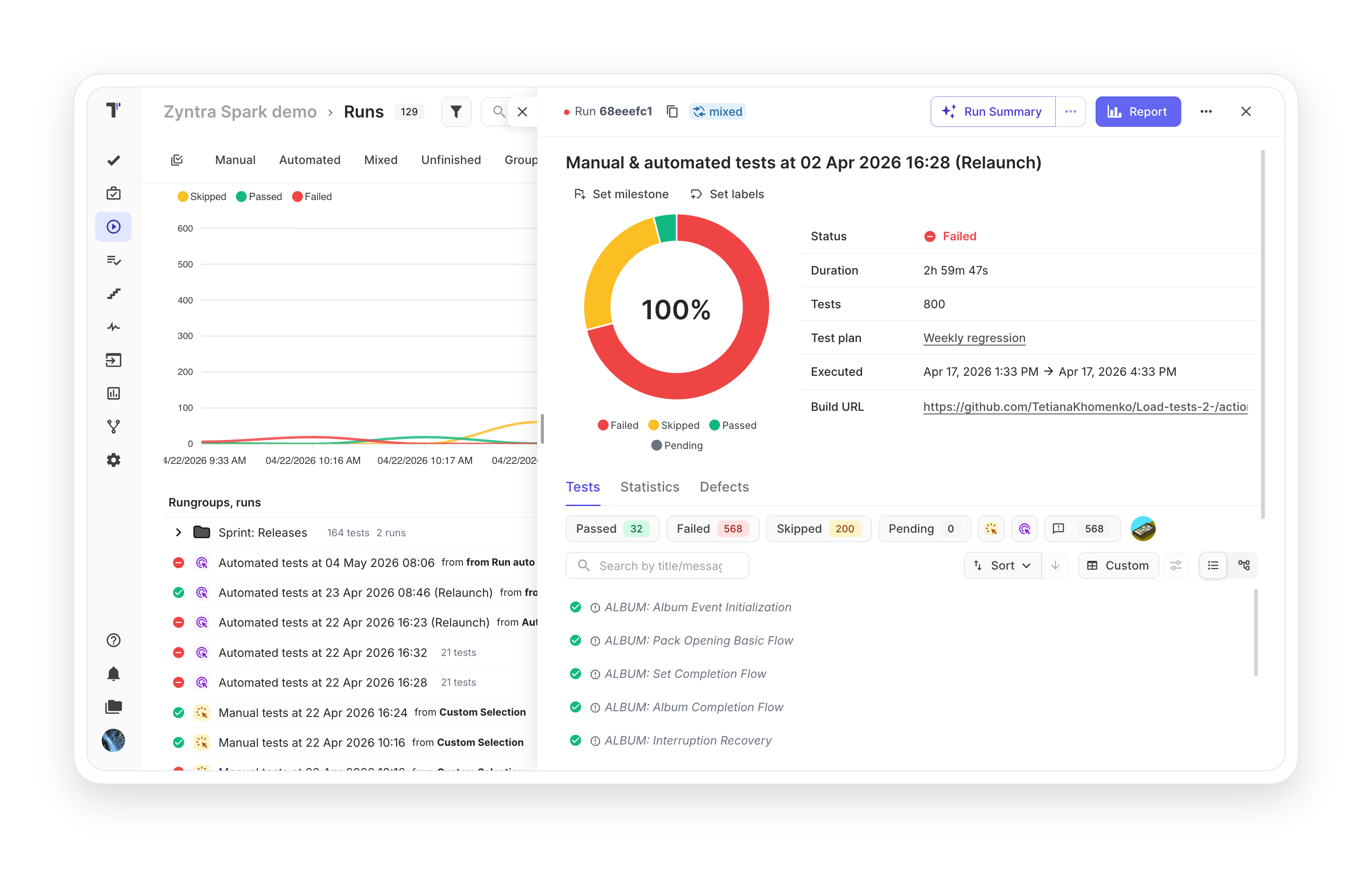
Testomat.io test automation integrations features

JavaScript testing frameworks

Import automated tests written in JavaScript and view real-time reports with video and screenshots. Works with Playwright, Cypress, WebdriverIO, CodeceptJS, Jest, Mocha, and others.

Learn more
 JavaScript   testing frameworks
PHP testing frameworks

Get live documentation and test counts for PHP projects without running the suite. Covers Codeception, PHPUnit, and Pest with a dedicated reporter.

Learn more
PHP  testing frameworks
Java support

Send results from JUnit, TestNG, Cucumber, and Karate straight into Testomat.io. The official Java reporter handles parametrized tests and step-level reporting, plus test artifacts like screenshots and logs.

Learn more
 Java  support
Gauge framework support

Native Gauge support for teams using Markdown-based specs. Manage Markdown-based specs alongside classical tests and reuse steps through the Step Database.

Learn more
 Gauge framework  support
Cucumber support

Seamless integration with Cucumber, the most popular BDD automation framework. Import your existing tests and make them visible to the whole team in one place.

Learn more
 Cucumber  support
JUnit XML format support syntax

Universal fallback for any framework that produces JUnit XML. Covers Pytest, Minitest, PHPUnit, Robot Framework, and internal frameworks that need result reporting.

Learn more
JUnit XML  format support  syntax
Postman Newman support

Run Postman collections through Newman and pipe results into Testomat.io automatically. API test results land in the same reports as your UI tests, no manual entry needed.

Learn more
 Postman Newman support
Jira integration

Link tests to Jira issues of any type, including user stories and bugs. Non-technical teammates can view and run scenarios from inside Jira itself, with no separate login needed.

Learn more
 Jira  integration
CI/CD execution

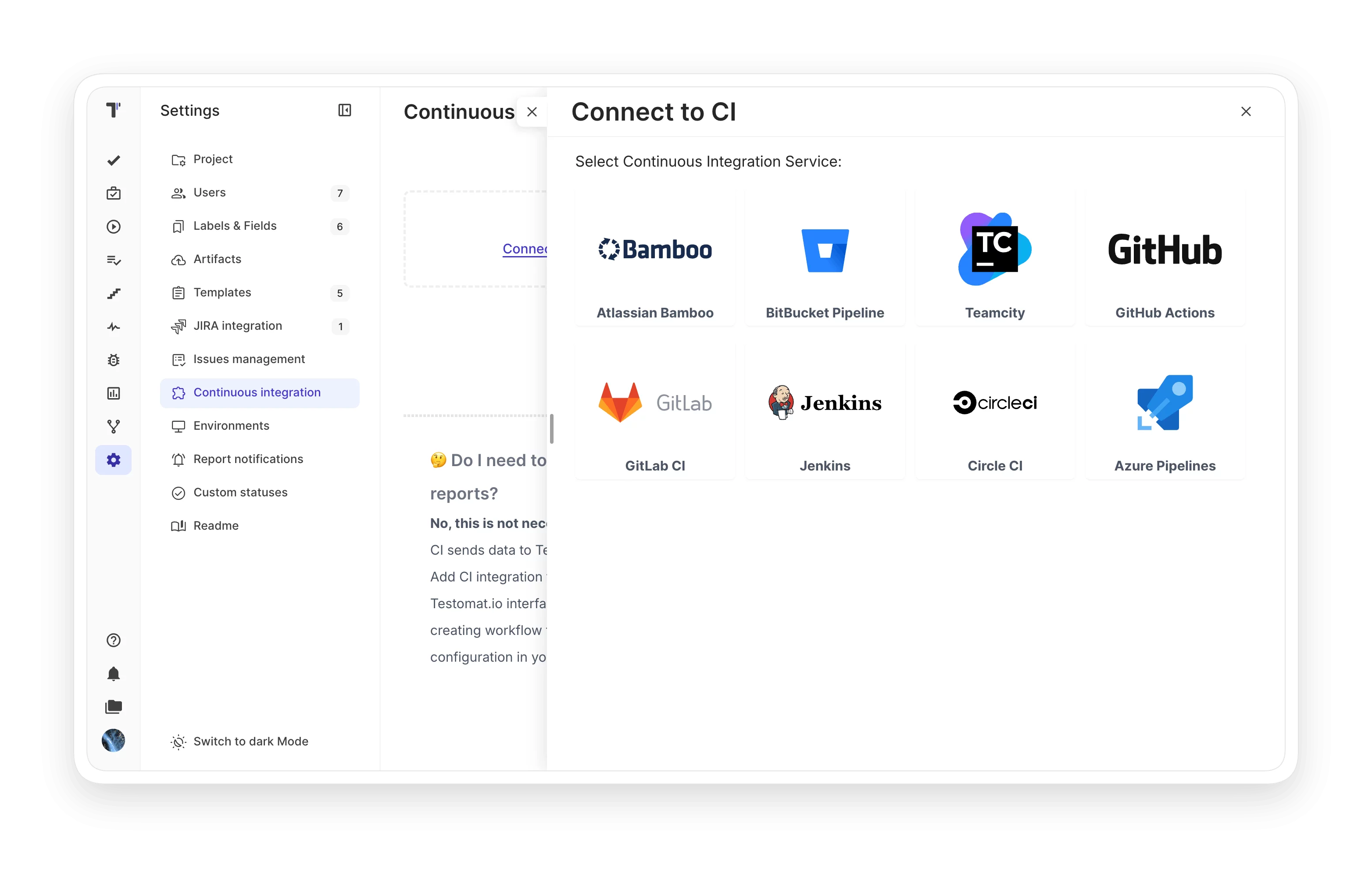
Trigger automated tests from any commit through GitHub Actions, GitLab CI, Jenkins, Bamboo, CircleCI, TeamCity, Bitbucket Pipelines, or Azure Pipelines.
Learn more
CI/CD  execution
MCP server

Connect AI assistants like Cursor and Claude to your Testomat.io project. The official open-source MCP server reads test data and creates suites through any MCP client.

Learn more
 MCP server

How test automation integrations can help?

Connect your existing stack in minutes. Whether you run a small suite or 100K+ tests, Testomat.io fits the tools your team already uses.
Startups & small teams
Quick setup
No DevOps help needed.
Free plan
Full integrations for small teams.
Single source
Manual and automated in one place.
Mid-sized products
Mixed runs
Manual and automated together.
Real-time reporting
Watch results as they happen.
Jira links
Failures map to tickets directly.
Enterprise projects
Handles 100K+ tests
Scales without performance loss.
Broad framework coverage
Multi-framework support in one TMS.
Self-hosted option
Keep data on-premise.
What clients says

Recent reviews

“Excellent customer support”
Customer support is always prompt and high-quality. It's also great to see that user feedback is considered when developing new features. The team makes an effort to provide overviews of new features and keeps users informed about the latest updates.
4/5
Aliona Kovalchuk
Aliona Kovalchuk
General QA
“The Best TMS for Our QA Team!”
Our 15-person QA team has used Testomat.io daily for over two years. After comparing tools like TestRail, it stood out in both features and pricing. It’s affordable yet powerful. Jenkins integration works seamlessly, even manual testers can run tests easily. The clean UI speeds onboarding, improves collaboration, and saves time. We’ve recommended it widely, and others love it too.
5/5
Vladyslav M.
Vladyslav M.
General QA
“Testomat.io makes daily testing so much easier”
I’ve used Testomat.io daily for over two years, and it’s the best TMS I’ve worked with. Compared to tools like TestRail, it offers more features at a better price. Jenkins integration is seamless, even for manual testers. The UI is clean and easy to learn. It speeds up workflows, improves transparency, and makes team collaboration much smoother.
5/5
Dmytro H.
Dmytro H.
General QA
“Very convenient platform for managing test cases”
The platform is convenient and intuitive to use. I’ve been using it long enough to say it’s very user-friendly. It’s clear that the team is constantly working on and improving the platform.
5/5
Aleksey K.
Aleksey K.
General QA
“Great tool for creating and managing manual test cases efficiently”
As a Manual QA, I use Testomat.io to create and manage test cases with ease. The interface is intuitive, making onboarding simple. Test plans, runs, and results are well-structured in one place. Tagging helps organize cases efficiently. AI features speed up test creation. It keeps workflows transparent, improves collaboration, and reduces routine work.
5/5
Oksana G.
Oksana G.
General QA
“Testomat.io has been a great tool for managing both automated and manual tests in one place”
I really like how easy it is to integrate with frameworks and CI/CD tools, and the real-time reports with screenshots and analytics save a lot of time. Overall, it makes collaboration in the team much smoother and keeps testing well-organized.
5/5
Aleksey K.
Aleksey K.
Quality Assurance Engineer

Frequently asked questions

Which test frameworks does Testomat.io support natively? Testomat

Native reporters exist for Playwright, Cypress, WebdriverIO, CodeceptJS, Jest, Mocha, Jasmine, TestCafe, Nightwatch, Vitest, Cucumber.js, JUnit, TestNG, Karate, Pytest, Codeception, PHPUnit, Pest, Robot Framework, Behave, Detox, Gauge, and Newman. Any framework that produces JUnit XML is also supported.

How do I connect my automation to Testomat.io? Testomat

Install the reporter package for your language (npm, Maven, pip, or Composer) and set the TESTOMATIO environment variable to your project API key. Run your tests as usual, and the reporter sends results to the platform automatically.

Does Testomat.io work with my CI/CD pipeline? Testomat

Yes. GitHub Actions, GitLab CI, Jenkins, Bamboo, CircleCI, TeamCity, Bitbucket Pipelines, and Azure Pipelines all work out of the box. Any CI that runs a shell command can integrate by setting one environment variable.

Can I report results from a framework that is not on the supported list? Testomat

Yes. Generate a JUnit XML report from your framework and upload it through the reporter. Testomat.io parses the XML and creates test cases automatically, producing a run report just like with native integrations.

How are test failures linked to Jira tickets? Testomat

The Jira plugin supports two-way linking. From a failed test, you can auto-create a Jira issue using a custom template. From a Jira story, you can see linked tests and their latest run status without leaving the issue view.
Start testing in minutes with Testomat.io.

Start testing in minutes with Testomat.io.

