

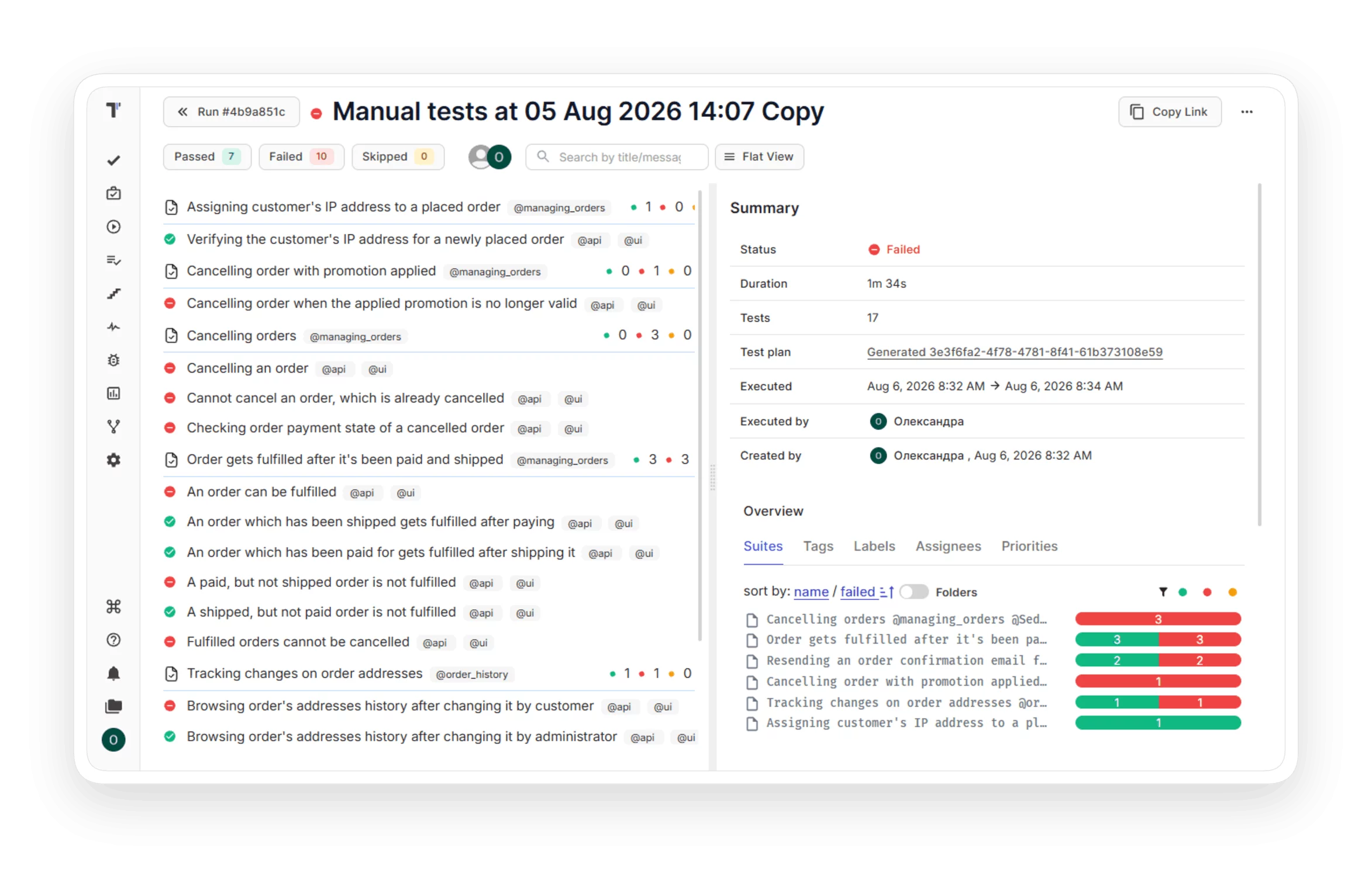
Reporting

Cut release decision time from days to minutes and stream live results to every stakeholder.
 Reporting

Trusted by over 500 forward-thinking companies

logo
logo
logo
logo
logo
logo
logo
logo
logo
logo
logo
logo
logo
logo
logo
logo
logo
logo

Benefits of reporting

https://testomat.io/wp-content/uploads/2026/07/faster-sprint-delivery.svg
Ship releases faster
Launch agile projects without configuration overhead.
https://testomat.io/wp-content/uploads/2026/08/cut-triage-time.svg
Cut triage time
AI summaries surface real failures instantly.
https://testomat.io/wp-content/uploads/2026/08/end-status-update-meetings.svg
End status-update meetings
Live links keep stakeholders self-served.
https://testomat.io/wp-content/uploads/2026/08/own-your-test-data.svg
Own your test data
Artifacts stay in your S3 forever.
https://testomat.io/wp-content/uploads/2026/08/catch-regressions-earlier.svg
Catch regressions earlier
Heatmaps flag risk before release day.

Testomat.io reporting features

Real-time reporting

Stop waiting for the full suite to finish before you act. Results stream into the dashboard as each test completes, so failures get triaged while the run is still going.

Learn more
 Real-time  reporting
Screenshots & video capturing

Reproduce any failure in seconds instead of asking the tester to rerun it. Attach screenshots or video directly to the test case, with public or private access to your S3 bucket.

Learn more
Screenshots & video  capturing
Unlimited artifacts storage on private S3 cloud

Keep full ownership of your test evidence. Artifacts upload to your own bucket on AWS, DigitalOcean, Azure, or Google Cloud, so your data stays with you even if you switch platforms.

Learn more
Unlimited  artifacts  storage on private S3 cloud
Public read-only test reports

Brief executives, clients, and PMs without paying for extra seats. A public link with optional passcode gives them live results, while security-sensitive data stays hidden.

Learn more
Public  read-only  test reports
Notifications

Hear about failures where your team already works. Push run results to email, Slack, MS Teams, or Jira based on rules you set, such as on-fail or threshold-exceeded.

Learn more
Notifications
Test results grouping

Match reports to how the business actually plans. Group results by sprint, release, or functional area so each audience sees the slice that matters to them.

Learn more
Test results grouping
Living docs

Generate publicly available documentation from your project. Living docs update in real time as your tests change, so the documentation is always up to date.

Learn more
 Living  docs
Merge strategy

Get a single go/no-go verdict from multi-run executions. Combine results from parallel browsers, environments, or shards using Realistic, Optimistic, or Pessimistic strategies.

Learn more
Merge  strategy
Multi-env results for cross-browser and mobile testing filtering

See cross-browser and mobile coverage in one view instead of stitching reports together. Tests run in sequence or parallel across environments and group automatically in the report.

Learn more
Multi-env  results for cross-browser and mobile testing  filtering
Test results heatmaps by test suite

Spot the riskiest areas of your product at a glance. Heatmaps highlight where defects cluster and where coverage is thin, so QA effort goes where it pays off.

Learn more
Test results  heatmaps   by test suite
Sorting and filtering in test results

Find the failure you care about in seconds. Sort by passed, failed, or skipped, then filter by name or @tag using the advanced search lookup.

Learn more
Sorting and filtering in  test  results
Test results in Jira

Keep developers in their workflow and stop the context-switching tax. The advanced Jira plugin shows test results and requirement coverage inside the issue, and lets you edit scenarios without leaving Jira.

Learn more
Test results in   Jira
Rerun failed tests

Skip the full regression rerun and save CI minutes. Re-execute only the failed tests in CI/CD with one click, or modify existing runs with updated results.

Learn more
Rerun  failed  tests
Create defect from the UI

Log defects in one click without leaving the test report. Push tickets to Jira, GitHub, Azure DevOps, Linear, ClickUp, YouTrack, or Shortcut with testing context already attached.

Learn more
Create defect from the  UI
Stacktraces and exceptions

Jump from failure straight to the root cause. The exception flags the error and the stack trace points to the exact line of code that caused it.

Learn more
Stacktraces and exceptions
Long test results history

Prove what shipped and who tested it across a full year of releases. Test runs are retained for up to 365 days, with revisions and history in Run Archive and Group Archive giving you side-by-side diffs across any release in that window

Learn more
Long test results  history
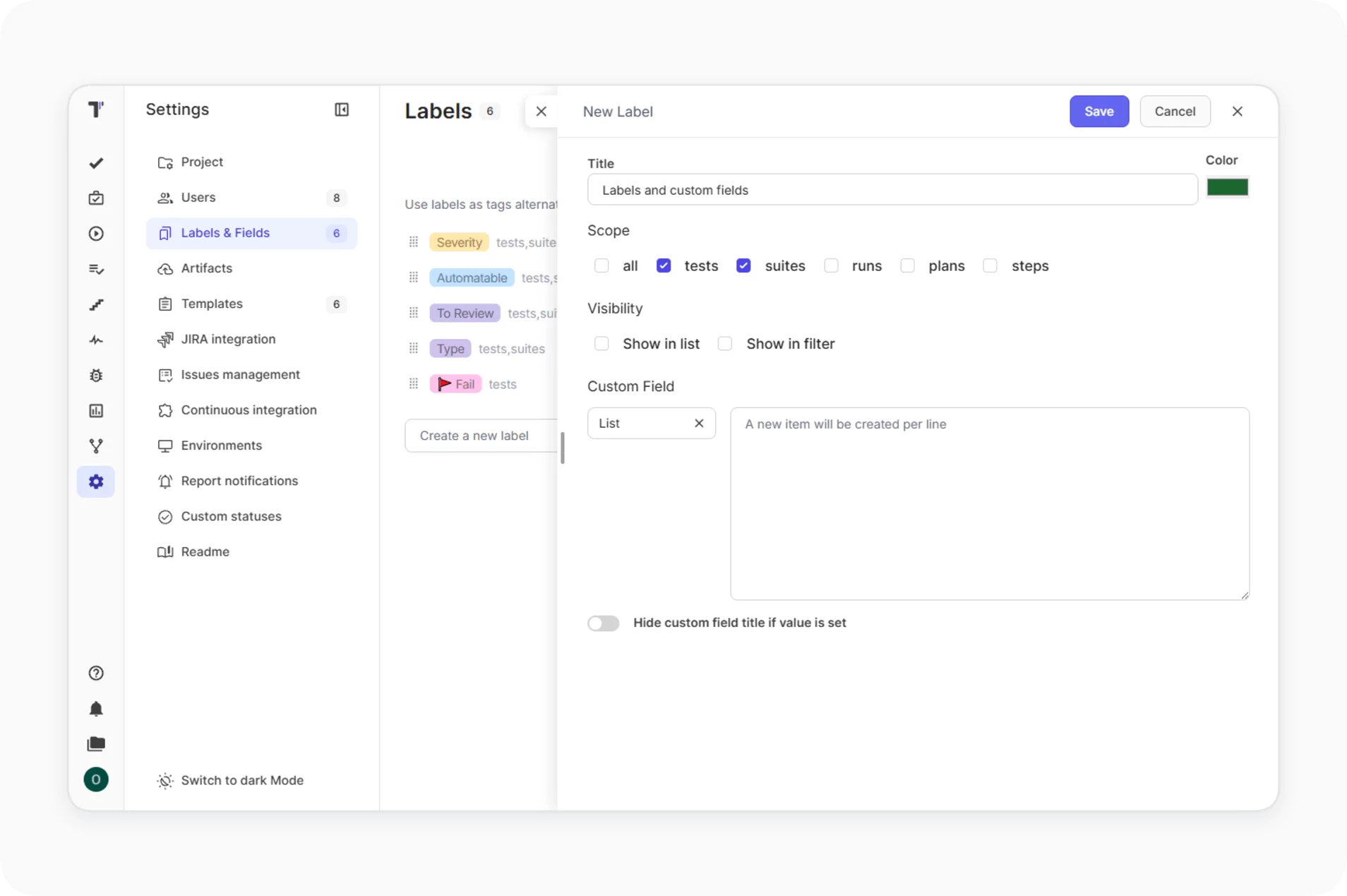
Labels and custom fields

Make your reports answer your business questions. Add custom labels and fields to test cases and suites so dashboards reflect priority, risk area, or release scope.
Learn more
Labels and custom fields
Compare test runs

Spot quality trends across releases instead of judging by the latest run alone. Summary statistics across selected runs show whether the product is getting more stable or less.

Learn more
Compare test runs
AI-powered run summary

Hand stakeholders a release-readiness verdict instead of a list of red squares. AI detects anomalies and frequent error points, and surfaces emerging bug patterns before they reach production.

Learn more
AI-powered run summary
Extended view with custom columns

Build the report your reviewer actually needs. Show or hide columns such as status, duration, labels, priority, and defects, and filter by assignee or custom status.

Extended view with custom  columns
Sharing and export

Get the report into whatever channel the recipient prefers. Email it from the Extended View, share a public link with expiration and passcode, or export a structured PDF.

Sharing and export
Milestones

Aggregate reporting results from multiple projects into a single milestone view. Track release-cycle progress across all included projects in one report.

Milestones

How reporting can help?

Turn raw test results into release decisions, with the right depth for every team size.
Startups & small teams
Release with confidence
Live results replace gut-feel go decisions.
Cut feedback loops
Failures reach the team within seconds.
Save engineering hours
No reporting pipeline to build or maintain.
Mid-sized products
Stabilize the regression suite
AI flags the flaky tests draining velocity.
Unblock review meetings
Stakeholders self-serve via public report links.
Scale QA without new hires
Heatmaps focus effort on real risk.
Enterprise projects
Pass audits faster
Long history proves what shipped when.
Keep data under your control
Private S3 storage retains every artifact.
Align distributed teams
One report consolidates every run and environment.
What clients says

Recent reviews

“Excellent customer support”
Customer support is always prompt and high-quality. It's also great to see that user feedback is considered when developing new features. The team makes an effort to provide overviews of new features and keeps users informed about the latest updates.
4/5
Aliona Kovalchuk
Aliona Kovalchuk
General QA
“The Best TMS for Our QA Team!”
Our 15-person QA team has used Testomat.io daily for over two years. After comparing tools like TestRail, it stood out in both features and pricing. It’s affordable yet powerful. Jenkins integration works seamlessly, even manual testers can run tests easily. The clean UI speeds onboarding, improves collaboration, and saves time. We’ve recommended it widely, and others love it too.
5/5
Vladyslav M.
Vladyslav M.
General QA
“Testomat.io makes daily testing so much easier”
I’ve used Testomat.io daily for over two years, and it’s the best TMS I’ve worked with. Compared to tools like TestRail, it offers more features at a better price. Jenkins integration is seamless, even for manual testers. The UI is clean and easy to learn. It speeds up workflows, improves transparency, and makes team collaboration much smoother.
5/5
Dmytro H.
Dmytro H.
General QA
“Very convenient platform for managing test cases”
The platform is convenient and intuitive to use. I’ve been using it long enough to say it’s very user-friendly. It’s clear that the team is constantly working on and improving the platform.
5/5
Aleksey K.
Aleksey K.
General QA
“Great tool for creating and managing manual test cases efficiently”
As a Manual QA, I use Testomat.io to create and manage test cases with ease. The interface is intuitive, making onboarding simple. Test plans, runs, and results are well-structured in one place. Tagging helps organize cases efficiently. AI features speed up test creation. It keeps workflows transparent, improves collaboration, and reduces routine work.
5/5
Oksana G.
Oksana G.
General QA
“Testomat.io has been a great tool for managing both automated and manual tests in one place”
I really like how easy it is to integrate with frameworks and CI/CD tools, and the real-time reports with screenshots and analytics save a lot of time. Overall, it makes collaboration in the team much smoother and keeps testing well-organized.
5/5
Aleksey K.
Aleksey K.
Quality Assurance Engineer

Frequently asked questions

How quickly do test results appear in Testomat.io? Testomat

Results stream into the dashboard in real time, as soon as the first test finishes. You do not need to wait for the full suite to complete before reviewing pass and fail counts.

Can I share test reports with stakeholders who do not have an account? Testomat

Yes. Generate a public read-only link with configurable expiration and optional passcode protection. The default expiration is seven days. Public reports exclude security-sensitive information.

Where are screenshots and videos stored? Testomat

Artifacts are uploaded to your own S3-compatible storage on AWS, DigitalOcean Spaces, Azure Blob, or Google Cloud Storage. You control retention and access, and your data stays with you even if you stop using the platform.

Which notification channels are supported? Testomat

Reporting sends run results to email, Slack, Microsoft Teams, Telegram, Jira comments, and Azure DevOps. You can configure rules and triggers such as on-fail, on-complete, or threshold-exceeded for each project.

Can I export or download reports for offline review? Testomat

Yes. Export a spreadsheet or a structured PDF directly from the Extended View. You can also send the run report by email from the Extra menu, or share a public link with a passcode for external reviewers.
Start shipping faster with Testomat.io

Start shipping faster with Testomat.io







