Team collaboration

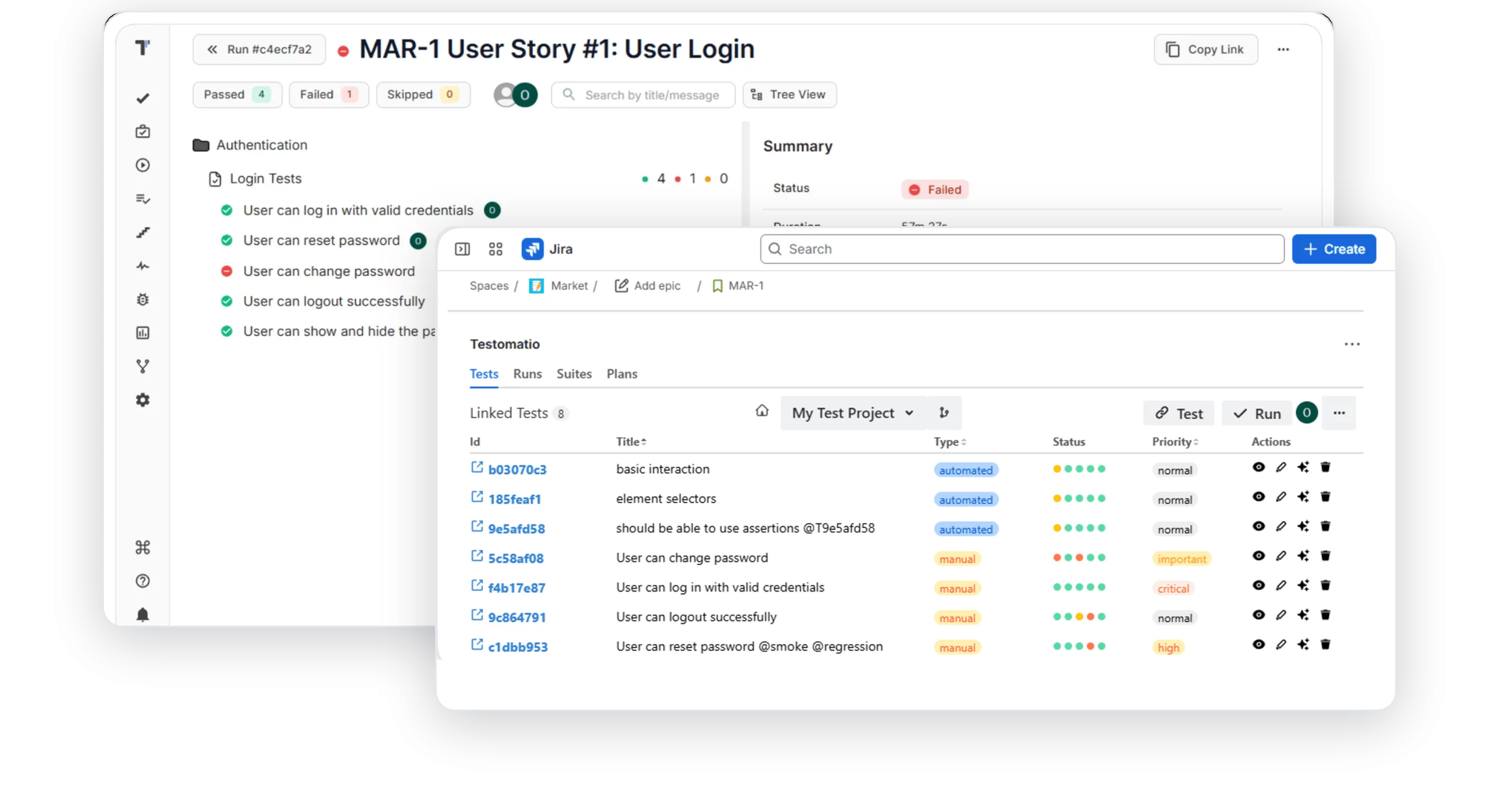
Give your Agile team a shared testing space. BAs write scenarios, QA runs them, and developers see results in Jira.
Team collaboration

Trusted by over 500 forward-thinking companies

logo
logo
logo
logo
logo
logo
logo
logo
logo
logo
logo
logo
logo
logo
logo
logo
logo
logo

How team collaboration works in Testomat.io

Plan together
1. Plan together
Invite BAs, devs, and QA to a project.
Open a user story for discussion.
Write scenarios in the Three Amigos session.
Keep all tests in a shared space.
Link stories to tests
2. Link stories to tests
Open an issue from Jira in Testomat.io.
Link it to tests, suites, or projects.
Attach several issues to a test.
See the tests that cover each story.
Run from Jira
3. Run from Jira
Open the linked scenarios in the issue.
Launch a run from Jira.
Edit BDD feature files from Jira.
See results on the user story.
Publish living docs
4. Publish living docs
Turn on Living Docs for the project.
Share the public documentation link.
Embed tests into a Confluence page.
Docs update as tests change.

How team collaboration can help?

Startups & small teams
Shared space
Whole team works together.
Living docs
Auto-generated from your tests.
Confluence
Embed tests on a page.
Free plan
Start without a card.
Mid-sized products
Story links
Connect issues to test cases.
Bulk edit
Change many cases at once.
CI/CD runs
Execute tests on every commit.
Real-time docs
Docs update as you work.
Enterprise projects
Non-tech execution
BAs run tests from Jira.
BDD in Jira
Edit feature files from Jira.
Coverage checks
See requirements covered from Jira.
Cross-project links
A single issue, many projects.

Testomat.io team collaboration features

Living docs

Living Docs generates public documentation from your project and updates it in real time as you edit tests. Teammates outside QA read the current scenarios in a browser and stop asking QA for the latest version. The whole team works from the same test base.

Learn more
Living docs
Confluence integration

The Living Docs iframe embeds a suite, a single test, or tests filtered by tag or Jira ID into a Confluence page. Product and business roles see test scenarios inside the pages they open every day. Test visibility grows and QA spends less time on status updates.

Learn more
Confluence integration
Bulk edit

Bulk edit changes the same field across many tests in a single action. You create or update multiple cases in an editor instead of clicking through each case. Routine updates take less time, and the suite stays consistent.

Bulk edit
User story linked to test cases

You can link an issue to several projects, test suites, and tests on a single screen, or attach many issues to a test. Each requirement shows the tests that cover it. Your team finds the stories that need tests before the release and plans QA work with this data.

Learn more
User story linked to test cases
Jira integration

The bidirectional Jira plugin links tests to user stories. You edit tests in Jira and see the changes in Testomat.io, and the reverse. QA and product work with the same test data.

Learn more
Jira  integration
User story tests execution

You check from Jira whether tests cover your requirements and launch a run from the issue. The generated Run Report adds run time, environment, configuration, and who launched the run. Stakeholders see coverage and results on the story itself, and release decisions rely on current data.

Learn more
User story tests execution
CI/CD execution

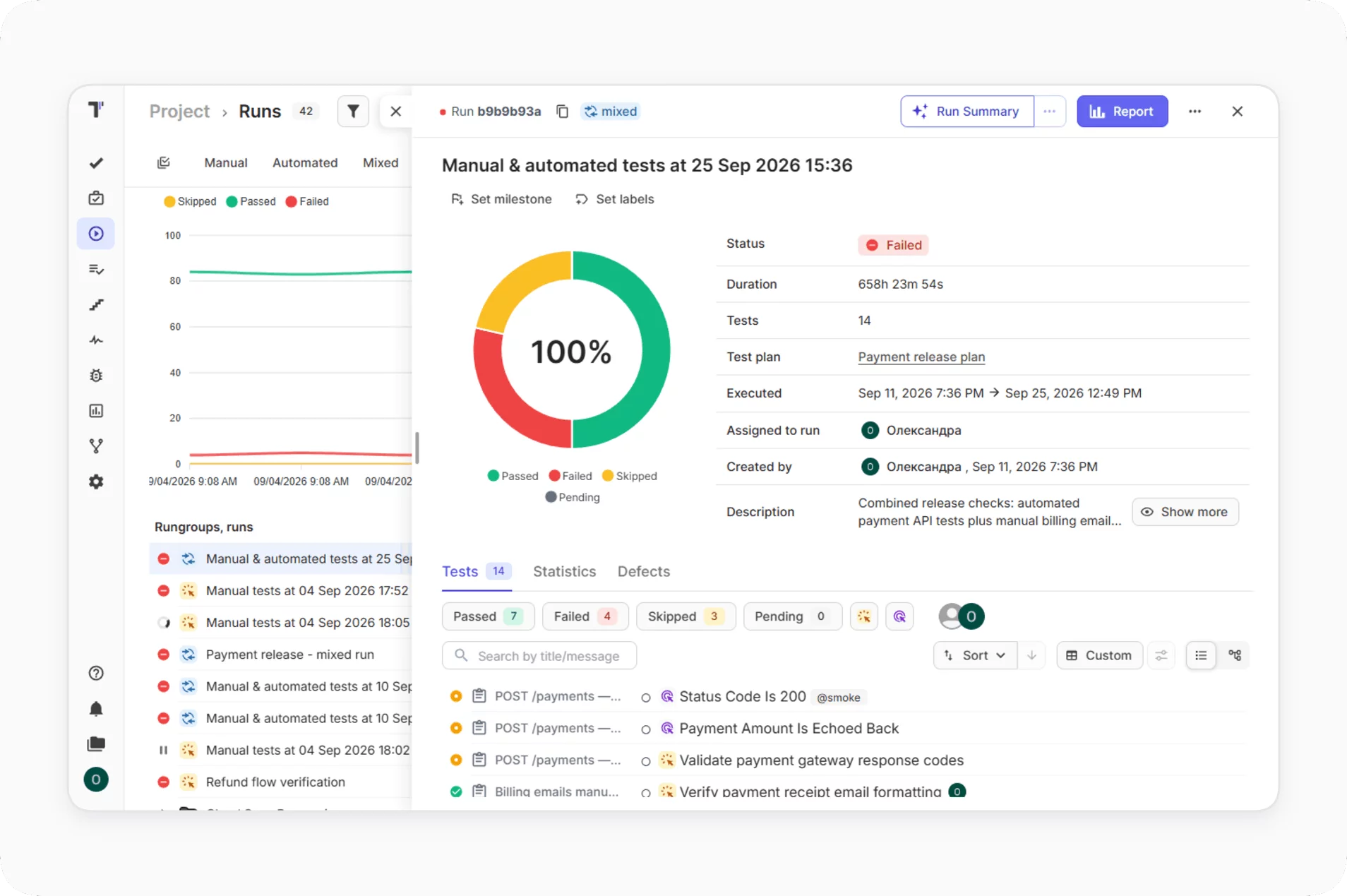
You run all or selected automated tests from Testomat.io once CI/CD is configured, and your pipeline triggers them on every commit with GitLab, GitHub, Jenkins, Bamboo, and CircleCI. Every team member launches a run from the UI and the results come back to the shared project. Developers, QA, and managers see the state of each commit in the same place.
Learn more
CI/CD execution

Benefits of team collaboration in Testomat.io

https://testomat.io/wp-content/uploads/2026/10/shared-context.svg
Shared context
A single space for the whole team.
https://testomat.io/wp-content/uploads/2026/10/live-documentation.svg
Live documentation
Docs stay current automatically.
https://testomat.io/wp-content/uploads/2026/10/non-tech-access.svg
Non-tech access
BAs and POs work in Jira.
https://testomat.io/wp-content/uploads/2026/10/connected-work.svg
Connected work
Stories linked to test cases.
https://testomat.io/wp-content/uploads/2026/10/faster-edits.svg
Faster edits
Bulk changes in many tests at once.
Start testing together today

Start testing together today

Invite BAs, developers, and QA to a shared project, link user stories to tests, and run them from Jira.
Invite
Invite
Link
Link
Run
Run
Start testing together today
What clients say

Recent reviews

“Excellent customer support”
Customer support is always prompt and high-quality. It's also great to see that user feedback is considered when developing new features. The team makes an effort to provide overviews of new features and keeps users informed about the latest updates.
4/5
Aliona Kovalchuk
Aliona Kovalchuk
General QA
“The Best TMS for Our QA Team!”
Our 15-person QA team has used Testomat.io daily for over two years. After comparing tools like TestRail, it stood out in both features and pricing. It’s affordable yet powerful. Jenkins integration works seamlessly, even manual testers can run tests easily. The clean UI speeds onboarding, improves collaboration, and saves time. We’ve recommended it widely, and others love it too.
5/5
Vladyslav M.
Vladyslav M.
General QA
“Testomat.io makes daily testing so much easier”
I’ve used Testomat.io daily for over two years, and it’s the best TMS I’ve worked with. Compared to tools like TestRail, it offers more features at a better price. Jenkins integration is seamless, even for manual testers. The UI is clean and easy to learn. It speeds up workflows, improves transparency, and makes team collaboration much smoother.
5/5
Dmytro H.
Dmytro H.
General QA
“Very convenient platform for managing test cases”
The platform is convenient and intuitive to use. I’ve been using it long enough to say it’s very user-friendly. It’s clear that the team is constantly working on and improving the platform.
5/5
Aleksey K.
Aleksey K.
General QA
“Great tool for creating and managing manual test cases efficiently”
As a Manual QA, I use Testomat.io to create and manage test cases with ease. The interface is intuitive, making onboarding simple. Test plans, runs, and results are well-structured in one place. Tagging helps organize cases efficiently. AI features speed up test creation. It keeps workflows transparent, improves collaboration, and reduces routine work.
5/5
Oksana G.
Oksana G.
General QA
“Testomat.io has been a great tool for managing both automated and manual tests in one place”
I really like how easy it is to integrate with frameworks and CI/CD tools, and the real-time reports with screenshots and analytics save a lot of time. Overall, it makes collaboration in the team much smoother and keeps testing well-organized.
5/5
Aleksey K.
Aleksey K.
Quality Assurance Engineer

Frequently asked questions

Can non-technical teammates run tests? Testomat

Yes. Through the Jira plugin, BAs and Product Owners can create, view, edit, and run test cases and BDD scenarios directly from Jira, no code required.

How do living docs stay up to date? Testomat

Living docs are generated from your tests and update in real time. Every time you change something with a test, the published documentation reflects it.

Can I link one user story to several tests? Testomat

Yes. You can link one issue to multiple projects, test suites, and tests on a single screen, and manage a test against many issues the other way around.

Can I edit many test cases at once? Testomat

Yes. Bulk editing lets you create or change multiple test cases in one step using the YAML format, instead of editing each item manually.

Does it connect to Confluence? Testomat

Yes. You can add tests to a Confluence page and use macros to display tests linked to a Jira ticket, by test suite or by test case name.
Make testing visible to the whole team with Testomat.io

Make testing visible to the whole team with Testomat.io