





Test design
Trusted by over 500 forward-thinking companies
















Benefits of test design


Testomat.io test design features
Describe BDD scenario on the gherkin language quickly with central steps database autocompletion and an autoformatting. The automatic tracking validation system will notify about gherkin syntax errors.

Add parameters to your test cases, which means tests variables. And during the execution, each parameter creates a new particular test. Test case execution is like on the parallel mode.

Create a steps database that describes application actions. Then quickly create through these steps test cases using built-in auto-suggestion and auto-completion features.

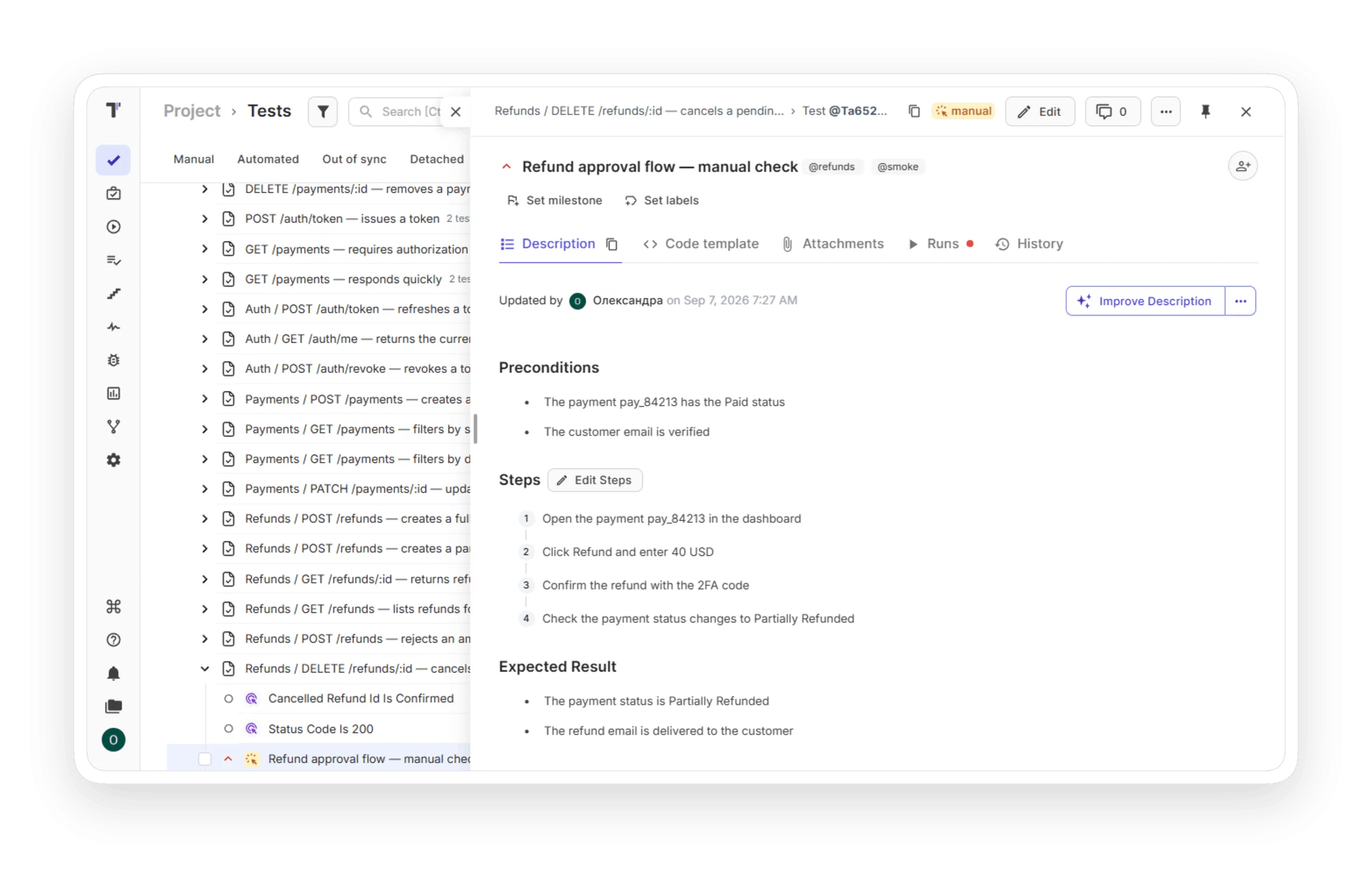
Create classic manual test cases using an advanced markdown editor that gives you flexible capabilities. Outline test preconditions, steps for actual and expected results, postconditions, any additional information or fields, etc.

Write your BDD test cases, both manual and automated BDD test cases. Link it between documents and involve all participants.

Combine test cases in a test module based on functionality, priority or one type of testing etc. Run and then check the results of these tests in the test report by Test Suite.

Spot missing test scenarios before they become production bugs: map user flows and decision trees as diagrams inside your test descriptions. Your whole team sees the same picture, so agreeing on coverage takes minutes instead of meetings.

Create a list of test tasks to quickly test your app and document your test activities. Note, the bulk editor feature allows you to create of hundred tests with a few clicks.

Prioritize test cases with test management and Jira Apps to reduce testing costs and speed up product delivery of your test project.

Create classic manual test cases by using an advanced markdown editor that gives you flexible capabilities. Outline test preconditions, steps for actual and expected results, postconditions, any additional information or fields etc.

This test management tool powers BDD implementation at the Feature level. Edit existing feature files, review changes before saving, and study finished Gherkin scenarios in a convenient format.

You can check test tagging directly in Jira from Testomat.io to better optimize the order solving issues. Sorting tests by test execution result: passed, failed, skipped. Also, filter tests or test suites in test results by name or @tag using the lookup capability of an advanced search field.

How test design can help?


Recent reviews






Frequently asked questions
What is test design in Testomat.io?


Does it support BDD and Gherkin?
Can I reuse test steps?
How does test parameterization work?
Can I organize tests by suite and tag?
