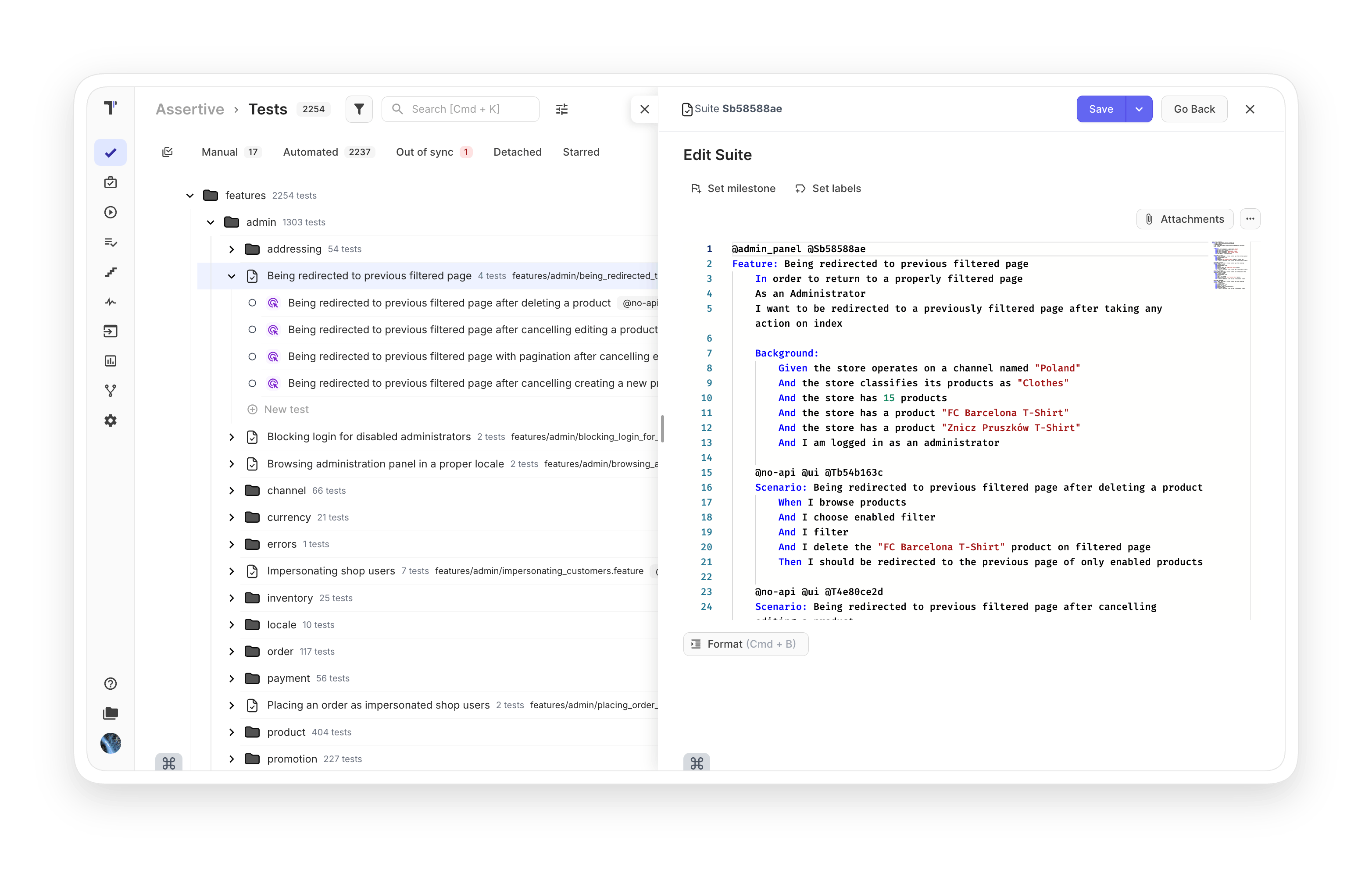
BDD support

Involve non-technical teammates in automation testing and let them describe scenarios in BDD format alongside QA in one shared space.
 BDD  support

Benefits of BDD support

https://testomat.io/wp-content/uploads/2026/06/shared-understanding.svg
Shared understanding
One language for the whole team.
https://testomat.io/wp-content/uploads/2026/06/faster-scenario-writing.svg
Faster scenario writing
Autocomplete from your steps database.
https://testomat.io/wp-content/uploads/2026/06/ai-powered-conversion.svg
AI-powered conversion
Turn classical tests into Gherkin.
https://testomat.io/wp-content/uploads/2026/06/two-way-jira-sync.svg
Two-way Jira sync
Edit feature files inside Jira.
https://testomat.io/wp-content/uploads/2026/06/living-documentation.svg
Living documentation
Docs stay in sync with tests.

Testomat.io BDD support features

Gherkin syntax support

Write scenarios in Gherkin language with autocompletion and introspection through an advanced steps database, directly inside the test management app.

Learn more
 Gherkin syntax  support
Gherkin editor

Describe BDD scenarios in Gherkin quickly with central steps database autocompletion and autoformatting. The validation system notifies you about Gherkin syntax errors automatically.

Learn more
Gherkin  editor
Feature editing mode

Power BDD implementation at the Feature level. Edit existing feature files, review changes before saving, and study finished Gherkin scenarios in a clean, readable format.

Learn more
Feature editing  mode
Intelligent steps autocompletion

Build a steps database that describes application actions. Then create new test cases faster using built-in auto-suggestion and auto-completion across the project.

Learn more
Intelligent  steps  autocompletion
Cucumber support

Seamless integration with Cucumber, the most popular BDD automation framework. Import your existing tests and make them visible to the whole team in one place.

Learn more
Cucumber support
Migration and automatically turning tests to BDD Gherkin syntax

Import classic test cases from any TMS directly into BDD format. Convert them in one click. No need to write Gherkin syntax by hand: the system handles the conversion for you.

Learn more
Migration and automatically turning tests to BDD Gherkin  syntax
Add BDD test cases

Write your BDD test cases in both manual and automated formats. Link them between documents so every participant can contribute and stay aligned.

Learn more
 Add  BDD test cases
Steps creation from Gherkin editor

The Steps database sorts steps by type and counts how often each step is used, so reusable steps surface naturally as your project grows.

Learn more
Steps creation  from Gherkin editor
Steps filtering

Filter your Steps database by type and frequency. Find the right step in seconds, even in large projects with many reusable steps.

Learn more
Steps  filtering
Import automated BDD tests

Import your Gherkin scenarios in a few clicks. Work with BDD scenarios at the feature level. All steps load into the test management tool automatically.

Learn more
 Import automated  BDD tests
Features and scenarios history

Side-by-side diff tools make review easy. See what was deleted and what was saved in feature files, so you can focus on the changes that matter.

Learn more
 Features and scenarios  history
Test execution by non-tech persons

The Advanced Jira plugin links BDD test cases and suites to Jira user stories. BAs and POs can create, view, edit, and run BDD scenarios directly from Jira.

Learn more
 Test execution  by non-tech persons
Living docs

Generate publicly available documentation from your project. Living docs update in real time as your tests change, so the documentation is always up to date.

Learn more
 Living  docs
Transform Project to BDD

AI agent that converts an entire project to BDD format automatically. Titles become Scenarios, preconditions become Given, expected results become Then. No manual rewriting.

Learn more
Transform  Project to BDD
AI-Generated BDD Scenarios

AI reads your Jira tickets and existing BDD steps, then drafts new Given-When-Then scenarios that reuse what you already have. Fill coverage gaps without starting from scratch.

Learn more
 AI-Generated  BDD Scenarios

How BDD support Can Help?

Bring BAs, developers, and QA into the same scenarios, with AI solving your conversion and coverage challenges.
Startups & small teams
Faster onboarding
Plain Gherkin reads like English.
One-click BDD migration
Convert classic tests instantly.
Reusable steps
Build your library as you go.
Mid-sized products
Cross-team collaboration
BAs and POs join in.
Living documentation
Always-current product specs.
Jira plugin
Edit feature files inside Jira.
Enterprise projects
AI scenario generation
Cover gaps at scale.
Project-wide BDD transform
Convert legacy suites.
Version history
Track every change to features.
What clients says

Recent reviews

“Excellent customer support”
Customer support is always prompt and high-quality. It's also great to see that user feedback is considered when developing new features. The team makes an effort to provide overviews of new features and keeps users informed about the latest updates.
4/5
Aliona Kovalchuk
Aliona Kovalchuk
General QA
“The Best TMS for Our QA Team!”
Our 15-person QA team has used Testomat.io daily for over two years. After comparing tools like TestRail, it stood out in both features and pricing. It’s affordable yet powerful. Jenkins integration works seamlessly, even manual testers can run tests easily. The clean UI speeds onboarding, improves collaboration, and saves time. We’ve recommended it widely, and others love it too.
5/5
Vladyslav M.
Vladyslav M.
General QA
“Testomat.io makes daily testing so much easier”
I’ve used Testomat.io daily for over two years, and it’s the best TMS I’ve worked with. Compared to tools like TestRail, it offers more features at a better price. Jenkins integration is seamless, even for manual testers. The UI is clean and easy to learn. It speeds up workflows, improves transparency, and makes team collaboration much smoother.
5/5
Dmytro H.
Dmytro H.
General QA
“Very convenient platform for managing test cases”
The platform is convenient and intuitive to use. I’ve been using it long enough to say it’s very user-friendly. It’s clear that the team is constantly working on and improving the platform.
5/5
Aleksey K.
Aleksey K.
General QA
“Great tool for creating and managing manual test cases efficiently”
As a Manual QA, I use Testomat.io to create and manage test cases with ease. The interface is intuitive, making onboarding simple. Test plans, runs, and results are well-structured in one place. Tagging helps organize cases efficiently. AI features speed up test creation. It keeps workflows transparent, improves collaboration, and reduces routine work.
5/5
Oksana G.
Oksana G.
General QA
“Testomat.io has been a great tool for managing both automated and manual tests in one place”
I really like how easy it is to integrate with frameworks and CI/CD tools, and the real-time reports with screenshots and analytics save a lot of time. Overall, it makes collaboration in the team much smoother and keeps testing well-organized.
5/5
Aleksey K.
Aleksey K.
Quality Assurance Engineer

Frequently asked questions

Do I need to know Gherkin to start writing BDD scenarios? Testomat

No. The Gherkin editor highlights keywords, autocompletes steps from your project database, and notifies you about syntax errors. The autocompletion is built on a shared steps database that grows as your team writes scenarios.

Can I convert my existing classical test cases to BDD? Testomat

Yes. You can convert in one click using the built-in conversion tool, or run the Transform Project to BDD AI agent for project-wide migration. Titles become Scenarios, preconditions become Given, and expected results become Then.

Which BDD frameworks does Testomat.io work with? Testomat

Cucumber is the most popular BDD automation framework Testomat.io integrates with. The platform also supports Playwright + BDD, Cypress + BDD, and CodeceptJS + BDD. Any framework that produces Gherkin feature files will sync.

Can non-technical teammates write or run BDD tests? Testomat

Yes. BAs and POs can create, view, edit, and run BDD scenarios from Jira through the Advanced Jira plugin. Living Docs also give read access to anyone who needs to see what is being tested.

How does AI fit into BDD scenario writing? Testomat

AI reads your Jira tickets and existing BDD steps, then drafts new Given-When-Then scenarios. It reuses steps you already have, so generated tests stay consistent with your project style.
Start your first BDD scenario with Testomat.io

Start your first BDD scenario with Testomat.io