Let’s be real: software testing can be exhausting. While running automated suites is easy, the prep work—analyzing requirements, brainstorming scenarios, and writing test cases—drains hours of engineering time. While general AI tools like ChatGPT help with ad-hoc prompts, modern QA teams increasingly rely on specialized ai test management solutions to bridge the gap between requirements and execution. In this comparison, we break down why dedicated platforms outperform standalone chatbots for scalable QA documentation analysis.
Want to skip manual copy-pasting and let AI generate, structure, and sync your test cases directly inside your project? Explore Testomat.io’s free tier and start automating your test workflows today.
Before AI assistants like ChatGPT came along, requirement analysis alone could eat up hours or even days of your time. QA professionals would manually dig through massive specification documents, trying to identify every possible use case, edge case, and potential failure scenario. It was tedious, repetitive, and honestly? Pretty soul-crushing. 😅
But we’re living in a different era now. Tools like ChatGPT have completely revolutionized how we approach test case generation and the entire test process. Today, you can write a simple prompt in plain English (or any language, really), and boom, you get structured, comprehensive test cases in minutes instead of hours.
This isn’t just about speed, though. ChatGPT can help improve test coverage, identify edge cases that humans might overlook, and standardize your entire testing workflow. Whether you’re focused on manual testing or building complex test automation frameworks, this language model has become an essential part of the modern QA toolkit.
In this guide, we’ll show you exactly how to use ChatGPT for every stage of your testing journey from analyzing requirements to generating automated test scripts that actually work. Let’s dive in!
Why ChatGPT for QA Testing Is Still Highly Relevant in 2026
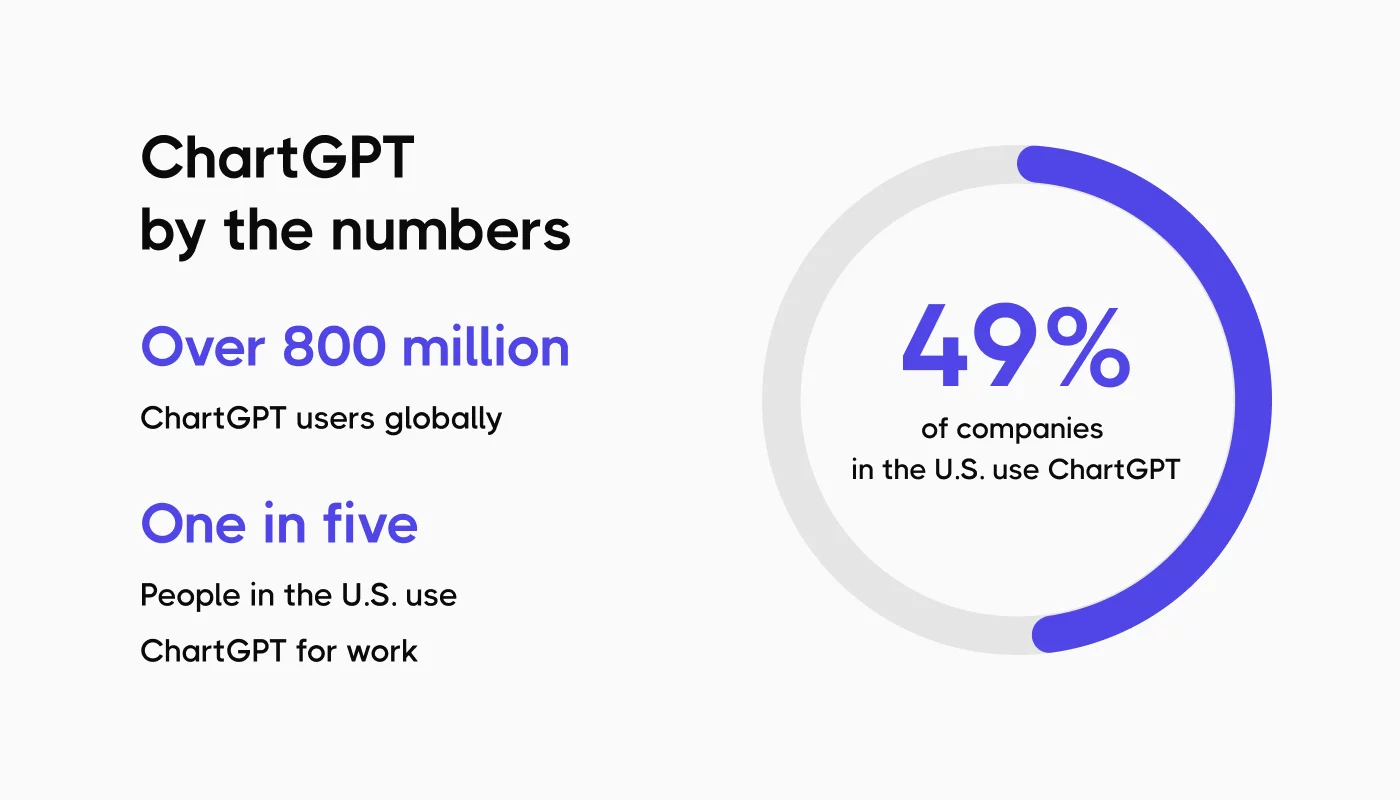
ChatGPT remains one of the most powerful AI assistants in the tech world because it provides:
- Fast and accurate text analysis – Perfect for processing long requirement documents and extracting key points.
- Structured output in any format – Tables, lists, JSON, Gherkin, test case templates, whatever your team uses.
- Multi-language support – You can write prompts in English, Ukrainian, Polish, Spanish, ChatGPT adapts instantly.
- Compatibility with modern testing tools – It generates scripts for Playwright, Cypress, Selenium, Postman Collections, etc.
- Deep consistency – ChatGPT 5.x models maintain strict reasoning and high accuracy, which is critical for tasks like scenario expansion and code generation.
Simply put: ChatGPT helps QA teams save time, reduce routine work, and standardize output quality.
Step 1: Use ChatGPT for Requirement Analysis in QA Testing
Before you can create test cases, you need to understand what you’re actually testing. This is where ChatGPT absolutely shines.
One of the coolest things about this language model is how it can transform massive requirement documents into short, actionable summaries. Got a 15-page spec document? ChatGPT can extract the core functionality and create a clear list of what needs testing.
👀A killer prompt you can use right now:
#ROLE: You are a Quality Assurance Manager with 5 years of experience analyzing web applications.

#TASK: Review these feature requirements for a new e-commerce app. Summarize the text in 2-3 short paragraphs maximum. Identify high-level functionality that should be developed.

Requirements:
"""
Edit/Delete Todo's app entries

# Goal:
Allow users to easily edit or delete existing TODO items with minimal friction, optimized for clarity and usability.

# Requirements:

## Edit Todo:
- UI Interaction:
** Users should be able to click on an existing TODO item to open an editable input field (e.g., inline editing or modal).
** The editable input should auto-focus on the task’s current content.
- Actions:
** Pressing "Enter" confirms the edit and updates the task.
** Pressing "Escape" cancels the edit (reverts to the original task text).
- Optional Metadata:
** When editing a task, users should have the ability to update optional metadata (e.g., due date, priority, tags/labels).
** Metadata fields should appear as editable fields, keeping UI clean.
- Instant Feedback (Optimistic UI):
** Updates should reflect immediately in the list of tasks with a loading indicator while the change is being saved to the backend.
- Validation:
** Prevent saving empty tasks or tasks that only contain spaces.
** If the task fails to update due to a backend error, display an inline error message.

## Delete Todo:
- UI Interaction:
** Provide a visible "Delete" button (e.g., trash icon) next to each task in the list.
** Clicking "Delete" should trigger a confirmation prompt to prevent accidental deletions.
- Actions:
** Clicking "Confirm" in the confirmation prompt permanently deletes the task.
** Clicking "Cancel" or outside the confirmation prompt dismisses the action.
- Instant Feedback (Optimistic UI):
** Once the user confirms deletion, the task should be immediately removed from the list with a loading indicator while being deleted from the backend.
- Validation:
** If the deletion fails, display an inline error message and provide an option to retry.
"""

Output must include:
- Brief summary
- Table with columns: Feature Name | Summary | Priority
After ChatGPT generates the summary, you can quickly identify which features need immediate testing attention. Obviously, if your requirements are just two sentences, you don’t need this step. But for typical enterprise software where requirements span multiple pages? This feature is an absolute lifesaver!
Step 2: Generate Test Scenarios for QA Testing That Actually Make Sense
Once you understand the requirements, it’s time to brainstorm test scenarios. This is where ChatGPT can help you generate comprehensive test coverage way faster than traditional methods.
The language model is incredible at thinking through multiple use cases, edge cases, and potential failure scenarios. It can generate both positive test cases (validating expected behavior) and negative test cases (ensuring proper error handling). And it does this in seconds, not hours.
👀A powerful prompt for test scenario generation:
#ROLE: You are a Test Manager with 5 years of experience suggesting test scenarios.

#TASK: Suggest test scenarios based on the requirements summary. Focus on identifying potential gaps, ambiguities, and missing functionality.

Format output as a prioritized table with:
Title | Scenario Description | Priority | Notes

This prompt instructs ChatGPT to generate test scenarios while thinking about:

Coverage gaps: What functionality might be missing?
Ambiguities: Where are the requirements unclear?
Priority: Which test cases are critical versus nice-to-have?
Context: Why each scenario matters
The beauty of using ChatGPT for test case generation at this stage is the speed of iteration. If the initial list doesn’t quite match your needs, just refine your prompt! You can say: “Generate additional negative test cases for payment processing” or “Create more edge cases for the login flow.”
This iterative approach helps you build a comprehensive test plan that anticipates real-world usage patterns and potential disasters before they happen.
Step 3: Create Detailed Test Cases with ChatGPT Without the Pain
After identifying relevant test scenarios, it’s time to convert them into detailed, execution-ready test cases. This is where ChatGPT really proves its worth for standardization.
Manual testing documentation can be wildly inconsistent. One QA professional writes super verbose test cases, another writes cryptic one-liners, and suddenly your test suite is a mess. ChatGPT can help standardize test case creation across your entire team.
👀An effective prompt:
#ROLE: You are a QA Engineer with 5 years of web application testing experience.

#TASK: Generate well-structured test cases based on the selected scenarios.

Use this structure:

Title
Description
Priority
Preconditions
Test steps (numbered and detailed)
Expected results
Requirement reference
Automation potential (Yes/No/Partial)
Output in table format for easy import into test management tools.
Step 4: Expand Test Coverage with AI Edge Cases
One of the most valuable capabilities of ChatGPT for test case generation is its ability to identify edge cases that human testers might miss. The language model can rapidly consider boundary conditions, unusual input combinations, and rare scenarios that still need validation.
👀You can specifically prompt ChatGPT to focus on edge case generation:
#ROLE: You are a Senior QA Engineer specializing in comprehensive test coverage.

#TASK: Based on these test scenarios, generate additional test cases covering:

Edge cases and boundary conditions
Negative test cases with invalid inputs
Race conditions and timing issues
Unusual but valid user behaviors
Error recovery scenarios
For each generated test case, explain why it matters for test coverage.
These edge cases are crucial for comprehensive test coverage but often get overlooked in traditional manual testing because they’re time-consuming to brainstorm. ChatGPT can generate dozens of relevant edge cases in seconds, dramatically improving your test coverage without weeks of analysis. Pretty amazing, right?
Step 5: Generate Test Data for Automated Testing
Comprehensive software testing requires diverse test data: valid inputs, boundary values, invalid entries, and realistic datasets that simulate production conditions. ChatGPT excels at generating test data quickly and in various formats.
👀A useful prompt for test data generation:
#ROLE: You are a QA automation specialist focused on test data management.

#TASK: Generate comprehensive test data for these test scenarios:
[Describe your scenarios]

Include:

Valid test data (10 examples)
Invalid test data with various error conditions (10 examples)
Boundary value test data
Output in JSON format ready for automation frameworks
Cover different data types, special characters, and realistic user patterns.
The generated test data can be directly exported to CSV, JSON, or SQL formats, making it super easy to integrate into your automated test scripts or testing tools. No more spending hours manually creating realistic test data!
Step 6: Generate Automated Test Scripts Using AI
For QA professionals focused on test automation, ChatGPT’s ability to generate code is perhaps its most transformative feature. This language model understands multiple programming languages and testing frameworks, allowing it to create production-ready test scripts.
👀A comprehensive prompt for automated test generation using Playwright:
#ROLE: You are an Automation QA Engineer with 5 years of experience writing test scripts.

#TASK: Generate an automation test script in JavaScript using Playwright framework for this test case:

"""
[Insert your test case description]
"""

Requirements:

Follow Page Object Model design pattern
Create a separate page class
Include clear comments
Add proper assertions for expected results
Include error handling and timeouts
Make the code maintainable and reusable
Code should be production-ready and follow best practices.
ChatGPT can generate automated test scripts for virtually any testing framework:
- Playwright: Modern cross-browser testing with auto-wait 🎭
- Cypress: Developer-friendly web application testing 🌲
- Jest: Unit test frameworks for JavaScript 🃏
- Pytest: Python-based testing with fixtures 🐍
- RestAssured: API testing for Java applications ☕
The generated test scripts typically need only minor tweaks to match your specific project structure, saving you hours of boilerplate coding. It’s like having a coding assistant that never gets tired!
Step 7: Build a Smart AI Test Plan and Execution Strategy
Beyond individual test case generation, ChatGPT can help you design comprehensive test plans and improve your overall test execution strategy.
You can use ChatGPT to:
- Create Test Plans: Organize generated test cases into logical test suites
- Estimate Execution Time: Calculate manual testing time or automated test runtime
- Design Regression Testing Strategy: Decide which tests go in regression vs smoke testing
- Identify Testing Tools: Get recommendations for automation tools and frameworks
- Analyze Test Coverage: Understand where gaps exist in your test process
👀Here’s a sample prompt for test plan creation:
#ROLE: You are a Test Lead coordinating QA activities across multiple teams.

#TASK: Based on these generated test cases, create a comprehensive test plan including:

Test execution schedule
Resource allocation (manual vs automated testing)
Risk assessment and mitigation strategies
Regression testing approach
Smoke test suite definition
Criteria for test completion
Format as a structured document suitable for stakeholder review.
What ChatGPT Can’t Do in QA Test Management
Look, ChatGPT is amazing for test case generation and automation, but it’s important to understand its limitations:
- No Project Context: ChatGPT doesn’t know your existing test suites, naming conventions, or organizational standards. Every prompt is treated fresh.
- Manual Copy-Paste Required: You need to manually transfer generated test cases into your test management tools – annoying and error-prone.
- No Integration: ChatGPT can’t connect to Jira, GitHub, your CI/CD pipeline, or test automation frameworks directly.
- Limited Coverage Analysis: It can’t tell you which parts of your application already have test coverage or where gaps exist.
- No Collaboration Features: There’s no built-in way for your QA team to review, approve, or version control the test cases ChatGPT generates.
These limitations don’t make ChatGPT less valuable, they just mean you need additional testing tools to complete the workflow. And that’s where modern test management platforms come in! 🚀
How Testomat.io Supercharges Your ChatGPT for QA Testing Workflow
This is where tools like Testomat.io become your ChatGPT’s best friend. While ChatGPT excels at generating ideas and creating initial test cases, Testomat.io provides the structured environment where those test cases live, evolve, and integrate with your entire development workflow.
Context-Aware Test Generation: Unlike ChatGPT, Testomat.io’s AI understands your existing test suites, components, tags, and naming conventions. It generates test cases that actually fit your project structure.
Direct Integration: Test cases generated by Testomat.io’s AI are automatically linked to Jira stories, placed in appropriate suites, and connected to automated test scripts – no copy-paste needed!
Coverage Analysis: Testomat.io’s AI can identify duplicates, missing scenario coverage, and gaps in your regression testing. It suggests what’s missing rather than just generating blindly.
Automated Test Script Generation: Like ChatGPT, Testomat.io can generate automation code, but it does so based on your project’s specific framework and existing patterns.
Team Collaboration: Built-in approval flows, versioning, comments, and audit logs ensure AI-generated test cases become part of your team’s collaborative test process.
Seamless Test Execution: Whether manual testing or automated test runs, Testomat.io connects test case generation directly to test execution and reporting.
The combination creates a powerful workflow:
- Use ChatGPT to quickly analyze requirements and generate initial test scenarios
- Refine those scenarios using ChatGPT’s iterative capabilities
- Import finalized test cases into Testomat.io where they integrate with your test suite
- Let Testomat.io’s AI enhance the test cases with context and automation recommendations
- Execute tests and track results within comprehensive analytics dashboards
It’s like having the creative brainstorming power of ChatGPT combined with the structured, enterprise-ready capabilities of a dedicated test management platform. Best of both worlds!
AI Under the Hood: More Than Just Prompts
ChatGPT is amazing for generating ideas, expanding scenarios, or analyzing documentation.
But Testomat.io goes one step further: it embeds AI directly into every stage of test creation and maintenance.
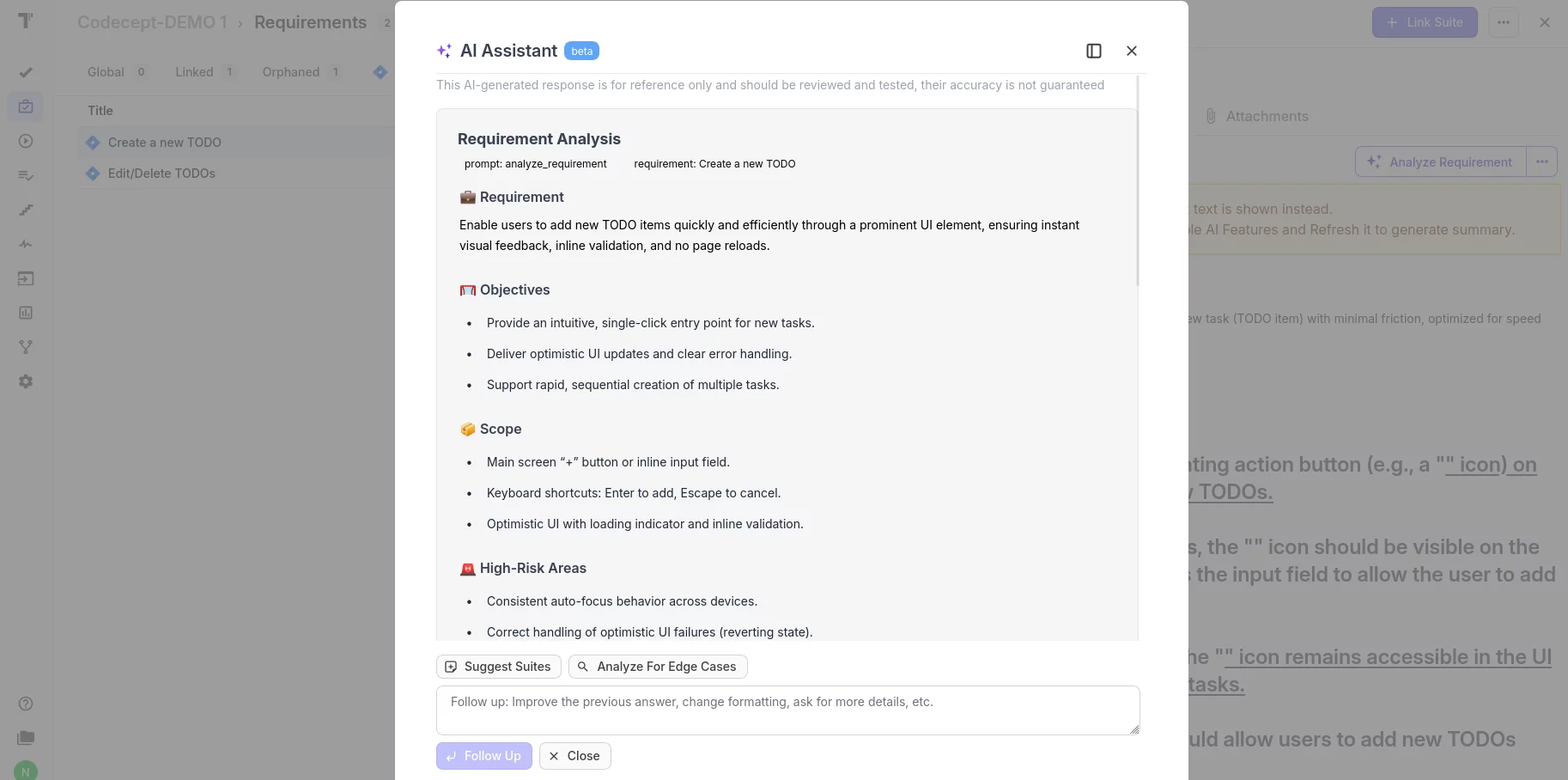
In other words, instead of copying prompts between tools, you get AI where you actually work, inside your test repository, inside your requirements, and inside your automation project.
This is the level-up QA teams need today.
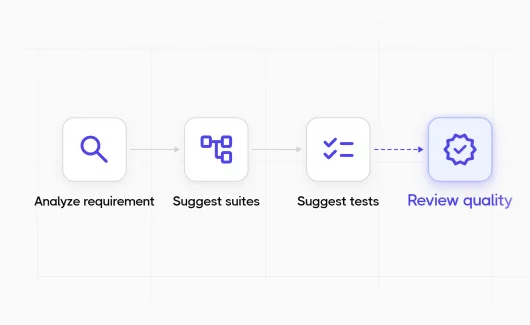
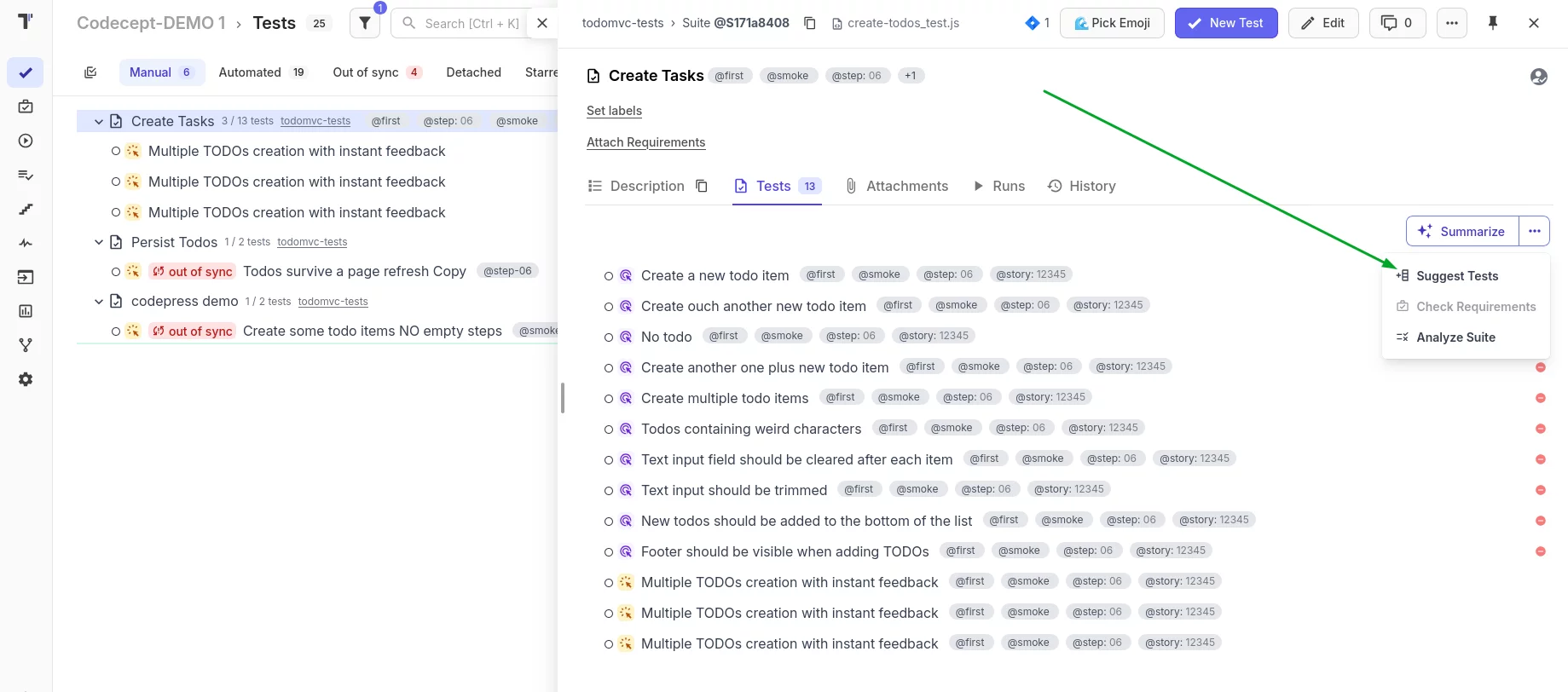
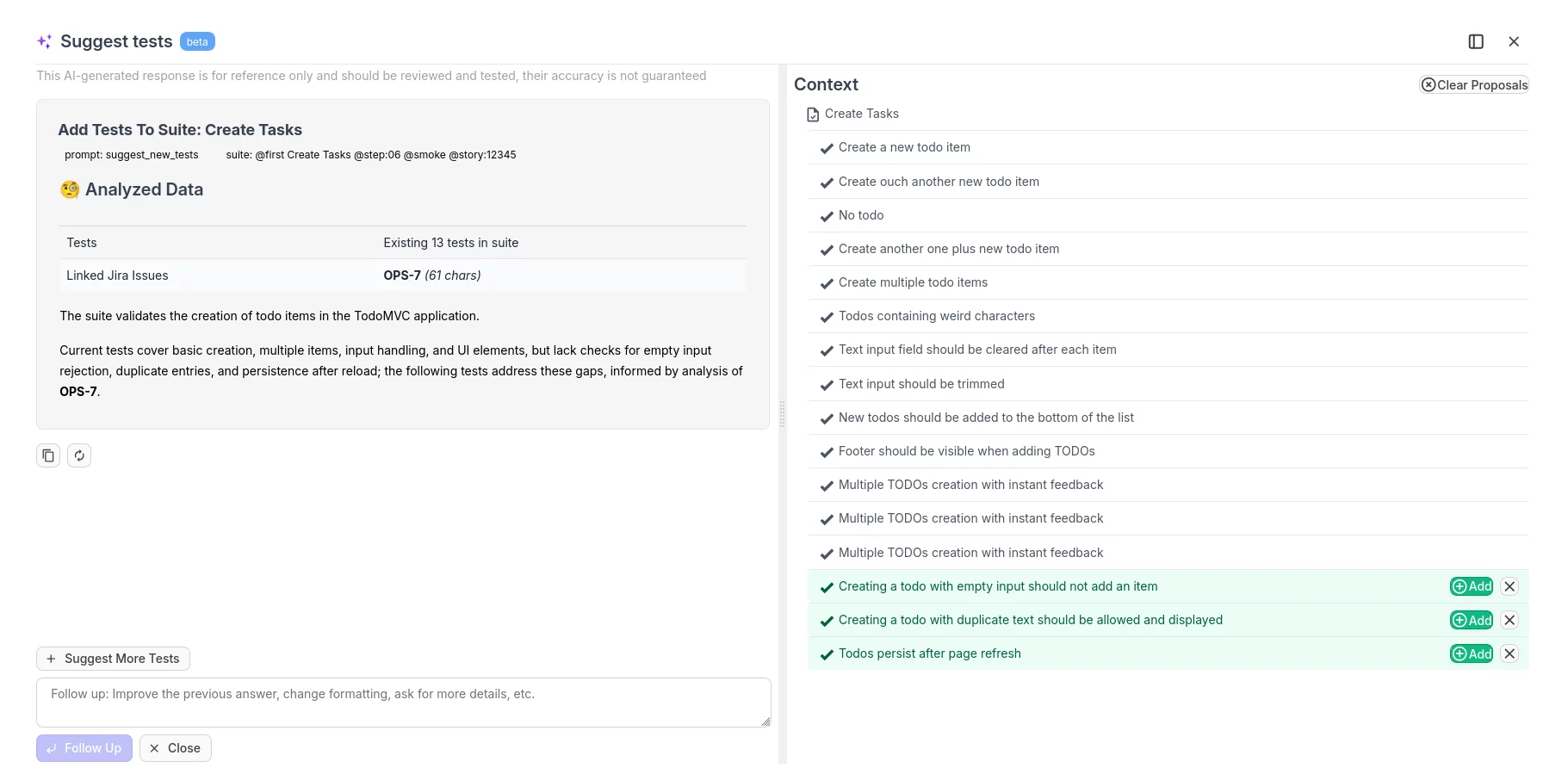
1. Suggest Tests from Requirements
If you have requirements, Testomat.io can turn them into structured test cases. Requirements may come from:
- linked Jira issues, or
- files stored directly in the Testomat.io project.
Just click “Suggest Tests”, wait for AI analysis, and the system generates a relevant set of test scenarios.
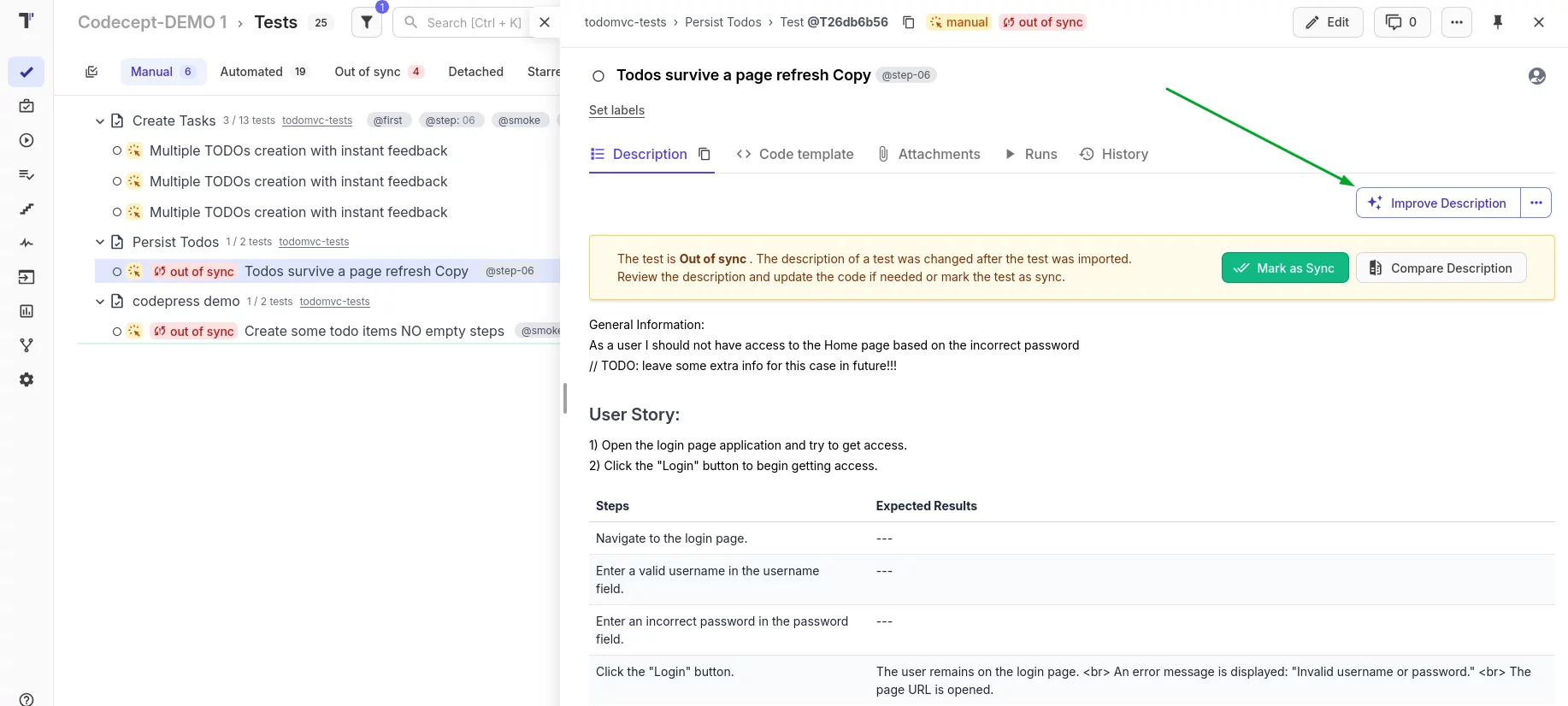
2. Suggest Test Descriptions
Once you have generated test titles, you can instantly expand them into full, structured test cases. Click “Suggest Description”, and AI will produce:
- clear steps,
- expected results,
- and a consistent format your team can rely on.
If something is incorrect or incomplete, you can edit the test manually and save the corrected version, no risk, no lock-in.
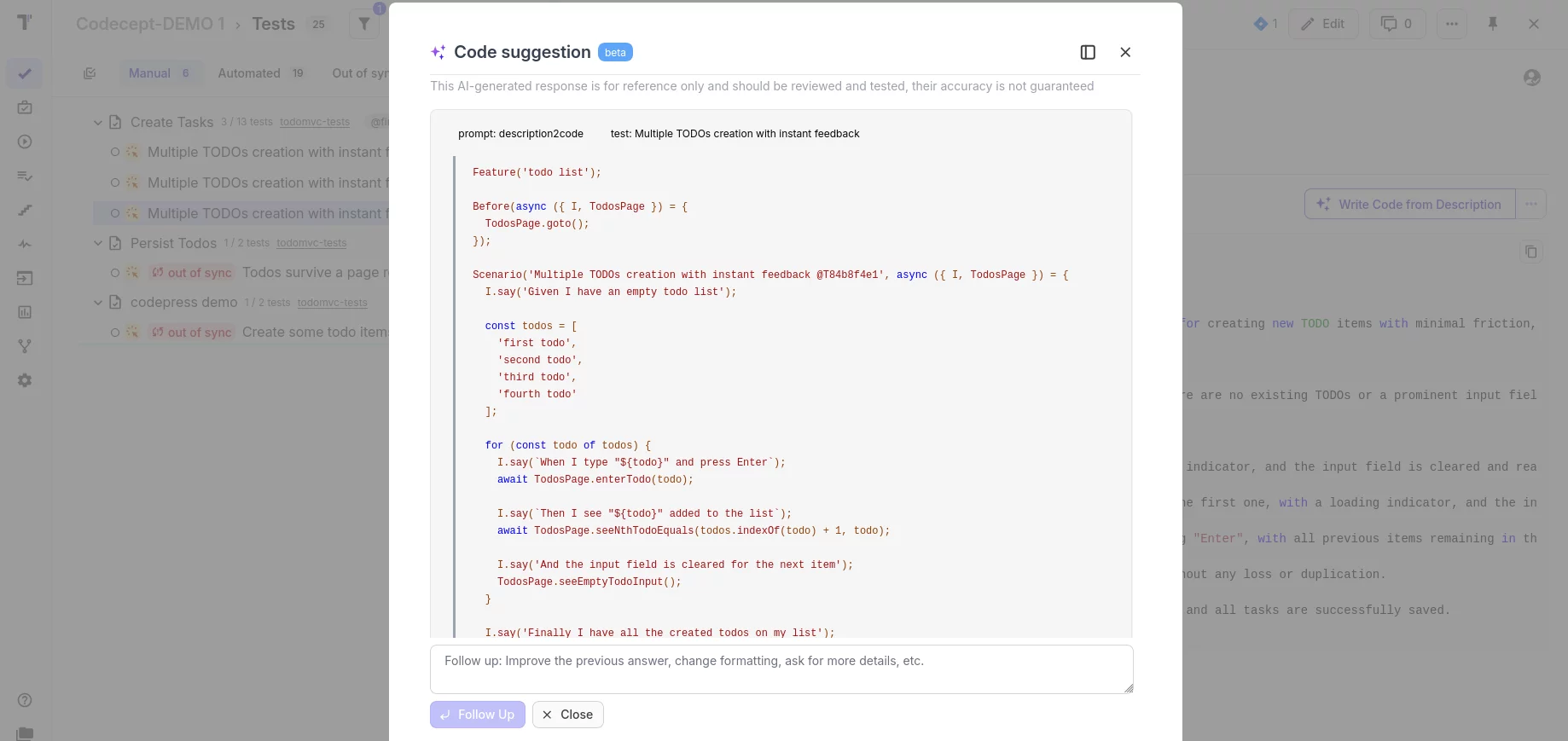
3. Suggest Automation Code from Test Descriptions
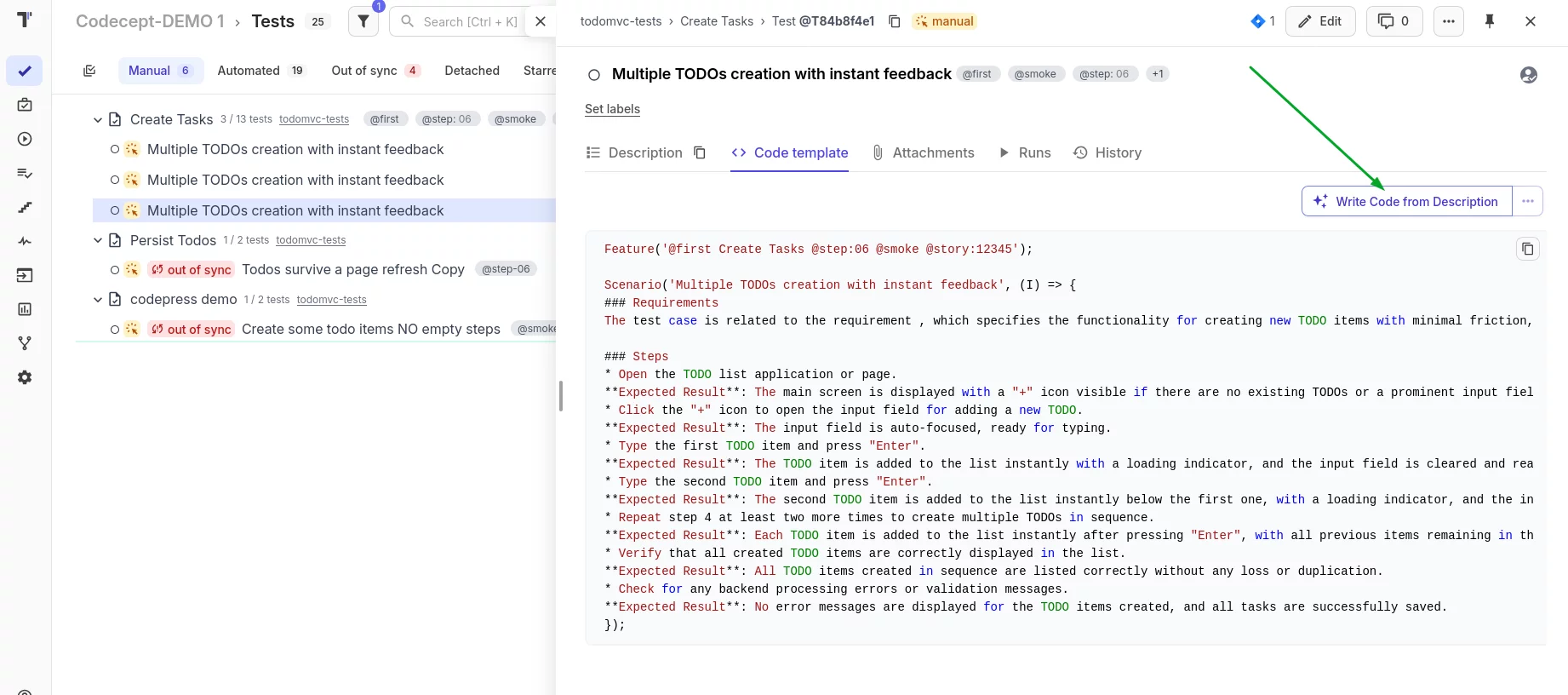
When you’re ready to automate, Testomat.io can generate automation code based on the existing test description. Using “Code by Description”, you can obtain ready-to-use code snippets tailored to:
- the programming language of your project, and
- the test framework you selected (Playwright, Cypress, WebdriverIO, etc.).
This removes several hours of routine scaffolding and lets automation engineers focus on logic instead of boilerplate.
Your AI Testing Journey Starts Here
ChatGPT has fundamentally transformed how QA professionals approach test case generation, test automation, and the entire test process. It accelerates requirement analysis, improves test coverage by identifying edge cases, standardizes test case creation, and even generates automated test scripts.
But here’s the key takeaway: ChatGPT works best as part of a comprehensive testing ecosystem. When you combine the creative power of this language model with test management platforms like Testomat.io, you get the speed and intelligence of AI with the structure and integration that enterprise QA teams actually need.
Whether you’re doing manual testing or building sophisticated test automation frameworks, ChatGPT can save you dozens of hours every single week. The key is learning how to write effective prompts, iterate on results, and integrate AI-generated content into your existing testing tools and workflows.
In 2026, using ChatGPT for test case generation isn’t just a productivity boost – it’s becoming the new standard for modern software testing. QA professionals who master these AI-powered techniques will deliver higher quality software faster while maintaining comprehensive test coverage.
So what are you waiting for? Start experimenting with the prompts we’ve shared in this guide, refine them for your specific use cases, and discover how dramatically ChatGPT can enhance your testing workflow.
The future of QA is here, and it’s powered by intelligent collaboration between human expertise and AI assistance. Let’s go!