

Test automation execution

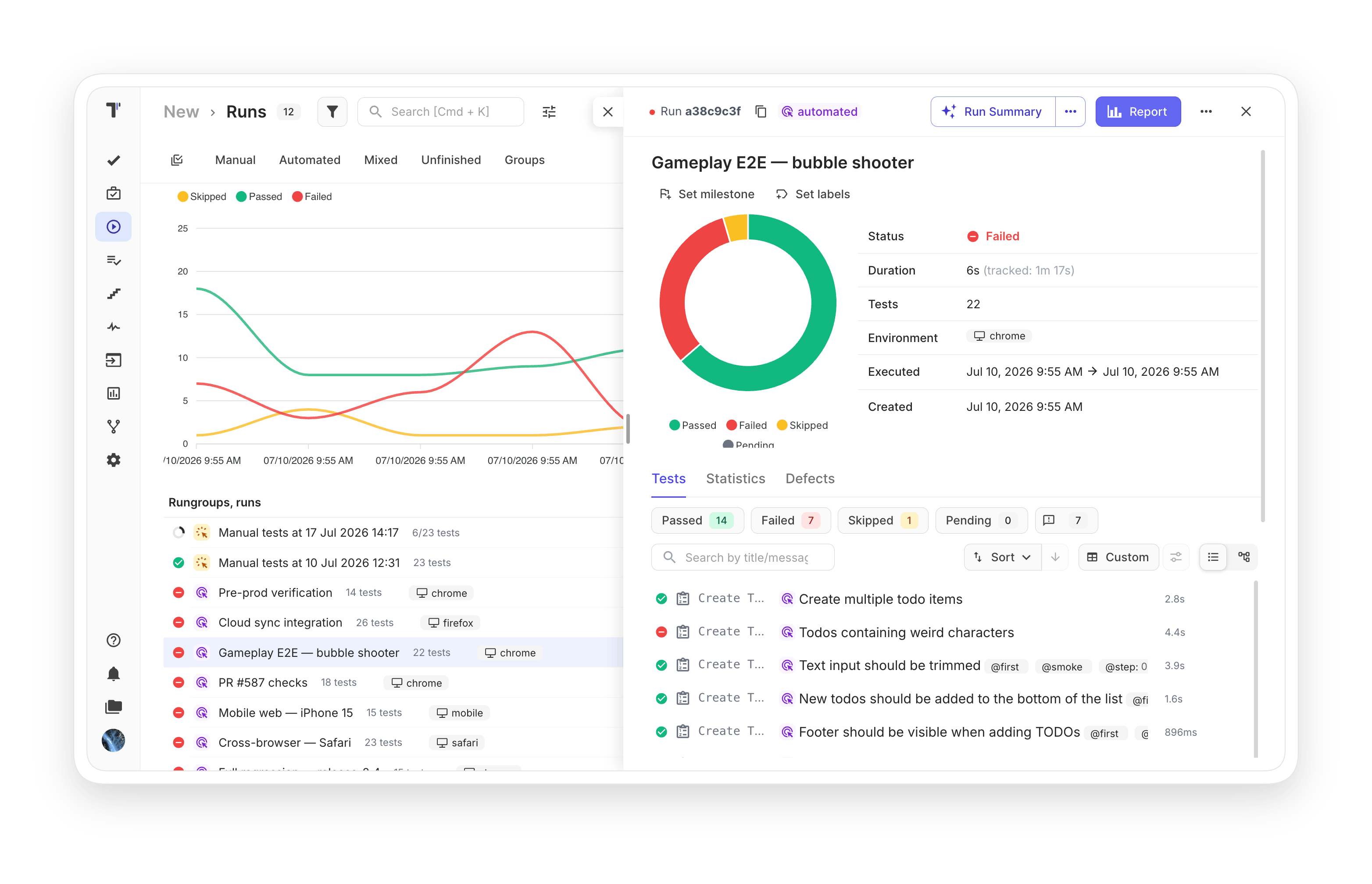
Create, manage, and run automated test executions across frameworks and CI/CD pipelines with real-time reporting at any scale.
 Test automation execution
Trusted by over 500 forward-thinking companies

logo
logo
logo
logo
logo
logo
logo
logo
logo
logo
logo
logo
logo
logo
logo
logo
logo
logo

Benefits of test automation execution

https://testomat.io/wp-content/uploads/2026/08/real-time-reports.svg
Real-time reports
See results as tests finish.
https://testomat.io/wp-content/uploads/2026/08/parallel-execution.svg
Parallel execution
Run suites across many environments.
https://testomat.io/wp-content/uploads/2026/08/cicd-integration.svg
CI/CD integration
Trigger runs from major pipelines.
https://testomat.io/wp-content/uploads/2026/08/mixed-test-runs.svg
Mixed test runs
Combine manual and automated tests.
https://testomat.io/wp-content/uploads/2026/08/full-run-history.svg
Full run history
Up to 365 days of results.

Testomat.io test automation execution features

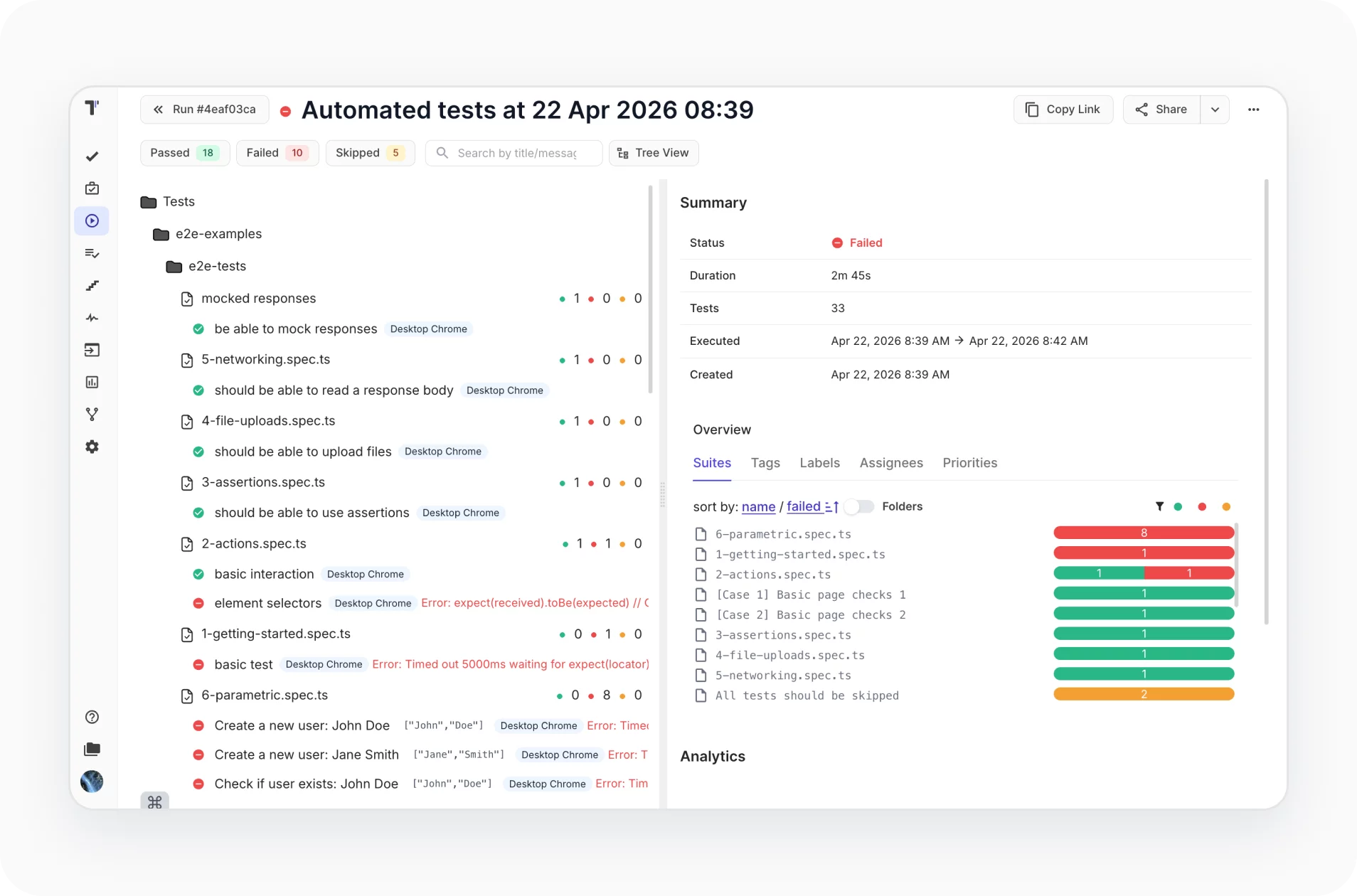
Parallel execution support

Make cross-browser testing or mobile testing in sequence or in parallel on multiple environments. All environment executions fit into one specifically designed interface.
Learn more
Parallel  execution support
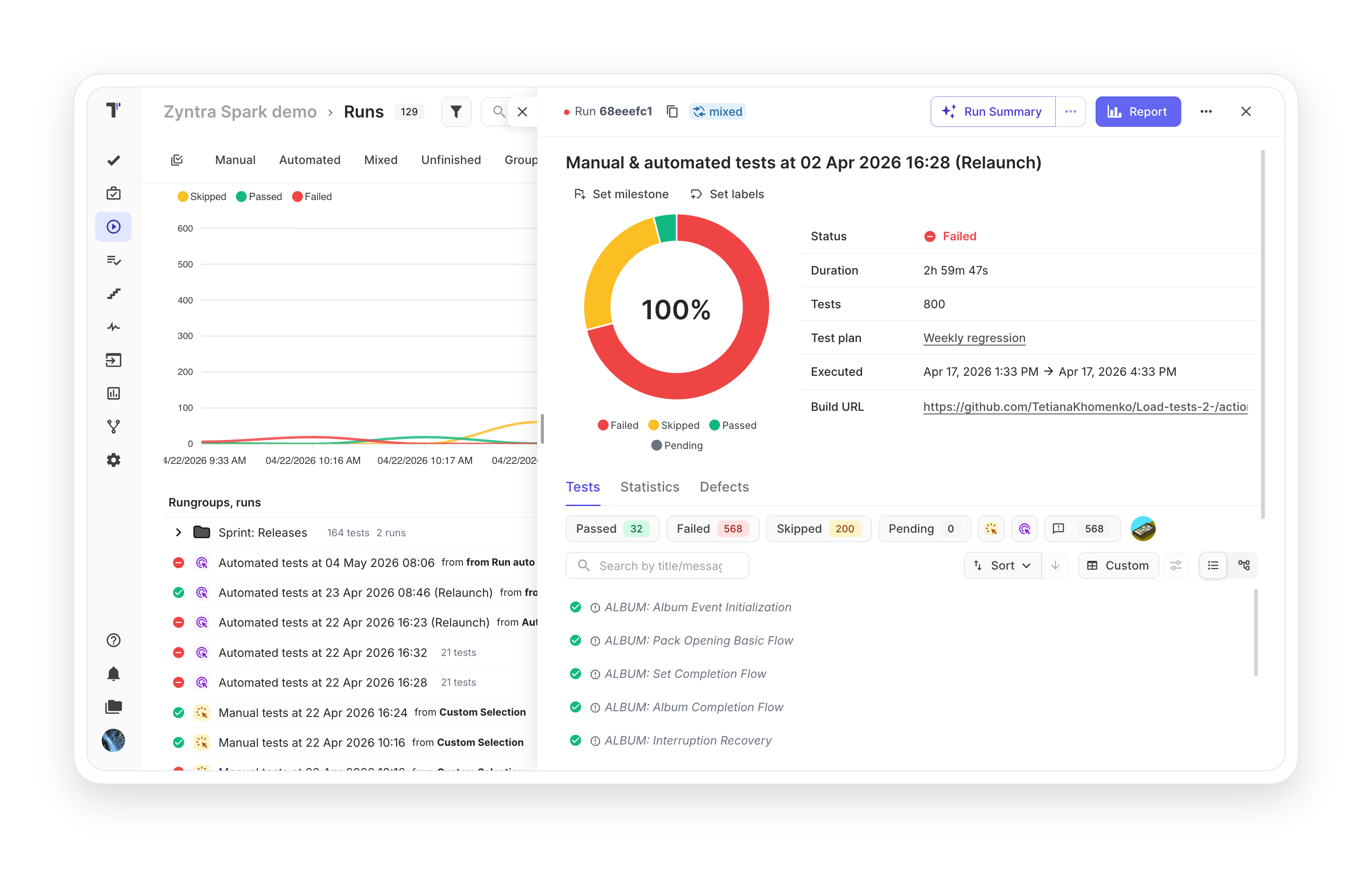
CI/CD execution

Run all or specific automated tests once CI/CD is configured. Run it on every commit from your CI/CD pipeline, with GitLab and GitHub integration, plus Jenkins, Bamboo, CircleCI.
Learn more
CI/CD   execution
Reporters by testing frameworks

Keep full ownership of your test evidence. Artifacts upload to your own bucket on AWS, DigitalOcean, Azure, or Google Cloud, so your data stays with you even if you switch platforms.

Learn more
  Reporters  by testing frameworks
Rerun failed tests

No need to do extra actions to rerun manual or automated tests. You can modify existing test runs with updated results or re-execute only failed automated tests in CI/CD with one click.

Learn more
 Rerun  failed tests
Run automated tests as manual

This feature gives you the capability to execute automated tests as manual. It also keeps manual test cases separate from automated ones, preventing the two from mixing.

Learn more
Run  automated tests as manual
Test results grouping

Match reports to how the business actually plans. Group results by sprint, release, or functional area so each audience sees the slice that matters to them.

Learn more
Test results grouping
Unlimited test results history

Track any test changes by using revisions and history in Run Archive or Group Archive. Diff tools provide easy visual comparison side by side so you can focus on review and changes.

Learn more
Unlimited test   results   history
Notifications

Send notifications about finished runs once results are generated. Notifications can be sent by email, Slack, MS Teams, Telegram, and Jira. You may define the condition for notifications.

Learn more
 Notifications
Mixed test run

Combine both automated and manual tests in one quality assurance flow on CI. Track results in one Report to see the full picture and save time.

Learn more
 Mixed  test run
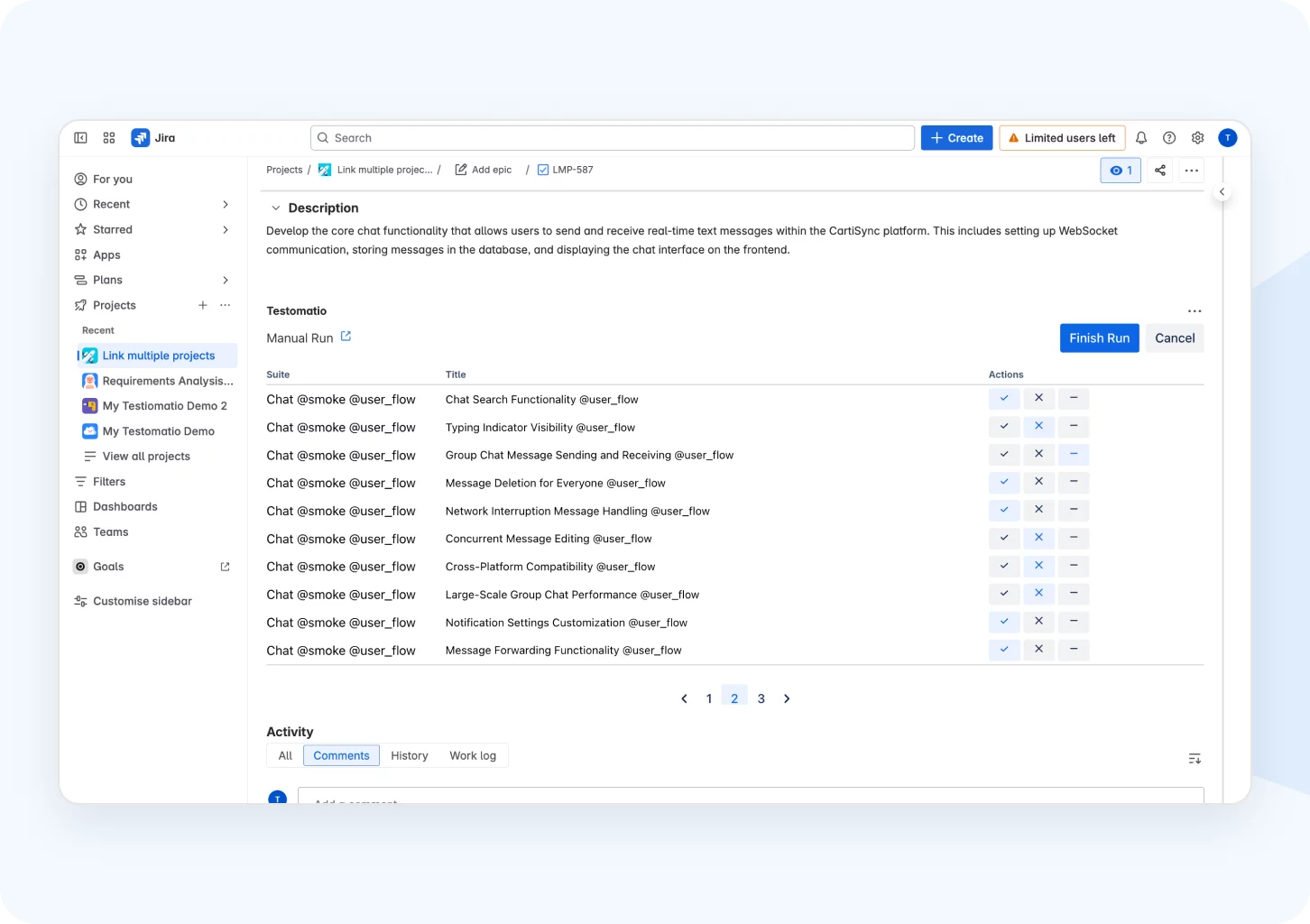
Mixed test run in Jira

Execute manual and automated tests in the same run directly with Jira. When automated tests start on a CI/CD service, check manual tests as a checklist in Jira at the same time. After the Mixed Run group finishes, a link to the merged result is created.
Learn more
Mixed test run in  Jira
Test plan

Follow your testing strategy by adding tests regardless of status and combining them into logical groups. Start running without switching between windows.

Learn more
Test  plan

How test automation execution can help?

From small startups to enterprise QA teams, test automation execution adapts to your pipeline scale and framework stack.
Startups & small teams
Quick CI setup
Add reporter, set token, done.
Mixed runs
Combine manual and automated tests.
Free stakeholder access
Share reports without paid seats.
Mid-sized products
Parallel execution
Run tests across many environments.
Rerun failed tests
Save time on flaky runs.
Real-time reporting
See results as they appear.
Enterprise projects
Run groups
Aggregate multi-pipeline run results.
Unlimited history
Track every change for audits.
Mixed run in Jira
Sync manual and automated runs.
What clients says

Recent reviews

“Excellent customer support”
Customer support is always prompt and high-quality. It's also great to see that user feedback is considered when developing new features. The team makes an effort to provide overviews of new features and keeps users informed about the latest updates.
4/5
Aliona Kovalchuk
Aliona Kovalchuk
General QA
“The Best TMS for Our QA Team!”
Our 15-person QA team has used Testomat.io daily for over two years. After comparing tools like TestRail, it stood out in both features and pricing. It’s affordable yet powerful. Jenkins integration works seamlessly, even manual testers can run tests easily. The clean UI speeds onboarding, improves collaboration, and saves time. We’ve recommended it widely, and others love it too.
5/5
Vladyslav M.
Vladyslav M.
General QA
“Testomat.io makes daily testing so much easier”
I’ve used Testomat.io daily for over two years, and it’s the best TMS I’ve worked with. Compared to tools like TestRail, it offers more features at a better price. Jenkins integration is seamless, even for manual testers. The UI is clean and easy to learn. It speeds up workflows, improves transparency, and makes team collaboration much smoother.
5/5
Dmytro H.
Dmytro H.
General QA
“Very convenient platform for managing test cases”
The platform is convenient and intuitive to use. I’ve been using it long enough to say it’s very user-friendly. It’s clear that the team is constantly working on and improving the platform.
5/5
Aleksey K.
Aleksey K.
General QA
“Great tool for creating and managing manual test cases efficiently”
As a Manual QA, I use Testomat.io to create and manage test cases with ease. The interface is intuitive, making onboarding simple. Test plans, runs, and results are well-structured in one place. Tagging helps organize cases efficiently. AI features speed up test creation. It keeps workflows transparent, improves collaboration, and reduces routine work.
5/5
Oksana G.
Oksana G.
General QA
“Testomat.io has been a great tool for managing both automated and manual tests in one place”
I really like how easy it is to integrate with frameworks and CI/CD tools, and the real-time reports with screenshots and analytics save a lot of time. Overall, it makes collaboration in the team much smoother and keeps testing well-organized.
5/5
Aleksey K.
Aleksey K.
Quality Assurance Engineer

Frequently asked questions

Which testing frameworks does Testomat.io support for automated execution? Testomat

Testomat.io has native reporter support for Cypress, Playwright, WebdriverIO, CodeceptJS, Jest, Mocha, TestCafe, Nightwatch, Cucumber.js, Jasmine, Vitest, pytest, Robot Framework, Behave, JUnit 4/5, TestNG, PHPUnit, Codeception, Pest, and Gauge. Any framework that outputs JUnit XML can also report results.

How does parallel test execution work in Testomat.io? Testomat

Testomat.io does not run tests itself. Orchestration happens in your CI. Multiple workers can report to the same run by sharing the TESTOMATIO_RUN environment variable, so results from parallel processes are aggregated into a single report.

Can I rerun only failed tests instead of the full suite? Testomat

Yes. You can re-execute only failed automated tests in CI/CD with a single click, or modify existing test runs with updated results. There is also a Rerun automated tests manually option for marking specific tests as passed or failed by hand.

How are notifications about test runs delivered? Testomat

Testomat.io can send run notifications via email, Slack, Microsoft Teams, Telegram, Jira comments, and Azure DevOps. Notification rules support conditions such as on-fail, on-complete, or threshold-based triggers.

Can I combine manual and automated tests in the same run? Testomat

Yes. The Mixed Test Run feature combines both in one CI flow with results in a single report. You can also run mixed test plans directly inside Jira, where automated tests run on CI/CD while manual tests are checked as a checklist at the same time.
Run your first test with Testomat.io

Run your first test with Testomat.io







