Teams pick Jira for Agile project management, then meet its limits on testing and price. This guide covers the best alternatives to Jira in 2026: project management tools that replace the boards, and test management platforms that cover the QA side Jira was never built for. Each Jira alternative below is checked against its current pricing page.
What are the best alternatives to Jira?
The best alternatives to Jira depend on which job you need covered: project management, test management, or both at once. QA teams start with Testomat.io, because it handles the part Jira leaves to plugins.
- Testomat.io. Test management with two-way Jira integration, AI test generation and reporting for Playwright, Cypress and other frameworks.
- Linear. Fast issue tracking for product and engineering teams that want less configuration.
- YouTrack. Flexible boards, a knowledge base and 20+ built-in reports, free for teams of up to 10 users.
- ClickUp. Tasks, docs and dashboards in one workspace for teams beyond engineering.
- monday.com. Visual boards and automations for cross-functional projects.
- Azure DevOps. Boards, repositories and pipelines inside one Microsoft stack.
- GitHub. Planning next to the code, with issues, milestones and project tables.
- Backlog. Flat monthly pricing with Git and SVN repositories included.
- Sentry.io. Error tracking for teams that organise work around production bugs.
- TestRail, Qase, Xray and Testmo. Test management tools QA teams usually compare with Testomat.io.
Every tool in this list has a free tier or a trial, so you can test one Jira alternative on a real project before you migrate the rest. Teams that need free Jira alternatives will find the exact limits later in this article.
Why do Agile teams choose Jira for project management?
To accelerate the release of a quality software product on the market, testers must communicate detected bugs to developers and supervise their correction. It is also a priority to involve the PO (Product Owner), PM (Project Manager) and BA (Business Analyst) in software creation. Many distributed teams therefore combine digital product creation, testing and work management in one familiar interface, and because of its popularity that tool is often Agile project management software Jira.
You may also be interested in the following post:
There are several reasons behind that choice:
- Extensive integration capabilities. The system supports integration with thousands of third-party tools. Each team can choose the one used by its individual specialists. This allows designers, developers, testers, and others to work together on a project without switching between different interfaces.
- Robust reports are built into this project management tool. Jira offers users in-depth real-time analytics, dashboards with gadgets, and various reports that inform about the status and progress of the project.
- Scrum and Kanban project boards. With Jira, it’s easy to visualize your workflow and break your project into smaller tasks to easily follow your work plan.
- Quality support and constant updates. Atlassian developers are constantly trying to make their product better. To do this, they regularly add new functionality to it. For example, comparatively recently, Jira has been able to display the results of a burnout report on the board, which allows you to solve problems faster.
Since Jira is not only suitable for project management, it is important to mention why many teams prefer to use this software for testing as well.
Advantages of Jira for test management
Although Jira is primarily a project management tool, you can also use it for manual test cases. This brings some advantages for teams:
- Create test cases as Jira Issues or User Stories. If a test case has been created, all you have to do is to generate the Test Run subtask and run the test.
- Use a single space for development, testing and managing projects. Software development teams, testers, and business representatives can collaborate in the system.
- Generate robust reports that are built into this project management tool. Jira offers users in-depth real-time analytics, dashboards with gadgets, and various reports that provide information on project work status and progress.
- Save your budget. If your company has already purchased this project management software and uses it for development and task management, you can avoid the expense of buying an additional software product.
- Use Scrum and Kanban project boards. With Jira, it’s easy to visualize your workflow and divide your project into smaller tasks to easily follow the outlined work plan.
If manual testing is not enough for you, you can use the integration capabilities implemented in the agile project management tool Jira. The product easily integrates with third-party software, including popular test management systems for Jira such as Testomat.io, TestRail, and XRay.
Why should you consider Jira alternatives?
Although there are certain benefits to using project management software for testing that can be associated with some issues:
- The program does not implement specific functions for testing, as stated by the developers themselves. For example, if you need to re-run a test run, you can not do so. After all, all User Stories in Jira are marked as Done by default after testing is completed. Those that act as test cases are no exception.
- The need for integration with test environments to handle automated test cases. Jira was not designed as test management software, so it must be integrated with TMS for test automation.
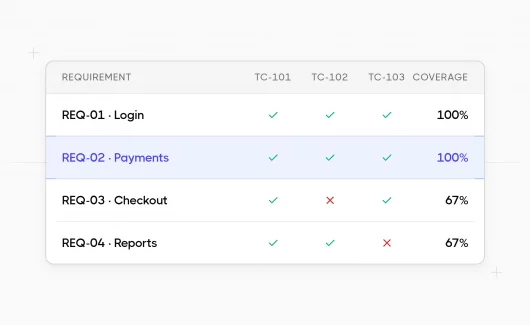
- Lack of some work reports, including test case coverage report, inter-task traceability report, and test case coverage.
In addition, Jira has general shortcomings unrelated to testing that cause users to search for alternatives to it:
- Expensive plans. The project management tool offers a free plan, limited to 10 users, one site and 2 GB of file storage. These parameters rarely satisfy the needs of modern software teams, so they have to switch to paid packages. Jira Standard starts at about $7.91 per user per month and Premium at about $14.54, and Atlassian bills every licensed account rather than every active one. This pricing policy makes Jira expensive for small companies and startups.
- Complicated interface. Jira is a relatively flexible project-tracking software that allows you to customize workflows to specific team priorities. However, everyone who has tried the configuration process notes that it is pretty cumbersome. The entire interface has long been considered outdated and inconvenient for everyday use. In addition, learning the functionality of this system takes too much time.
- No support for multiple assignees. The tool does not allow more than one person to work on a task. The rest of the team members become bystanders; they can add comments and work with Jira Issues, but nothing more.
- Focus on software developers. Jira was originally designed specifically for development teams, so QA testers have to integrate it with third-party test management tools to expand the available functionality. Because many progressive and easier-to-use platforms exist in today’s software market, even developers are increasingly searching for alternatives among Jira competitors.
Jira alternatives for test management
Jira alternatives for test management store test cases as first-class objects and repeat runs as often as a release needs. This is the group most alternatives to Jira ignore, although QA owns half of the release cycle. Jira issues cannot do that without a plugin, which is why QA teams treat this category separately from project management software.
Testomat.io
Testomat.io is an AI-powered test management platform that covers the QA half of the delivery cycle and connects to Jira instead of replacing it. Manual and automated tests live in the same project, so one report answers what was tested and what broke.
- Keep manual and automated tests in one place. The platform imports tests from Playwright, Cypress, Cucumber, Jest, PyTest and CodeceptJS, and reports both types inside the same run.
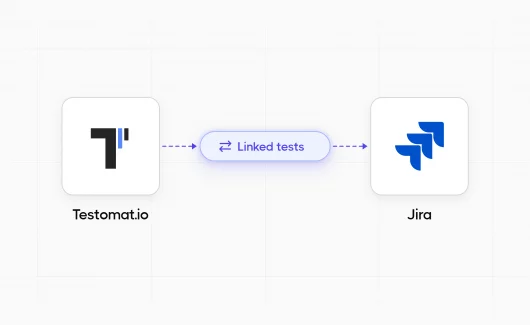
- Synchronize with Jira in both directions. Link tests to user stories, run manual checklists inside Jira through the Jira plugin, and create a Jira issue automatically when a test fails.
- Generate tests with AI. AI turns requirements and user stories into test cases, and the Explorbot agent explores a web application in a real browser to produce Playwright tests.
- Find the real cause of red builds. Failures group by root cause, and historical analysis marks tests that behave as flaky.
- Report coverage to the whole team. Analytics show automation coverage and sprint progress for QA leads and managers who never open a CI log.
- Connect your CI/CD and your AI tools. Native integrations cover GitHub, GitLab, Jenkins and Azure DevOps, and an MCP server exposes test data to MCP-compatible AI agents.
The free plan covers 2 users and 2 projects, including MCP server access. The Professional plan costs $30 per user per month, or $27 per user with annual billing. Enterprise adds SSO and a self-hosted option; see the current pricing page for details.
TestRail, Qase, Xray and Testmo
These four tools compete for the same QA budget, so most teams shortlist them next to Testomat.io:
- TestRail. A standalone platform with deep roots in manual QA and a Jira integration for defects. Our TestRail alternatives comparison covers the differences in automation reporting.
- Qase. Cloud test management with Jira synchronization and results from automated suites.
- Xray. An app that lives inside Jira, where test cases become Jira issue types. See the Xray and Testomat.io comparison for the trade-offs of that model.
- Testmo. One workspace for manual, exploratory and automated test results.
A practical rule: if your QA process already runs inside Jira and never leaves it, a Jira app fits. If automated runs come from several frameworks and pipelines, a dedicated platform such as Testomat.io reports them faster. Our guide to test automation with Jira shows how that workflow looks day to day.
Best Jira alternatives: project management software for Agile teams
Nobody doubts that Jira is a powerful solution for modern Agile project management, also widely used by QA teams as we mentioned before. But still, we recommend paying attention to the top Jira software alternatives below. Each one covers the same planning tasks, and several of them work as free alternatives to Jira for small teams. The list opens with Testomat.io, because a tracker alone leaves QA without a home.
Testomat.io
Testomat.io earns a place in this list for a different reason than the trackers below: it takes over the QA layer of Jira and connects to whichever board you choose. Teams that move from Jira to Linear or YouTrack keep their test cases and run history in Testomat.io instead of rebuilding them as issues.
- Keep testing outside the tracker. Test cases and run history live in one QA workspace, and only real failures travel back to your board as tasks.
- Connect it to any board you pick. Native integrations cover Jira, GitHub and Azure DevOps, so a migration between trackers never touches your test data.
- Report releases in terms managers read. One dashboard shows automation coverage and flaky tests next to sprint progress.
- Start for free. The free plan covers 2 users and 2 projects with automated test reporting included, so a pilot costs nothing.
Use Testomat.io next to any Jira alternative from this list, or run it beside Jira while your team decides which tracker stays.
YouTrack
YouTrack is one of the modern project management tools that can improve team collaboration and streamline workflow. It is a universal solution that allows you to manage projects regardless of size: perform software development, manage workflow and personnel, and engage in marketing.
Let’s discuss the capabilities of the platform in more detail 👇
- Streamline project collaboration. The digital solution features an intuitive interface that facilitates easy collaboration between team members and different teams. Mentions and update subscriptions keep everyone aware of the current state of the project.
- Manage workflows. With YouTrack, users can make, organize tasks and monitor their progress throughout the entire lifecycle. In addition, the platform reduces the time spent on repetitive tasks by automating as many processes as possible.
- Use built-in Agile boards. YouTrack is a great alternative to Jira for teams using agile practices. Platform users can choose pre-installed Scrum or Kanban boards and create a customized work-tracking tool.
- Create a vast knowledge base. The program allows you to structure all existing information about the project and provide access to it in one place, a common knowledge base. All team members have access to the creation of base materials and discuss them with other users. You can use @UserName format mentions and notifications for effective communication.
- Plan your work. The tool’s functionality allows you to set priorities, plan sprints, track the project’s status and make realistic forecasts.
- Generate the necessary reporting. YouTrack offers customers 20 built-in custom reports to track progress and perform in-depth analysis on various performance metrics. Use the dashboard and time tracking features to get a complete picture of the project status.
- Use the system’s wide-ranging integration capabilities. The program easily integrates with third-party software, including TMS; you can manage testing in an environment familiar to the entire team.
YouTrack stays free for teams of up to 10 users, which makes it one of the most complete free Jira alternatives. Larger teams pay from $4.50 per user per month with annual billing, or $5.40 per month.
Linear
Linear is a platform whose creators position it as a modern solution. The program combines an easy-to-use user interface and high performance for a better digital product creation experience. This project management software suits innovative startups and large established companies. The tool provides users with many features:
- Experience the ease of use of the platform. Linear has keyboard shortcuts for invoking commands, a command line to perform the desired action in one click, and real-time synchronization.
- Keep track of problems and work with all project members to fix them. The software allows you to break large-scale tasks into smaller ones, determine the progress of their implementation, keep only the relevant ones, and discuss the work on the project with the team.
- Manage multiple projects and monitor their progress. Use Linear to organize collaboration between multiple teams or departments, create project specifications, use roadmaps to organize projects, and track the speed and progress of work.
- Use a broader range of external integrations than many other tools offer. This online project management software can integrate with many external services:
- GitHub and GitLab. Synchronize inclusion requests with problems.
- Slack and Discord. Create tasks and alerts for team members.
- Sentry. Automatically create tasks from code exceptions.
- Airbyte. Synchronize with external storage and databases.
- Front, Intercom, Zendesk. Keep in touch with users.
- Figma. Add design files to tasks.
- TMS platforms. Organize effective test management.
- Delegate triage to AI. The Business plan adds Triage Intelligence and Code Intelligence, which sort incoming issues and connect them to the related code.
Linear offers a free plan limited to 250 issues and 2 teams. Paid plans start at $10 per user per month for Basic and $16 for Business, both with annual billing.
Sentry.io
Sentry.io is project management software actively used to track team performance. This product started as a startup and, in a few years, has turned into one of the top Jira alternatives for bug-driven teams. This would not have been possible without the wide possibilities the tool offers to its users:
- Get up-to-date information that will be useful for your project. With Sentry.io, you’ll receive bug fixes, event notifications, and access to live streaming from the platform team.
- Use stack trace to monitor the performance of your digital solution. The easy-to-use error filtering system and stack parameters will help.
- Get information about what events caused the errors. This can simplify the development process.
- Compare versions and see clearly which errors have been fixed and which have just appeared.
- Use the monitoring panel to visualize the progress of your work.
Developers who work independently can use the free Developer plan for one user. Teams choose between the $26 and $80 monthly plans, and larger organizations discuss Enterprise terms case by case.
Backlog
Backlog is a versatile tool for Agile project management, creating and monitoring daily tasks, software development, and bug management. It is a cloud-based collaboration software that simplifies workflow and suits small and large projects.
By choosing Backlog, users can appreciate its wide range of features:
- Plan your work and monitor your team’s progress in one click. Project management tool allows you to use Gantt Charts, Burndown charts, and boards for effective task management.
- Customize the system to the needs of your project. Create parent and child tasks, custom fields, and task templates. With Backlog, your project work will be structured and clear.
- Maintain close communication with your team. You can track all updates, leave comments, and send notifications about changes to the specialists. Another plus is the ability to automatically create tasks by e-mail.
- Manage your code. Git and SVN repositories are built into the tool to easily track and manage code changes.
- Use Backlog for document management. Make project information available to all team members by adding it to a shared knowledge base. You can also manage user access to files.
Backlog has a free version for teams of up to 10 people. Paid plans are priced per workspace rather than per user: $35 per month for up to 30 users, $100 for the Standard plan and $175 for Premium, both with unlimited users.
GitHub
GitHub is a tool primarily used as a code repository and for bug tracking, and it also acts as a Jira alternative for software development teams that plan next to their code. The platform lets you plan projects and track their progress in real-time. Among its functions are creating new issues, dividing them into smaller tasks, customization, visualization, and process automation. We’ll discuss the system’s features in more detail below.
- Create a project in a few clicks. Click Create Project, give it a name and description, and then use a template or create custom fields for tables with workflow steps.
- Use automatic triggers for task management. The principle behind this online project management software is to configure triggers that automatically create a task and place it in the appropriate table column. Any action of project participants, such as creating a pull request, can be a trigger.
- Apply milestones for comprehensive issue tracking and pull request monitoring. When a milestone is created, it will automatically provide a due date for related issues or requests. Users can also arrange tasks by priority level and analyze their progress.
- Provide information about the project on the Wiki. Post project data to the repository and allow everyone to contribute to your project.
- Supplement GitHub with hundreds of app integrations: Slack, Asana, ZenHub, and other tools.
GitHub keeps a free plan with unlimited public and private repositories. The Team plan costs $4 per user per month, and Enterprise starts at $21 per user per month.
Azure DevOps
Azure DevOps is a toolkit ideal for project management, portfolio management, code management, build execution, digital product deployment, and launch testing. This software solution is designed for team collaboration of all project participants: developers, QA specialists, project and product managers, and business analysts. They can benefit from a wide range of Azure DevOps capabilities to manage the Agile process:
- Manage user access, rights, and permissions. Users who join Azure Active Directory (AD) have standard access and permissions. Once assigned to teams, the administrator grants them access that is appropriate to their job responsibilities. The software provides the ability to invite third-party guests to project collaboration simply by entering their e-mail addresses. Another feature is organizing project participants into groups or teams and configuring common permissions.
- Implement the processes that are closest to your company. Azure DevOps supports four processes: Basic, Scrum, Agile, and CMMI (Capability Maturity Model Integration). The categories of each available process are displayed on the boards, but users also have access to customization options.
- Plan and track the progress of the project and the completion of each task. To implement this feature in the tool, there are:
- Journals of unfinished work.
- Boards with work items.
- Iteration paths with time-tracking capabilities.
- Areas for dividing work, especially useful for working on large-scale projects.
- Customized monitoring dashboards.
- Analytical reports, including various charts to visualize results.
- Control code versions in the Azure repository. You can control code changes made by each developer, merge them, test them, and publish them. Two control methods are available to users: Team Foundation Version Control and Git.
The first five project participants use the Basic plan for free, and each additional user costs $6 per month. A free trial helps you decide before you pay.
ClickUp
ClickUp is a versatile tool for project management, engineering, marketing, design, finance, HR, and software development. It is designed for teams of any size and allows you to replace many digital solutions for project work. Let’s talk about ClickUp as a Jira alternative for software development teams:
- Plan and track your agile project in any available formats: List, Box, Gantt, Board, Calendar, or create your own workflow based on one of 10+ project templates.
- Work on a project collaboratively. You can add comments to tasks and documents, communicate online, send attachments, and receive notifications of critical events in ClickUp.
- Make your custom workflows transparent and easy to track with dashboards with visual widgets and time tracking.
- Structure your tasks and always know what you need to work on first. Mind maps, checklists, task dependencies, priorities, and statuses can help.
- Keep all information about the project in one place. System users can create wikis, and knowledge bases, edit existing documents and leave comments on them.
- Synchronize ClickUp with third-party tools that your team uses. These include Timely, Dropbox, OneDrive, Figma, and many others.
ClickUp keeps a Free Forever plan with unlimited tasks. The Unlimited plan costs $7 per user per month with annual billing, and Business costs $12. AI features are sold as a separate Brain subscription from $9 per user per month.
Monday.com
Monday.com is another platform that is popular with users because of its multitasking capability. Like ClickUp, you can use it for software development, marketing and sales, design, HR, and project and task management. Let’s take a look at its capabilities in this area:
- Visualize the state of your project with Scrum and Kanban boards. These agile tools allow you to track multiple projects in parallel without getting confused.
- Make project information available to all team members thanks to built-in file management features.
- Integrate Monday with other services you use. Do it in a single click, thanks to numerous APIs.
- Create automated workflows. Your team can focus on more important tasks without manual routine.
- Appreciate the tool’s user-friendly interface, which features animated elements, pop-up text, and color highlighting for intuitive content.
Monday.com offers many different pricing plans. A team of two people can work on the platform for free. Paid seats start at $9 per month on Basic, $12 on Standard and $19 on Pro, and each plan includes a monthly pool of AI credits.
Free Jira alternatives and what their free plans really cover
Free alternatives to Jira rarely stay free at scale, so check the limit that matters for your team before you migrate. These free Jira alternatives differ mainly in caps rather than in features:
- YouTrack: free for up to 10 users with the full feature set.
- ClickUp: Free Forever plan with unlimited tasks and limited storage.
- GitHub: free unlimited repositories with 2,000 CI/CD minutes per month.
- Backlog: free for up to 10 users on one project.
- Azure DevOps: first 5 users free on the Basic plan.
- Linear: free up to 250 issues and 2 teams.
- monday.com: free for 2 seats, which suits evaluation rather than delivery.
- Testomat.io: free for 2 users and 2 projects, including MCP server access and automated test reporting.
How to choose Jira alternatives for software development
Jira alternatives for software development fall into two groups: trackers that replace the boards and platforms that cover testing. Four questions usually settle the shortlist:
- Where does your work start? Teams that plan around pull requests favour GitHub or Azure DevOps. Teams that plan around roadmaps favour Linear or YouTrack.
- Who pays per seat? Per-user pricing punishes large teams with occasional readers. Backlog charges per workspace instead.
- What happens to QA? If test cases, runs and coverage reports matter, add a test management platform to the stack rather than another tracker.
- How much configuration can you absorb? Azure DevOps and YouTrack reward customization. Linear and monday.com work almost immediately.
Bottom Line: Which Jira alternative should you try first?
Jira still fits companies that want one tracker for every department, and the alternatives to Jira in this guide win on price, speed of configuration or QA coverage. If your bottleneck is QA visibility, the fastest experiment costs nothing: open a free Testomat.io project, connect it to your existing Jira board and compare what your next release report tells you. Teams usually see the difference after one sprint, when failed tests carry their own history instead of disappearing into closed tickets.