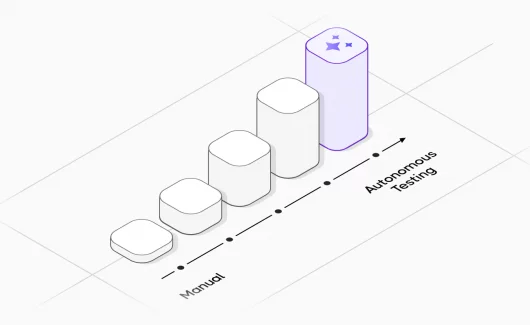






AI is quickly changing how QA teams work due to its growing popularity, ease of use and adoption. The latest stage in the evolution of software testing is the independent AI agents that help software testers amplify their productivity by automating a variety of routine tasks, from test design to execution. Such agents can work autonomously in response to predefined triggers, adapt to changing contexts, self-heal from failures, enhance their analysis over time, and perform a wide range of complex tasks with minimal human intervention, among other capabilities.
After months of experimentation, I built my own orchestration workflow that thinks like a tester, acts like a developer, and scales like a cloud service. It enables an AI agent to analyze a web page, create test steps, and run them automatically in a real browser.
So, in this tutorial, we will demonstrate how to build an AI-powered browser testing workflow using Playwright MCP and n8n. This stack enables QA teams to connect multiple services and data sources under one hood and adopt AI without redesigning the existing automation stack.
Key ideas of this automation agentic workflow are:
- Workflow orchestration.
- n8n coordinates the entire process and connects services.
- AI model generates test scenarios and automation instructions.
- Browser automation.
- Playwright execution of the generated tests.
Before diving deeper, let’s quickly go over a few key concepts ⤵️
What is the Difference Between Automation and AI Agent?
Traditional test automation requires significant effort from QA engineers. AI-driven automation improves this process by allowing engineers to describe what should be tested instead of how to test it. What does AI-powered web automation look like? Just provide instructions in natural language:
Step 1: Test the login flow and verify that the user dashboard appears.
Step 2: Convert this into a full Playwright script automatically.
Anyway, as you can see, classic automation workflows are linear: step 1… 2… 3… and so on, limited by the test framework. However, an AI agent is intelligent — it can operate non-linearly, choose its own approach, understand the context, and make decisions on the way to solve the problem. In this sense, AI is a combination of available tools and your instructions, while automation is a pipeline that acts as the compass guiding testing.
👉 Let’s sum up — AI assistant is a junior test engineer, consisting of a particular toolset and your instructions. Test automation is a strict mode.
What is Playwright MCP?
Playwright MCP is a server that acts as a bridge between Large Language Models (LLMs) or other agents and Playwright-managed browsers.
This server enables LLMs to interact with web pages through structured accessibility snapshots or visually tuned models. Instead of writing selectors manually and executing tests as before, an AI agent can perform these itself under your control, such as clicking buttons, filling forms, or validating content automatically. MCP works with the page structure; thus, autonomous Playwright agents are well-suited for exploratory automation, self-healing tests, and long-running testing workflows.
Think of MCP like a USB-C port for AI applications — it creates a universal way to connect AI models to different data sources and tools. Playwright MCP only belongs to one of them.
What is n8n?
n8n (n-eight-n) is an open-source, low-code workflow automation platform that helps you connect tools, APIs, databases, CI/CD pipelines, and AI — visually. The flexibility and extensibility of n8n make it specifically handy for QA engineers. n8n is a tool that lets you connect different services into one testing workflow. n8n is similar to Zapier but self-hosted and free.
QA teams can gain impressive advantages by using n8n to automate testing workflows. While tools like Playwright focus on executing tests, n8n helps orchestrate the entire testing pipeline — connecting triggers, different tools like Jira, some project management tools, or CI/CD, Slack, Teams notifications, APIs and results into one automated system. It connects to 300+ tools.
The platform uses a graphical node-based approach where each node performs a specific action (like opening a browser, reading a file or sending a notification via email). By connecting multiple nodes, you can create complex workflows that automate repetitive tasks.
— Maybe, you ask 🤔 “Why does it matter?”
Instead of stitching together scripts, schedulers, and CI pipelines, n8n unifies it all. Triggers, test execution, reporting, and AI-driven insights flow in one visual, scalable automation layer.
Why Use Docker to Run n8n in Containers?
Docker is a platform for developing, delivering, and running applications inside containers.
In simple terms, Docker allows you to package an application along with everything it needs — libraries, dependencies, and configuration files — into a single container. This container can then run consistently on any machine. Docker containers are similar to virtual machines, but they are much lighter, faster, and easier to manage. The key idea is simple 💡: you do not need to install environment software to run the application directly on your computer globally. This keeps your system clean and makes it easy to recreate the same environment anywhere. In fact, it is considered the industry standard today.
Why Docker is useful in n8n workflows
- Consistency across environments. It solves the classic development problem that an application should work on a colleague’s machine or a production server, like on one’s own computer. Docker guarantees that an application runs the same way.
- Isolation — each application runs in its own container without conflicts with other services.
- Fast deployment — you can start a database, web server, or any other service in seconds.
- Easy scaling. If you need more capacity, just run additional containers.
For instance, instead of installing tools like Node.js, Redis or PostgreSQL directly on your local machine, you can run preconfigured Docker containers.
Database for Storing Test Automation Metadata
In building Playwright n8n AI agent we also need a database to ensure processing of the complex logic of the AI Agent, namely storing configs, test execution results, and persisting data across system restarts using Docker named volumes. Moreover, the approach is significantly cheaper (saves tokens) and faster, as AI analyzes the textual structure of the site, rather than heavy images. In our case — PostgreSQL.
The Architecture of the QA Agent Solution
The combination of n8n + MCP + Playwright has become one of the most powerful no-code automation solutions.
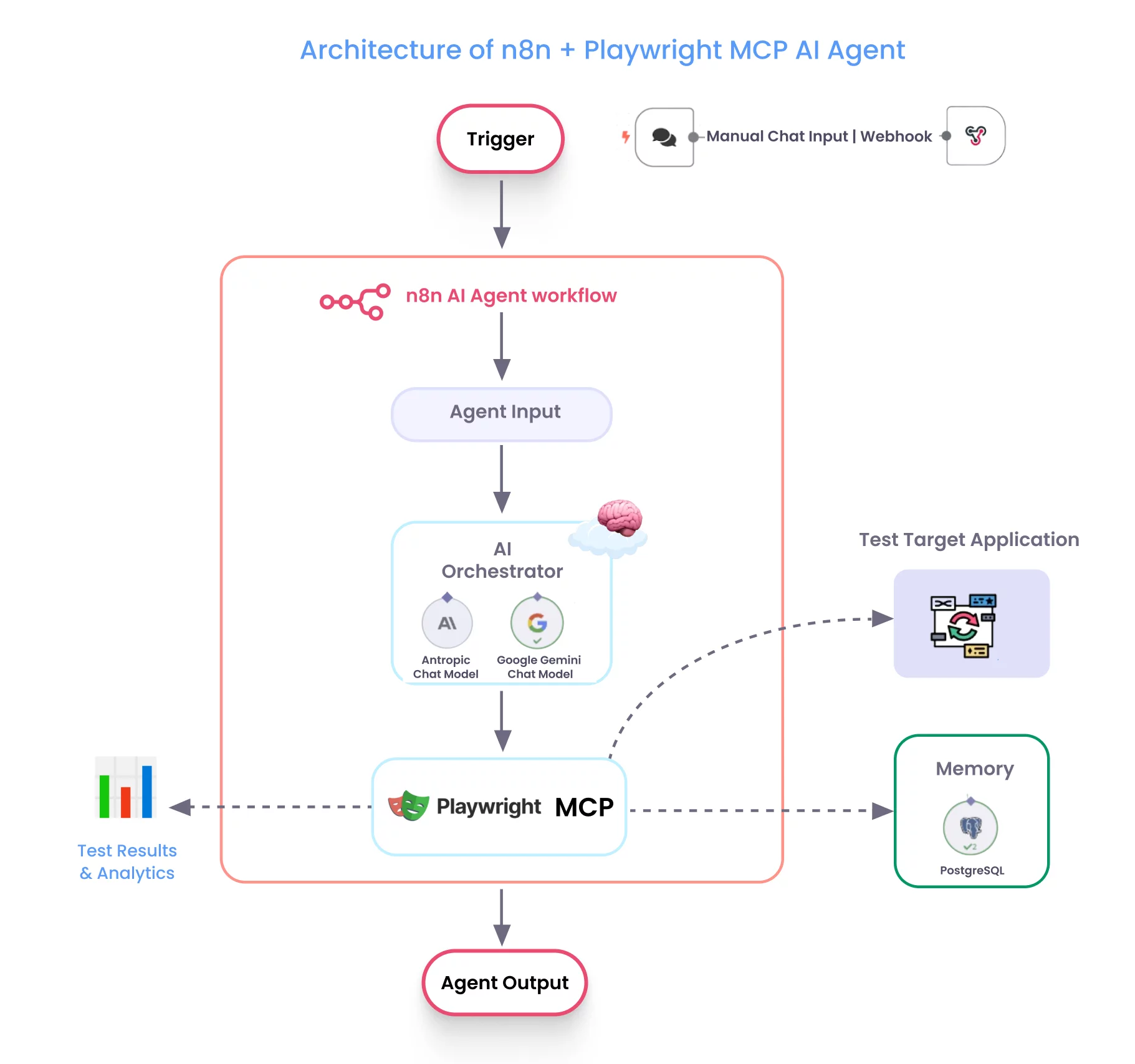
Here, the combination has its strength:
- n8n serves as the orchestrator
- AI acts as the intelligence layer
Agentic Project Structure
.
├── docker-compose.yml       # Main Docker Compose configuration
├── Dockerfile.n8n           # Custom n8n image with Docker CLI and Git
├── .env                     # Environment variables (already exists)
├── exported_workflows/
│   └── workflows.json       # Single file containing all exported workflows
├── runner/
│   └── Dockerfile           # Playwright MCP server container
├── artifacts/               # Test outputs (empty by default)
├── *.png                    # Various screenshot files
└── README.md
Build QA AI Agent with n8n Automation Flows Step by Step
To get started, I highly recommend visiting this page of the official n8n documentation with videos — they are great. The community forum is especially helpful if you run into any issues, just ask people there.
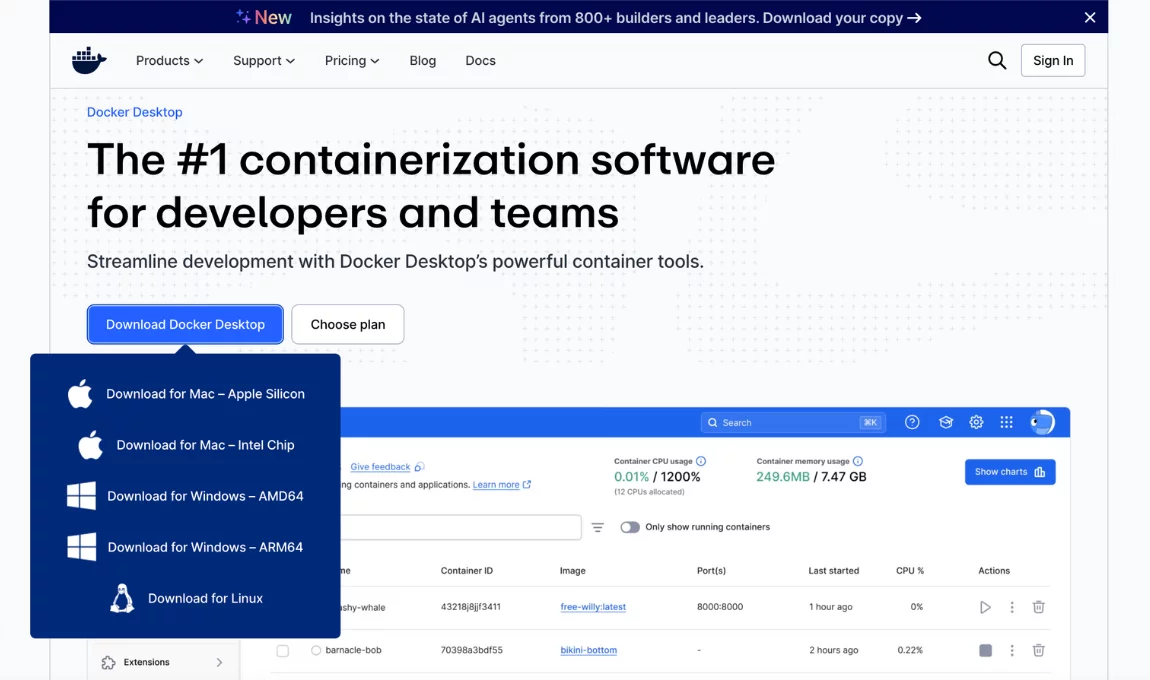
Step #1: Install Docker image
Go to here and choose your OS, then click Download → Install → Launch Docker, like this:
Step#2: Connecting to PostgreSQL and running in Docker
Before running PostgreSQL, you can visit Docker Hub to check the available version. This image serves as a template for creating containers. To pull the latest PostgreSQL image, run the command in your terminal:
docker pull postgresor similarly do it with the image variable initialisation in docker-compose.yml file. Also, I recommend checking out the following video and article, which provide a detailed, step-by-step guide on how to get started with Pgql databases in details. We won’t pause this right now.
Example Template Docker Compose file
This file orchestrates everything:
#docker-compose.yml

services:
  # Rock-solid PostgreSQL
  postgres:
    image: postgres:18-alpine
    container_name: n8n-postgres
    environment:
      POSTGRES_USER: ${POSTGRES_USER}
      POSTGRES_PASSWORD: ${POSTGRES_PASSWORD}
      POSTGRES_DB: ${POSTGRES_DB}
      PGDATA: /var/lib/postgresql/data
    volumes:
      - postgres_data:/var/lib/postgresql/data
    ports:
      - "5432:5432"
    healthcheck:
      test: ["CMD-SHELL", "pg_isready"]
      interval: 5s
      retries: 20
volumes:
  postgres_data:
Checking to make sure everything is working okay:
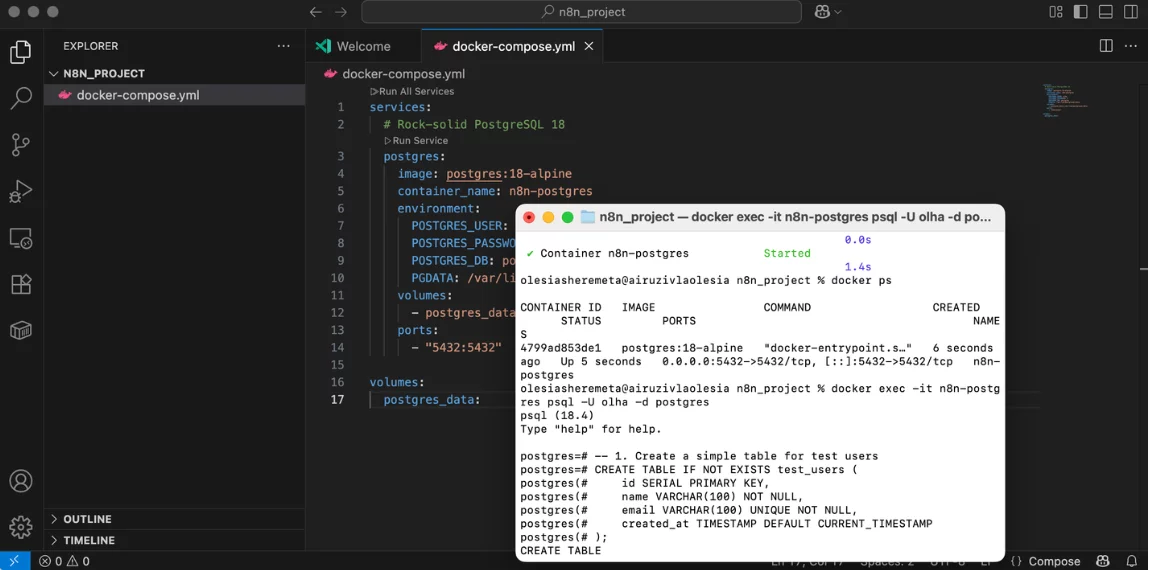
🙂 Great! Let’s shift focus to our next step…
Step#3: Install n8n
From the terminal, you need to run the following commands, replacing the placeholders with <YOUR_TIMEZONE>
docker volume create n8n_data

docker run -it --rm \
 --name n8n \
 -p 5678:5678 \
 -e GENERIC_TIMEZONE="<YOUR_TIMEZONE>" \
 -e TZ="<YOUR_TIMEZONE>" \
 -e N8N_ENFORCE_SETTINGS_FILE_PERMISSIONS=true \
 -e N8N_RUNNERS_ENABLED=true \
 -v n8n_data:/home/node/.n8n \
 docker.n8n.io/n8nio/n8n
It contains only what is needed to run the n8n application itself. We need to supercharge our n8n within docker-compose.yml Yeah, standard n8n is powerful, but we need superpowers for an AI-powered test automation platform, so add to the file:
  # Supercharged n8n
    n8n:
    build:
      context: .
      dockerfile: Dockerfile.n8n
    depends_on:
      postgres:
        condition: service_healthy
    ports: ["5678:5678"]
    environment:
      - DB_TYPE=postgresdb
      - DB_POSTGRESDB_HOST=postgres
      - DB_POSTGRESDB_USER=${POSTGRES_USER}
      - DB_POSTGRESDB_PASSWORD=${POSTGRES_PASSWORD}
      - DB_POSTGRESDB_DATABASE=${POSTGRES_DB}
      - N8N_ENCRYPTION_KEY="Your Key"
    volumes:
      - n8n_data:/home/node/.n8n
      - /var/run/docker.sock:/var/run/docker.sock
    restart: unless-stopped
volumes:
  postgres_data:
  n8n_data:
Create a Dockerfile.n8n file It gives the container the ability to run more complex, custom shell scripts, which is necessary for orchestrating more sophisticated automation tasks. Like Git settings inside, n8n allows you to clone code repositories, pull the latest test code, and commit/push results back to Git.
#Dockerfile.n8n
FROM alpine:latest AS alpine-base
FROM n8nio/n8n:latest
COPY --from=alpine-base /sbin/apk /sbin/apk
COPY --from=alpine-base /usr/lib/libapk.so* /usr/lib/
USER root
RUN apk add --no-cache docker-cli git bash
USER node
Go back to your terminal and tell Docker Compose to look at the new setup:
docker compose down -v

#and the next one
docker compose up -d --build
Excellent! Once again, let’s check our result 👀
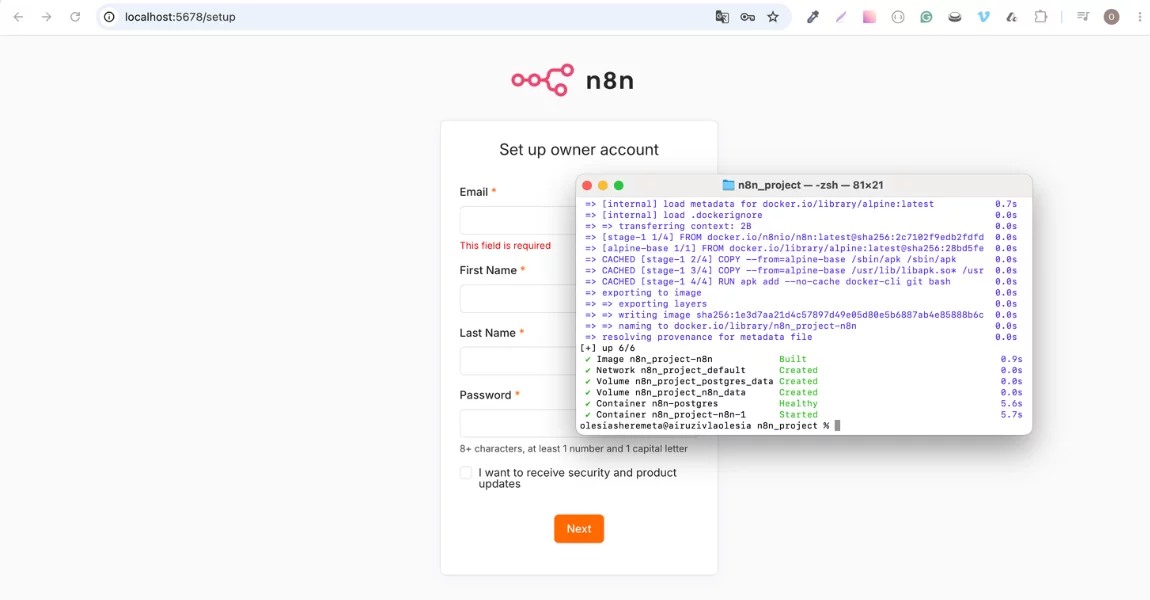
Step#4: Install Playwright
To integrate Playwright into your project, we need to add the third container — the Playwright MCP (Model Context Protocol) Runner. This serves as the dedicated containerised environment for your intelligent browser automation tasks.
Create a new file in the runner folder named Dockerfile.runner and paste the exact environment configuration required to give it standard global Playwright and Google Chrome capabilities. This instruction tells the container to boot up an MCP server listening on port 8931 so n8n’s AI tools can control it:
# Use the official Microsoft Playwright image as the base
FROM mcr.microsoft.com/playwright:v1.51.1-jammy

USER root
RUN apt-get update && apt-get install -y git && rm -rf /var/lib/apt/lists/*

WORKDIR /app

ENV NPM_GLOBAL=/home/node/.npm-global
ENV PATH=$NPM_GLOBAL/bin:$PATH

RUN mkdir -p "$NPM_GLOBAL" \
    && npm config set prefix "$NPM_GLOBAL" \
    && npm install -g playwright

# Install Google Chrome dependencies for headless running
RUN npx playwright install chromium --with-deps

EXPOSE 8931

ENTRYPOINT ["bash","-lc"]
CMD ["npx @playwright/mcp@0.0.38 --port 8931 --isolated --no-sandbox --ignore-https-errors --headless --browser chromium"]
Here is how to set up the playwright-runner service alongside your n8n and Postgres containers with the template of the full docker-compose.yml Playwright n8n file:
services:
  # Rock-solid PostgreSQL 18
  postgres:
    image: postgres:18-alpine
    container_name: n8n-postgres
    environment:
      POSTGRES_USER: ${POSTGRES_USER}
      POSTGRES_PASSWORD: ${POSTGRES_PASSWORD}
      POSTGRES_DB: ${POSTGRES_DB}
      PGDATA: /var/lib/postgresql/data
    volumes:
      - postgres_data:/var/lib/postgresql/data
    ports:
      - "5432:5432"
    healthcheck:
      test: ["CMD-SHELL", "pg_isready -U olha -d postgres"]
      interval: 5s
      timeout: 5s
      retries: 5

  # Supercharged n8n
  n8n:
    build:
      context: .
      dockerfile: Dockerfile.n8n
    depends_on:
      postgres:
        condition: service_healthy
    ports: ["5678:5678"]
    environment:
      - DB_TYPE=postgresdb
      - DB_POSTGRESDB_HOST=postgres
      - DB_POSTGRESDB_USER=${POSTGRES_USER}
      - DB_POSTGRESDB_PASSWORD=${POSTGRES_PASSWORD}
      - DB_POSTGRESDB_DATABASE=${POSTGRES_DB}
      - N8N_ENCRYPTION_KEY="Your Key"

    volumes:
      - n8n_data:/home/node/.n8n
      - /var/run/docker.sock:/var/run/docker.sock
    restart: unless-stopped

  # 3. Playwright Browser Automation Environment
  playwright-runner:
    build:
      context: ./runner
      dockerfile: Dockerfile.runner
    container_name: n8n-playwright-runner
    ports:
      - "8931:8931"
    restart: unless-stopped

volumes:
  postgres_data:
  n8n_data:
Now return to the terminal to build the Playwright dependencies, and spin it up in the background:
docker compose up -d --buildn8n Playwright Community Node
Because n8n is built on an open-source foundation, anyone can package custom tools or APIs into standard drag-and-drop visual nodes and publish them to the npm registry.
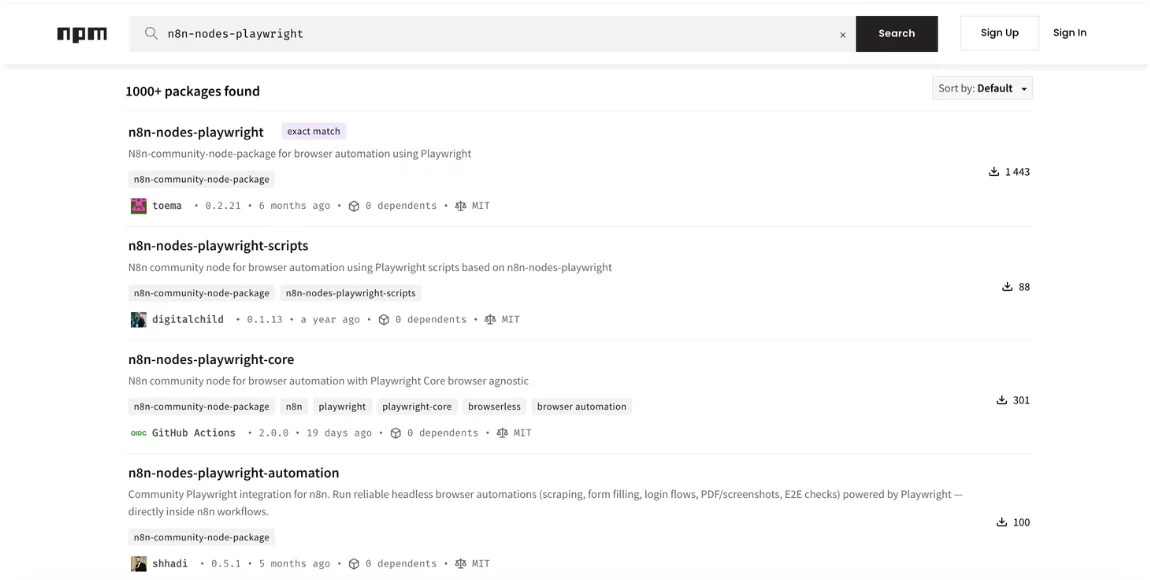
You can look for plugins on the platform to handle your tasks, but I managed to get by without them. I used standart AI Agent and MCP Client nodes. You won’t see a standalone “Playwright node,” but your AI Agent will now fully understand how to control the Playwright browser runner. I set configurations to talk to a Docker container pull in all of Playwright’s browser actions dynamically. My MCP Client node settings:
Type: SSE
URL: http://playwright-runner:8931/sse
I built in Google Gemini Open Model and Anthropic LLM models — using them requires topping up by at least 10$, if you use OpenRouter, there are a few absolutely free options to test this approach. If you import the AI test workflow from my repo below and watch the magic happen:
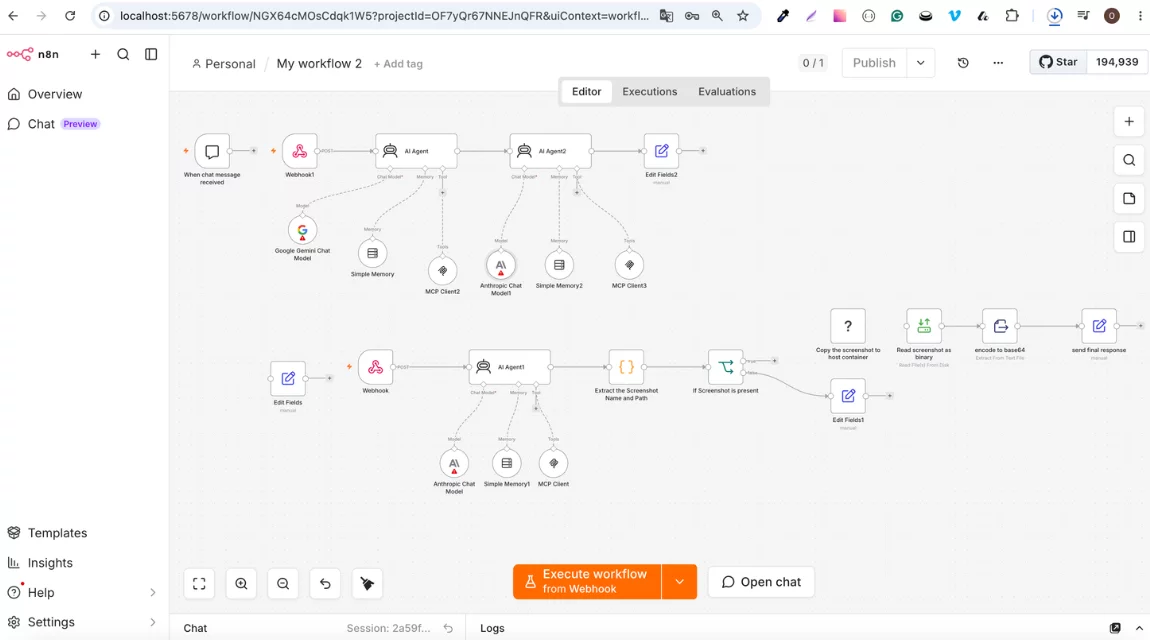
My web n8n automation solution is built on top of Playwright, powered by AI. Its biggest feature is the ability to accept language commands instead of writing complex selectors and execute tests. Try It Yourself! Only a 5-minute setup:
# 1. Clone the repo
git clone https://github.com/uzaynoll/n8n && cd n8n
# 2. Set your secrets
echo "N8N_ENCRYPTION_KEY=$(openssl rand -hex 16)" >> .env
echo "POSTGRES_PASSWORD=secure123" >> .env
# 3. Launch everything
docker-compose up -d - build
# 4. Open n8n
open http://localhost:5678
🔴 Remember: you need to use credentials not included in the exported workflows for security reasons, and manually reconfigure API keys.
Why QA Teams Should Use n8n to Automate Testing Workflows?
- Increase productivity by automating repetitive tasks
- Orchestrate the process with n8n and handle results
With agentic testing, quality assurance teams can spend more of their energy innovating and less time on time-intensive, repetitive work. Hope my agentic testing solution does just that.
Here are a couple of thoughts on what makes my AI agent special:
- Visual workflow builder — NO more YAML hell.
- AI test generation — describes tests in plain English.
- Intelligent browser automation — adapts to UI changes.
- Security-first design — secrets stay secret.
- One-click deployment — local to cloud in minutes.
Benefits, Value, ROI of Using an AI assistant
Let’s calculate a bit together:
Performance that my solution scales easily
- After 6 months in production, here are our real numbers:
- Test Generation Time: 30 seconds average
- Success Rate: 95% for standard patterns
- Concurrent Sessions: 10+ browser instances
- Resource Usage: 2GB RAM per workflow
- Uptime: 99.7% (including maintenance)
The “Aha!” Moments!
— What surprised me positively a lot?
- AI Test Quality better than human-written tests in many cases
- Speed Gains 40x faster than traditional automation setup
- Maintenance of self-healing workflows reduce support tickets
- Team Adoption — non-technical users can create and execute complex workflows
— What I’d Do Differently?
- Start with Error Handling, as AI can be unpredictable
- Add Rate Limiting to protect against runaway automation
- Better logging because debugging distributed systems is hard
AI Agent Popular Use Cases
- Regression testing: Test critical user flows after each deployment.
- Uptime monitoring: Regularly check covered cases with AI power.
- Data validation: Verify form submissions are processed correctly.
This approach can be a game-changer, especially for QA teams, DevOps engineers, and automation enthusiasts, but the reality is that n8n workflows cannot fully replace QA engineers in Playwright scripting automation; expert oversight is still required for proper AI orchestration.
I recommend starting with simple, well-defined tasks and gradually increasing your n8n agent’s complexity. Instead of Playwright, you are free use Selenium as well — Why not? If it helps to solve your problem. n8n is fantastic for running not only Playwright scripts.
Is this a New Era in Web QA Test Automation?
Building this platform taught me that the best automation feels like magic — it just works, scales effortlessly, and makes everyone’s life easier.
Key takeaways:
- AI + Traditional Tools = Superpowers
- Containers solve 90% of deployment headaches
- Security isn’t optional — build it in from day one
- Visual tools democratize complex automation
Whether you’re a solo developer or part of a 100-person engineering team, this architecture scales with your needs.
Follow the link to the project repository, which provides a containerized local setup for n8n Playwright Docker, with PostgreSQL as the datastore. It also includes a Playwright test runner and MCP server for workflow validation and automated testing.
*P.S. The complete source code, deployment scripts, and documentation are available in the GitHub repository. Star it if this helped you! ⭐