




Features may ship fast, but without functional testing, they don’t always work as intended. Teams push updates daily, sometimes hourly. But here’s the uncomfortable truth: faster releases don’t automatically mean better quality. A feature that looks perfect in development can fail spectacularly in production if it hasn’t been properly tested.
This is where functional testing becomes non-negotiable. It’s the safety net that catches problems before your users do. But as applications grow more complex and release cycles accelerate, manual testing alone can’t keep pace.
You need the right functional testing tool, one that automates repetitive tasks, manages test coverage intelligently, and gives your entire team visibility into what’s working and what’s not.
What Is Functional Testing?
Functional testing verifies that your software behaves according to its requirements. Unlike performance testing that measures speed, or security testing that hunts for vulnerabilities, functional testing asks one fundamental question: Does this feature do what it’s supposed to do?
Think of it this way: if your application is a car, functional testing checks whether the brakes stop the vehicle, the headlights illuminate the road, and the steering wheel actually steers. It focuses on what the system does, not the engineering details of how it does it.
The Different Layers of Functional Testing
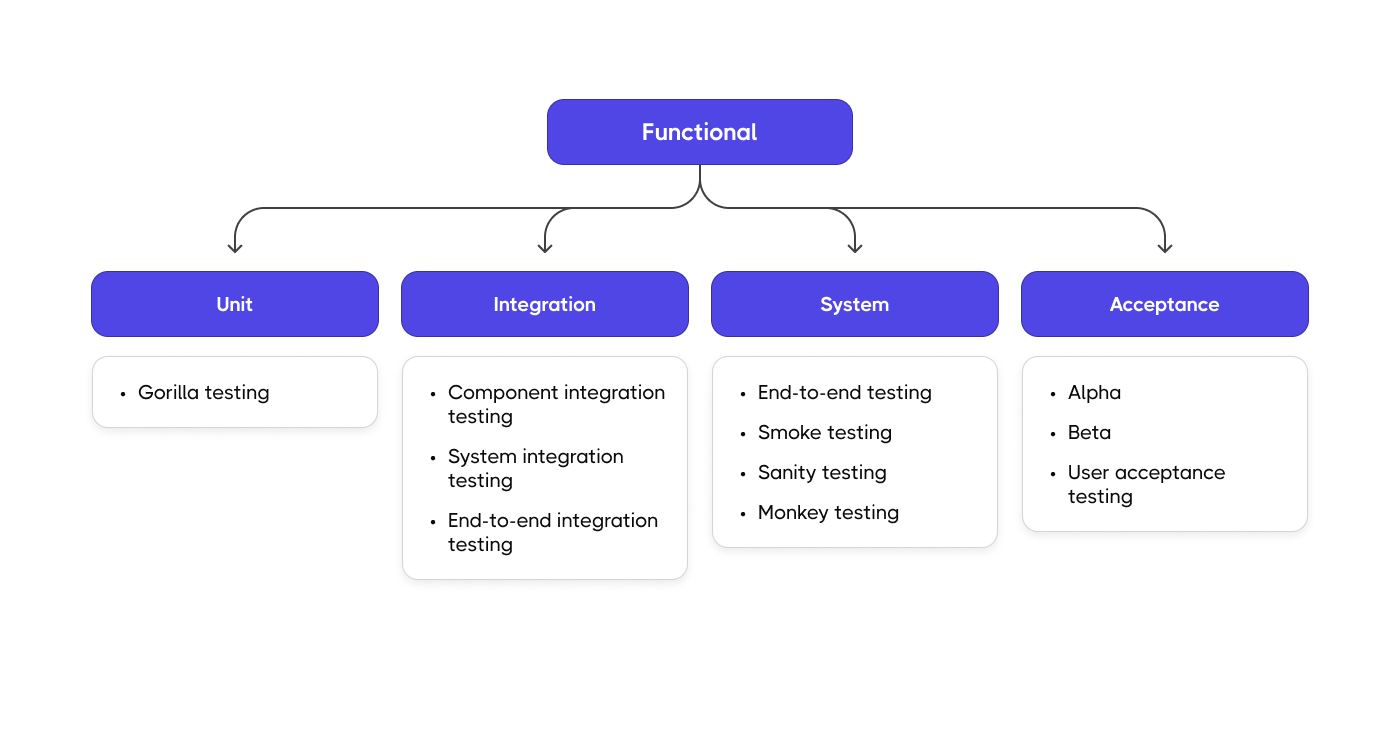
Functional testing happens at multiple levels:
- Unit tests validate individual functions or methods in isolation. These are your first line of defense, catching bugs at the code level before they cascade into larger problems.
- Integration tests verify that different components work together correctly. Can your payment module communicate with the inventory system? Does the authentication service properly hand off to the user dashboard?
- System and end-to-end tests examine complete user workflows from start to finish. These tests simulate real user behavior: logging in, browsing products, completing a purchase, receiving confirmation.
Why Functional Testing Tools Matter
You’re probably juggling multiple testing frameworks: Cypress for your web app, Playwright for cross-browser testing, Jest for your React components, maybe some API tests in Postman. Each tool generates its own reports in its own format. Good luck getting a unified view of your test coverage.
Your QA team maintains hundreds or thousands of manual test cases in spreadsheets. When requirements change, updating those tests becomes an archeological expedition. Which tests are still relevant? Which ones duplicate each other? Nobody knows for certain.
Your application architecture keeps evolving. You’ve moved from a monolith to microservices. You’ve added mobile apps. You’re testing APIs, webhooks, and third-party integrations. The complexity compounds with every sprint.
And through it all, stakeholders keep asking the same questions: How much of our functionality is actually tested? Which features are most at risk? Can we ship this release confidently?
The Real Benefits
A proper functional testing tool delivers benefits that ripple across your entire development process:
- Consistent test execution means the same tests run the same way every time, eliminating the “it works on my machine” problem that plagues manual testing.
- Reduced regression risk comes from catching breaking changes immediately, before they make it to production where they’re exponentially more expensive to fix.
- Faster feedback in CI/CD pipelines lets developers know within minutes whether their code changes broke existing functionality, enabling them to fix issues while the context is still fresh.
- Better collaboration happens when QA engineers, developers, product managers, and stakeholders can all see testing progress in one place, speaking the same language about quality metrics.
Core Features of a Functional Testing Tool
Not all functional testing tools are created equal. When evaluating your options, look for these essential capabilities:
- Support for multiple frameworks: Your team shouldn’t be locked into a single testing framework. The best tools work seamlessly with Cypress, Playwright, WebdriverIO, Jest, and other popular frameworks, meeting your developers where they already are.
- Reusable test suites and intelligent tagging: Tests should be organized logically, tagged appropriately, and easy to find. Reusability reduces duplication and maintenance overhead.
- Deep CI/CD integration: Tests need to run automatically on every commit, pull request, or deployment. Your tool should integrate naturally with GitHub Actions, GitLab CI, Jenkins, Azure DevOps, and other pipeline tools.
- Rich reporting and analytics: Raw test results aren’t enough. You need dashboards that show trends over time, identify flaky tests, highlight the slowest tests bottlenecking your pipeline, and reveal gaps in coverage.
- Parallel execution and scalability: As your test suite grows, running tests sequentially becomes impractical. Parallel execution cuts feedback time dramatically, but your tool needs to handle it reliably.
- Requirement linking: Functional tests should map to actual business requirements. Integration with tools like Jira creates traceability, showing exactly which requirements are tested and which aren’t.
- Collaboration and version control: Testing is a team sport. Multiple people need to create, modify, and review tests. Version history helps you understand what changed and why.
How Testomat.io Enhances Functional Testing
This is where Testomat.io enters the conversation with a fundamentally different approach to functional testing.
It’s a unified platform designed specifically for teams that take functional testing seriously, teams that need to manage both manual and automated tests, collaborate across departments, and maintain visibility as complexity grows.
Live Dashboards That Actually Help
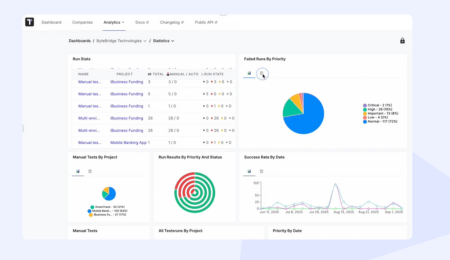
Test results sitting in CI logs help nobody. Testomat.io provides live dashboards showing real-time test execution status. When a test fails, you see it immediately with screenshots, video recordings, and detailed logs – all in one place.

But Testomat.io goes deeper. The analytics dashboard reveals patterns manual review would miss: which tests fail most frequently (flaky tests that need investigation), which tests take longest (bottlenecks slowing your pipeline), and where your automation coverage has gaps.
Seamless Integration with Your Workflow
Your team already uses Jira for issue tracking, GitHub for code reviews, Slack for communications. Testomat.io integrates with all of them, creating a connected ecosystem rather than another silo.
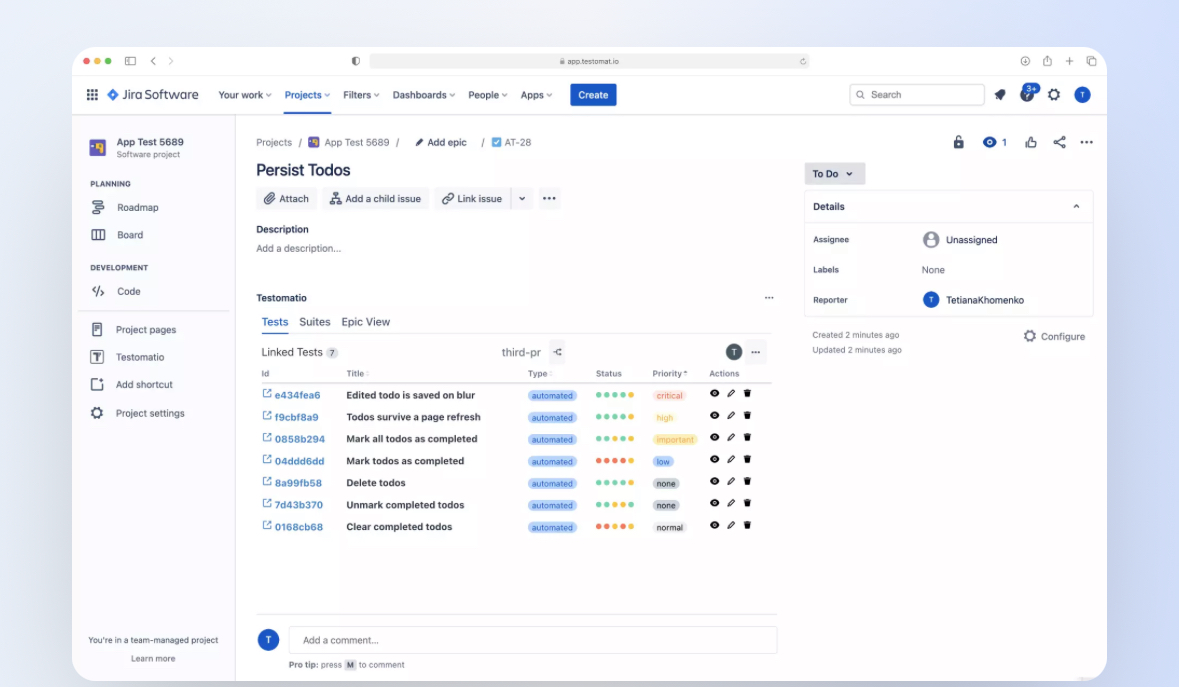
The Jira integration deserves special attention, it’s fully bidirectional. Create a test in Testomat.io, and it appears in Jira. Update a requirement in Jira, and Testomat.io reflects the change. Your teams can work in whichever tool they prefer while maintaining a single source of truth.
Built for Collaboration
Testomat.io brings everyone together. Its Gherkin editor with auto-completion lets non-technical team members write BDD scenarios in plain language. Developers can review and implement those scenarios.
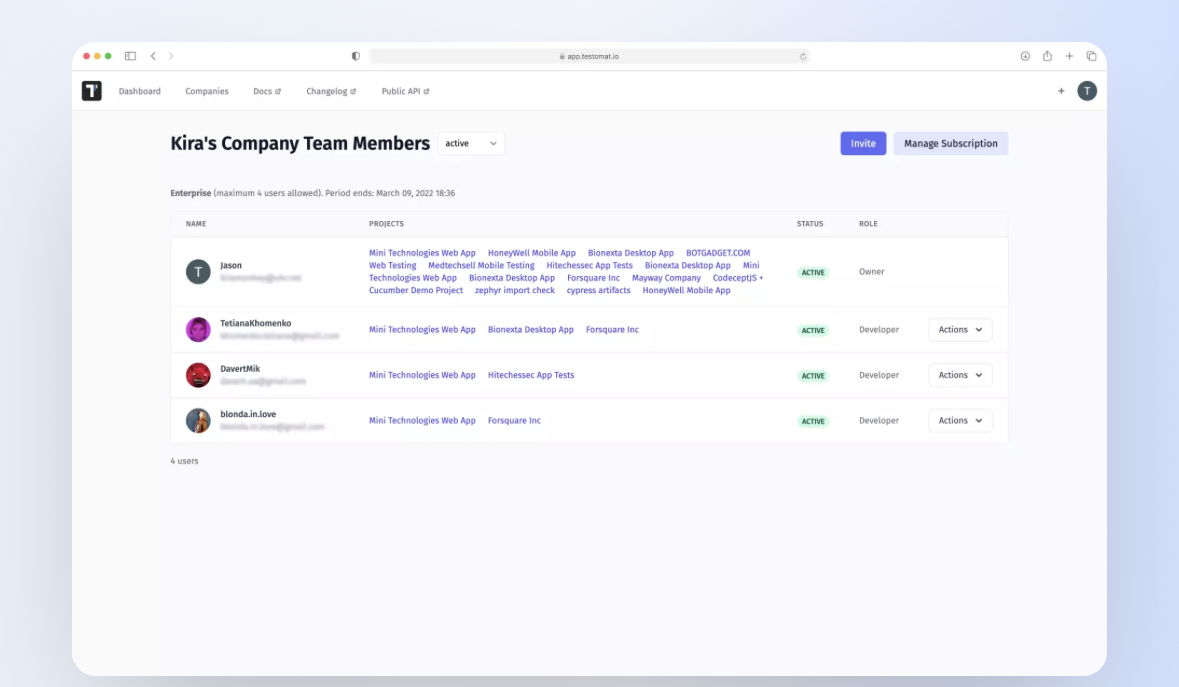
QA can execute them manually or automatically. Stakeholders can view public reports showing exactly what’s tested and what’s not.
AI-Powered Intelligence
As your test suite grows into thousands of tests, manual management becomes impossible. Testomat.io’s AI capabilities (available in Enterprise plans) help in ways that feel almost magical.
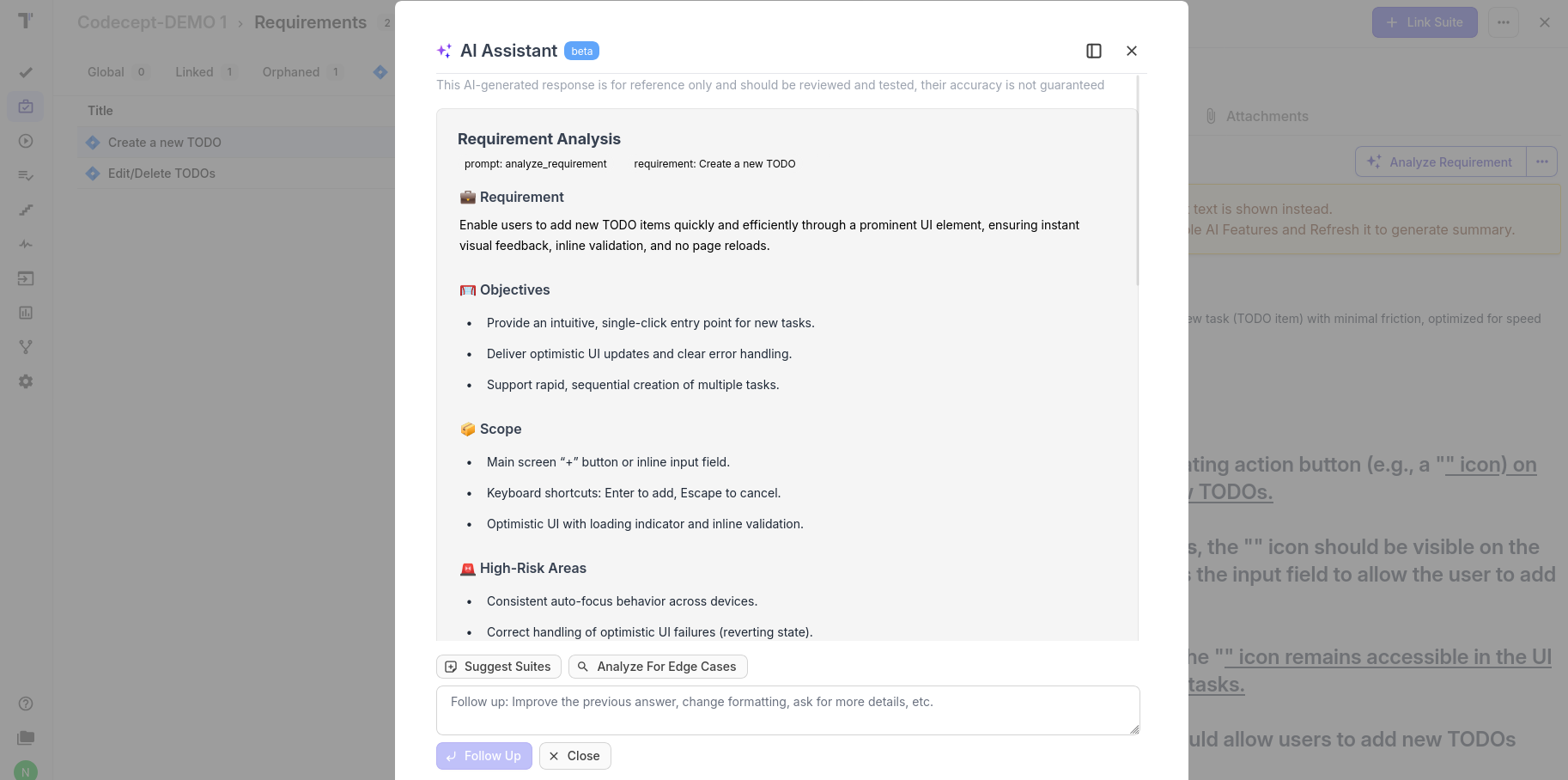
AI test generation analyzes your application and suggests test scenarios you might have missed. AI agents assist with organizing tests, identifying redundancies, and recommending improvements. AI-driven requirements management automatically links requirements to relevant tests, maintaining traceability as your product evolves.
Comparing Testomat.io with Other Functional Testing Tools
Let’s be transparent about where Testomat.io fits in the landscape of functional testing tools.
- Traditional test management tools like TestRail, Zephyr, and Xray excel at organizing manual tests and generating reports. But they weren’t designed for modern test automation. They lack native framework support, making automated test integration clunky at best.
- Browser automation platforms like BrowserStack provide excellent infrastructure for running tests across browsers and devices. But they focus on execution, not management. You still need separate tools to organize tests, track coverage, and collaborate with your team.
Testomat.io bridges these gaps. It handles both automated and manual testing equally well, supports multiple frameworks natively, and provides the collaboration features modern distributed teams need.
| Feature | Testomat.io | BrowserStack | TestRail | Zephyr | Xray |
| Automated Functional Tests | Native | Execution Only | Limited | Limited | Limited |
| Multi-Framework Support | Extensive | Limited | None | None | None |
| Unified Reporting | Advanced | Limited | Good | Good | Good |
| CI/CD Integration | Deep | Basic | Limited | Limited | Limited |
| Jira Sync | Bidirectional | None | Basic | Native | Native |
| Team Collaboration | Comprehensive | Basic | Basic | Basic | Basic |
| AI Features | Yes (Enterprise) | None | None | None | None |
Best Practices for Scalable Functional Test Automation
Having the right tool matters, but using it effectively matters more.
Start Strategic, Then Expand
Don’t try to automate everything on day one. Begin with your critical user flows, the features that, if broken, would prevent customers from accomplishing their primary goals. A login failure is catastrophic. A cosmetic alignment issue in a rarely-used admin panel can wait.
Once your core flows have solid automated coverage, expand systematically into secondary features. This approach delivers maximum risk reduction early while building momentum and expertise.
Maintain Test Readability
Six months from now, someone will need to update your tests. Make their life easier. Use descriptive names. Add comments explaining complex logic. Organize tests into logical groups with clear tagging.
Testomat.io’s tagging system helps here enormously. Tag tests by feature area, priority level, test type, or any custom dimension that makes sense for your team. Finding and running specific subsets of tests becomes trivial.
Combine Testing Layers
Functional testing doesn’t mean only UI tests. A robust strategy includes unit tests for business logic, API tests for service contracts, and UI tests for critical user journeys.
This pyramid approach gives you fast feedback from unit tests, confidence from API tests that services integrate correctly, and assurance from UI tests that real users can accomplish their goals. Each layer catches different types of problems.
Integrate Testing Early
Don’t make testing a final checkpoint before release. Integrate automated tests into your CI/CD pipeline so they run on every code change. This shift-left approach catches bugs when they’re easiest and cheapest to fix – right after they’re introduced.
With Testomat.io’s CI/CD integrations, this becomes straightforward. Configure your pipeline once, and tests run automatically whenever code changes.
Monitor and Maintain Test Health
Not all tests age gracefully. Some become flaky, failing randomly due to timing issues or environmental quirks. Others become slow, bottlenecking your entire pipeline. Many become redundant as features change.
Pro tip: Use dashboards to identify which functional areas break most often. That’s where stability investment pays off. If your checkout flow breaks every other sprint, maybe it needs architectural attention, not just more tests.
The Future of Functional Testing
The functional testing landscape is evolving rapidly. Understanding these trends helps you make tool decisions that won’t become obsolete in two years.
Unified, AI-Assisted Testing Orchestration
The future belongs to platforms that intelligently orchestrate testing across all layers and environments. AI will suggest optimal test coverage, predict which tests are most likely to catch bugs in a given code change, and automatically generate tests for new features.
Testomat.io is already moving in this direction with AI-powered test generation and smart analytics. Expect these capabilities to become more sophisticated, eventually handling routine test maintenance automatically.
Cross-Layer Test Management
The artificial boundary between unit, integration, API, and UI testing is dissolving. Modern applications span multiple platforms: web, mobile, desktop, IoT devices. Your testing tool needs to manage all of them coherently.
Testomat.io’s multi-framework support positions it well for this future. Whether you’re testing a React web app, a Flutter mobile app, or a REST API, everything lives in one ecosystem.
Predictive Analytics
Imagine your testing tool warning you: “Based on historical patterns, there’s a 73% chance this area of code will fail in production.” That’s where we’re heading. Machine learning models trained on your test history will forecast potential failures, letting you invest testing effort where it matters most.
From Reporting to Insights
Today’s test reports answer “what happened?” Tomorrow’s will answer “why did this happen?” and “what should we do about it?” The shift is from passive documentation to active intelligence that guides decision-making.
Conclusion: Testing That Scales With Your Ambitions
Functional testing ensures your application works as intended. But as your product grows, your team expands, and your release cadence accelerates, manual approaches hit a wall.
Testomat.io was built for teams facing these exact challenges. Teams that need to move fast without sacrificing quality. Teams that practice continuous delivery and need testing that keeps pace. Teams where testing is everyone’s responsibility, not just QA’s.
If your current functional testing approach feels like it’s holding you back rather than enabling you to ship confidently, maybe it’s time for something different.
Ready to see how Testomat.io can transform your functional testing workflow? Start your free trial today, no credit card required. Or book a demo with our team to discuss your specific testing challenges and see the platform in action.
Your users deserve software that works. Your team deserves tools that help them deliver it. Testomat.io brings both together.