






Why TypeScript? JS frameworks continue to grow in popularity, and TypeScript is a logical evolution of JS. Therefore, given the relevance of the topic and the author’s experience, we decided to share the next insights.
TypeScript superpower
Modern applications created with React, Angular, or Vue are often highly complex, and plain JavaScript alone can make them difficult to scale and maintain — they are no longer just small scripts. This is where TypeScript becomes essential. It provides features necessary for scalability and long-term maintainability while meeting safety requirements without sacrificing JavaScript’s flexibility. TypeScript is a superset of JavaScript, and its code is ultimately compiled into standard JavaScript.
Additionally, TypeScript’s strict type system reduces defensive coding, helping keep the code clear, consistent, and coherent. It enforces discipline, prevents common mistakes caused by ambiguity regarding data structures; another useful built-in tooling prevents many runtime errors by detecting issues at compile time, such as typos, incorrect arguments, missing properties, invalid return values, undefined variables and unsafe null usage — instantly while typing with an IDE, rather than finding them after the code is deployed.
😁 Thus, TypeScript is a great win!
Why focus on writing better TypeScript code?
Focusing on writing better TypeScript code is not about perfectionism — it is about building software that meets customers’ expectations.
Here is exactly why robust code matters:
- First, better TypeScript dramatically reduces runtime bugs by catching errors at compile time. It makes refactoring safer because the compiler immediately highlights broken contracts.
- Well-defined types clarify business logic and reduce ambiguity in complex systems.
- Consistent patterns reduce cognitive load in large codebases and improve long-term maintainability.
- Exhaustive checks protect from forgotten edge cases. Strong boundaries around external data increase reliability.
- Strict configurations prevent technical debt from silently accumulating.
- Understandable and well-commented code removes ambiguities by enforcing shared domain rules across teams, which in turn allows teammates stay on the same page, improving their collaboration.
Ultimately, writing well-structured TypeScript code should be a fundamental part of system design, as it is far more effective than reactively patching issues later as product features expand and the team grows.
Best Practices for Using TypeScript
TypeScript is full of hidden traps and becomes unpredictable when used ineptly. However, you can make your development process much smoother by avoiding the mistakes that lead to technical debt and wasted time. Let’s start our journey with common mistakes.
#1: Unnecessary Explicit Typing When Inference Works
The first mistake is not critical at all, but quite popular, which is why it is put first. So, create our main character, Alice.
— Who is Alice? … asking you… 🤔
— She is Alice from Wonderland! So,
It would seem that this is wrong here?
// ❌ there is no sense
const name: string = "Alice";
The fact is that TypeScript will extract the type itself in such a case; this is called implicit typing, and specifying it explicitly makes no sense. In this case, specifying string is redundant — TypeScript will infer the type automatically.
const name = "Alice"; // inferred as stringTakeaway: Trust type inference when it is sufficient. Explicit typing is not always needed.
#2: Unpredictable Return Types
We remember how Alice climbed down the rabbit hole and began to fall. We use a random function that will determine whether Alice will fall forever or die. And the function returns the corresponding result. And as you can see, the result of the function is a string:
// ❌ BAD – plain JavaScript (returns string, no type safety)

function jumpIntoRabbitHole() {
  const random = Math.random();
  let result;

  if (random > 0.5) {
    result = 'fly forever';
  } else {
    result = 'die';
  }

  return result;
}

const result = jumpIntoRabbitHole();
// TypeScript infers: string
Technically correct — but we can make it more precise. Since there are only two possible outcomes: fly forever and die, a separate type is created for these values, and it indicates the type that the function might return:
// ✅ GOOD – TypeScript with literal union type

type Result = 'fly forever' | 'die';

function jumpIntoRabbitHole(): Result {
  return Math.random() > 0.5 ? 'fly forever' : 'die';
}

// or one-liner
const jumpIntoRabbitHole = (): Result =>
  Math.random() > 0.5 ? 'fly forever' : 'die';
Now the function returns a specific union type, not just any string.
Benefit: The result is more predictable and clearer in expectations.
#3: Declaration class props
What about classes? There are several properties inside this class, and we set their values in the constructor. Of course, this is not an error, and executing such code will not cause problems.
// Wrong ❌

class Alice {
    // Creates a public writeable property
    age: number;
    hobbies: string[];

    constructor(
        age: number,
        hobbies: string[]
    ) {
        this.age = age;
        this.hobbies = hobbies;
    }
}
This is a cleaner syntax that significantly reduces the amount of code and makes it easier for others to read and understand. There is no necessity to declare the properties separately or assign values to them inside the constructor.
// Correct ✅
class Alice {
    // Just add visibility modifier

    constructor(
        public age: number,
        public hobbies: string[]
    ) { }
}
TypeScript visibility modifier (public, private, protected) automatically creates and initialises the properties for you.
Result: Less code — better readability.
#4: Using any weakens the TypeScript benefits
You should know that such a solution might have negative consequences, which typically are difficult to predict. You can not see an error after the execution of this code. But in fact, using any nullifies the benefits of TypeScript.
Unknown
One possible solution is to use the unknown type:
function readComposition() {
  return JSON.parse('{"strangeScent": true}');
}
The real example: when Alice found a potion that said, “Drink me”. Alice did not know what kind of potion it was, but she was a smart girl and knew that you should not drink poison. She looked to see if the potion had the words “poison” on it. There was no sticker, so Alice decided to drink the bottle. Afterwards, things happened to her that she could not have predicted: she started to shrink.
What about us? We have a function that protects us — the composition of the potion. And the function to drink. In the middle, we check whether the potion contains poison. And if there is no poison, then Alice can drink. As we can see, the function executed without errors; in turn, the potion was drunk. Are you ready to drink the potion, the composition of which is? Do we really care about this? Right, No! In essence, this means that it can contain anything we want.
async function drink() {
  const composition: any = await readComposition();

  if (!composition.poison) {
    // drink
  }

  // OK, no error
}
More reasonable to say that we do not know what kind of potion it is, what properties it may have, by giving it the type unknown:
async function drink() {
  const composition: unknown = await readComposition();

  if (!composition.poison) {
    // drink
  }

  // Object is of type 'unknown'
}
In this case, when trying to check that the drink is not a poison or liquor without specific properties. This will save us from the unpredictable consequences of drinking it.
Hack: Unknown exists to check the type before using.
Our next step is to know, then work with such unknown TypeScript type:
There is a card type which consists of two proportions. This is rank and master. And there is something, maybe it is a card, maybe not, we do not know yet, we parse a string and get the result in this variable.
type Card = {
  rank: string,
  suit: string,
};

const maybeCard = JSON.parse('{"rank":"Ace", "suit":"spades"}');
TypeGuard
Let’s look at a practical example.
function isCard(smth: unknown): smth is Card {
  return smth !== undefined && smth !== null && 'rank' in smth && 'suit' in smth;
}

if (isCard(maybeCard)) { // maybeCard: unknown
  someFn(maybeCard);     // maybeCard: Card
}
TypeGuard little is similar to a regular function, but it has a specific syntax for the returned value.
We pass something to the function input. Our goal is to check whether this something is a card or something else. To do this, we have to check if it is not equal to undefined and whether this something exists at all, if it is not equal to null. Then we have to make sure that this something has the proportions of rank and suit. When all these conditions are met, we can conclude that our something is really a card in truth.
Important: Type Guard enables us in the analysis of unknown variables to determine their type with confidence.
Generic type | Somebody
Each of us knows how a mirror works. When you look into it, you see yourself. This is the function lookAtTheMirror
function lookAtTheMirror(somebody: any) {
  return somebody;
}
Type any means that we do not know what it might return now.
const whatWeSee = lookAtTheMirror('Alice');
// Result: type is 'any' (type information is lost)
It returns to you what you passed to it. Obviously, if Alice looks into the mirror, then the mirror should return Alice. And if it is a cat, then a cat. But with the type any we have no information about what type the function will return
function lookAtTheMirror<Person>(somebody: Person) {
  return somebody;
}

const whatWeSee = lookAtTheMirror('Alice');
// Result: type is 'Alice' (type information is preserved)
Right now, the function returns any, meaning it could be anything. The correct version also accepts any type, so somebody can be of a different type and behave in another way. Now the type that is returned will be equal to the type of the arguments that we passed to it. In the case of Alice, when Alice looks into the mirror, the type that is returned to us is equal to a specific mustring with the value Alice.
This is one more step that makes our code predictable!
TypeScript Object Typing
Now let’s look at how to specify types for objects. Suppose we need to create our wonderland. We can define it as an object with any keys and any values that these keys can have. This is an example of creating such an object:
// ❌ BAD Index Signature — the worst option
interface Land { [key: string]: any };
const wonderland1: Land = {
  population: 500,
  residents: ['mouse', 'bird', 'snake'],
  size: 100500,
};
Type Record
Second example: if we know the list of properties, we can create a separate type for them, although this is not necessary. Then, using the keyword Record, which is an analogue of an object, I specify the list of these properties. Here we also use any:
// ✅ Using Record with Union Types is better
type LandProps = 'population' | 'residents' | 'owner';
const wonderland3: Record<LandProps, any> = {
  population: 654,
  residents: 42,
  owner: 'King',
};
A simple list of all the keys and the types we can define:
// ✅ The best Example
interface LandStrict { population: number, owner: string };
const wonderland2: LandStrict = {
  population: 654,
  owner: 'King',
};
Choose a method that describes the object you are working with as accurately as possible, but at the same time does not break your code.
🔴 Conclusion: using “any” is bad. Try to avoid this approach!
#5: Using a type assertion instead of a type declaration
When Alice fell down the well for a long time, she took out a jam from the shelf. Unfortunately, the jar was empty as we remember, but now we have created a full one. Aha, jam consists of a jar, sugar and any fruit:
type Jam = {
  jar: 'yes',
  sugar: 'yes',
  fruit: string,
};
In the following example, we created the object orange jam and said that it is a jam:
const orangeJam = {
  jar: 'yes',
  fruit: 'orange',
} as Jam;

// no error
🔴 Note! There are no errors after execution, although the object does not fall under the requirements of the jam type, because it does not contain sugar.
// ❌ Not true
const orangeJam: Jam = {
  jar: 'yes',
  fruit: 'orange',
}

// Property 'sugar' is missing in type
// '{ jar: "yes"; fruit: string; }'
// but required in type 'Jam'.
The correct way to specify the type. Then, trying to create jam without sugar, we get the corresponding error.
#6: Using objects instead of primitives
Another non-obvious error. You won’t encounter any problems with the standard usage of this type when you are trying to console.log it, but as you can see, in some cases, such code will lead to errors.
// ❌ BAD in some cases
const rules: String = '{rules: croquet}';

// translate
const rulesEN = JSON.parse(rules);

// Argument of type 'String' is not assignable to
// parameter of type 'string'.
// 'string' is a primitive, but 'String' is a wrapper
// object. Prefer using 'string' when possible.
Specify a string with a lowercase letter as the type only. Yes, a string with an uppercase letter and a string with a lowercase letter are different things. As the error notification says, a string with a lowercase letter is a primitive, and a string with an uppercase letter is a wrapper object.
// OK ✅
const rules: string = '{rules: croquet}';

// translate
const rulesEN = JSON.parse(rules);
Conclusion: string ≠ String
#7: Don’t overstep DRY when creating types
Don’t repeat yourself! There is a type with a list of cards of different ranks. We want to create another type that contains the same list of cards, and our cards correspond with numeric values, for example:
❌ BAD — cumbersome version of the code
type Cards = 'Ace' | 'King' | 'Queen' | 'Jack' | 'Joker';

type CardsStrength = {
  'Ace':    number,
  'King':   number,
  'Queen':  number,
  'Jack':   number,
  'Joker':  number,
};
The more elegant version with the same purpose, while we do not duplicate the code:
// ✅
type Cards = 'Ace' | 'King' | 'Queen' | 'Jack' | 'Joker';

type CardsStrength = {
  [key in Cards]: number
};
Benefit: Your code becomes more maintainable.
In addition, a few examples of how we can work with arrays:
// ✅
const cardSuits = ['♦', '♣', '♥', '♠'] as const;

type CardSuit = typeof cardSuits[number];

//
// Resulting type:
// type CardSuit = "♦" | "♣" | "♥" | "♠"
We prohibited the changing of the array. It makes it an array of fixed length with specific values, not an array of strings. Based on this, we can already create a type that will correspond to one of the cards’ suits.
Another option to type converting, by using an enum.
// ✅
enum CardSuits {
  Diamonds = '♦',
  Clubs    = '♣',
  Hearts   = '♥',
  Spades   = '♠',
}
type CardSuit = keyof typeof CardSuits;
Both TypeScript code examples and best practices work; use one of them that is convenient for you, as both have the same result.
Now, let’s go back to Wonderland. And remember that there was a queen who loved to play croquet. The participants never stuck to the rules, and everyone played so that the queen would win, because in a bigger case, she would have ordered them to be executed. There are standard rules for croquet, but we need to create other types of rules due to the above conditions.
The standard croquet rules are:
type CroquetRules = {
  points: number,
  rule1: string,
  rule2: string,
};
For example, the queen gets only points, and she does not care about the rules themselves. This can be implemented using the pick keyword. We define the type we inherit from, specify the list of properties we choose, and all others are ignored.
type QueenRules = Pick<CroquetRules, 'points'>;
// {
//   points: number;
// }
That is, we have chosen only points; the rules are not included in our new type.
Alice tries to follow all the rules, but she is not awarded points; she does not win the game. Therefore, by using omit, we specify the properties which we exclude from our type and include all the others.
type AliceRules = Omit<CroquetRules, 'points'>;
// {
//   rule1: string;
//   rule2: string;
// }
But we have other participants as well. They play, as I said, however they want, adapting to the rules, as long as the queen wins. The partial keyword indicates that all our properties of the type we are using become optional.
type ParticipantRules = Partial<CroquetRules>;
// {
//   points?: number | undefined;
//   rule1?: string | undefined;
//   rule2?: string | undefined;
// }
The owners of Wonderland had very strange clocks. For example, the Hatter’s showed the day, not the time. And Alice was very surprised by this. She thought, what if the clock showed the year, which would not be useful at all:
type Time = string | number | symbol;If we code the same in another way, the result will be similar
// ✅— better option type Time = keyof any; // type Time = string | number | symbol
So, writing the type from scratch will not lead to errors, of course, but it contradicts the principles of DRAI.
Benefit: It increases the time spent on maintaining such code.
#8: Do not use nullish coalescing ??
The queen often gives orders to cut the servants’ heads in Wonderland. What if today our queen is kind and decides not to cut off heads?
const cutOffTheHead = false; // or 0, '', [], NaN, etc.Judges perform a verdict anyway, as the queen really likes it. They move to the right side of the equation not only when there is no queen’s decision, but also in cases when this decision has the so-called false values (false; // or 0, ”, [], NaN, undefined)
// DON'T do this if you want to preserve false / 0 / '' etc.
const judgment = cutOffTheHead || true;

// Result: judgment = true
// But we probably wanted to keep false → wrong behavior!
In this case, it would be correct to move to the right-hand side only when the queen’s decision has the value null or undefined.
// ✅ Correct should be
const judgment  = cutOffTheHead ?? true
// judgment = false
// null or undefined
This approach allows us to work with the value of the variable even if it is false
#9: Never type never
The TypeScript type void must be specified after the function has finished. This function will never even complete; It throws an ♾️
// ❌ Incorrect: 'void' implies the function finishes but returns nothing
function drinkTea(): void {
  while (true) {
    // drink tea
  }
}
In our case, it would be better to use type never
// ✅ Correct: 'never' indicates the function never reaches an end point
function drinkTea(): never {
  while (true) {
    // drink tea
  }
}
Note: A function that has finished and does not return anything actually returns undefined.
Why QA Engineers should learn TypeScript?
Alice drank, ate everything in a row, some incomprehensible potions, mushrooms, cakes. And as a result, some unpredictable things constantly happened to her, it increased, then decreased. She was constantly surrounded by some strange creatures that behaved extremely incomprehensibly. Perhaps Alice’s experience is interesting. But would you like to transfer the rules of Wonderland to your project and your code? If not, then do not specify an explicit type declaration, specify a return type for the function. It is not necessary to declare a separate class property, just add a visibility modifier, and it will do everything for you. To combat unknown, you can use any, sorry, you can use unknown type maps and generic types. Use type assertion with great caution. In almost all cases, you need to use a type declaration. Writing a type from scratch is not necessary, and it complicates the maintenance of your code. Use knowledge collision when it is necessary and makes sense. And specify the type never for functions that will never complete or return an error.
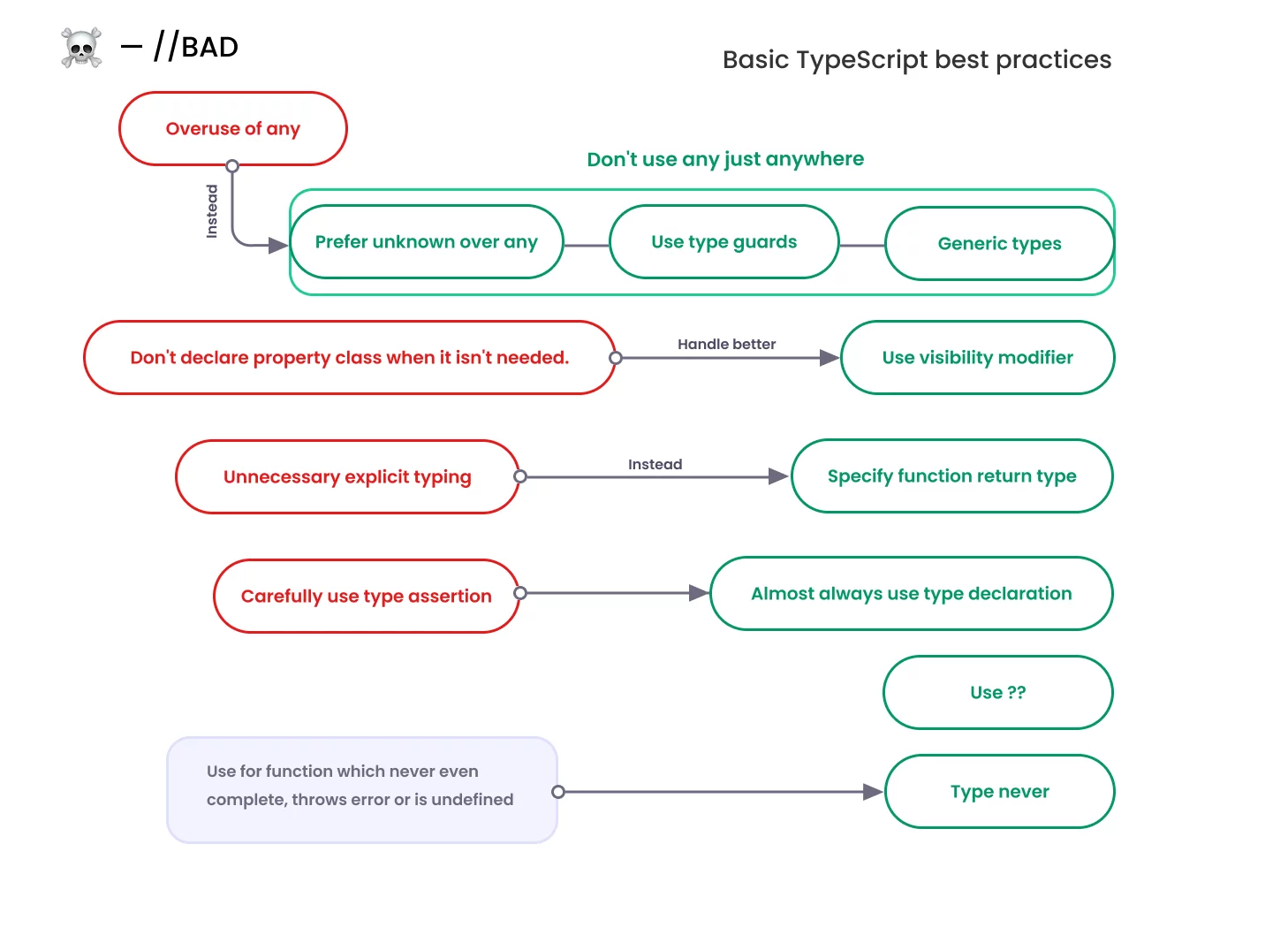
Let’s not be like Alice, make your code predictable 🙂