




Sequential testing made sense when test suites were small and releases happened once a quarter. Neither of those things is true anymore. Today’s QA teams run hundreds or thousands of automated tests per day, across multiple browsers, devices, and environments and every minute of test execution time has a direct cost. That’s where parallel testing changes the math.
This guide covers what parallel testing is, how parallel testing works in practice, when to use it, how to implement it properly, and which tools make it easier. Whether you’re evaluating a new testing framework or trying to cut your total test execution time in half, this is the guide to read first.
Key Takeaways
- Parallel testing is a software testing technique that runs multiple test cases simultaneously instead of one test after another
- It directly reduces overall test execution time, sometimes by 80% or more depending on your setup
- Parallel testing is not the same as distributed testing; parallel tests don’t interact with each other
- Test data management and test independence are the two biggest implementation challenges
- Tools like Testomat.io support parallel test execution natively across major testing frameworks
- AI in testing is making parallel execution smarter, test prioritization, self-healing, and flaky test detection all improve reliability of parallel testing
What Is Parallel Testing?
Parallel testing is a software testing technique where multiple test cases are executed at the same time, across different environments, browsers, or devices, rather than running one test after another in a queue.
The definition sounds simple. The impact on testing efficiency is not. Say you have a test suite with 45 automated browser tests, each taking 2 minutes to complete. Running them sequentially takes 90 minutes, one test after another, no overlap. Run three parallel tests simultaneously and that drops to 30 minutes. Run six in parallel and you’re at 15 minutes. Same tests, same coverage, a fraction of the total test execution time.
That’s the core mechanic. Parallel testing allows you to distribute test workload across available resources, machines, virtual environments, cloud instances, so that tests run simultaneously rather than waiting in line.
Parallel testing vs. sequential testing:
| Approach | Test Cases | Time per Test | Total Time |
| Sequential testing | 45 | 2 min | 90 min |
| Parallel (3 sessions) | 45 | 2 min | 30 min |
| Parallel (6 sessions) | 45 | 2 min | 15 min |
| Parallel (9 sessions) | 45 | 2 min | 10 min |
The table makes the value obvious. But to make parallel testing work at that scale, there are real implementation requirements to get right.
How Parallel Testing Works
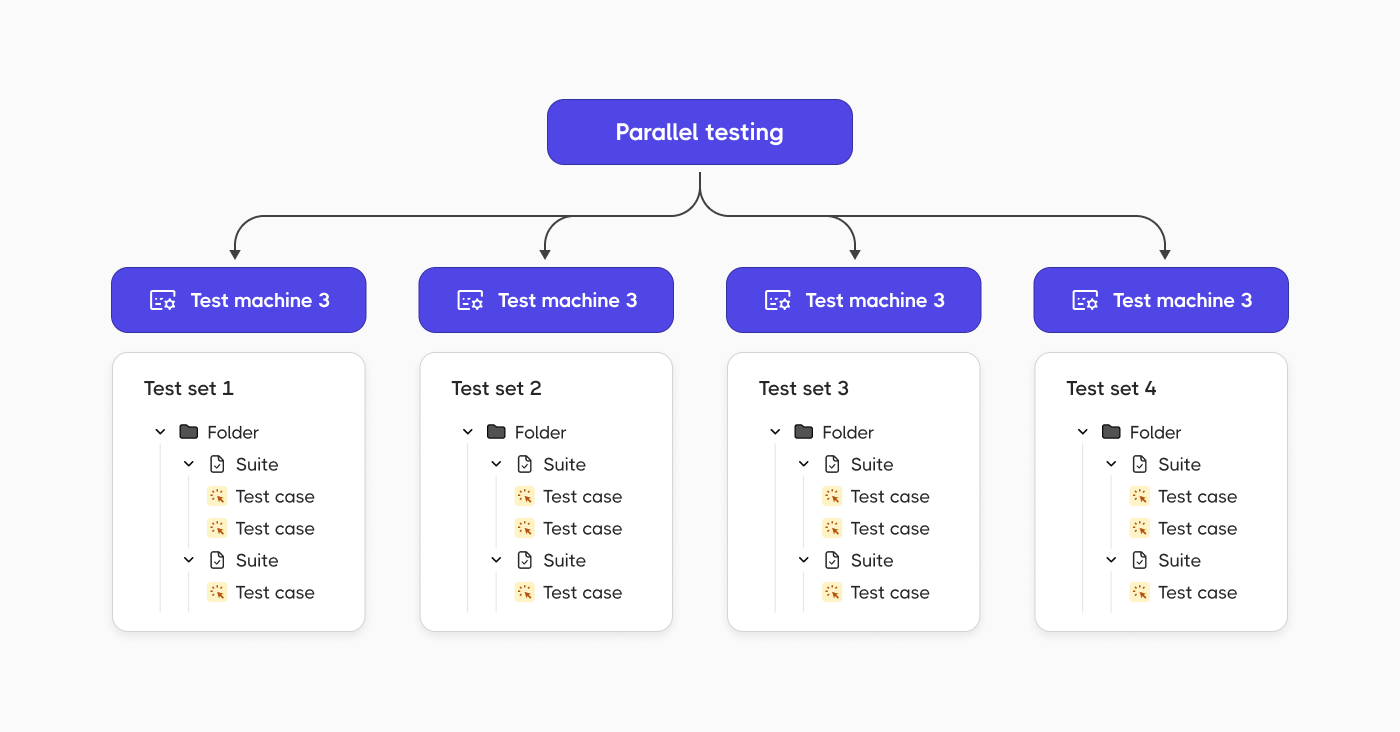
To understand how parallel testing works, it helps to separate the concept from the tooling.
At the framework level, parallel test execution means your test runner launches multiple test cases or multiple test files at the same time, each in its own isolated thread, process, or environment. The tests run independently. One test doesn’t wait for another test to finish. One test fails without affecting the others.
At the infrastructure level, each parallel session needs its own environment. That might mean:
- Multiple browser instances for cross-browser testing
- Multiple virtual machines or containers
- A cloud-based device farm for mobile testing
- A managed test grid (like the one Testomat.io provides)
The number of parallel tests you can run simultaneously depends on your infrastructure. Cloud-based testing tools let you scale the number of parallel sessions on demand, which is why parallel testing in the cloud tends to be more cost-effective than maintaining your own hardware.
What Makes a Test Safe to Run in Parallel
Not every test is designed for parallel execution. To run tests in parallel safely, each test case needs to be:
- Atomic. Each test should test one thing and do it completely. A test that depends on the output of another test will break when execution order changes.
- Independent. Tests can’t share mutable state. If two test cases write to the same test data or database record at the same time, you get race conditions and false failures.
- Self-sufficient. Hard-coded values and shared external resources both cause problems. Each test should set up its own preconditions and clean up after itself.
When test cases meet these requirements, you can execute multiple test cases simultaneously without worrying about interference. When they don’t, parallel execution may produce inconsistent, unreliable results and the test suite itself becomes the problem.
Benefits of Parallel Testing
Running tests in parallel changes what’s actually possible for a QA team. Sequential testing forces tradeoffs: you can have broad coverage or fast feedback, but rarely both. Parallel testing removes that constraint.
The six benefits below show up consistently once teams make the shift, whether they’re running a few hundred tests or tens of thousands.
1. Faster Test Execution
The most direct benefit of parallel testing is speed. Large test suites that take hours sequentially complete in minutes when run in parallel. This is especially valuable in CI/CD pipelines where test execution time determines how fast code reaches production.
A pipeline that waits 90 minutes for test results slows every developer on the team. The same pipeline with parallel test execution delivering results in 15 minutes changes the development rhythm entirely.
2. Better Cross-Browser and Cross-Browser Compatibility Testing
Cross-browser testing is one of the strongest use cases for parallel execution. Testing an application across 10 different browser/OS combinations sequentially means running the full test suite 10 times in a row. Parallel testing allows all 10 configurations to run simultaneously, same total test coverage, a fraction of the time.
The same logic applies to cross-browser compatibility testing across mobile devices. Android and iOS, different screen sizes, different OS versions, parallel testing handles all of it without multiplying your test time by the number of configurations.
3. CI/CD Optimization
Parallel testing and CI/CD belong together. Continuous integration depends on fast feedback. When a developer pushes new code, the testing process needs to complete quickly enough that the feedback loop stays tight. If tests take too long, developers push again before getting results, conflicts stack up, and the pipeline becomes a bottleneck. By running tests in parallel, teams can run automated tests on every code commit without slowing down delivery.
4. Improved Test Coverage
Parallel testing enables teams to run more tests against more configurations in less time. That means broader test coverage without extending the total test execution time. Teams can test the application under test across more browsers, more devices, and more environments, catching compatibility issues that sequential testing would miss simply because there wasn’t time to run everything.
5. Cost Efficiency
Running parallel tests on cloud infrastructure means you pay for compute time only when tests are running. A sequential test run that takes 90 minutes on one instance might cost the same as a parallel run that takes 15 minutes on six instances, but the parallel approach returns results six times faster. For teams running automated tests dozens of times per day, the time savings compound into real cost savings over weeks and months.
6. Early Bug Detection
Parallel testing allows defects to surface faster in the development cycle. The faster a test fails and reports, the sooner the team can fix the underlying issue. Bugs caught during a five-minute parallel test run are cheaper to fix than bugs caught 90 minutes into a sequential run or worse, in production.
Limitations of Parallel Testing
Parallel testing is not a universal fix. There are real constraints worth understanding before you adopt parallel testing at scale.
- Test dependencies. If your test suite was written assuming sequential execution, tests may share state in ways that break under parallel execution. Refactoring those dependencies is necessary work before implementing parallel testing properly.
- Test data management. Tests running simultaneously against the same database or API can conflict. Good test data management, separate datasets per test, or reset mechanisms between runs is essential to conducting parallel testing successfully.
- Infrastructure costs. More parallel sessions mean more compute resources. Cloud grids make this manageable, but teams need to budget for increased parallelism rather than treating it as free.
- Complexity of setup. Some testing frameworks support parallel execution natively. Others need additional configuration. And not every testing tool handles the reporting of parallel runs cleanly, keeping track of results across multiple simultaneous test runs requires a test management system designed for parallel execution.
- Coverage isn’t automatic. Parallel testing enables broader coverage, but it doesn’t guarantee it. Two test cases covering the same functionality in parallel don’t improve coverage. The testing strategies behind parallelization need to be intentional.
When to Use Parallel Testing
Parallel testing is a good fit in these situations:
- Regression testing at scale. When the test suite grows large enough that sequential testing takes hours, parallel execution brings that back to minutes without dropping coverage.
- Cross-browser and cross-device testing. Any time the same functional test needs to run across multiple browser/OS/device combinations, parallelization cuts the time proportionally.
- CI/CD pipelines . Every team running automated tests on code commits benefits from parallel execution. Faster test runs mean faster feedback loops.
- Legacy data migration. When importing data from an older system to a newer one, parallel tests can check that everything is transferred correctly across multiple data segments simultaneously.
- Pre-release testing. When the application under test needs to be validated across every supported configuration before a release, parallel testing compresses the timeline without cutting corners.
Sequential testing still has its place for tests that genuinely can’t be made independent, or for small test suites where the overhead of parallelization isn’t worth it. The time-consuming approach to testing sequentially becomes a problem when the test suite grows.
How to Implement Parallel Testing
Most teams know they need parallel testing before they know how to set it up. The steps below follow a logical order, skipping ahead is what causes the race conditions and false failures that give parallel execution a bad reputation. Work through them in sequence and you’ll have a stable, scalable setup rather than one that needs constant firefighting.
Step 1: Audit Your Test Suite for Independence
Before you run tests in parallel, you need to know which test cases are safe to parallelize. Review each test for:
- Shared mutable state with another test
- Hard-coded test data that would conflict under simultaneous execution
- Dependencies on test execution order (one test relying on what a previous test set up)
Tests that fail these checks need refactoring before parallel execution. Tests that pass are ready.
Step 2: Set Up Test Data Management
Each parallel test session needs its own test data. Common approaches:
- Use separate database schemas or test databases per session
- Generate unique test data at the start of each test run
- Use API mocking to eliminate shared external dependencies
Good test data management is what separates a parallel test suite that works reliably from one that produces intermittent failures nobody can explain.
Step 3: Choose a Framework That Supports Parallel Execution
Most modern testing frameworks support parallel test execution either natively or through plugins. Testomat.io, for example, supports parallel execution across:
- Cypress parallel testing
- Playwright parallel execution
- Pytest with parallel execution plugins
- TestNG parallel execution
- Cucumber parallel execution
- Jest, Mocha, WebdriverIO, CodeceptJS
The testing framework you choose shapes how parallel execution is configured. Some frameworks are split by test file, others by test method, others by tag or suite. Know the model your framework uses before designing your parallelization strategy.
💡 For a deeper look at one of the most popular options, see our Playwright test automation guide.
Step 4: Configure Your Test Runner
Most parallel execution configuration lives in the test runner. Key settings:
- Number of parallel workers or threads
- How to split test files or test cases across workers
- Timeout handling (a test that hangs in parallel can block a worker indefinitely)
- Retry logic for flaky tests
Start with a conservative number of parallel sessions and increase based on results. The goal is faster test execution time, not maximum parallelism for its own sake.
Step 5: Set Up Reporting
Parallel testing generates results across multiple simultaneous sessions. Without a test management tool that handles parallel runs, results from different test runs can be hard to aggregate and interpret.
Testomat.io solves this with two reporting modes:
- Single consolidated report, all parallel runs merged into one test report
- Separate reports per run, each parallel execution gets its own report
The implementation doesn’t require a merging strategy. Create an empty test run first, execute your parallel tests, then use the CLI command to generate the consolidated report. Run groups let you plan and organize parallel executions before they happen, which makes tracking the results of complex parallel testing strategies much cleaner.
Step 6: Integrate with CI/CD
Connect your parallel test execution to your CI/CD pipeline. Every major platform works:
- GitHub Actions
- GitLab CI
- Jenkins
- Azure DevOps
The CI/CD integration triggers test runs automatically on code changes. The parallel execution ensures those runs complete fast enough to keep the pipeline moving.
🤔 Not sure which CI/CD tool fits your stack? This comparison covers the key differences.
AI in Testing and Parallel Execution
AI in testing is changing how teams approach parallel test execution by making it smarter.
- Test prioritization. AI-powered tools analyze historical test run data to identify which tests are most likely to catch a given type of change. Rather than running the entire test suite in parallel on every commit, intelligent test selection runs only the relevant subset, reducing testing time further.
- Self-healing tests. When the application under test changes and a test fails because a locator is stale or a UI element moved, self-healing capabilities update the test automatically. This reduces the maintenance burden that comes with large parallel test suites.
- Flaky test detection. Tests that fail intermittently poison parallel test results. AI-driven analytics in tools like Testomat.io identify flaky tests across parallel runs and flag them separately, so the team knows which failures are real and which are noise.
- AI test generation. Testomat.io’s Enterprise plan generates new test cases automatically from requirements. As the test suite grows, AI-assisted generation keeps coverage expanding without requiring proportional manual effort.
Leveraging parallel testing alongside AI-powered test management gives QA teams a compounding advantage: more tests run faster, with smarter prioritization and lower maintenance overhead.
Parallel Testing in Testomat.io
Testomat.io is built with parallel test execution as a first-class feature, not an afterthought. The test management platform provides complete visibility into parallel runs through a single interface, all environment executions, all parallel sessions, all results in one place.
Key parallel testing capabilities in Testomat.io:
- Native support for parallel execution across all major JavaScript and Python frameworks
- Run Groups for planning and organizing parallel test execution strategies
- Consolidated and per-run reporting without complex merging logic
- Real-time reporting during parallel runs: live progress across all sessions
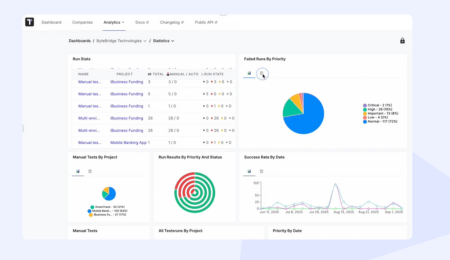
- Analytics showing overall test execution time trends, slowest tests, and flaky test patterns
- CI/CD integration with GitHub, GitLab, Jenkins, and Azure DevOps
- Multi-environment support run parallel tests across different environments simultaneously
- Unlimited artifact storage via S3 for screenshots, videos, and logs from every parallel session
For teams conducting parallel testing at scale, the Run Group feature is particularly useful. It lets you define a test automation strategy upfront, which tests run together, in which environments, with what parallelism, and then track those groups consistently across releases.
🔎 Looking for free options? See our roundup of free test management tools .
Parallel Testing Best Practices
Parallel testing can significantly cut your test execution time, but only if the underlying test suite is built to support it. Teams that rush into parallelization without the right foundations end up with flaky results, race conditions, and harder-to-debug failures than they started with. These practices separate parallel testing that works reliably from parallel testing that creates more problems than it solves.
- Design tests for independence from the start. Retrofitting parallel execution into a test suite built for sequential execution is painful. If you’re writing new test cases, write them to be atomic and self-contained. The testing strategies you establish early determine how easily parallel testing scales later.
- Keep test execution time balanced across workers. If one worker gets all the slow tests and others finish in 30 seconds, you haven’t optimized anything. Distribute test files or test cases to keep parallel sessions finishing at roughly the same time.
- Monitor and act on flaky tests. A test that fails intermittently gets amplified in parallel execution because it runs more often. Identify flaky tests early and fix or quarantine them before they create noise in your results.
- Use run groups to organize parallel testing efforts. Rather than running everything in one massive parallel test execution, group related tests together. Functional tests can run in parallel with performance tests. Smoke tests can run on every commit while full regression runs happen nightly.
- Track overall testing time over time. The point of parallel testing is reducing total test execution time. Measure it. If your test suite grows faster than your parallelism, the time advantage shrinks. Use analytics to stay ahead of that curve.
Summary
Parallel testing is one of the highest-leverage changes a QA team can make to their testing process. The math is straightforward: more tests running simultaneously means lower overall test execution time, faster CI/CD pipelines, broader cross-browser and cross-device coverage, and earlier bug detection.
The implementation requires real work: test independence, test data management, framework configuration, reporting setup. But the teams that invest in parallel testing successfully end up with a test automation foundation that scales as the codebase grows, rather than becoming the bottleneck that slows everyone down.
If you’re ready to adopt parallel testing with a tool built for it, Testomat.io gives you the framework integrations, reporting, and analytics to make it work at any scale.