

Aggregated analytics

Pull test data from every project in your company and track coverage and flaky tests in real time.
Aggregated analytics
Trusted by over 500 forward-thinking companies

logo
logo
logo
logo
logo
logo
logo
logo
logo
logo
logo
logo
logo
logo
logo
logo
logo
logo

Benefits of aggregated analytics

https://testomat.io/wp-content/uploads/2026/05/icon-badge2.svg
Full-company view
See every project on one screen.
https://testomat.io/wp-content/uploads/2026/04/icon-badge-9.svg
Real-time data
See results as they finish.
https://testomat.io/wp-content/uploads/2025/09/icon-test-execution.svg
Smart filters
Filter by environment or tag.
https://testomat.io/wp-content/uploads/2026/04/icon-ba.svg
Custom widgets
Pick the widgets your team needs.
https://testomat.io/wp-content/uploads/2026/04/icon-be.svg
Quality metrics in one place
All risk signals in one place.

How aggregated analytics can help?

Turn scattered project data into clear answers about where to focus and when to ship.

Startups & small teams
Skip the reporting spreadsheet
Built-in dashboards replace manual reports.
See coverage from the start
Automation ratio visible without extra setup.
Catch flaky tests early
Unstable tests flagged as you grow.
Mid-sized products
Compare projects side by side
Spot the project lagging behind others.
Filter by environment fast
Isolate issues by OS or browser.
Share dashboards with PMs
Read-only viewers cost no extra seats.
Enterprise projects
Roll up data across teams
Company-level metrics for every business unit.
Build role-specific dashboards
Widgets tuned for QA or leadership.
Track defect coverage at scale
Jira-linked metrics for user stories.

Testomat.io aggregated analytics features

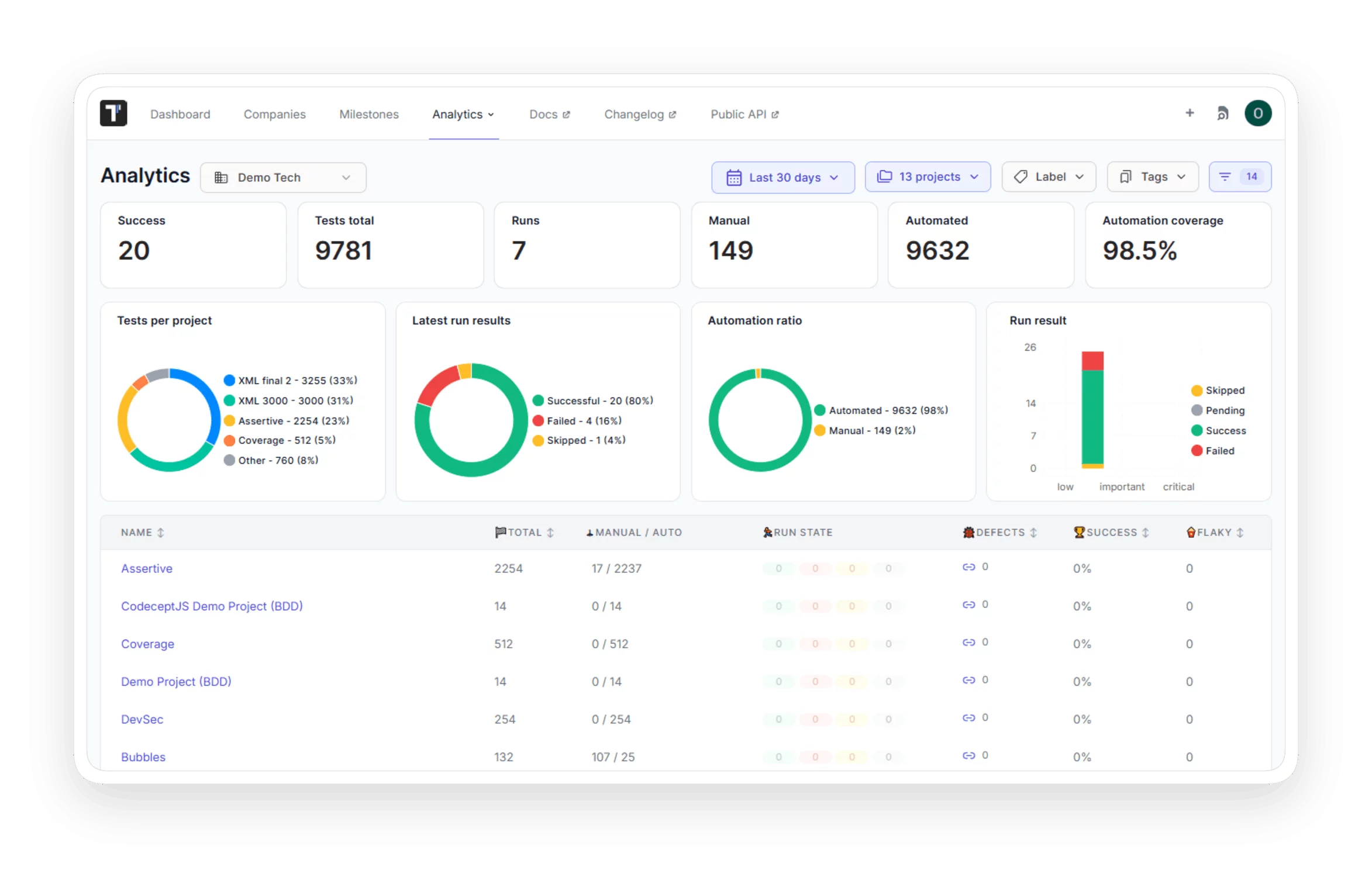
Analytics dashboard

See test metrics from all your projects on one board in real time. Find problems faster and make release decisions with complete data.

 Analytics  dashboard
Custom widgets

Choose widgets that match your testing goals: Success Rate by Date, Run Stats, Automation Rate by Date, and Test Runs by Date. Each team sees the numbers it needs, and reviews take less time.

Custom  widgets
Global analytics

Track flaky tests, success rate, slow tests, and automation coverage across all projects. Filter by project and data maturity. Find the weakest parts of your test suite and decide where to focus QA work first.

 Global  analytics
Custom charts

Tailor the Global Analytics data view to your unique needs. QA managers control how testing data is presented beyond predefined metrics.

Custom charts
Project metrics

Compare all projects by run state, success rate, flaky tests, slow tests, and defects. Find the projects with the most unstable tests and fix them first, so the team can trust test results.

Project metrics
Defect coverage

Detailed statistics regarding Jira User Story coverage. See how testing maps to product backlog items at scale.

Learn more
Defect  coverage
Global analytics widgets

Filter and build widgets by test priority. See critical tests first, find coverage gaps in the most important areas, and fix the problems with the biggest impact on the release.


Global analytics widgets
See every project in a single dashboard

See every project in a single dashboard

Global Analytics collects results from all projects in your company. You filter by project, tag, or label and get the success rate, automation coverage, and run trends on a single screen.
Select projects
Select projects
Filter
Filter
Compare results
Compare results
See every project in a single dashboard
What clients say

Recent reviews

“Excellent customer support”
Customer support is always prompt and high-quality. It's also great to see that user feedback is considered when developing new features. The team makes an effort to provide overviews of new features and keeps users informed about the latest updates.
4/5
Aliona Kovalchuk
Aliona Kovalchuk
General QA
“The Best TMS for Our QA Team!”
Our 15-person QA team has used Testomat.io daily for over two years. After comparing tools like TestRail, it stood out in both features and pricing. It’s affordable yet powerful. Jenkins integration works seamlessly, even manual testers can run tests easily. The clean UI speeds onboarding, improves collaboration, and saves time. We’ve recommended it widely, and others love it too.
5/5
Vladyslav M.
Vladyslav M.
General QA
“Testomat.io makes daily testing so much easier”
I’ve used Testomat.io daily for over two years, and it’s the best TMS I’ve worked with. Compared to tools like TestRail, it offers more features at a better price. Jenkins integration is seamless, even for manual testers. The UI is clean and easy to learn. It speeds up workflows, improves transparency, and makes team collaboration much smoother.
5/5
Dmytro H.
Dmytro H.
General QA
“Very convenient platform for managing test cases”
The platform is convenient and intuitive to use. I’ve been using it long enough to say it’s very user-friendly. It’s clear that the team is constantly working on and improving the platform.
5/5
Aleksey K.
Aleksey K.
General QA
“Great tool for creating and managing manual test cases efficiently”
As a Manual QA, I use Testomat.io to create and manage test cases with ease. The interface is intuitive, making onboarding simple. Test plans, runs, and results are well-structured in one place. Tagging helps organize cases efficiently. AI features speed up test creation. It keeps workflows transparent, improves collaboration, and reduces routine work.
5/5
Oksana G.
Oksana G.
General QA
“Testomat.io has been a great tool for managing both automated and manual tests in one place”
I really like how easy it is to integrate with frameworks and CI/CD tools, and the real-time reports with screenshots and analytics save a lot of time. Overall, it makes collaboration in the team much smoother and keeps testing well-organized.
5/5
Aleksey K.
Aleksey K.
Quality Assurance Engineer

Frequently asked questions

How is data refreshed on the Analytics Dashboard?
Testomat

Data updates in real time as each test finishes. The Analytics Dashboard reflects results instantly, with no batch refresh required.

Can people without a paid seat view the Analytics Dashboard? Testomat

Yes. Read-only stakeholders such as PMs and BAs can view dashboards without a paid license. The Read-Only user role does not count toward licensing.

What filters are available in the Analytics Dashboard? Testomat

You can filter by project, date range, test environment (OS and browser), tags, Jira issues, and labels. Multiple environments can be selected at once.

How many projects can I aggregate in one company account? Testomat

There is no hard entity limit on the number of projects per company. The platform supports 100,000+ test cases per project and 10,000+ test results per run.

Does aggregated analytics cover both manual and automated tests? Testomat

Yes. The dashboard displays manual and automated tests, including parameterized tests where input variables differ across runs.
Track every project in Testomat.io

Track every project in Testomat.io







