

icon
icon

Confluence test case management
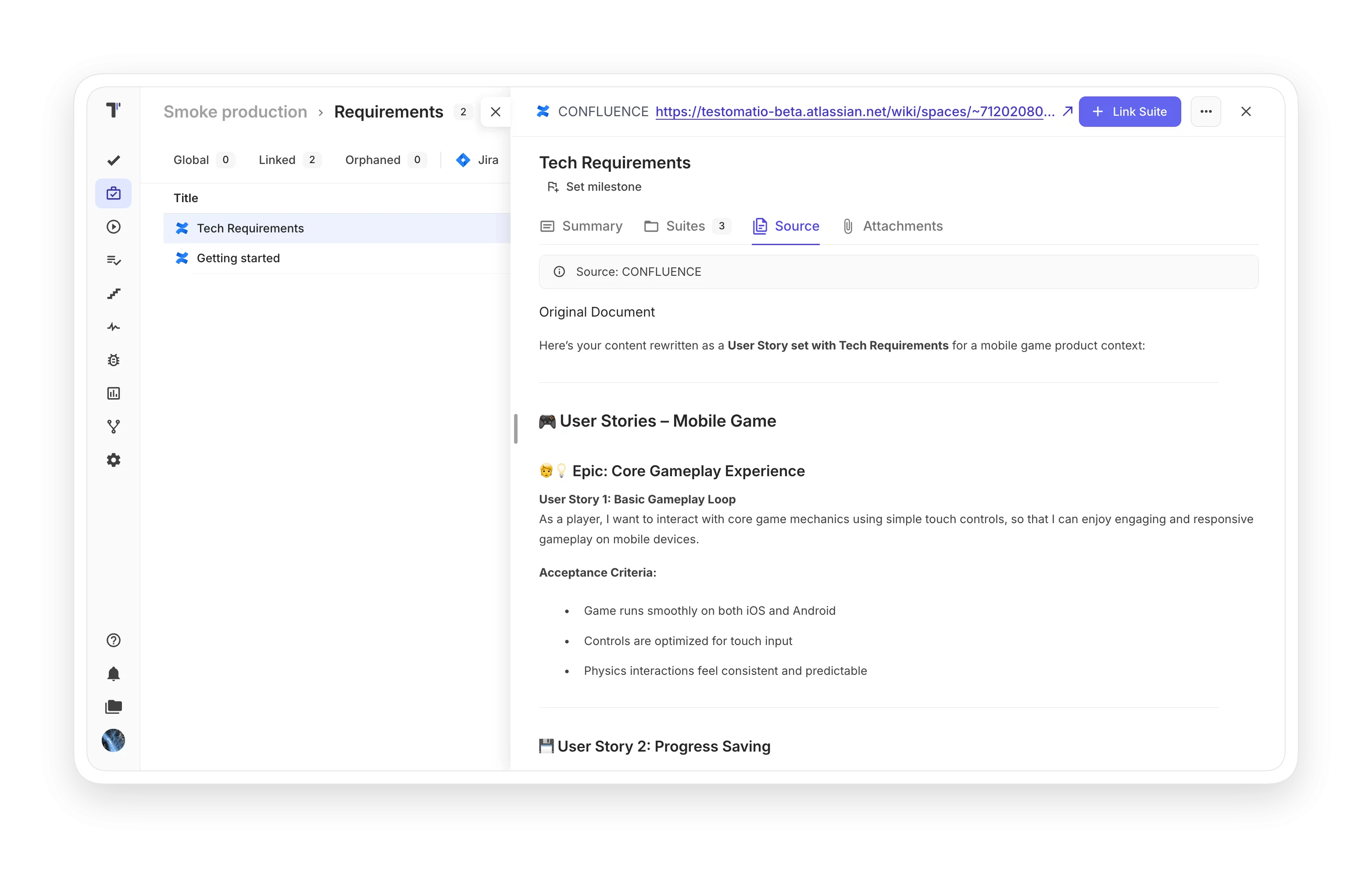
Turn your Confluence requirements into test cases with Testomat.io. See which requirements have real test coverage and close the gaps before the release.
Confluence test case management

Trusted by over 500 forward-thinking companies

logo
logo
logo
logo
logo
logo
logo
logo
logo
logo
logo
logo
logo
logo
logo
logo
logo
logo

Confluence test case management workflow

Plan
1. Plan
Dynamic test planning based on your requirements and release cycle.
Connect your Confluence space
Select requirement pages
Define test strategy goals
Design suite structure
Design
2. Design
Generate test cases from requirements and skip the manual writing.
AI test generation from requirements
Edge case detection
Review and edit generated cases
Link tests to requirements
Execute
3. Execute
Run generated tests manually today and automate them later.
Run tests manually
Launch CI runs from UI
Mixed runs
Track execution progress
Analyze
4. Analyze
Reports and analytics are available from the very first test run.
Coverage per requirement
Real-time run reports
Defect statistics
PDF, XLS report export

Testomat.io features for Confluence test case management

AI-Requirements

Turning a specification into test cases by hand takes days, and each reader gets a different result. Connect your space, and the AI extracts requirements from your pages and generates the suites for review.

AI-Requirements
Edge case detection

Every specification contains more edge cases than it states, and those are the bugs that reach production. The analysis converts them into explicit test cases before a tester ever opens the page.

 Edge case detection
Tests linked to Confluence pages

Each test keeps a live link to its Confluence page, so every requirement knows which tests cover it. When the page changes, open the requirement and every affected test is right there, whether your project holds 300 test cases or 3000.

Tests linked to Confluence pages
Traceability assessment

Tests can pass while half of the specification stays untested. Linked pages show coverage for each requirement, so you see the gaps before the release.

Traceability assessment
Confluence connection

Self-hosted server, blank email, blank space key: the connection needs only your server URL and an Atlassian token to link your space to a Testomat.io project.

Confluence connection

Confluence features that work better in Testomat.io

AI test generation
Generated suites need review, not creation from a blank page. Days of specification translation become hours.
AI test generation
Mixed manual & automated runs
Combine manual testing with GitHub Actions results in a single report that shows if the release is covered.
Mixed manual & automated runs
Living documentation
Feature descriptions with attached test results become readable documentation for the whole team.
Living documentation
AI test generation
Mixed manual & automated runs
Living documentation

Why teams choose Testomat.io for Confluence test case management

https://testomat.io/wp-content/uploads/2026/06/ai-follows-your-lead.svg
Documentation becomes tests
AI writes the first draft from your requirement pages, and QA reviews the test cases.
https://testomat.io/wp-content/uploads/2026/06/flaky-detection.svg
Early edge case detection
Implied scenarios become explicit cases before development ends.
https://testomat.io/wp-content/uploads/2026/07/clear-release-signal-type1.svg
Release decisions with data
Coverage for every requirement shows the real state of testing before every release.
https://testomat.io/wp-content/uploads/2026/08/TEST-L1.svg
The single source stays single
Requirements remain in Confluence, and tests link to them instead of copying them.
https://testomat.io/wp-content/uploads/2026/06/seamless-team-collaboration.svg
Free stakeholder access
BAs and PMs view coverage and reports with read-only access.

All Confluence test management features

Requirements & AI
Space connection
Requirement extraction
AI test generation with review
Edge case detection
Coverage & linking
Coverage metrics per requirement
Traceability assessment
Links to tests, suites and runs
Orphaned requirements view
Execution & collaboration
Manual runs of generated tests
Mixed runs
Defects linked to requirements
Real-time reports and history
Tests from your Confluence pages

Tests from your Confluence pages

Connect your space, review the generated suites, and run them. Your first requirement takes about five minutes.
Import
Import
Execute
Execute
Test result feedback
Tests from your Confluence pages
What clients says

Recent reviews

“Excellent customer support”
Customer support is always prompt and high-quality. It's also great to see that user feedback is considered when developing new features. The team makes an effort to provide overviews of new features and keeps users informed about the latest updates.
4/5
Aliona Kovalchuk
Aliona Kovalchuk
General QA
“The Best TMS for Our QA Team!”
Our 15-person QA team has used Testomat.io daily for over two years. After comparing tools like TestRail, it stood out in both features and pricing. It’s affordable yet powerful. Jenkins integration works seamlessly, even manual testers can run tests easily. The clean UI speeds onboarding, improves collaboration, and saves time. We’ve recommended it widely, and others love it too.
5/5
Vladyslav M.
Vladyslav M.
General QA
“Testomat.io makes daily testing so much easier”
I’ve used Testomat.io daily for over two years, and it’s the best TMS I’ve worked with. Compared to tools like TestRail, it offers more features at a better price. Jenkins integration is seamless, even for manual testers. The UI is clean and easy to learn. It speeds up workflows, improves transparency, and makes team collaboration much smoother.
5/5
Dmytro H.
Dmytro H.
General QA
“Very convenient platform for managing test cases”
The platform is convenient and intuitive to use. I’ve been using it long enough to say it’s very user-friendly. It’s clear that the team is constantly working on and improving the platform.
5/5
Aleksey K.
Aleksey K.
General QA
“Great tool for creating and managing manual test cases efficiently”
As a Manual QA, I use Testomat.io to create and manage test cases with ease. The interface is intuitive, making onboarding simple. Test plans, runs, and results are well-structured in one place. Tagging helps organize cases efficiently. AI features speed up test creation. It keeps workflows transparent, improves collaboration, and reduces routine work.
5/5
Oksana G.
Oksana G.
General QA
“Testomat.io has been a great tool for managing both automated and manual tests in one place”
I really like how easy it is to integrate with frameworks and CI/CD tools, and the real-time reports with screenshots and analytics save a lot of time. Overall, it makes collaboration in the team much smoother and keeps testing well-organized.
5/5
Aleksey K.
Aleksey K.
Quality Assurance Engineer

Frequently asked questions

How does the Confluence integration work? Testomat

Connect your space in Settings → Issues Management with your server URL and an Atlassian token. Testomat.io analyzes the pages and extracts requirements. Then it generates test suites and cases for review.

Does the AI replace test design? Testomat

It writes the first draft from your requirements, and QA reviews and approves every case. Test design stays in human hands.

Does it work with self-hosted Confluence? Testomat

Yes. User email and space key can stay blank for private servers.

What if a requirement changes? Testomat

Its linked tests stay on the page, so you open the requirement and see exactly which tests need an update.

Do we need automation to start? Testomat

Generated tests run as manual tests on day one, and you automate them later at your own pace.
Set up Confluence test case management in minutes

Set up Confluence test case management in minutes








