

icon
icon

Pytest test management
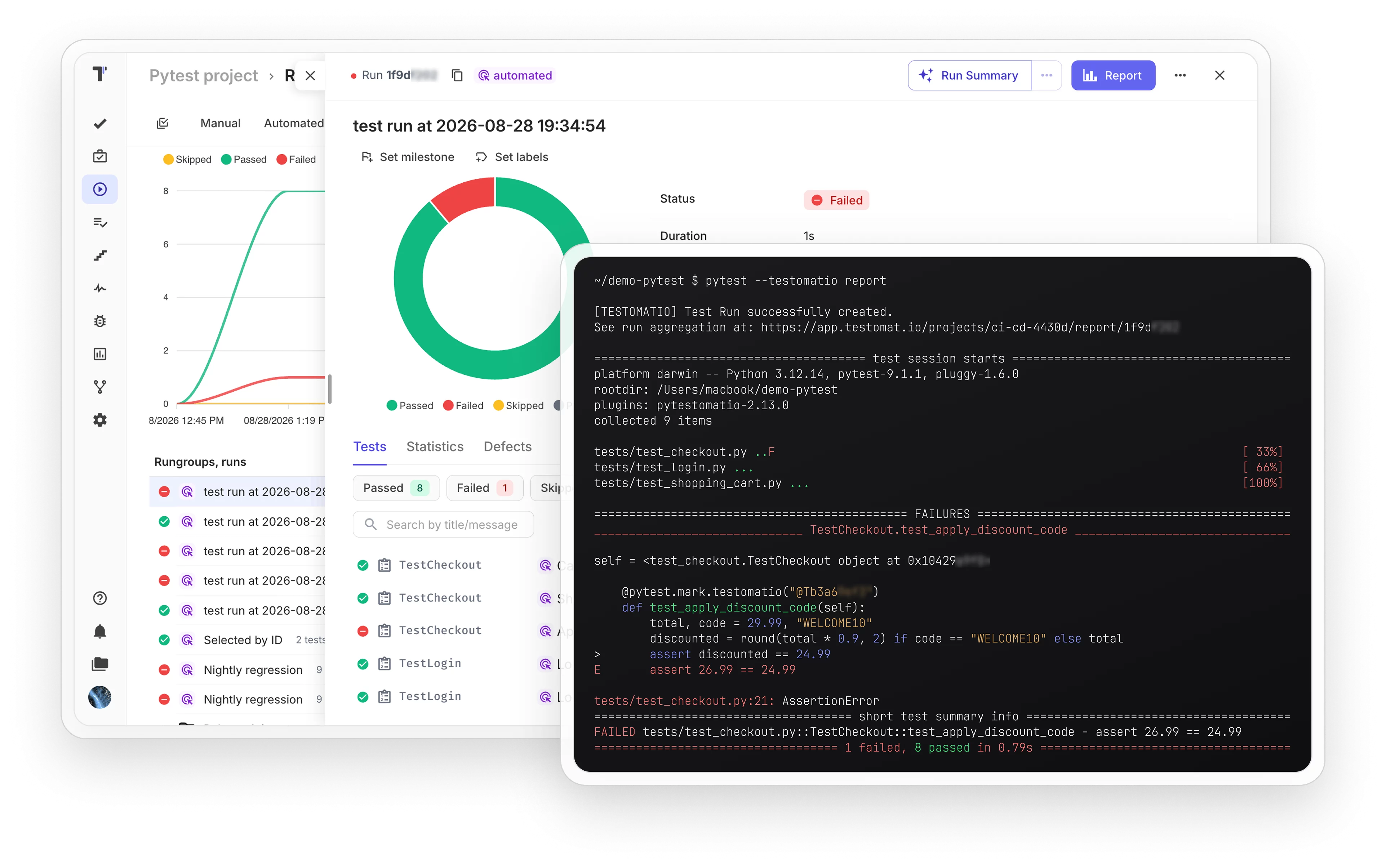
Add the plugin to your Python project and sync tests with a single command. Results arrive in Testomat.io in real time.
Pytest test management

Trusted by over 500 forward-thinking companies

logo
logo
logo
logo
logo
logo
logo
logo
logo
logo
logo
logo
logo
logo
logo
logo
logo
logo

Pytest test management workflow

Plan
1. Plan
Dynamic test planning based on your Python project and release cycle.
Connect your repository
Define test strategy goals
Design suite structure
Set environments
Design
2. Design
Sync tests from code with one command and fill the gaps with new cases.
Import tests with sync command
IDs as pytest markers
Use AI test generation
Link tests to user stories
Execute
3. Execute
Start pytest runs from the terminal, from CI, or from the TMS.
Send results in real time
Filter tests by ID or tag
Run autotests as manual
Mixed runs
Analyze
4. Analyze
Reports and analytics are available from the very first test run.
Real-time run reports
Parametrized test iterations
Flaky test detection
PDF and XLS report export

Testomat.io features for pytest

Sync tests with Testomat.io

One command imports your pytest tests and adds IDs to the code. Structure and names stay the same, and every next sync updates the changes.

 Sync  tests with Testomat.io
Real-time test execution reporting

Results arrive in Testomat.io while the tests run. The team sees failures immediately, without waiting for the pipeline to finish.

Real-time test  execution  reporting
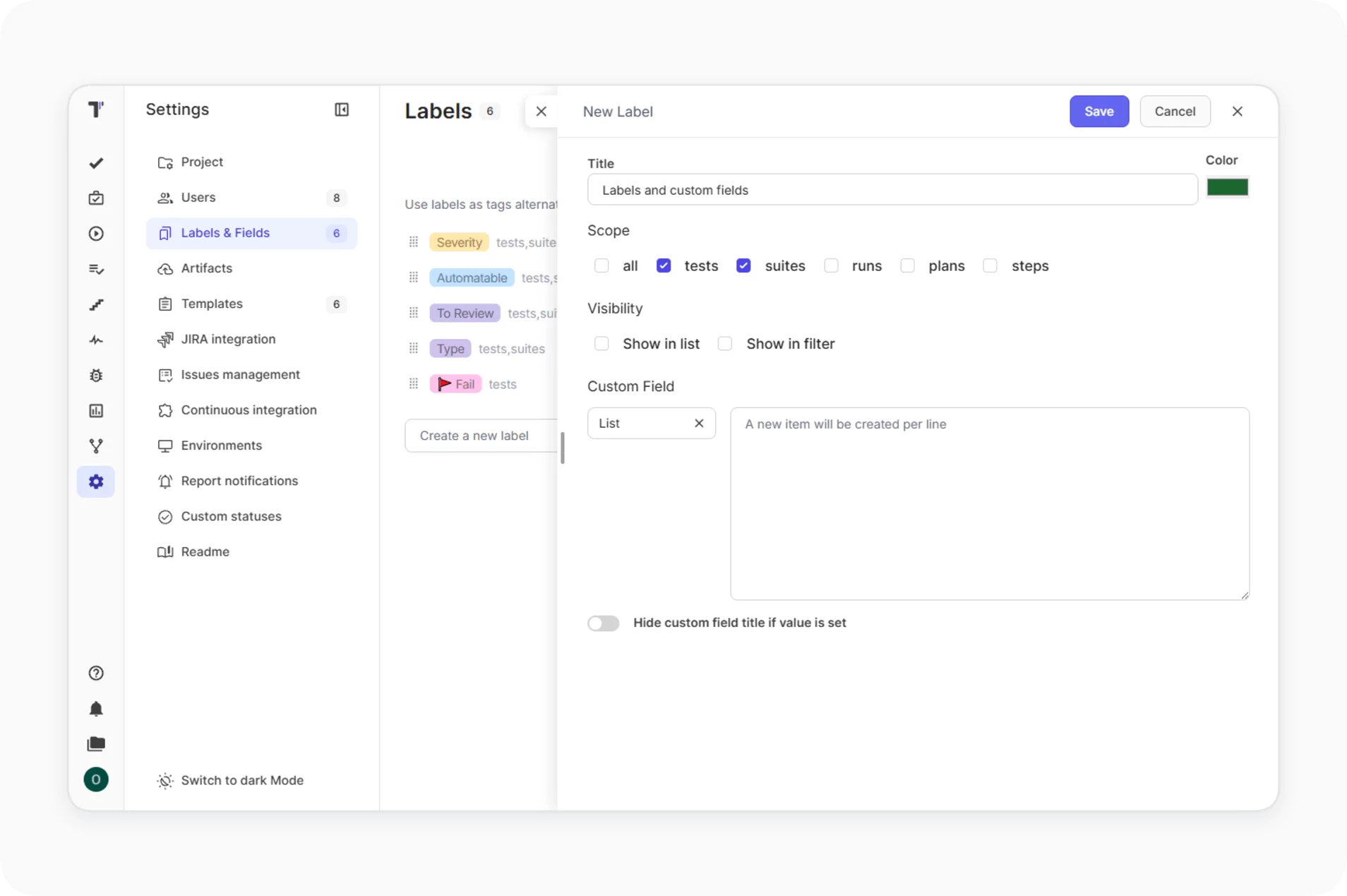
Test labeling and categorization

Assign labels to runs and test cases straight from the command line. Filter runs by label to find smoke, regression or release results.
Test  labeling  and categorization
Test run grouping and environments

Group runs under a title and tag each run with its environment, like Linux or Chrome. The whole group stays visible in one view.

Test run grouping and environments
Artifact management with S3 integration

Failure screenshots and logs upload to your own S3 bucket and attach to their test results. You control the storage and the retention rules.

 Artifact  management with S3 integration
Advanced filtering and debugging

Run only the tests you select by ID, and use debug mode to inspect the collected test data before it reaches the platform.

Advanced  filtering  and debugging

Why teams choose Testomat.io for pytest test management

https://testomat.io/wp-content/uploads/2026/07/one-command.svg
Four commands cover everything
Sync, report, remove and debug cover the whole workflow.
https://testomat.io/wp-content/uploads/2026/06/code-badge.svg
Full code ownership
IDs stay plain pytest markers in your code.
https://testomat.io/wp-content/uploads/2026/07/open-source.svg
Open source plugin
pytestomatio is public on GitHub. Read the code and extend it when you need more.
https://testomat.io/wp-content/uploads/2026/08/team-alignment.svg
Everyone runs tests
Manual testers launch pytest suites from the UI without CI access or YAML knowledge.
https://testomat.io/wp-content/uploads/2026/04/icon-badge-2-1.svg
24/7 professional support
QA engineers support the team through the whole release.

All pytest test management features

AI-assisted test management
AI-powered features
AI-requirements
AI agents
Versioning & collaboration
Branches
Audit log
Defects
Comments & Notifications
Analytics & quality insights
Analytics
Global analytics
Analytics dashboards
Pulse
Execution & orchestration
Running tests manually
Running automated tests
Running manual and automated tests
Environments
Plans
RunGroups
Merge Strategies
Test authoring & structure
Import from Source Code
Tags
Labels and Custom Fields
Steps
Snippets
TQL
Bulk Edit
Reporting, artifacts & troubleshooting
Testomat.io Reporter
Test artifacts
Run reports
Report notifications
Logger
Sync your pytest suite today

Sync your pytest suite today

Connect Testomat.io to your Python project and sync your tests with the pytestomatio plugin. Receive real-time reports from every pytest run today
Import
Import
Execute
Execute
Test result feedback
Sync your pytest suite today
What clients says

Recent reviews

“Excellent customer support”
Customer support is always prompt and high-quality. It's also great to see that user feedback is considered when developing new features. The team makes an effort to provide overviews of new features and keeps users informed about the latest updates.
4/5
Aliona Kovalchuk
Aliona Kovalchuk
General QA
“The Best TMS for Our QA Team!”
Our 15-person QA team has used Testomat.io daily for over two years. After comparing tools like TestRail, it stood out in both features and pricing. It’s affordable yet powerful. Jenkins integration works seamlessly, even manual testers can run tests easily. The clean UI speeds onboarding, improves collaboration, and saves time. We’ve recommended it widely, and others love it too.
5/5
Vladyslav M.
Vladyslav M.
General QA
“Testomat.io makes daily testing so much easier”
I’ve used Testomat.io daily for over two years, and it’s the best TMS I’ve worked with. Compared to tools like TestRail, it offers more features at a better price. Jenkins integration is seamless, even for manual testers. The UI is clean and easy to learn. It speeds up workflows, improves transparency, and makes team collaboration much smoother.
5/5
Dmytro H.
Dmytro H.
General QA
“Very convenient platform for managing test cases”
The platform is convenient and intuitive to use. I’ve been using it long enough to say it’s very user-friendly. It’s clear that the team is constantly working on and improving the platform.
5/5
Aleksey K.
Aleksey K.
General QA
“Great tool for creating and managing manual test cases efficiently”
As a Manual QA, I use Testomat.io to create and manage test cases with ease. The interface is intuitive, making onboarding simple. Test plans, runs, and results are well-structured in one place. Tagging helps organize cases efficiently. AI features speed up test creation. It keeps workflows transparent, improves collaboration, and reduces routine work.
5/5
Oksana G.
Oksana G.
General QA
“Testomat.io has been a great tool for managing both automated and manual tests in one place”
I really like how easy it is to integrate with frameworks and CI/CD tools, and the real-time reports with screenshots and analytics save a lot of time. Overall, it makes collaboration in the team much smoother and keeps testing well-organized.
5/5
Aleksey K.
Aleksey K.
Quality Assurance Engineer

Frequently asked questions

How does the pytest integration work? Testomat

Install pytestomatio with pip and run pytest --testomatio sync. Tests import into Testomat.io and receive IDs as standard pytest markers. Then pytest --testomatio report sends results in real time.

Do I need to rewrite my tests? Testomat

Your tests stay as they are. The plugin adds one marker line per test, and even that is optional: results match by test title, and Testomat.io creates unmatched tests during the report.

What happens if I leave Testomat.io? Testomat

Run pytest --testomatio remove and every ID disappears from your code. Your tests were standard pytest the whole time.

How do parametrized tests report? Testomat

Each parameter set reports as its own result, so you see which input failed.

Where do screenshots and logs go? Testomat

To your own S3 bucket, without storage limits. Share credentials once in Settings → Artifacts or pass them as env variables.
Start managing pytest tests in minutes

Start managing pytest tests in minutes








