You ship a feature. Someone writes a manual test case in a spreadsheet, and someone else automates it later. The spec drifts from the manual case. The manual case drifts from the product. Nobody knows what’s actually covered. I wanted to fix that entire chain, not by hiring more people, but by rethinking who (or what) does each step. The result: a multi-agent pipeline built on Claude Code, where specialized AI agents explore the live UI via Playwright, write structured test cases to Testomat.io, generate page objects and specs, and execute them, all coordinated through a structured handoff contract. I’ve applied this approach across two production single-page applications, an internal admin dashboard and a customer-facing storefront, and it’s changed how I think about test infrastructure entirely.
Why Use Claude Code, Playwright, and Testomat.io?
Before diving into the architecture, it’s worth explaining why I landed on this specific stack: Claude Code and Playwright working together over MCP in particular. Each choice was deliberate, and each eliminated a class of problems I’d been fighting for years.
Why Claude Code as the Orchestrator
The core need was an AI that could do things, not just generate text, but navigate a browser, write files, call APIs, and coordinate multi-step workflows.
- Custom agents with persistent instructions. You define an agent as a markdown file with a role, tools, rules, and constraints. Claude Code loads them automatically. Each agent gets a tailored personality: the explorer is told to never guess at locators, the test writer is told to never assume something is automatable without checking page object coverage. This is not prompt engineering in a chat window; it’s durable, version-controlled agent configuration that lives in the repo alongside the code.
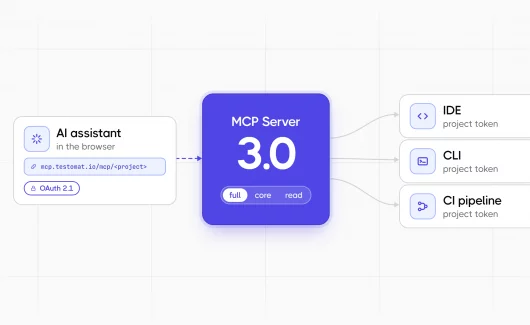
- MCP (Model Context Protocol) integration. Claude Code connects to external tools through MCP servers: Playwright for browser control, Testomat.io for test management. The agent doesn’t use these tools through brittle shell scripts. MCP gives it native, typed access to
browser_navigate,browser_snapshot,create_test,search_suitesas first-class tool calls, same as reading a file or running a build. - Multi-agent coordination. Claude Code supports spawning sub-agents, running them in the background, and passing structured data between them. One agent explores, writes a handoff file, and the next agent picks it up. No custom orchestration framework needed.
- Code generation that follows your patterns. The page objects and test specs the agents produce follow the patterns defined in agent instructions: composition over inheritance, semantic locators, typed methods,
@stepdecorators on pages only. The output rarely needs manual cleanup because the constraints are explicit, not implied.
I evaluated other options. GitHub Copilot is great for inline suggestions but can’t orchestrate multi-step workflows or control a browser. ChatGPT can generate test code but has no agent framework, no MCP, no persistent instructions. LangChain-based custom agents are powerful but require building the entire orchestration layer yourself. Claude Code gives you that for free.
Why Playwright for Browser Automation
- Accessibility tree snapshots. This is the killer feature for AI-driven testing, and it’s a big part of why Playwright’s MCP server works so well for agent-driven testing. Playwright can dump the full accessibility tree of a page, every element with its role, name, and state. The AI agent reads this tree instead of raw HTML, which means it picks locators the way a screen reader would: by role and label, not by CSS class or DOM position. The resulting locators are inherently stable and accessible
- First-class MCP server. Playwright has an official MCP server that exposes browser actions as tool calls:
browser_navigate,browser_click,browser_snapshot,browser_take_screenshot. The AI agent controls the browser through the same protocol it uses for everything else. No Selenium WebDriver setup, no custom bridges.
Modern architecture. Auto-waits, built-in assertions, parallel execution, trace viewer for debugging. The specs the agents generate useawait expect(element).toBeVisible(),not sleep(2000)followed by a DOM query. - TypeScript-native. Page objects, specs, and config are all TypeScript. Type checking catches locator typos and missing methods at compile time, before a test ever runs. ESLint rules enforce that every function has an explicit return type, every promise is awaited, and every file follows the naming convention (
.spec.ts,.page.ts,.comp.ts).
I used Selenium for years. Cypress is good but single-tab only and doesn’t support multi-browser well. Playwright gives the best combination of modern API, MCP integration, and the accessibility tree that makes AI-driven locator extraction actually work.
Why Testomat.io for Test Management
- Bidirectional sync with source code. Testomat.io’s check-tests CLI parses Playwright spec files the same way it reads results from native framework reporters, creates matching test cases in the platform, and writes unique IDs (
@T,@S) back into the source code. A test case in Testomat.io and a test() block in a spec file are the same entity. Change one, sync the other. No spreadsheet drift. - MCP server for AI agents. Testomat.io exposes
create_test,create_suite,search_tests,update_testas MCP tools, the same surface its own AI agent test assistant uses internally. The test-writer agent creates structured test cases directly in Testomat.io, with preconditions, steps, expected results, without touching a browser or a file system. - Manual and automated tests coexist. Not everything should be automated. Testomat.io handles both, in the same suite hierarchy, with the same reporting. A suite can have three automated Playwright tests and two manual test cases, all visible in one dashboard.
- CI reporter. In nightly pipeline runs, the Testomat.io Playwright reporter (
@testomatio/reporter) pushes results directly: pass, fail, duration, matched to the@TIDs in source. The same dashboard shows manual QA results and automated pipeline results side by side.
I looked at TestRail, Zephyr, and qTest. They’re built for manual test management with automation bolted on. Testomat.io is built for the bidirectional sync pattern: code-first test management where the spec file is the source of truth and the platform keeps it organized.
The Architecture: Claude Code Agents in One Pipeline
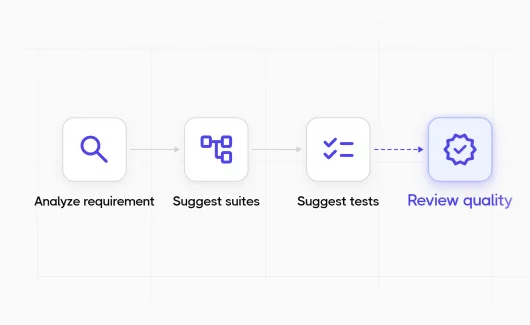
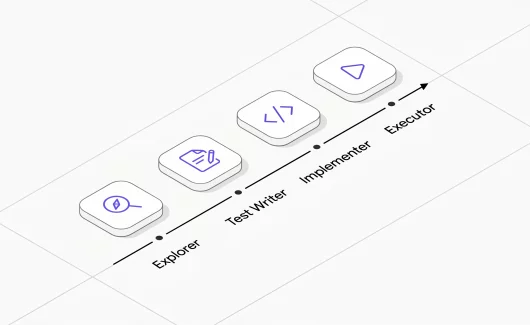
The system is built around four specialized Claude Code agents defined as markdown files in the project’s .claude/agents/ directory. Each agent has its own tool access, rules, and constraints. They don’t share conversation context; instead, they communicate through a structured handoff.json file that acts as a contract between stages.
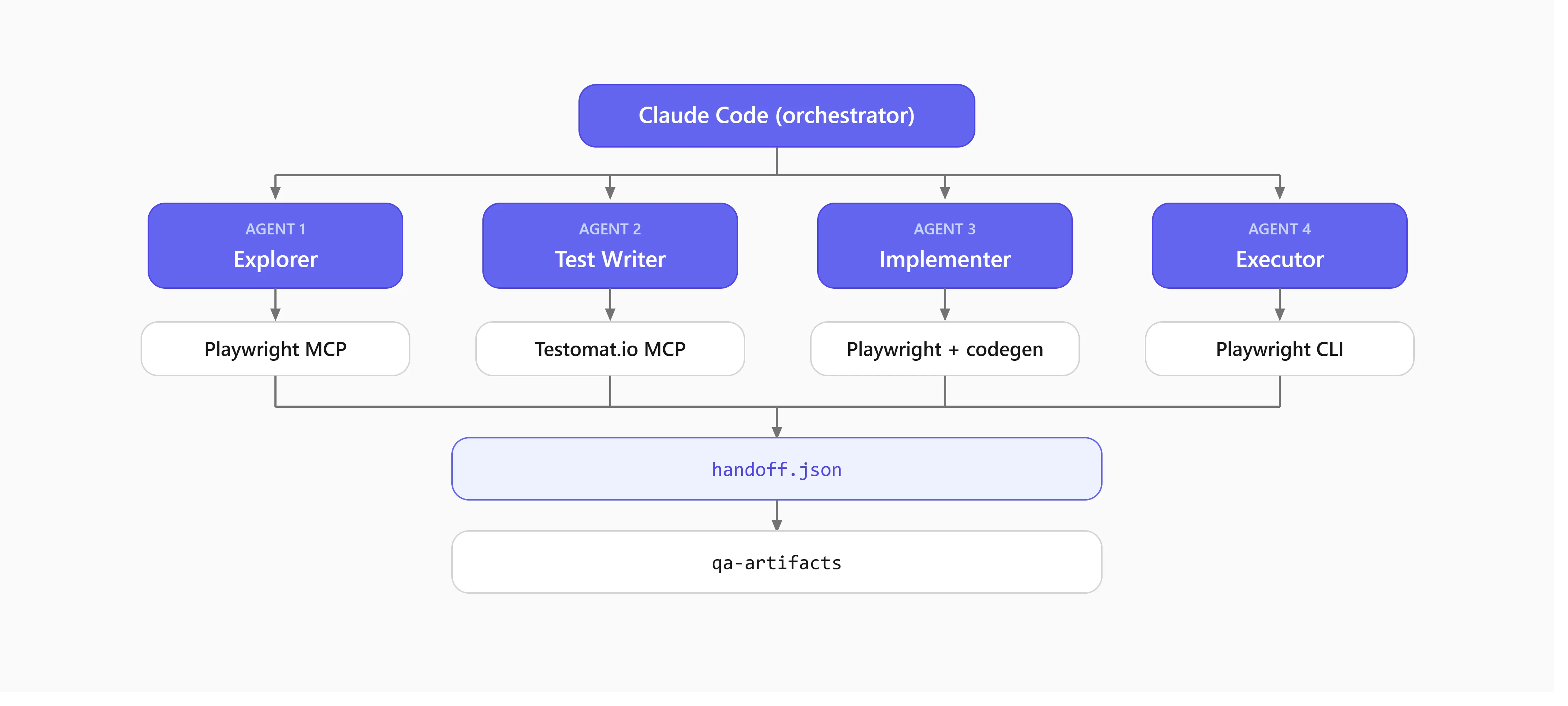
Claude Code is the brain. The MCP servers are the hands. The handoff file is the shared memory.
Agent 1: The Explorer
This Claude Code agent has access to the Playwright MCP server. When told to explore the order page, it doesn’t ask what’s on the page; it opens a browser, navigates there, and finds out. The agent takes an accessibility snapshot (browser_snapshot), which returns every element with its ARIA role, label, and state. From this tree, it builds a structured inventory, not just a list of elements, but locators rated for reliability:
{
  "id": "L01",
  "element": "Save button",
  "locator": "getByRole('button', { name: 'Save' })",
  "reliability": "stable",
  "scope": "footer"
}
Each locator gets a reliability rating: stable(semantic, ARIA-based), moderate (text content, placeholder), or fragile (CSS class, positional). The downstream agents use these ratings to decide what’s safe to automate and what needs human review.
The explorer also evaluates existing page objects, checking if a POM file already covers the page, what methods exist, and what gaps remain. This assessment feeds directly into the test writer’s suitability decisions.
Agent 2: The Test Case Writer
A separate Claude Code agent with Testomat.io MCP access but no browser. It reads the exploration data and writes structured test cases directly into Testomat.io.
Each test case gets a suitability rating:
- Automate: full page object coverage exists, locators are stable, ready for a spec.
- Manual-only: requires human judgment (visual verification, complex multi-step workflows).
- Deferred: could be automated, but the POM has gaps or locators are fragile.
The agent’s instructions require it to check whether the page object actually has the locators and methods needed before rating anything automate. If not, it defers, and routes the gap back to the explorer via the handoff file.
Agent 3: The Implementer
This agent reads the rated test cases and generates Playwright specs and page object updates. It follows strict rules encoded in its agent definition:
- Specs never contain raw
page.locator()calls, everything goes through POMs. - Components use root scoping (locators relative to
this.root, notthis.page). @stepdecorators on page methods only, never on components.- Test names include feature, test name, and Testomat ID:
'OrderPage-SaveDraft-PersistsFormData @T4635c34a'.
After writing specs, it runs check-tests to sync to Testomat.io, which writes @T and @S IDs back into the source.
Agent 4: The Executor
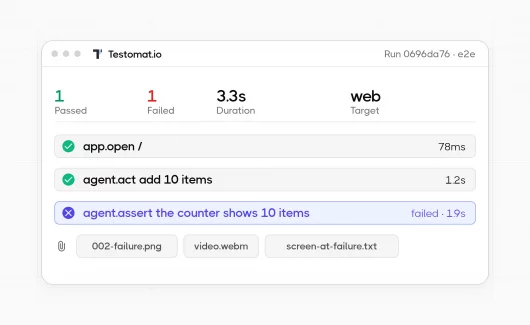
Runs in two modes. For automated specs, it composes Playwright CLI commands. For manual test cases, it opens the browser via Playwright MCP and walks through the steps as written. When a test fails, it triages into four categories: locator break (route to implementer), environment issue (flag in notes), genuine bug (report with screenshot), or test design flaw (route to test writer). This triage is structured in the handoff, instead of a chat message that gets lost.
The page object architecture
The POM is not just one class per page. It follows the page object model pattern as a layered architecture with base classes, component composition, and scoped locators.
Base Classes Enforce Consistency
// Every component extends this, provides root scoping and loading detection
class BaseComponent {
constructor(page: Page, options?: { root?: Locator | string }) {}
readonly root: Locator;
async waitForLoaded(): Promise<void>;
}
// Every page extends this, provides navigation and API wait helpers
class BasePage extends BaseComponent {
async waitForApiOk(match: string, timeout: number): Promise<void>;
}
Domain pages extend BasePage. Domain components extend BaseComponent. This means every element lookup is scoped; a Customer component’s locators search within its root element, not the entire page. When you have two customer panels on screen, the scoping prevents cross-talk.
Components Compose, not Inherit
export class Customer extends BaseComponent {
readonly profile: ProfileTab;
readonly shipping: ShippingTab;
readonly billing: BillingTab;

constructor(page: Page, rootSelector: string) {
super(page, { root: rootSelector });
this.profile = new ProfileTab(this.page, this.root);
this.shipping = new ShippingTab(this.page, this.root);
}
}
A page composes its components. A component composes its child components. Each level passes its root down, so locators are always scoped to the right DOM subtree.
Atomic Actions in Components, Orchestration in Pages
Components do one thing per method: fill a field, click a button, read a value. No waits, no multi-step flows, no @step decorator.
Pages orchestrate multiple component actions into meaningful user flows, marked with @step for reporting:
// Component, atomic, no @step
async fillFirstName(value: string): Promise {
  await this.firstNameInput.fill(value);
}

// Page, orchestration, with @step
@step('Fill customer profile info')
async fillProfileInfo(model: ProfileModel): Promise {
  await this.customer.profile.fillFirstName(model.firstName);
  await this.customer.profile.fillLastName(model.lastName);
  await this.customer.profile.fillEmail(model.email);
}
The @step decorator wraps the method in a Playwright test step, which shows up in Testomat.io reports and the HTML trace viewer. Placeholder support (@step('Fill {0}')) substitutes arguments into the step name.
The Application facade
One root object gives tests access to everything:
export class Application {
  readonly order = new OrderPage(this.page);
  readonly customer = new CustomerPage(this.page);
  readonly orderList = new OrderListPage(this.page);
  readonly ribbon = new Ribbon(this.page);
  readonly toast = new Toast(this.page);
  // ... every page and global component
}
Tests receive app from a fixture. Every interaction goes through app.order.customer.profile.fillFirstName(...). This means specs contain zero locators, zero CSS selectors, zero XPath: pure method calls.
Fixtures: Test Data Without the Mess
One of the most impactful patterns is layered fixtures that create test data via API, then optionally navigate to the result, building on how fixtures work in Playwright at the framework level.
API Controllers Create Data Without a Browser
export class OrderController {
async createOrderWithAllCustomerInfo(): Promise<OrderResponse> {
return await new JsonRequest()
.url(`${BASE_URL}/api/data/orders/`)
.method('POST')
.headers(authHeaders)
.data({ category: 'Electronics', customer: {...} })
.send();
}
}
Fixtures Chain Data Creation with Navigation
// API-only: creates data, no browser
export const withApiOrder = baseFixture.extend<{ apiOrder: OrderData }>({
  apiOrder: async ({}, use) => {
    const resp = await orderController.createOrderWithAllCustomerInfo();
    await use(resp.OrderData);
  }
});

// Browser + API: creates data, then navigates to it
export const newOrder = baseFixture.extend<{ orderResponse: OrderInfo }>({
  orderResponse: async ({ app }, use) => {
    const resp = await orderController.createOrderWithAllCustomerInfo();
    await app.order.open(resp.OrderData.OrderId);
    await app.order.waitForLoading();
    await use(resp);
  }
});
Test Data Models Randomize Everything
export class ProfileModel {
readonly firstName = randomFirstName(); // "Sarah"
readonly lastName = randomLastName(); // "Mitchell-PW"
readonly email = randomEmail(); // "xk7f2m@nomail.com"
readonly postalCode = randomPostalCode(); // "94107"
readonly phone = randomPhone(); // "(555) 867-5309"
}
The -PW suffix on last names is a small but important detail: it makes test data instantly recognizable in any environment. You can tell at a glance whether a record was created by automation or a real user.
Tests Become Declarative
test('Order-Customer-FillProfileInfo @Tf6c5dff9', async ({ app, newOrder, profileModel }) => {
// newOrder fixture already created data via API and navigated to the order page
await app.order.customer.profile.fillAll(profileModel);
await app.order.footer.clickSave();
await app.toast.expectToastTitle('Saved');
});
No setup code in the test body. No cleanup. No “create an order, wait for it, navigate to it, wait for the page.” The fixture handles all of that. The test reads like a user story.
The Handoff Contract
The glue between agents is a handoff.json file stored per-feature in a qa-artifacts/ directory. Each stage writes its section and marks its pipeline status:
{
  "meta": {
    "feature": "Payment Tab",
    "pipeline": {
      "explore": "complete",
      "testcases": "complete",
      "implement": "in-progress",
      "execute": "pending"
    }
  },
  "explore": {
    "locators": [
      { "id": "L01", "element": "Save button",
        "locator": "getByRole('button', { name: 'Save' })",
        "reliability": "stable" }
    ],
    "pom": [
      { "file": "pages/order.page.ts", "status": "exists", "coverage": "partial" }
    ]
  },
  "testcases": {
    "scenarios": [
      { "id": "TC01", "title": "Payment-Save-PersistsValues",
        "suitability": "automate", "testomat_id": "S5816a785" }
    ]
  },
  "implement": {
    "specs": [
      { "file": "tests/order/payment.spec.ts", "tests": 3,
        "testomat_ids": ["Tce3cf861"], "status": "complete" }
    ]
  },
  "execute": {
    "summary": { "pass": 3, "fail": 0, "blocked": 0 },
    "results": [
      { "testomat_id": "Tce3cf861", "result": "PASS" }
    ]
  }
}
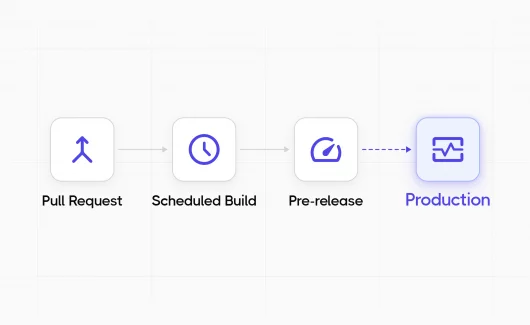
Pipeline gates enforce ordering: the test writer won’t start unless explore is complete. The implementer won’t start unless testcases is complete. Each agent checks the gate before proceeding.
This is what makes the pipeline composable. Any agent can be re-run independently. The explorer can re-scan a page after a UI change. The test writer can re-rate suitability after new page objects are added. Each stage is idempotent.
How Testomat.io Stays the Single Source of Truth
Every test, whether manual or automated, lives in Testomat.io. The Playwright specs sync back to it using the check-tests CLI:
npx check-tests@latest Playwright "**/*.spec.ts" --typescript --dir tests --update-ids
This writes unique IDs directly into the test titles:
test.describe('Dashboard Page @S5816a785', () => {
  test('should display all stats cards @Tce3cf861', async () => {
    // ...
  });
});
The IDs are the bridge. A test case in Testomat.io and a test in the Playwright spec are the same entity. In CI, the @testomatio/reporter pushes results back: pass, fail, duration, screenshots, matched by ID. When someone reads the test management dashboard, they see the same tests that run in the pipeline.
No drift. No “which spreadsheet has the latest version.” One test, one ID, one truth.
CI/CD: ESLint Guards the Gate, Nightly Runs Prove Coverage
The CI/CD execution strategy is deliberately split:
- PR validation runs ESLint only, no Playwright tests. This is fast (seconds, not minutes) and catches the structural issues that matter most: floating promises, missing return types, raw locators leaking into specs, wrong file naming conventions. If a page object uses framework-specific debug attributes (the kind stripped from production builds), ESLint catches it before review.
- Nightly pipelines run the full Playwright suite against DEV, UAT, and PROD environments on a cron schedule. Results push to Testomat.io and JUnit artifacts. This catches environment-specific regressions without slowing down the PR cycle.
- The split matters because E2E tests are inherently slower and more fragile than unit tests. Running them on every PR creates noise. Running them nightly against real environments catches the things that actually break.
What Works Well
- AI is excellent at page object generation. Give Claude Code a browser and an accessibility tree, and it produces clean, well-structured page objects faster than a human. The locator choices are consistent: semantic, stable, framework-agnostic. This is the highest-ROI part of the pipeline.
- Suitability triage saves wasted effort. The test-writer agent’s classification prevents the classic mistake of trying to automate everything. Locator reliability ratings (stable/moderate/fragile) give the classification real grounding: it’s not a gut call, it’s based on what the explorer actually found.
- The handoff file creates accountability. Each agent writes structured output. If a test case is bad, you can trace it to the test cases stage. If a locator breaks, it’s the implement stage. The pipeline makes debugging the process itself possible.
- Agent definitions are version-controlled. The .claude/agents/ directory lives in the repo. When a new team member clones the project, they get the same agents with the same rules. There’s no copying a prompt from Notion. It’s infrastructure as code for AI behavior.
- Fixtures eliminate test setup noise. API controllers create data in milliseconds. Chained fixtures navigate to the result. By the time the test body runs, the world is ready. Tests read like user stories, not setup scripts.
Where It Needs Humans
- Authentication flows. Handling OAuth/SSO login requires an interactive browser session to acquire tokens. The global setup automates this once per run, but the flow itself, username, password, MFA, is human-configured. This is a security boundary.
- Business rule validation. An AI can verify that a number appears on screen. It cannot verify that the number is correct according to domain rules. Critical assertions still need human specification: the AI automates the mechanics, not the judgment.
- Flaky test diagnosis. When a test intermittently fails, flaky test analytics and the triage logic help, but root-causing timing issues in a real application still requires human investigation.
The Improvement Path
- Autonomous crawling. Right now, the explorer navigates pages it’s told about. The next step is giving it an entry point and letting it discover the application’s page graph, building coverage maps as it goes.
- Visual regression. Page objects verify structure and content, but not visual appearance. Adding toHaveScreenshot() to the pipeline would catch CSS regressions that structural checks miss.
- Circular CI feedback. A failing test in CI should automatically create a triage entry for the executor agent, which routes the break to the right agent. The handoff structure supports this; the CI integration just needs to write back to it.
- Cross-agent self-healing. When the executor reports a locator break, the explorer should automatically re-scan the page, update the page object, and re-run the test, without human intervention. The pipeline stages and reliability ratings make this feasible.
- Feature coverage metrics. Comparing the exploration map (every element discovered) against the test cases (every element tested) would produce a quantitative coverage metric. Not line coverage, feature coverage.
The Bigger Idea
QA engineers spend less time on the mechanical parts and more on the judgment calls. Writing page objects is mechanical. Creating structured test cases from known UI elements is repeatable. Running a test and recording pass/fail is routine. These are things Claude Code does well, and humans find tedious. What humans do well, and AI doesn’t, is deciding what matters to test and whether a result is actually correct. They’re also the ones who know what a failure actually means for the product. The pipeline is designed around this split: AI handles the volume, humans handle the judgment.
Across two production applications, this approach has produced 50+ automated tests with full page object coverage, component composition, API fixtures, and test management integration. It comes from structured conversations with specialized Claude Code agents, each with access to the right MCP tools for its job. Weeks of manual work would have gotten there slower, if at all.
The tests aren’t perfect. Some will need adjustment as the UI evolves. But the infrastructure is the real output: the page objects, the base class hierarchy, the fixture layer, the test management sync, the handoff pipeline, the agent definitions in version control. It’s a system that makes the next fifty tests faster than the first.