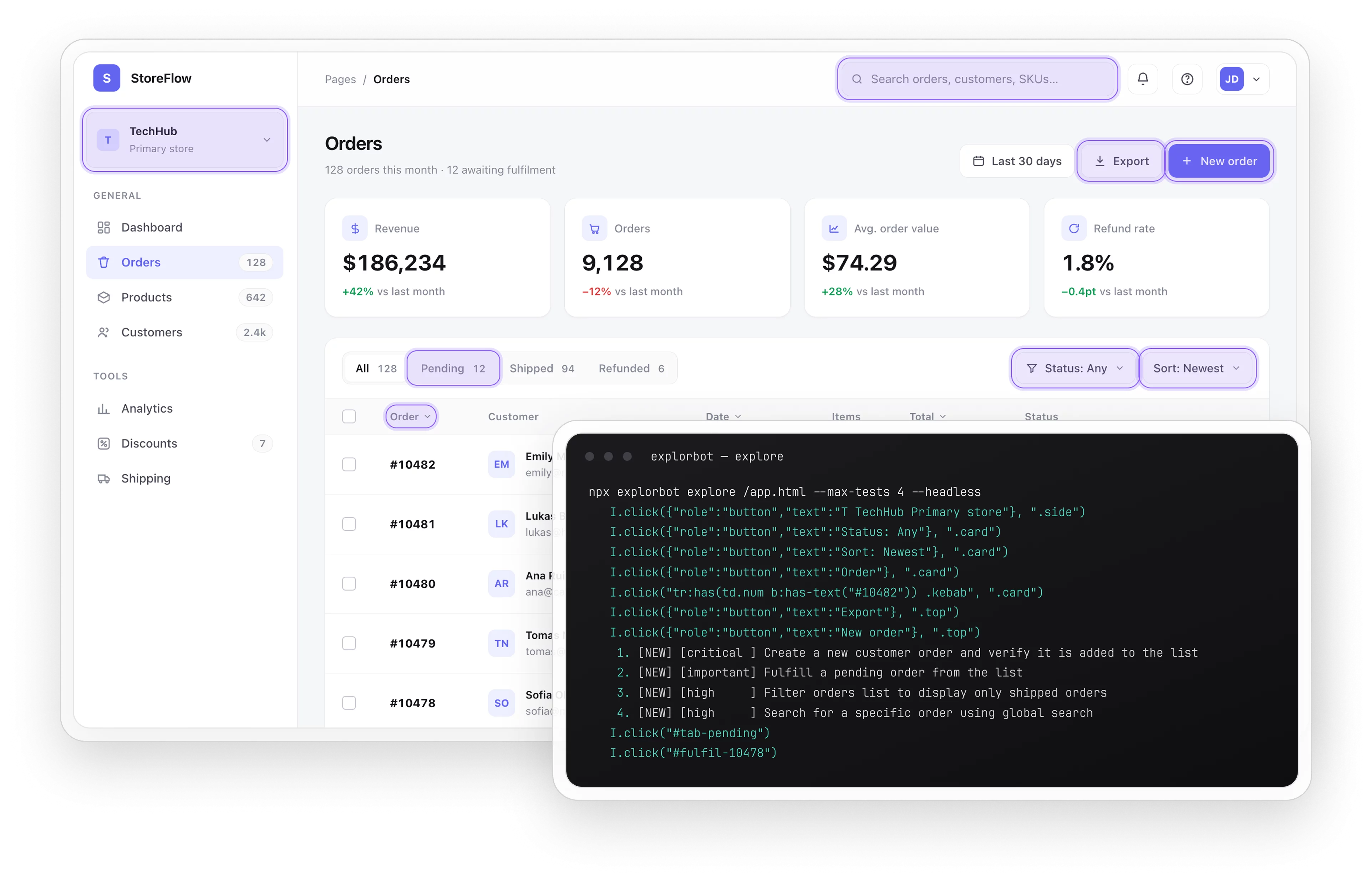
Explorbot AI agent

An AI agent that explores your web app like a curious QA engineer, then turns every discovery into a Playwright or CodeceptJS test you can keep.
Explorbot AI  agent

Trusted by over 500 forward-thinking companies

logo
logo
logo
logo
logo
logo
logo
logo
logo
logo
logo
logo
logo
logo
logo
logo
logo
logo

How Explorbot works in Testomat.io

Add the skills to your agent, and they carry your QA from the first test case to CI reporting.
Research
1. Research
Maps your live UI
Scan pages
Index elements
Skip source
Build map
Plan
2. Plan
Drafts test scenarios
Normal flows
Curious paths
Edge cases
Many per page
Execute
3. Execute
Drives the browser
Real clicks
Fill forms
Step by step
Avoid loops
Verify
4. Verify
Checks each outcome
Validate results
Cluster findings
Find bugs
Root cause
Keep
5. Keep
Saves passing flows
Playwright/CodeceptJS
Screencasts
Reports
Reusable code

How Testomat.io Explorbot can help?

Explorbot adds a new layer of testing above your unit and e2e suites, and it scales from a weekend MVP to a large product.
Startups & small teams
Fast coverage
Test an app with no suite
Cheap
Around one dollar per hour
MVPs
Quick tests for prototypes
Early bugs
Catch them before manual QA
Mid-sized products
Alongside
Runs with Playwright or Cypress
New features
Covered before manual tests
Real tests
Passing flows become code
Local data
Stays on your machine
Enterprise projects
Continuous
Explores in your CI pipeline
Hidden bugs
Catches what scripts miss
Accessibility
Flags issues with axe-core
Private
No cloud, data stays home

Testomat.io Explorbot features

UI map

Explorbot scans each live page and indexes every interactive element into a UI Map. It reads the screen instead of your source code.

  • Scans each live page.
  • Indexes interactive elements.
  • Reads the screen.
  • Skips your source code.
Learn more
UI map
Multi-agent system

A team of agents splits the work. The Researcher maps the UI and the Planner drafts scenarios. The Tester then drives the browser while the Pilot supervises.

  • Researcher maps the UI
  • Planner drafts scenarios
  • Tester drives the browser
  • Pilot supervises the run
Learn more
Multi-agent system
QA thinking

Explorbot plans several scenarios per page, the way a curious user would, from normal flows to tough edge cases. It tests one screen many ways and surfaces more bugs.

  • Several scenarios per page.
  • Normal user flows.
  • Tough edge cases.
  • One screen, many ways.
Learn more
QA thinking
Playwright or CodeceptJS tests

Every passing flow becomes a real Playwright test you can commit, with a screencast video of each step. Prefer CodeceptJS? Switch the framework and Explorbot writes CodeceptJS instead.

  • Playwright or CodeceptJS files.
  • Ready to commit and run.
  • Screencast of every step.
  • Switch framework any time.
Learn more
Playwright or CodeceptJS tests
Freesail mode

Freesail mode runs continuous exploration across page after page. Explorbot keeps searching your app on its own, and revisits known pages a new way each time.

  • Continuous exploration.
  • Page after page.
  • Runs on its own.
  • Revisits pages differently.
Learn more
Freesail mode
Accessibility checks

The Quartermaster agent runs axe-core against your pages while it explores, and flags accessibility issues alongside the functional bugs it finds.

  • Runs axe-core checks.
  • Flags accessibility issues.
  • Explores at the same time.
  • Reports with the bugs.
Learn more
Accessibility checks
API testing

Give Explorbot an OpenAPI spec and it explores your REST API. It plans and runs tests for your endpoints and their request combinations, the same way it tests the UI.

  • Reads an OpenAPI spec.
  • Explores your REST API.
  • Tests endpoint combinations.
  • Same agent as the UI.
Learn more
API testing
Reporting

The Reporter agent sends every result to Testomat.io. Your exploratory runs sit in the same project as your manual and automated tests, so QA sees the full picture.

  • Sends results to Testomat.io.
  • One project for every run.
  • Sits with manual tests.
  • QA sees the full picture.
Learn more
Reporting
Teach it your app

Add knowledge and rules files, and Explorbot learns your logins and page rules. It remembers what worked before, so it gets better at testing your app each run.

  • Knowledge and rules files.
  • Learns your logins.
  • Remembers what worked.
  • Improves each run.
Learn more
Teach it your app
Runs in your CI

Explorbot runs in your pipeline next to Playwright, Cypress, or CodeceptJS. It covers new features before manual tests exist and keeps all data on your infrastructure.

  • Runs in your pipeline.
  • Sits next to Playwright.
  • Covers new features early.
  • Keeps data on your infrastructure.
Learn more
Runs in your CI

Why teams choose Testomat.io Explorbot

https://testomat.io/wp-content/uploads/2026/08/local-and-private.svg
Local & private
Runs on your machine, only your AI provider sees the app.
https://testomat.io/wp-content/uploads/2026/08/playwright-codeceptjs-tests.svg
Playwright & CodeceptJS tests
Saves passing flows as Playwright or CodeceptJS code, with a screencast of every run.

https://testomat.io/wp-content/uploads/2026/08/pay-per-token.svg
Pay per token
Around one dollar an hour, with no subscription to buy.

https://testomat.io/wp-content/uploads/2026/08/wide-ai-models.svg
Wide AI models
Works with OpenRouter, OpenAI, Gemini, Anthropic, and Groq.


https://testomat.io/wp-content/uploads/2026/08/built-by-testomatio.svg
Built by Testomat.io
Results report straight into your Testomat.io project.
Start working with Explorbot today

Start working with Explorbot today

Give Explorbot an hour with your app and see the tests it writes.
Install
Install
Run
Run
Get results
Get results
Start working with Explorbot today
What clients says

Recent reviews

“Excellent customer support”
Customer support is always prompt and high-quality. It's also great to see that user feedback is considered when developing new features. The team makes an effort to provide overviews of new features and keeps users informed about the latest updates.
4/5
Aliona Kovalchuk
Aliona Kovalchuk
General QA
“The Best TMS for Our QA Team!”
Our 15-person QA team has used Testomat.io daily for over two years. After comparing tools like TestRail, it stood out in both features and pricing. It’s affordable yet powerful. Jenkins integration works seamlessly, even manual testers can run tests easily. The clean UI speeds onboarding, improves collaboration, and saves time. We’ve recommended it widely, and others love it too.
5/5
Vladyslav M.
Vladyslav M.
General QA
“Testomat.io makes daily testing so much easier”
I’ve used Testomat.io daily for over two years, and it’s the best TMS I’ve worked with. Compared to tools like TestRail, it offers more features at a better price. Jenkins integration is seamless, even for manual testers. The UI is clean and easy to learn. It speeds up workflows, improves transparency, and makes team collaboration much smoother.
5/5
Dmytro H.
Dmytro H.
General QA
“Very convenient platform for managing test cases”
The platform is convenient and intuitive to use. I’ve been using it long enough to say it’s very user-friendly. It’s clear that the team is constantly working on and improving the platform.
5/5
Aleksey K.
Aleksey K.
General QA
“Great tool for creating and managing manual test cases efficiently”
As a Manual QA, I use Testomat.io to create and manage test cases with ease. The interface is intuitive, making onboarding simple. Test plans, runs, and results are well-structured in one place. Tagging helps organize cases efficiently. AI features speed up test creation. It keeps workflows transparent, improves collaboration, and reduces routine work.
5/5
Oksana G.
Oksana G.
General QA
“Testomat.io has been a great tool for managing both automated and manual tests in one place”
I really like how easy it is to integrate with frameworks and CI/CD tools, and the real-time reports with screenshots and analytics save a lot of time. Overall, it makes collaboration in the team much smoother and keeps testing well-organized.
5/5
Aleksey K.
Aleksey K.
Quality Assurance Engineer

Frequently asked questions

What is Explorbot?

Testomat

Explorbot is an autonomous testing agent that explores your web app like a curious user. It navigates your pages and fills forms to find bugs. Explorbot saves the flows that pass as Playwright tests. Testomat.io builds it.

How does it test without my source code? Testomat

Explorbot works from the live page. It scans each screen and indexes every interactive element into a UI Map, then plans and runs tests from that map.

What does it cost? Testomat

You pay only for AI tokens, roughly one dollar per hour of continuous exploration, with no subscription. In that hour Explorbot writes 30 to 50 meaningful tests.

Is my data safe? Testomat

Explorbot runs on your own machine. The only external service that sees your app is the AI provider you configure. Run it against staging, or a limited-scope account on production.

What do I need to run it? Testomat

You need NodeJS 24 or newer or Bun, an AI provider API key (OpenRouter works well), and a modern terminal. You can also add Explorbot through the Testomat.io QA skills in Claude, Cursor, Codex, or Gemini.
Try Explorbot

Try Explorbot