

icon
icon

Cucumber
test management

Test management built for BDD. Import feature files from your repository and keep scenarios in sync with code. Managers write scenarios in the TMS, engineers automate them, and the whole team sees the results.
Cucumber
test management

Trusted by over 500 forward-thinking companies

logo
logo
logo
logo
logo
logo
logo
logo
logo
logo
logo
logo
logo
logo
logo
logo
logo
logo

Cucumber test management workflow

Plan
1. Plan
Dynamic test planning based on your GitLab repository and release cycle.
Connect your repository
Define test strategy goals
Design feature structure
Link scenarios to user stories
Design
2. Design
Write scenarios in Gherkin and reuse steps from your project.
Import feature files
Use the steps database
Use AI test generation
Use templates and duplicate
Execute
3. Execute
Run scenarios manually or start automated runs from the TMS.
Launch CI runs from UI
Run scenarios manually
Select tests with filters
Mixed runs
Analyze
4. Analyze
Reports and analytics are available from the very first test run.
Real-time run reports
Automation coverage
Flaky test detection
PDF, XLS report export

Testomat.io features for Cucumber

Import of feature files

Avoid weeks of manual test migration and import your feature files with a single command, keeping scenarios and structure. Every push auto-imports changes, so the test management system matches your code.

 Import  of feature files
Scenarios in sync with code

Managers edit a scenario in the TMS and engineers update the code. Testomat.io compares both sides and marks scenarios that differ, so outdated tests become visible.

Scenarios in  sync   with code
Steps database for faster writing

New scenarios reuse existing steps with autocomplete. The team writes consistent Gherkin and skips duplicate step definitions.

 Steps database for faster  writing
BDD editor with Gherkin support

Write scenarios in a structured editor instead of a plain text file. Syntax support helps managers and QAs write correct Gherkin.
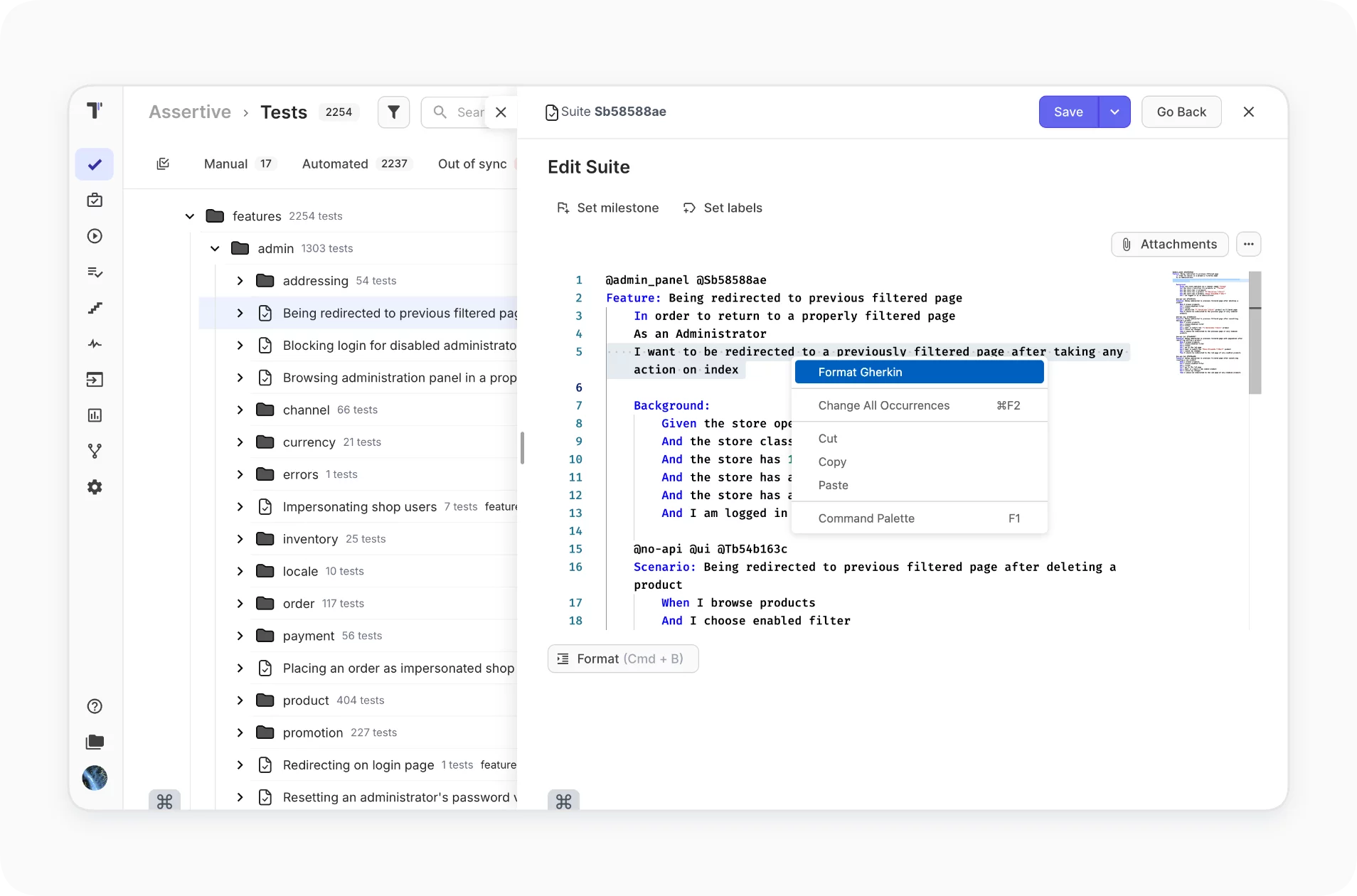
BDD editor with Gherkin support
Run BDD scenarios manually or in CI

Execute the same scenario as a manual test or start automated runs from the UI. Manual testers work without CI access or YAML edits.

 Run  BDD scenarios manually or in CI
Living documentation

Feature files become readable documentation with test results attached. Product managers and BAs see what the product does and what the tests cover.

 Living  documentation

Why teams choose Testomat.io for Cucumber test management

https://testomat.io/wp-content/uploads/2026/08/team-alignment.svg
Everyone runs tests
QA engineers launch pipelines from the UI and work independently.
https://testomat.io/wp-content/uploads/2026/06/coverage-visibility.svg
Requirement coverage
Link tests to user stories and see which features have test coverage.
https://testomat.io/wp-content/uploads/2026/07/stakeholder-visibility-type1.svg
Free stakeholder access
Developers and managers view reports with free read-only access.
https://testomat.io/wp-content/uploads/2026/06/smooth-tms-migration.svg
Easy migration
Move from TestRail, Qase or Zephyr with built-in importers.
https://testomat.io/wp-content/uploads/2026/04/icon-badge-2-1.svg
24/7 professional support
QA engineers support the team through the whole release.

All Cucumber test management features

AI-assisted test management
AI-powered features
AI-requirements
AI agents
Versioning & collaboration
Branches
Audit log
Defects
Living documentation
Comments & Notifications
Analytics & quality insights
Analytics
Global analytics
Analytics dashboards
Pulse
Execution & orchestration
Running tests manually
Running automated tests
Running manual and automated tests
Environments
Plans
RunGroups
Merge Strategies
Test authoring & structure
BDD Test Case Editor
Import from Cucumber
Import Cucumber BDD tests
Steps
Snippets
TQL
Reporting, artifacts & troubleshooting
Testomat.io Reporter
GitHub pipe / GitLab pipe
Test artifacts
Run reports
Report notifications
Start Cucumber test management in minutes

Start Cucumber test management in minutes

Connect Testomat.io to your repository and import your feature files. Write scenarios in the Gherkin editor and receive real-time reports from every run today.
Import
Import
Execute
Execute
Test result feedback
Start Cucumber test management in minutes
What clients says

Recent reviews

“Excellent customer support”
Customer support is always prompt and high-quality. It's also great to see that user feedback is considered when developing new features. The team makes an effort to provide overviews of new features and keeps users informed about the latest updates.
4/5
Aliona Kovalchuk
Aliona Kovalchuk
General QA
“The Best TMS for Our QA Team!”
Our 15-person QA team has used Testomat.io daily for over two years. After comparing tools like TestRail, it stood out in both features and pricing. It’s affordable yet powerful. Jenkins integration works seamlessly, even manual testers can run tests easily. The clean UI speeds onboarding, improves collaboration, and saves time. We’ve recommended it widely, and others love it too.
5/5
Vladyslav M.
Vladyslav M.
General QA
“Testomat.io makes daily testing so much easier”
I’ve used Testomat.io daily for over two years, and it’s the best TMS I’ve worked with. Compared to tools like TestRail, it offers more features at a better price. Jenkins integration is seamless, even for manual testers. The UI is clean and easy to learn. It speeds up workflows, improves transparency, and makes team collaboration much smoother.
5/5
Dmytro H.
Dmytro H.
General QA
“Very convenient platform for managing test cases”
The platform is convenient and intuitive to use. I’ve been using it long enough to say it’s very user-friendly. It’s clear that the team is constantly working on and improving the platform.
5/5
Aleksey K.
Aleksey K.
General QA
“Great tool for creating and managing manual test cases efficiently”
As a Manual QA, I use Testomat.io to create and manage test cases with ease. The interface is intuitive, making onboarding simple. Test plans, runs, and results are well-structured in one place. Tagging helps organize cases efficiently. AI features speed up test creation. It keeps workflows transparent, improves collaboration, and reduces routine work.
5/5
Oksana G.
Oksana G.
General QA
“Testomat.io has been a great tool for managing both automated and manual tests in one place”
I really like how easy it is to integrate with frameworks and CI/CD tools, and the real-time reports with screenshots and analytics save a lot of time. Overall, it makes collaboration in the team much smoother and keeps testing well-organized.
5/5
Aleksey K.
Aleksey K.
Quality Assurance Engineer

Frequently asked questions

How does the Cucumber integration work? Testomat

Import your feature files with check-cucumber and add the reporter to your test runner. Scenarios appear in the TMS with stable IDs, and results arrive in real time.

Can managers write scenarios without code access? Testomat

Yes. Managers and QAs write feature definitions in the BDD editor. Engineers automate them in code, and Testomat.io marks scenarios that differ between the TMS and the repository.

Can I reuse steps across scenarios? Testomat

Yes. The steps database collects steps from your project. New scenarios reuse them with autocomplete, which keeps Gherkin consistent.

Does it work with Cucumber + Playwright or Cypress? Testomat

Yes. Cucumber runs with cucumber-js, CodeceptJS, Playwright or Cypress. Each setup reports through the framework adapter to the same dashboard.

Can I run BDD scenarios manually? Testomat

Yes. Any scenario runs as a manual test, and manual and automated results combine in a single report.

Do I need to change my feature file structure? Testomat

No. Import keeps your folders, files and scenario names. Auto-import on push keeps code and TMS in sync with test IDs.
Start managing Cucumber tests in minutes

Start managing Cucumber tests in minutes







