Mixed test execution

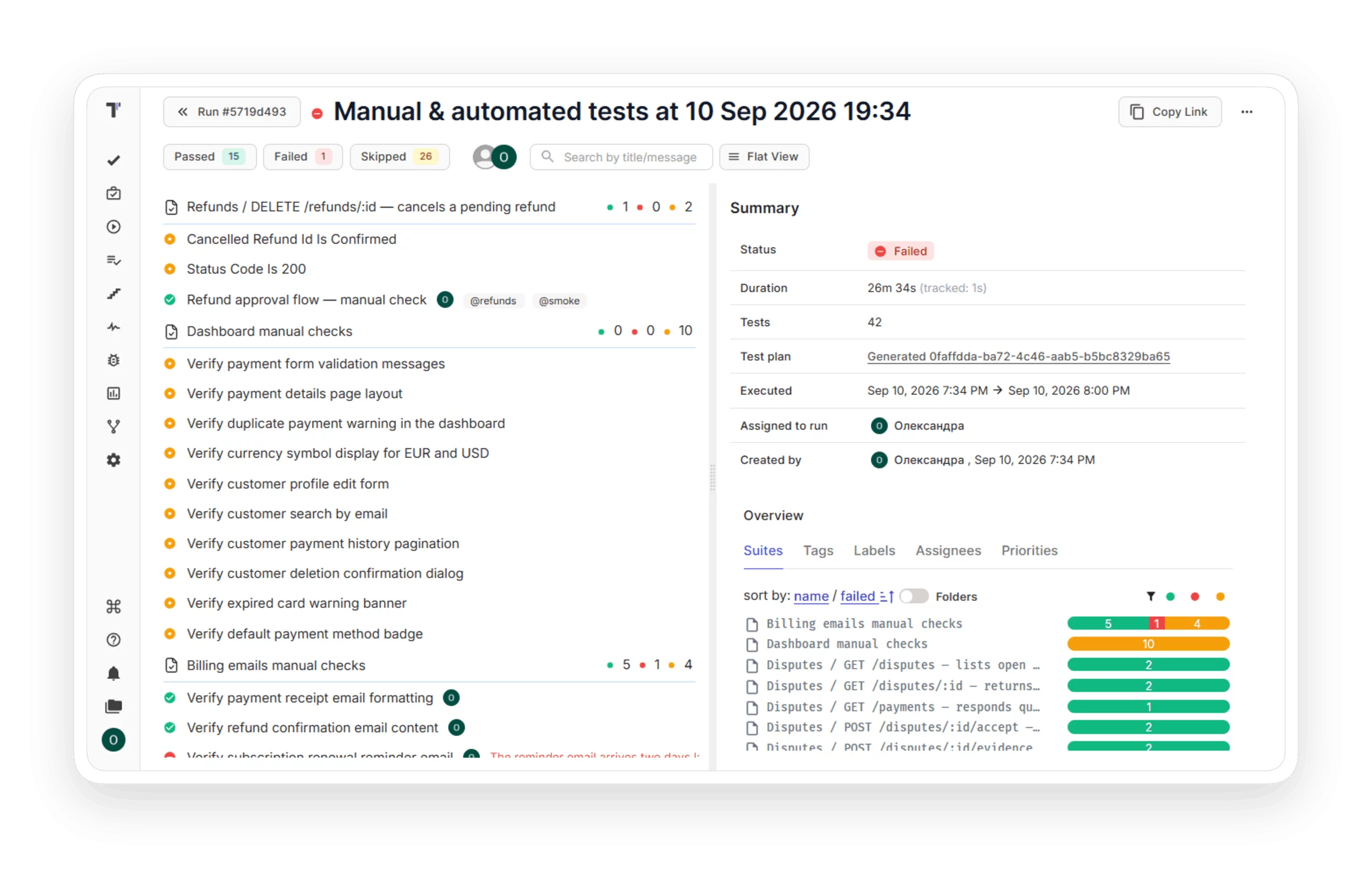
Mixed Run puts your Playwright, Cypress, or pytest results next to your manual checks in a single run. A single view shows what passed and what stays untested before release.
Mixed test execution
Trusted by over 500 forward-thinking companies

logo
logo
logo
logo
logo
logo
logo
logo
logo
logo
logo
logo
logo
logo
logo
logo
logo
logo

How mixed test execution works in Testomat.io

Run manual and automated tests together, from the first pick to the final report to see release readiness.
Select
1. Select
Choose your tests.
Select a suite
Mix manual and automated
Hand-pick from the tree
Start an empty run
Configure
2. Configure
Set how automation runs.
Pick a CI profile
Copy a CLI command
Trigger the pipeline
Send results to the same run
Execute
3. Execute
Run both together.
Automated tests run on CI
Manual cases run in the UI
Both run at the same time
Assign testers to cases
Track
4. Track
Watch results live.
Watch results in real time
Follow manual progress
Relaunch failed tests
Edit the run in progress
Report
5. Report
Read a single report.
Read the heat map report
Check every test status
Spot untested test cases
Share the report link

Watch how manual and automated tests run together

A real mixed run from launch to the final report in two minutes.

How can mixed test execution help?

Run manual and automated tests together and read the full release in a single report, whatever your team size.
Startups & small teams
CLI start
Run automation from the terminal.
Single report
Manual and automated tests together.
Quick launch
Start a run from a suite.
Free
Mixed Runs on the free plan.
Mid-sized products
Build validation
A Mixed Run on each PR.
Rerun
Relaunch only failed automated tests.
Assign
Give manual test cases to the right people.
Frameworks
Playwright, Cypress, pytest, and more.
Enterprise projects
Release readiness
A single report for PMs.
CI integration
Run automated tests on CI.
Notes
Add context to completed runs.
Scale
A shared run across every project.

Benefits of mixed test execution

https://testomat.io/wp-content/uploads/2026/04/icon-badge-7.svg
Single report
Manual and automated together.
https://testomat.io/wp-content/uploads/2026/04/ico-badge.svg
Runs without CI
Launch from the CLI.
https://testomat.io/wp-content/uploads/2026/04/icon-be.svg
Every test visible
See every planned test.
https://testomat.io/wp-content/uploads/2026/08/bugs-and-completion.svg
Rerun failures
Relaunch only what broke.
https://testomat.io/wp-content/uploads/2026/04/icon-badge-2-1.svg
Change mid-run
Add tests during a run.

Testomat.io features that work with mixed test execution

Sync tests with Testomat.io

Imports tests from Playwright, Cypress, pytest, Jest, and other frameworks, so a mixed run always matches the current source.

Sync tests with Testomat.io
Test plan

Test plan allows you to follow your testing strategy. Add tests regardless of their status, combine them into logical groups depending on the context, and start running without switching between windows.

Test plan
Tags for manual and automated tests

A project can hold thousands of test cases, and your plan only needs some of them. Type @ in a test title to tag it. One tag covers both manual and automated tests, so you filter by it and add the whole group to a plan in seconds.

Tags for manual and automated tests
CI/CD execution

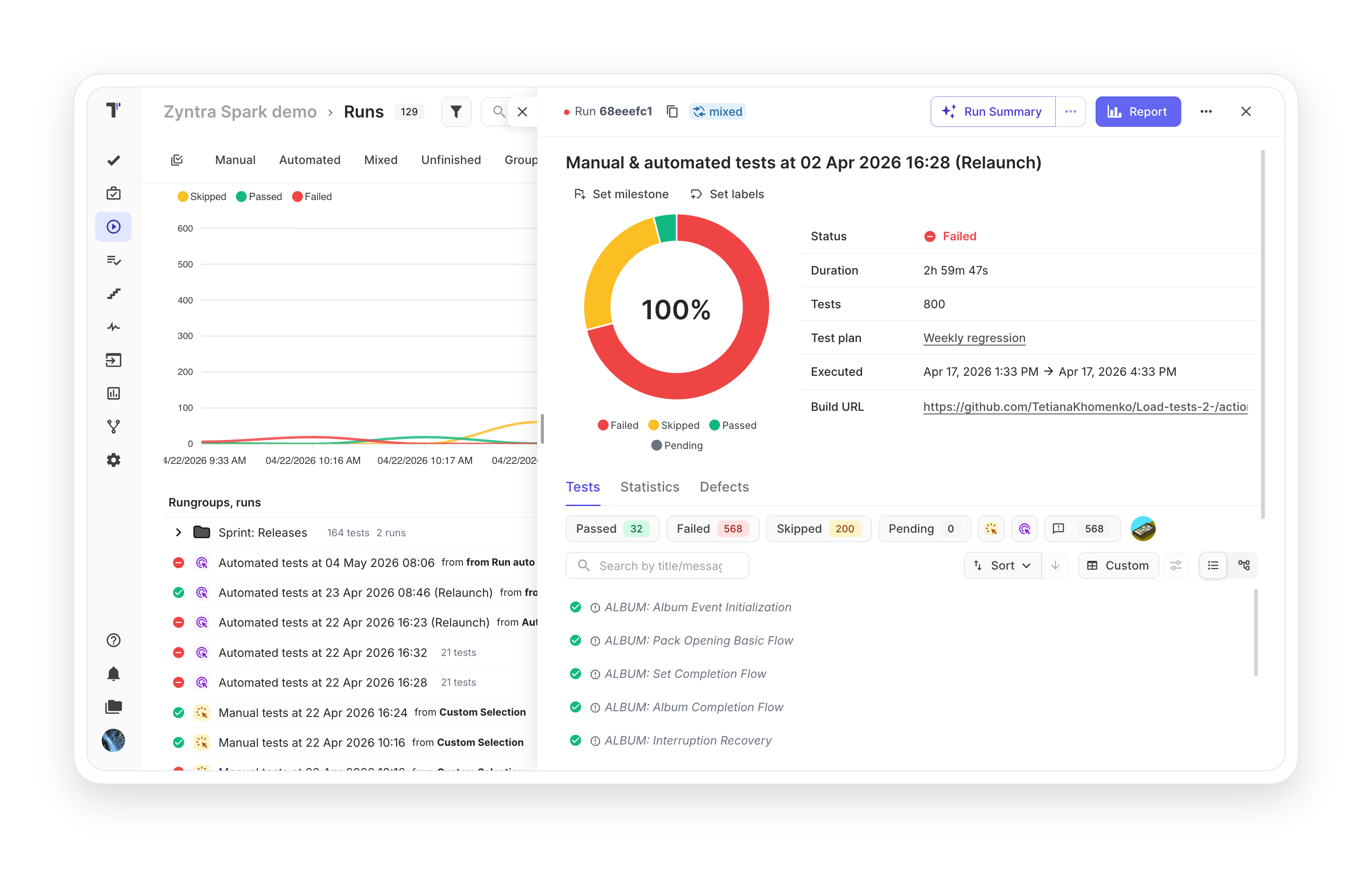
Run all or specific automated tests from your pipeline once CI/CD is set up. Trigger runs on every commit with the GitHub and GitLab integration, and send results from any CI service like Jenkins, CircleCI, or Bamboo. The results land in the same mixed run next to your manual checks.
CI/CD execution
Real-time report

A mixed run can take hours. The development team doesn’t have to wait. The report updates during execution: which tests finished, passed, failed, or got skipped. You read the product status before the run ends.

Real-time report
Test results heatmaps

Spot the riskiest areas of your product at a glance. Heatmaps highlight where defects cluster and where coverage is thin, so QA effort goes where it pays off.

Test results heatmaps
Mixed run in Jira

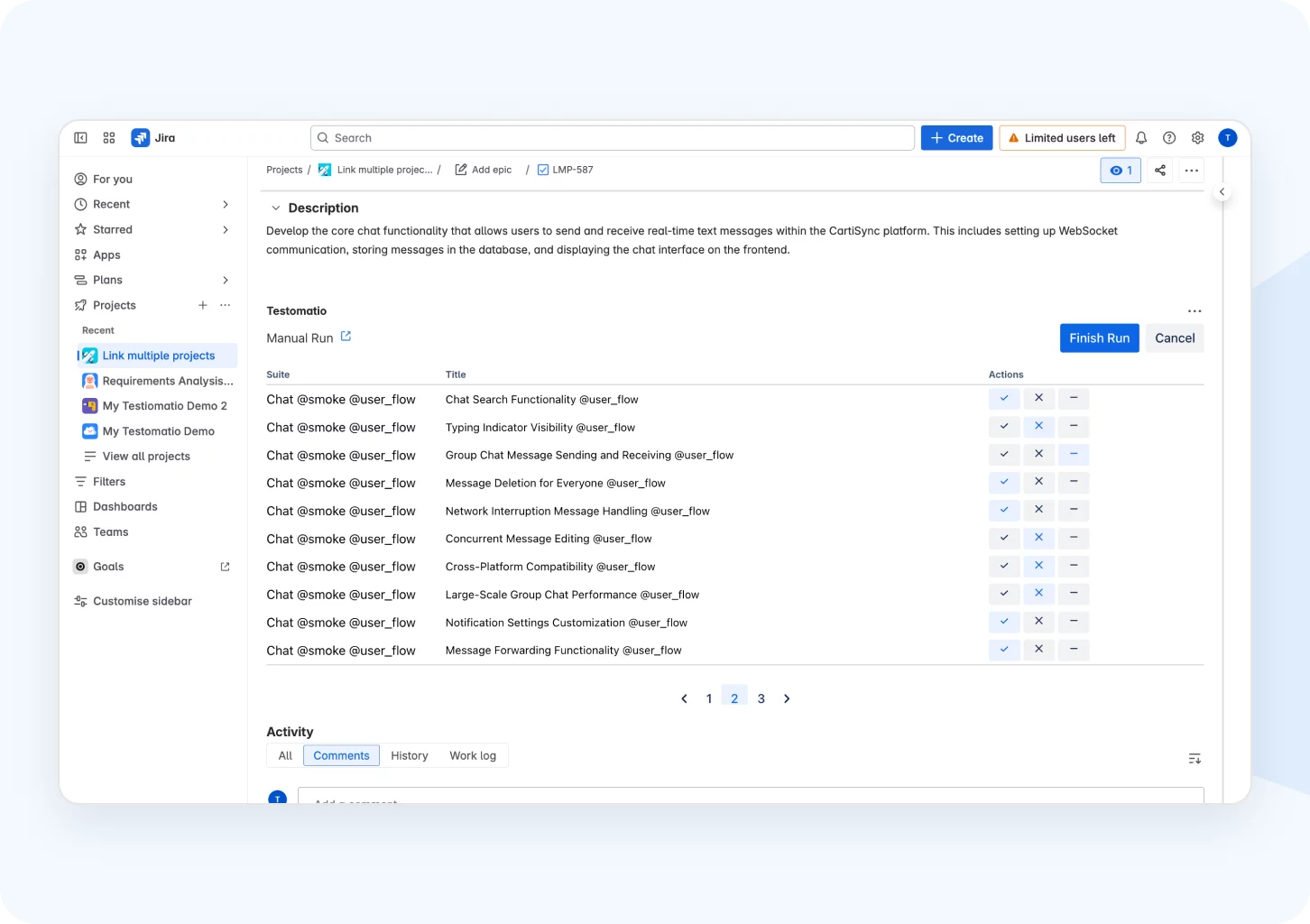
Run manual and automated tests from a Jira ticket and watch results land in the issue as they come in. When the run finishes, attach the report with one click so the whole team sees what was tested without leaving Jira.
Mixed run in Jira

All mixed test execution features

Execution & orchestration
Mixed Run: automated and manual together
Configurable test execution
Run automated tests as manual
Parallel execution reporting
Re-run failed tests only
Extend shared run timeout
CI/CD & CLI
Choose your CI integration
Run without CI from the CLI
GitHub, GitLab, Jenkins, CircleCI, Bamboo
Run on every commit
Test execution duration tracking
Framework sync
Import from Playwright, Cypress, pytest, Jest
Sync automated tests by IDs
Link automated tests to Jira
Out-of-sync test detection
Detached test status
Manual testing in the run
Manual cases in the UI
Assign testers to test cases
Manual checklist in Jira
Step-by-step execution
Create a defect from a failed step
Run Management
Edit a run in progress
Add tests or plans mid-run
Add notes to completed runs
Run groups by sprint or release
Tag runs by environment
Reporting & Readiness
Heat map report
Passed, failed, skipped
Real-time reporting
Public read-only report
Dashboards for PMs
Launch a mixed run in minutes

Launch a mixed run in minutes

Start with the tools you already have. Copy a single CLI command to run automation from the terminal, then check manual cases in the UI while results arrive. CI connects later, whenever your team needs it.
CLI command
CLI command
Execute
Execute
Report
Report
Launch a mixed run in minutes
What clients say

Recent reviews

“Excellent customer support”
Customer support is always prompt and high-quality. It's also great to see that user feedback is considered when developing new features. The team makes an effort to provide overviews of new features and keeps users informed about the latest updates.
4/5
Aliona Kovalchuk
Aliona Kovalchuk
General QA
“The Best TMS for Our QA Team!”
Our 15-person QA team has used Testomat.io daily for over two years. After comparing tools like TestRail, it stood out in both features and pricing. It’s affordable yet powerful. Jenkins integration works seamlessly, even manual testers can run tests easily. The clean UI speeds onboarding, improves collaboration, and saves time. We’ve recommended it widely, and others love it too.
5/5
Vladyslav M.
Vladyslav M.
General QA
“Testomat.io makes daily testing so much easier”
I’ve used Testomat.io daily for over two years, and it’s the best TMS I’ve worked with. Compared to tools like TestRail, it offers more features at a better price. Jenkins integration is seamless, even for manual testers. The UI is clean and easy to learn. It speeds up workflows, improves transparency, and makes team collaboration much smoother.
5/5
Dmytro H.
Dmytro H.
General QA
“Very convenient platform for managing test cases”
The platform is convenient and intuitive to use. I’ve been using it long enough to say it’s very user-friendly. It’s clear that the team is constantly working on and improving the platform.
5/5
Aleksey K.
Aleksey K.
General QA
“Great tool for creating and managing manual test cases efficiently”
As a Manual QA, I use Testomat.io to create and manage test cases with ease. The interface is intuitive, making onboarding simple. Test plans, runs, and results are well-structured in one place. Tagging helps organize cases efficiently. AI features speed up test creation. It keeps workflows transparent, improves collaboration, and reduces routine work.
5/5
Oksana G.
Oksana G.
General QA
“Testomat.io has been a great tool for managing both automated and manual tests in one place”
I really like how easy it is to integrate with frameworks and CI/CD tools, and the real-time reports with screenshots and analytics save a lot of time. Overall, it makes collaboration in the team much smoother and keeps testing well-organized.
5/5
Aleksey K.
Aleksey K.
Quality Assurance Engineer

Frequently asked questions

What is a Mixed Run in Testomat.io? Testomat

A Mixed Run combines manual and automated tests in a single execution. Automated tests run on CI or from the CLI while testers work manual cases, and every result arrives in the same report.

Do I need CI to use Mixed Runs? Testomat

No. Disable the CI build and run automation with a single CLI command. The results arrive in the same run.

Can I rerun only the failed automated tests? Testomat

Yes. On CI runs, Relaunch Failed re-executes only the tests that broke, under the same run ID and report, so you skip a full re-run.

Can I change a run after it starts? Testomat

Yes. Add tests or a whole plan to a run in progress, and reassign manual cases while it runs. The results stay together.

Which frameworks work with a Mixed Run? Testomat

Testomat.io imports automated tests from Playwright, Cypress, CodeceptJS, WebdriverIO, Jest, Mocha, pytest, JUnit, and more. See the full list in the docs.
Run your manual and automated tests in a single flow

Run your manual and automated tests in a single flow