QA and testing teams struggle to meet the demands of modern software delivery. In a traditional testing process, they rarely balance high-quality releases with thorough bug detection.
Poorly built software then damages the user experience and the company’s name and reputation.
AI agents in testing reduce human errors, make QA teams more productive, and expand test coverage. This guide explains what AI agent testing is, describes the types of AI agents in software testing and their core components, shows how to test AI agents, and covers much more.
What is an AI Agent?
An artificial intelligence agent — an AI agent for short — is both a small program and a complex system that uses artificial intelligence to complete tasks and meet user needs. Because it reasons logically and understands context, an AI-backed assistant makes decisions, learns, and responds to change in real time. Most AI agents share these traits:
- They perform repetitive or expert tasks and can even replace an entire QA department.
- They work autonomously toward defined goals, often without constant human input.
- They plug directly into organizational workflows.
What is AI Agent Testing?
AI agent testing uses smart systems that apply artificial intelligence (AI) and machine learning (ML) to perform or support software testing tasks.
These agents replicate the work of human testers — they create, execute, and maintain tests with little manual effort, and they operate within parameters the team defines. AI-powered assistants help most in these situations:
- Anyone on the team, even without technical skills, writes and maintains stable test scripts in plain English.
- They adjust, fix, and update tests when the system changes, so human testers spend less effort.
- They suggest ways to improve your tests.
- They run manually created test cases automatically and need minimal supervision from QA specialists.
Types of AI Agents in Software Testing
The list below covers the widely known categories of AI agents in software testing, grouped by their roles and capabilities:
Simple Reflex QA Agent
Reflex agents apply if-then rules or pattern recognition. They follow fixed instructions with rule-based logic and decide from current information alone. As the most basic type, these agents react directly to environmental conditions — different operating systems and browsers, network connections, structured and unstructured data, poorly documented APIs, and user traffic. For example, a simple reflex agent detects basic failures such as 404s or missing elements, logs the errors, and captures screenshots when an error message appears on screen.
Model-based Reflex Test Agent
These agents act on new data with an understanding of the context around it, not just a direct reaction. They weigh the broader situation and then respond to new input, and they simulate user flows or business logic. Testing teams rely on them for more complex tasks, because their decisions draw on what they remember about the situation.
For example, this agent remembers past login attempts. After several failures, it triggers a Forgot Password flow or alerts the team about a possible account lockout instead of simply logging an error.
Goal-based Agents
Goal-based agents also work as rule-based agents, because they follow a set of rules to reach concrete goals. They choose the best strategy and apply search and planning algorithms to achieve it. For example, when an agent’s goal is to find every unique error or warning, it writes test scripts that surface only unforeseen errors and cut re-testing effort.
Utility-based AI Testing Agent
These agents make informed decisions. They analyze complex issues and select the most effective action. For each option, they predict the outcome, score how useful it is, and then choose the action most likely to deliver the best result.
For example, rather than run every test like goal-based agents or react to immediate errors like simple reflex agents, a utility-based agent uses a utility function to rank situations, skip the less critical ones, and focus on high-severity bugs.
Learning Agents
Learning agents draw on past experience and learn from earlier mistakes or code updates. From feedback and data, they adapt and improve over time. For example, QA teams use learning agents to optimize regression testing: the agent learns from previous bugs and codebase changes, prioritizes the areas that fail most often, and directs the team’s attention to what matters most.
The Core Components of an AI Agent for QA Testing
The essential parts of an AI agent for QA testing let it analyze, learn, adapt, and act intelligently during the software testing process. Let’s examine each one:
- Perception (Input Layer). Collects data from the environment — code changes, test results, execution logs, test diff analysis, API responses, or patterns in the test project.
- Knowledge Base. Stores the historical information the agent learns from: past bugs and their root causes, test coverage data, and frequently failing components. This memory helps the testing agent decide from context and experience.
- Reasoning Engine (the agent’s brain). Decides from the current input and the knowledge it holds. AI agents apply rule-based logic, impact analysis, risk-based prioritization, and dependency-graph evaluation to process information. For example, the agent selects which tests to run based on recent code changes.
- Learning Module. AI agents learn from user stories and test cases through training and adapt to their patterns over time. This continuous learning reduces false positives and test noise and improves overall reliability. With natural language processing (NLP), agents predict likely test failures, detect flakiness, and optimize the order in which tests run.
- Action (Execution Engine). Performs tasks based on decisions — generates new test cases, selects and proposes the most relevant tests, reports defects, or opens issues.
- Feedback Loop. Reviews test engineers’ feedback on false positives to improve future answers. It drives the agent’s continuous learning and self-improvement.
- Integration Layer. Connects the agent to external tools so it both sends and receives data. Incoming information feeds the perception and learning modules and sharpens the agent’s reasoning across the testing process. It links the agent to test frameworks, bug trackers, project management tools such as Jira, documentation tools such as Confluence, and CI/CD pipelines.
These components work together to support automated, efficient, and smarter testing.
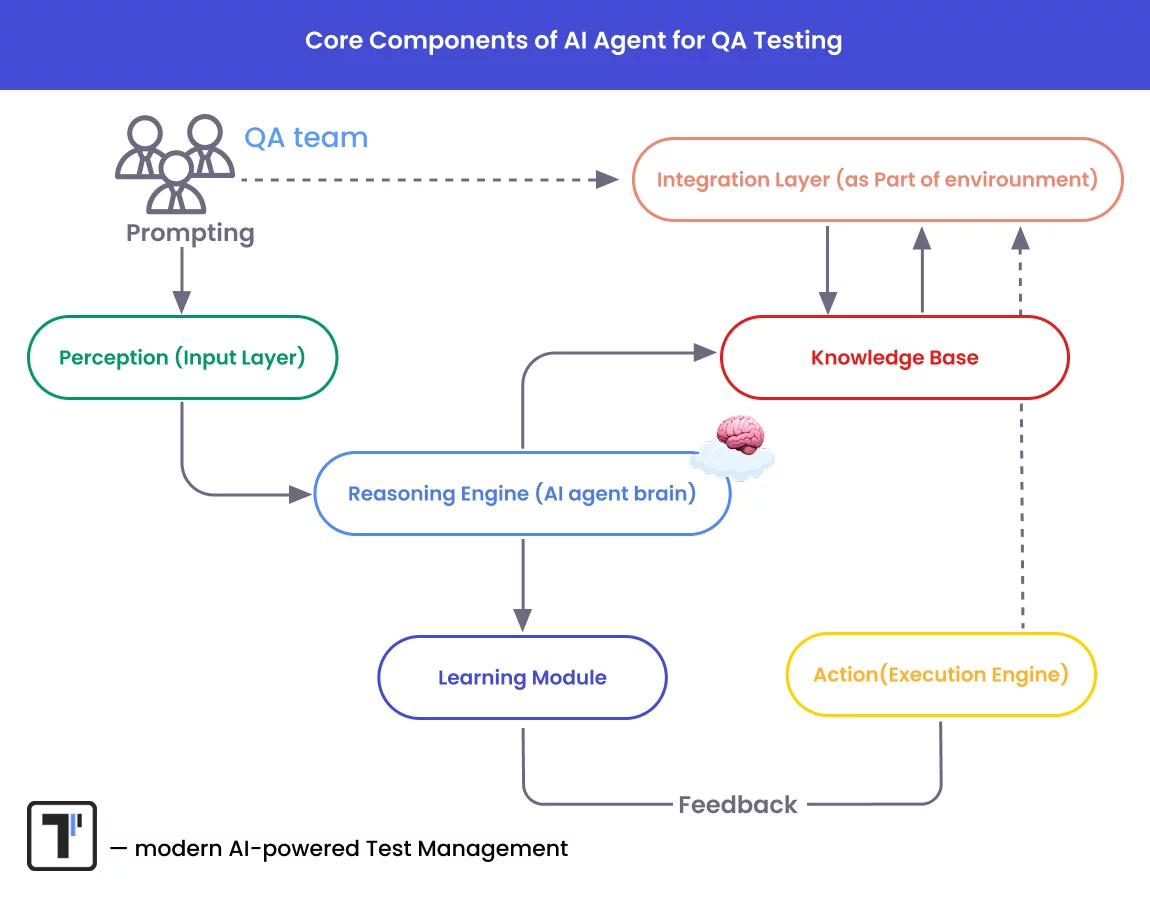
Look at this flow. Where should test engineers focus the most? Right — on their prompting and on the artifacts and documentation they supply. Let’s move to the next section.
What Does an AI Agent Depend On?
First, improve the quality of your inputs — specifically, the prompts. The accuracy and usefulness of the results depend directly on how you frame your instructions. Prompting now ranks as a core skill for modern QA engineers who work alongside AI-driven tools.
What is prompt engineering in software testing?
Prompt engineering means the specific questions, instructions, and inputs you give MCP AI agents to guide their responses. Good prompts help agents generate and improve tests, flag potential faults, and support analysis and decisions.
5 basic rules for prompting in software testing
1. Write clearly and avoid vague instructions. State exactly what you want: test type, tool, scenario, and outcome.
Example of a clear prompt to generate test cases:
Good: Generate test cases for the login form with email and password fields and a Sign In button to verify they work.
Weak: Write a test for the form.
2. Provide context. More context produces better results. Include the user story, functionality, code snippet, or bug description.
Example of a prompt based on a user story:
Good: Based on this user story <User Story RM-1523>: As a user, I want to reset my password via email — suggest edge cases for testing.
Weak: Generate tests for password.
3. State the expected behavior or test goals. This helps the AI understand the validation points. Use terms such as edge cases, negative testing, or happy path to guide the logic.
Example:
Good: Write a test case that confirms users reach the dashboard after they log in.
4. Keep the prompt focused. Do not cram many instructions into one sentence — it confuses the MCP agent’s model and lowers output quality. Instead, divide large tasks into smaller steps with step-by-step or follow-up prompts.
Example of a step-by-step prompt:
Good: Begin with “What should I test in…”, then request detailed test cases or code.
5. Name the tool, framework, and format. If you use a specific stack such as Playwright, Cypress, or Selenium, or you need a checklist, code, or a Gherkin test case, state it in the prompt.
Examples:
Good: Write Gherkin-style scenarios for login functionality in Playwright with invalid credentials.
Good: Return the test cases in a markdown table.
Well-structured artifacts equal efficient AI prompting
Second, keep your artifacts well-structured. Do not inflate your test project with excessive, unused test cases — that signals trouble. Prioritize only what you need. This discipline matters most for AI agents, since they rely on clear, relevant artifacts and use them as follows:
- Requirements & Specifications. AI agents need a detailed description of the system’s purpose and environment. Functional and non-functional requirements tell assistants what the system should do and how well it should perform on speed, usability, and security.
- Existing user stories. AI agents read user stories to understand the desired features from the user’s view, then simulate realistic user journeys and test the end-to-end experience.
- Test Cases. AI agents read test cases to learn which steps to take and which situations to check. With this information, they confirm the software works correctly and find bugs.
- Bug Reports. You store them in Jira, Bugzilla, Linear, internal analytics dashboards, or external tools such as testomat.io Defect Tracking Metrics. AI agents link to them to reproduce bugs and identify the fault behind a run, and they summarize bug trends to guide QA decisions and prevent defects.
- Reporting and Analytics metrics. AI agents pull data from Allure reports, CI/CD pipelines, and test dashboards. They evaluate test duration, failure trends, and pass/fail consistency, flag frequent or critical failures for priority investigation, and suggest fixes for unstable tests. They also learn which tests deliver the most regression value from history and recommend where to optimize test automation.
- Documentation. With access to testing documents, AI agents know what the software should do and what its goals are. The documents tell them exactly what to test, give clear rules, and set expected pass or fail results. Agents also run existing tests and learn from past reports to test smarter.
Choose the Best Artificial Intelligence Testing Agent
The test management system testomat.io is a modern AI-powered test management tool that helps you build test artifacts and organize test projects with maximum clarity.
It does more than store test artifacts — it delivers powerful AI-driven functionality that accelerates your QA process. AI Orchestration spans your entire test lifecycle — from requirements to execution and defect tracking — and syncs automated and manual testing, supported by many integrations and AI enhancements.
Its other strengths are collaboration and scalability. Team members share test reviews, select tests for plans and runs flexibly, and adapt AI suggestions to their needs.
The AI testing assistant works at these levels:
Generative AI and Chat with Test modes let you interact with test suites in natural language — much like chatting with a QA teammate. You generate new test cases or refactor existing ones, automate repetitive tasks, manage suggestions, map tests to requirements, identify test gaps and flaky scenarios, and understand your coverage clearly enough to improve it continuously.
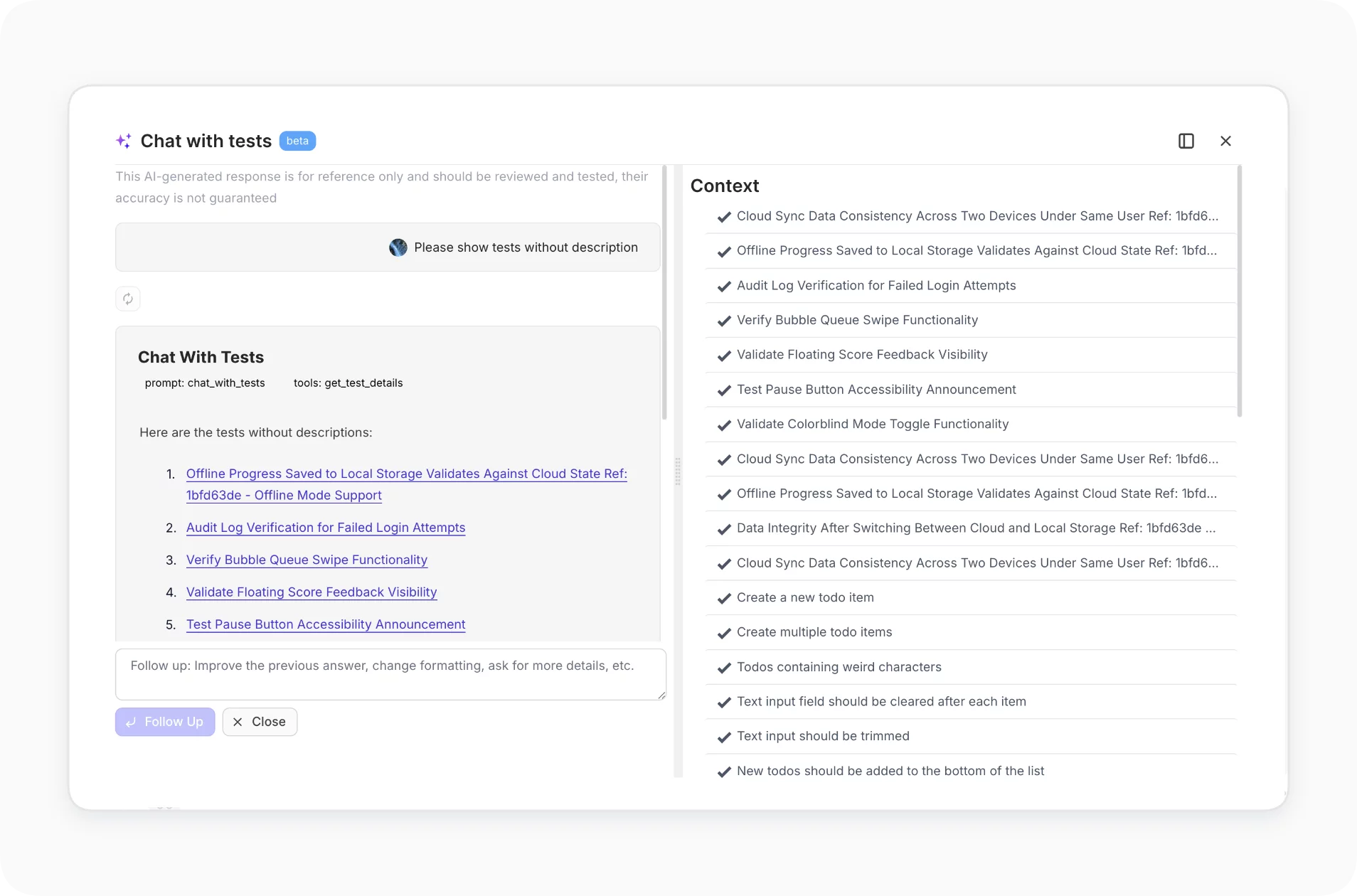
For instance, sample prompt questions:
- What does this test case do?
- Write edge tests for password reset.
- Rewrite this test to read more clearly.
- Which parts of the app lack tests?
- Find duplicates.
- Map these test cases to requirements.
- Teach the MCP AI model with gradual follow-ups to sharpen its feedback.
The AI agent is an intelligent automation component that bridges the test management system and the test automation framework ecosystem. It learns, analyzes, and optimizes the testing process. It suggests clear, readable test descriptions for automated tests — accessible even to non-technical stakeholders such as manual QAs and business analysts — and converts your project into Behavior-Driven Development (BDD) format automatically. It also detects flaky or failing tests from execution history.
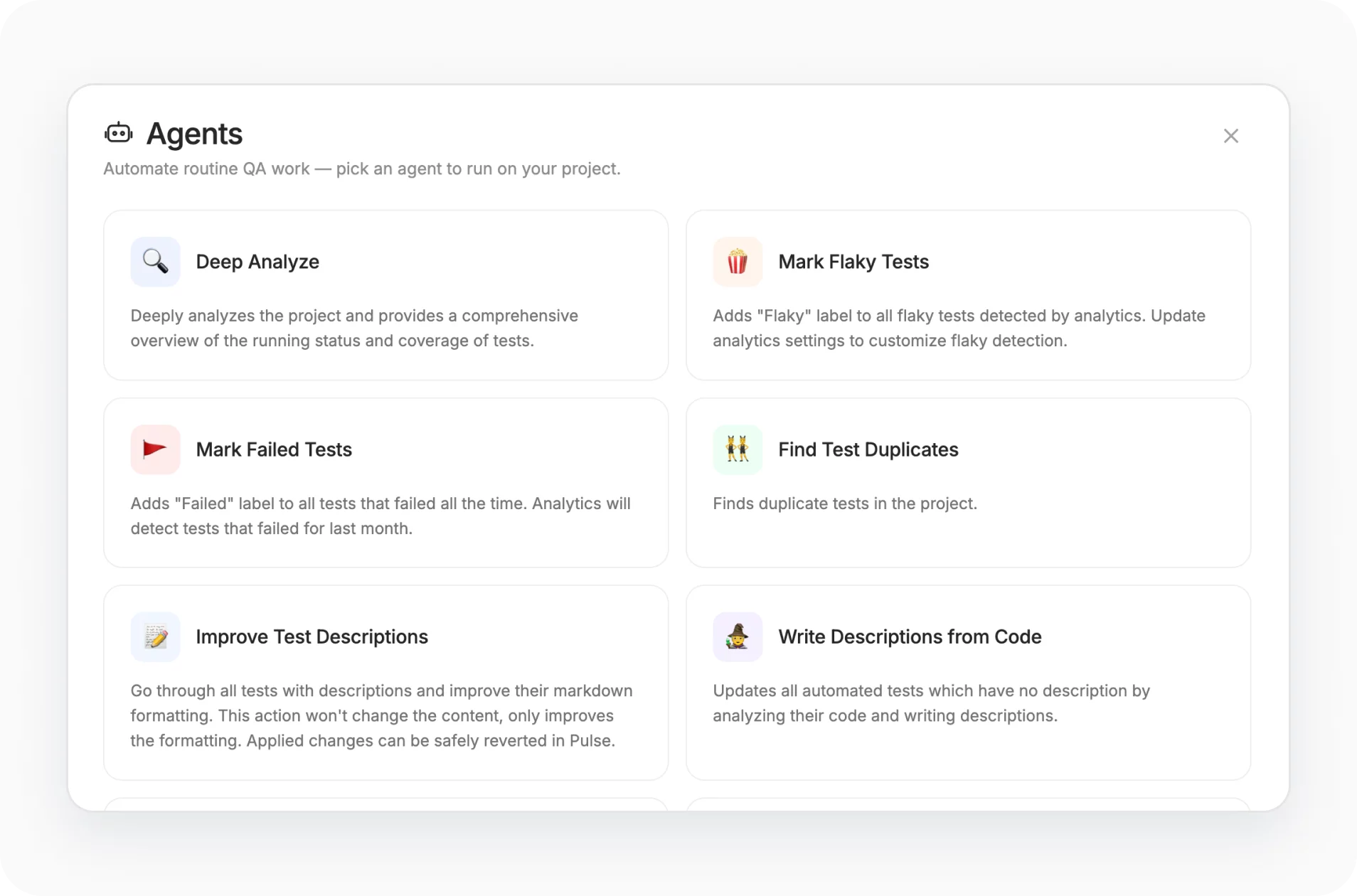
AI Reporting and Analytics is another strength. The AI assistant surfaces insights directly as suggestions in the Report UI. The development team built two AI extensions inside the Report — the Project Status Report and the Project Run Status Report. Both generate automatically from recent test-run history and give instant visibility into project health, so you skip individual Test Archive logs.
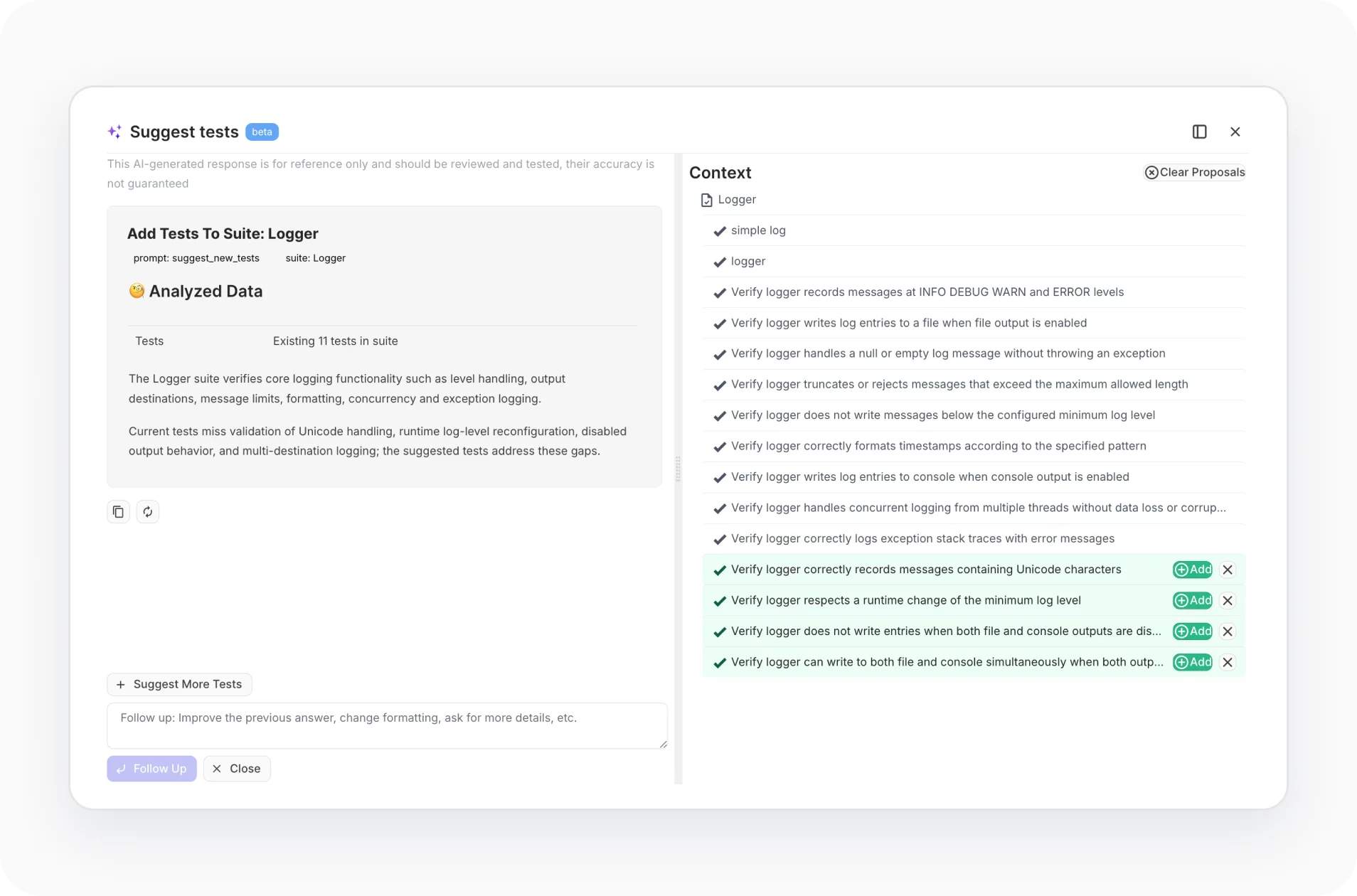
The AI testing agent from Testomat.io acts as an intelligent testing co-pilot. It helps testers move faster, test smarter, and reduce risk with far less manual effort. Below, we show its capabilities in action and how its workflow runs.
How AI Agents Support Software Testing
AI-driven agents change how QA engineering teams work and make testing faster, more reliable, and more efficient. Here are the key areas where AI assistants prove most reliable:
Test Case Generation
To speed up test-suite creation, QA teams use AI assistants that read the software requirements and turn simple instructions into test scripts instantly. With Natural Language Processing (NLP) and generative AI, this runs far faster and covers many more situations than human QAs could reach in the same time.
Test Case Prioritization
AI assistants analyze previous test results, code changes, and defect patterns, then choose the most effective order for test runs. Rather than a fixed or random order, they use data from prior executions to prioritize tests and optimize which cases to select.
Automated Test Execution
AI agents run tests without QA involvement, 24/7. When the source code changes, the agent triggers the test suites automatically for continuous testing and fast feedback. Integrations with test management systems report bugs and share every update with the relevant teams and stakeholders.
Shift-Left Testing
In shift-left testing, AI agents run faster and surface bugs quickly, so developers fix issues earlier. They also adapt to changing requirements and suggest relevant tests based on code changes.
Test Adaptation
With self-healing, AI agents respond to interface changes and adjust their actions to match. They handle UI, API, or backend changes and keep automated tests working whenever the codebase changes.
Self-Learning
Because AI agents learn from earlier test findings, they analyze trends and patterns from past cycles and predict future results. As they learn and adapt, they identify potential bugs more accurately and address them proactively.
Visual Testing
With computer vision, agents detect UI mismatches across devices and screen sizes and verify the accuracy of the parts users see. They find visual bugs — misaligned buttons, overlapping images or text, and partially visible elements — that traditional functional testing often misses.
Test Result Analysis
AI agents review test results on their own, find failures, and group similar defects. They highlight patterns in the data, locate the root cause faster, and focus on what matters most — the patterns that expose vulnerabilities in the system.
Overview: Pros and Cons of an AI Agent for Software Testing
This table weighs the advantages and disadvantages of AI agent testing (agentic testing), notes common AI hallucination problems, and gives a balanced view of AI’s role in testing.
| Pros of agentic testing | Cons of AI agent testing |
| Generates test cases humans might miss and improves test coverage. | Misses wider context — user intent, business logic, and non-functional requirements a human tester would grasp. |
| Updates test cases automatically when the code changes. | Generates test cases that trigger false positives or false negatives and demand careful review before use. |
| Runs test suites faster, shortens the release cycle, and cuts manual effort. | Requires ongoing maintenance and updates to match evolving testing needs. |
| Predicts potential bugs from previous test data. | Develops blind spots or inaccurate predictions when the training data is poor and skips edge cases. |
| Identifies and fixes broken tests. | Lacks human intuition in complex scenarios. |
| Learns on its own and adapts testing strategies from feedback. | Over-reliance on AI weakens human oversight, especially in senior and QA manager roles where risk surfaces. |
How to Test AI Agents: Basic AI Workflow
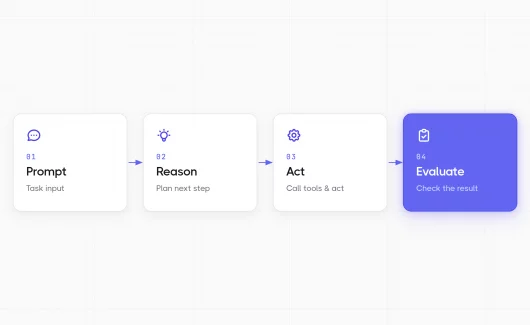
To test AI agents, define the agent’s goal and success criteria, then feed it well-structured artifacts — requirements, user stories, and test cases. Run the agent against real and edge-case scenarios, and evaluate its outputs — the test cases it generates, the tools it calls, and the decisions it makes — against expected results. Review those results, correct false positives, and retrain the agent so it improves each cycle. Keep a human in the loop to catch context the model misses.
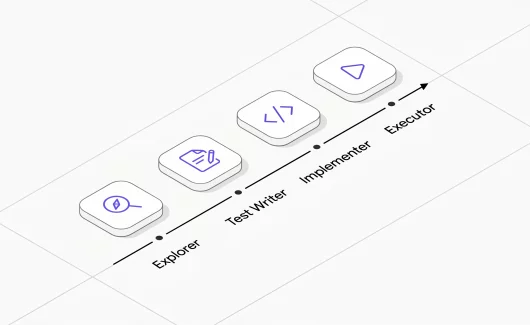
AI agentic workflows follow an Agile process and go beyond simple repetitive tasks. QA teams define the roles, decide what to test, and choose which AI agent tool to use.
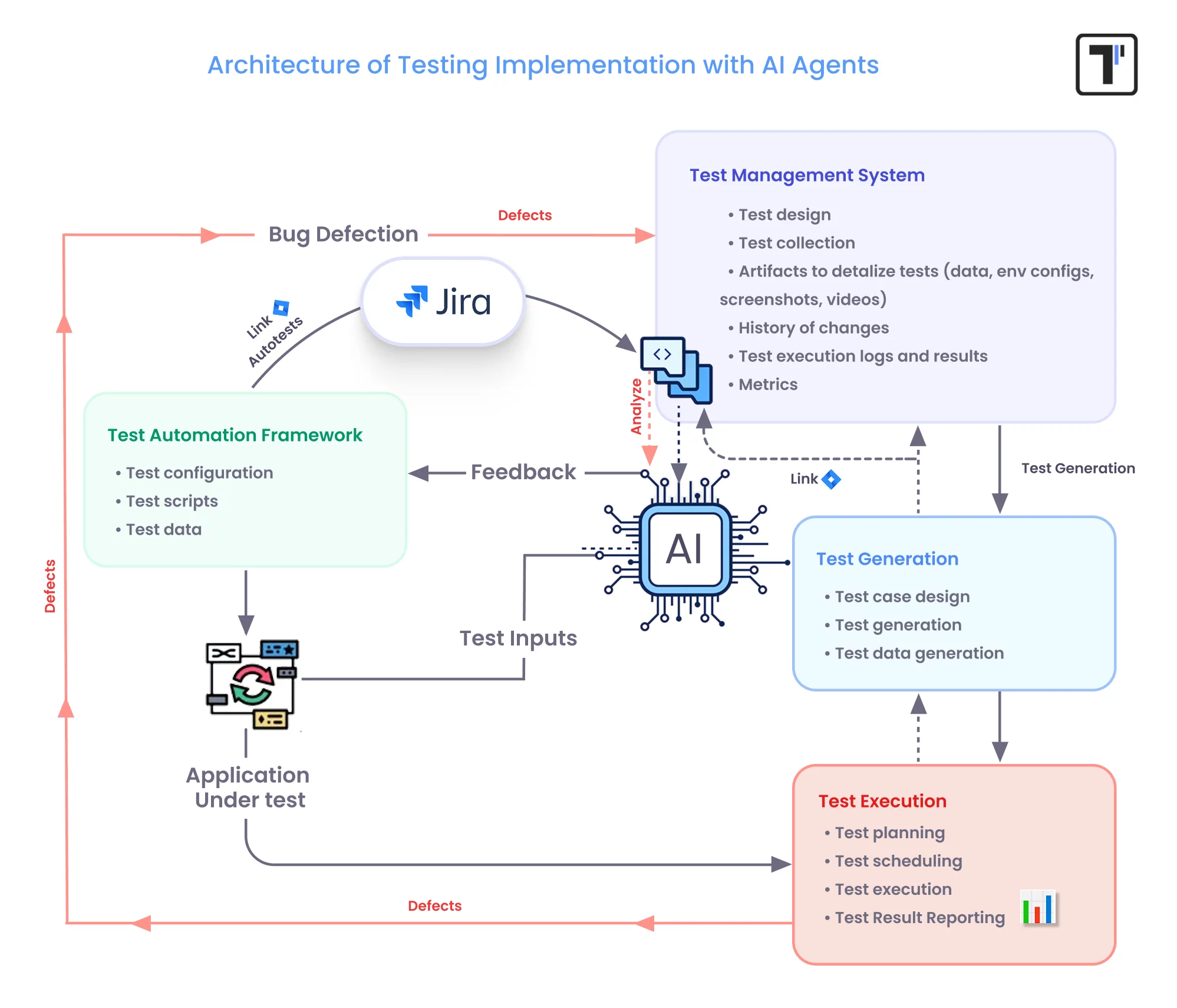
*This shows a plain AI agent testing workflow; a more detailed one appears in a LinkedIn post. Follow the link to view the AI Agent testing Workflow within testomat.io test management software.
- Data Gathering. The AI test agent gathers data from many sources — APIs, user commands, requirements, past bugs, usage logs, external tools, and environmental feedback — to train when needed. Our test management solution integrates natively with many of them.
- Collection & Coordination. This is the role of the test management system. Once it collects the relevant datasets, the AI agents create test cases that reach strong coverage, including edge cases, while human testers approve which generated cases fit. The agents also generate large volumes of unique test and user data — email, name, phone number, address — that mirror real-world data. When you add large language models (LLMs) and generative AI, the agents simulate diverse real-world conditions quickly and evaluate applications with greater intelligence.
- Test Execution. AI agents run tests autonomously and simulate user interactions to check UI components, functionality, usability, and performance.
- Real-time Bug Detection & Reporting. AI agents detect anomalies and frequent error points, predict bugs, and report defects to stakeholders automatically. They also recognize repetitive flows and high-priority areas to test.
- Test Analysis & Continuous Learning. As the software scales, the agents analyze data from user interactions and system updates to keep tests aligned with the application’s current state.
- Feedback and Improvement. QA members review AI-generated results regularly to protect software quality. Despite the power of AI, continuous monitoring and periodic checks keep the results accurate and reliable.
Challenges of an AI Agent for Testing
- When the product grows more complex, AI testing demands exponentially more computing resources.
- The absence of representative data makes testing ineffective — agents develop biases and miss ethical standards.
- Outdated APIs and poor documentation block AI testing adoption.
- AI-generated test cases and results demand careful review before use.
- Because of the AI black-box problem, QA teams struggle to understand the logic behind a failed test case.
Best Practices for AI Agent Testing Implementation
When you choose a test assistant, pick the tool that best fits your testing needs and your software development lifecycle. Weigh customization, integration, and ease of use. One reminder:
Combine AI and human effort to balance efficiency and creativity.
These tips help you find the right AI agent testing framework:
- Study how your organization works — the systems and tools you already use and the testing tasks you own.
- Define which areas the AI agent testing framework will automate before you scale.
- Make sure your team understands why they need a QA agent in test automation and how to use it well.
- Check whether the AI bot integrates with the platforms you already use.
- Plan your budget across free, subscription, and enterprise pricing.
- Weigh its customization options so it fits your unique testing requirements.
Boost Your Capabilities with AI Agent Testing Right Now
Whether you lead QA or found a startup, an AI testing agent changes how you test. These agents now count as essential tools for modern QA teams: they learn from past data, predict failure points, generate varied tests, self-heal, and adapt to change to lift software quality in record time.
Ready? Contact us to learn how to use AI agents to create precise test cases and improve the quality and coverage of your testing.