




An agent can write the application. I still want to control its business rules without asking it to rewrite the code.
This changes the answer to a common question: what is the best programming language to learn in 2027? Agents already write a large share of application code. In the Octoverse 2026 report, GitHub says agents started more than 40% of pull requests in September 2026. In March, this share was 17%. When agents write the code, my main programming language is the language I use to change product decisions.
ScriptedYaml adds expressions and conditions to YAML. The application evaluates these definitions at runtime. In agentic development, this gives me a place to keep decisions visible while the agent handles their implementation.
What Is Business Logic?
Business logic is the decision-making part of an application. Writing it turns product requirements into behavior the application can enforce. I want to keep control over those decisions even when an agent writes the code. Developers see a similar split. In the Stack Overflow Developer Survey 2026, 74% of respondents said AI helps with implementation. For design tasks, this share was 50%.
Take a subscription product. We decide that automation is available on Pro and Team, but not on Free. One simple rule. Now look at how many places in the application need to follow it.
The desktop navigation checks whether the customer is paying:
// DesktopNav.jsx
{plan !== 'free' && <Link to="/automation">Automation</Link>}
The mobile sidebar lists the plans explicitly:
// MobileSidebar.jsx
{['pro', 'team'].includes(plan) && (
  <SidebarLink to="/automation">Automation</SidebarLink>
)}
The router makes its own decision about direct visits:
// routes.jsx
<Route
  path="/automation"
  element={plan === 'free'
    ? <Navigate to="/pricing" />
    : <AutomationPage />}
/>
The API controller checks access again before accepting a request:
// automation-controller.js
export async function createAutomation(req, res) {
  const { account } = req; // Supplied by authentication middleware.

  if (!['pro', 'team'].includes(account.plan)) {
    return res.status(403).json({ error: 'Automation requires an upgrade' });
  }

  const automation = await automations.create(account.id, req.body);
  return res.status(201).json(automation);
}
These checks agree for Free, Pro, and Team. Now add Starter: a paid plan without automation. Desktop shows the link and the router opens the page, but mobile hides it and the API rejects the request. Add Enterprise with all Team features, and the explicit lists reject customers who should have access.
Nothing about rendering a link or handling an HTTP request caused this problem. The subscription policy was redefined in each layer. Moving automation from Pro to Team now requires finding and changing every version of that decision.
An agent can search for those checks. I would rather keep the policy somewhere I can read and change it directly.
This matters more when agents write the code. The 2025 DORA report from Google calls AI an amplifier. AI increases the strengths of high-performing organizations and the problems of struggling ones. When plan rules live in many places, an agent can repeat the same mistake in more files.
“Which features does Pro include?” should have one answer in one place.
Put The Policy In One Readable Place
The subscription definition should name the features, their availability, and their limits together. For example, after moving automation to Team:
# subscriptions.yml
$vars:
  plan: { default: free }

features:
  exports:
    enabled!: vars.plan in ["pro", "team", "enterprise"]
  automation:
    enabled!: vars.plan in ["team", "enterprise"]
    max_active!: if vars.plan = "enterprise" then 1000 else 25
  approvals:
    enabled!: vars.plan in ["team", "enterprise"]
Availability and limits are visible together. The ! marks expressions that ScriptedYaml evaluates for the supplied plan. Adding Enterprise does not depend on an assumption that every paid plan gets every feature; its inclusion is explicit.
I ask the agent to make the application consume this definition wherever a subscription matters:
- Navigation uses it to show links.
- Routes use it to allow access.
- Controllers enforce it on requests.
- Workers check it before running scheduled work.
The agent builds that integration, including server-side enforcement. I do not need to maintain those implementations myself.
Suppose I want to offer a trial with exports and up to three active automations. I add "trial" to those features and set its automation limit to three:
features:
  exports:
    enabled!: vars.plan in ["trial", "pro", "team", "enterprise"]
  automation:
    enabled!: vars.plan in ["trial", "team", "enterprise"]
    max_active!: >-
      if vars.plan = "trial" then 3
      else if vars.plan = "enterprise" then 1000
      else 25
That is the feature policy for Trial. Creating trial accounts and handling expiration still need application support; I ask the agent to build that too. Once it supplies the current plan to this definition, I can adjust what trial customers receive without changing the surrounding code.
To give Pro customers approvals, I change one line:
   approvals:
-    enabled!: vars.plan in ["team", "enterprise"]
+    enabled!: vars.plan in ["pro", "team", "enterprise"]
To remove exports from Pro while keeping trial access:
   exports:
-    enabled!: vars.plan in ["trial", "pro", "team", "enterprise"]
+    enabled!: vars.plan in ["trial", "team", "enterprise"]
The agent owns the implementation work. I keep a readable place to decide how the product should behave.
YAML Is Readable Structure
YAML is a great language for keeping things clear and readable. Indentation shows the hierarchy. Lists look like lists. Ordinary labels need neither braces nor quotation marks. Some values still need quoting, but most of the page can speak the application’s language.
That language can describe an order state machine, a discount policy, an RPG system, or a UI. Each has different concepts. All benefit from visible structure.
Plain YAML stores data. ScriptedYaml adds formulas, conditions, and scripting hooks to that structure:
$vars:
  subtotal: {}

minimum_order: 200
discount_rate: 0.10

discount!: >-
  if vars.subtotal >= minimum_order
  then vars.subtotal * discount_rate
  else 0

message: You save {{ discount }}.
The threshold, rate, calculation, and wording live together. Changing the policy does not require finding a conditional inside checkout code. The ! marks a formula, written in FEEL.
The same approach applies elsewhere. A state machine describes transitions and their guards. An RPG definition keeps progression formulas beside character attributes. A UI definition names groups, labels, and visibility rules.
What Is FEEL?
FEEL stands for Friendly Enough Expression Language. The Decision Model and Notation (DMN) standard from the Object Management Group (OMG) defines it. DMN is a standard for describing and modeling business decisions. Business rules tools use FEEL in decision tables, and ScriptedYaml uses FEEL inside YAML.
Using ScriptedYaml With An Agent
ScriptedYaml is a library that evaluates YAML with embedded expressions. The application supplies inputs, and ScriptedYaml computes the values it needs. The rules stay in the YAML file instead of becoming instructions the agent translates into more application code.
The main constructs are:
$varsdeclares the inputs the application supplies. Expressions read them asvars.planorvars.subtotal. An input can have a default; without one, it is required unless marked optional.!after a key makes its value a FEEL expression.{{ }}inserts an expression’s result into text.$if!includes or excludes an item based on a condition.$schemadefines the file’s structure: required fields, optional fields, and allowed values. It gives the agent a format to follow and lets validation catch mistakes.$dslpoints to a separate schema file when several definitions share the same format. For a single definition,$schemakeeps that structure in the file itself.
I give the agent a specific instruction:
Keep subscription rules in
subscriptions.ymlusing ScriptedYaml. Declare the inputs with$varsand the structure with$schema. Make navigation, routes, and server access checks use the resolved rules. Validate the file and check the resulting behavior. Do not duplicate plan conditions in application code.
The agent builds the integration. I review the definition and edit the product decisions there. If several files later need the same structure, the agent can move the schema into a shared DSL and reference it with $dsl.
This kind of control matters for agent projects. Gartner predicts that companies will cancel over 40% of agentic AI projects by the end of 2027. Weak risk controls are among the key reasons.
ScriptedYaml Skills
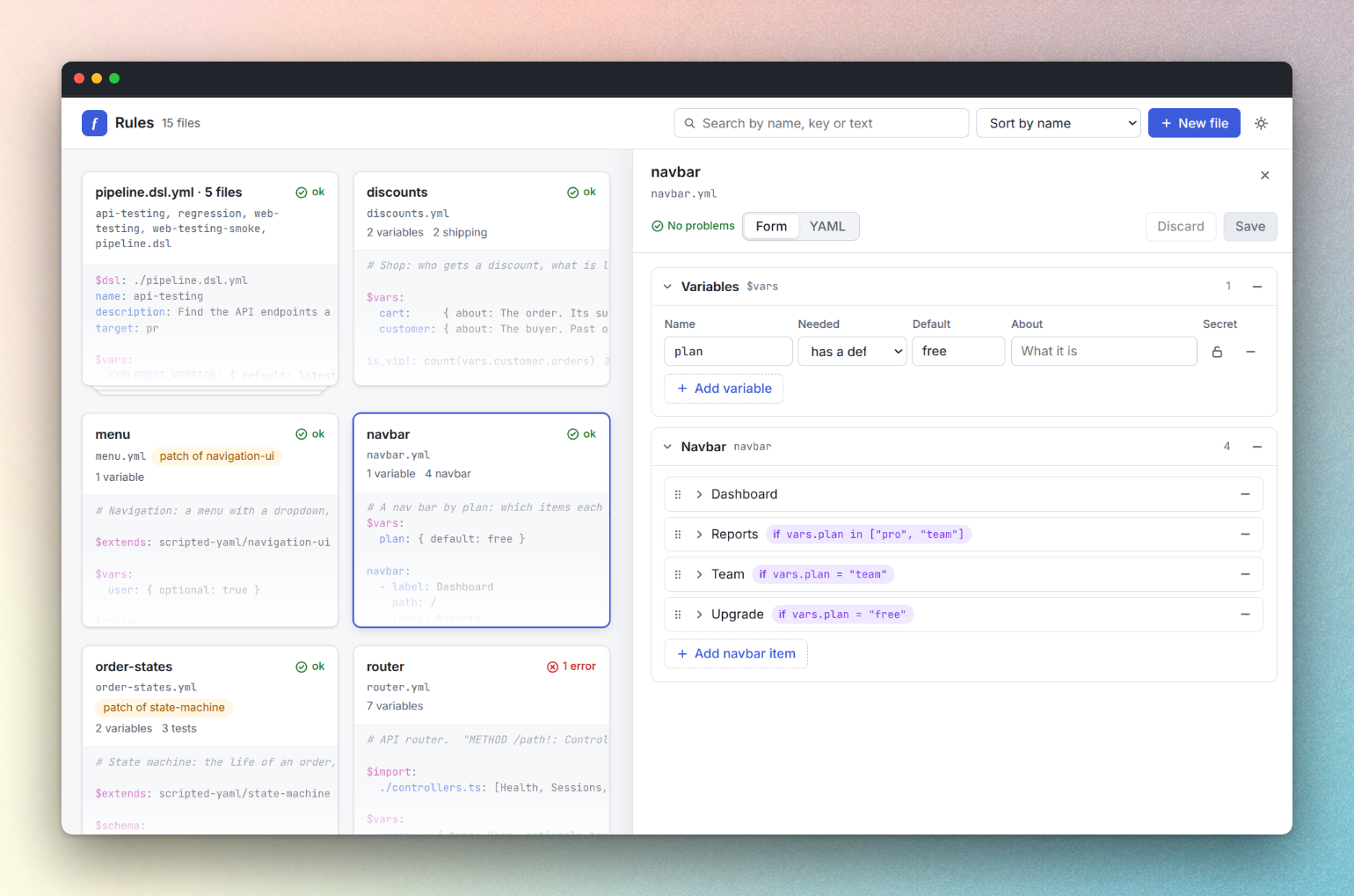
The ScriptedYaml package contains skills so an agent can expose business logic in YAML files and load and invoke it inside the application.
However, if you are not a fan of reading or editing YAML directly, there is a skill that can build a customizable dashboard, which can be embedded in your application or used standalone:
Keep A Whole Decision In One File
Self-contained files are the goal here. A pricing definition should reveal the policy without sending its reader through five imports. A page definition should keep its content and section mapping together.
YAML and Markdown do not guarantee that property. ScriptedYaml supports external schemas, imports, and templates. Those are useful, but every dependency adds another place to look. I would keep each human-owned definition as self-contained as practical.
This is also more than moving constants into configuration. The calculation belongs beside its inputs. The visibility rule belongs beside the element it controls. Business logic moves out of presentation code and scattered technical configuration into explicit definitions.
A reader can then understand a complete decision in one sitting.
Bottom Line
By “main programming languages,” I mean the languages people directly use to change their applications. Generated TypeScript may still outnumber the YAML by thousands of lines. That says little about where the human is programming.
My recommendation is to ask agents to build around editable definitions from the beginning. Keep the definitions authoritative. Validate their structure. Check the resulting behavior.
Start with one policy in ScriptedYaml, or one page whose sections are selected with mdq-cli. Let the agent build the surrounding implementation.
The next programming language I want to use is one that lets me leave the agent out of a small change.