Defects management for QA teams

Track every bug where your tests live. Testomat.io links defects to the test cases they block and to your issue tracker, so you see blocked tests in seconds.
 Defects   management for QA teams
Trusted by over 500 forward-thinking companies

logo
logo
logo
logo
logo
logo
logo
logo
logo
logo
logo
logo
logo
logo
logo
logo
logo
logo

How defects management works in Testomat.io

Follow each bug from a failed test to a closed issue in Testomat.io.
Find
1. Find
A test fails in a run.
Failed test
Blocked case
Open the run
Spot the bug
Report
2. Report
Create a defect in one click
Single click
AI drafts it
Sends to your tracker
Stays linked to the result
Link
3. Link
Defect links to test cases
Affected test cases
Inline view
Runs column
Milestones
Track
4. Track
See defects across the project
Defects board
Analytics view
Opened and closed
Filters and Severity
Resolve
5. Resolve
Close it in your tracker
Stays in step
Attachments sync
Detached flag
Clear in one

Testomat.io features for defectsmanagement

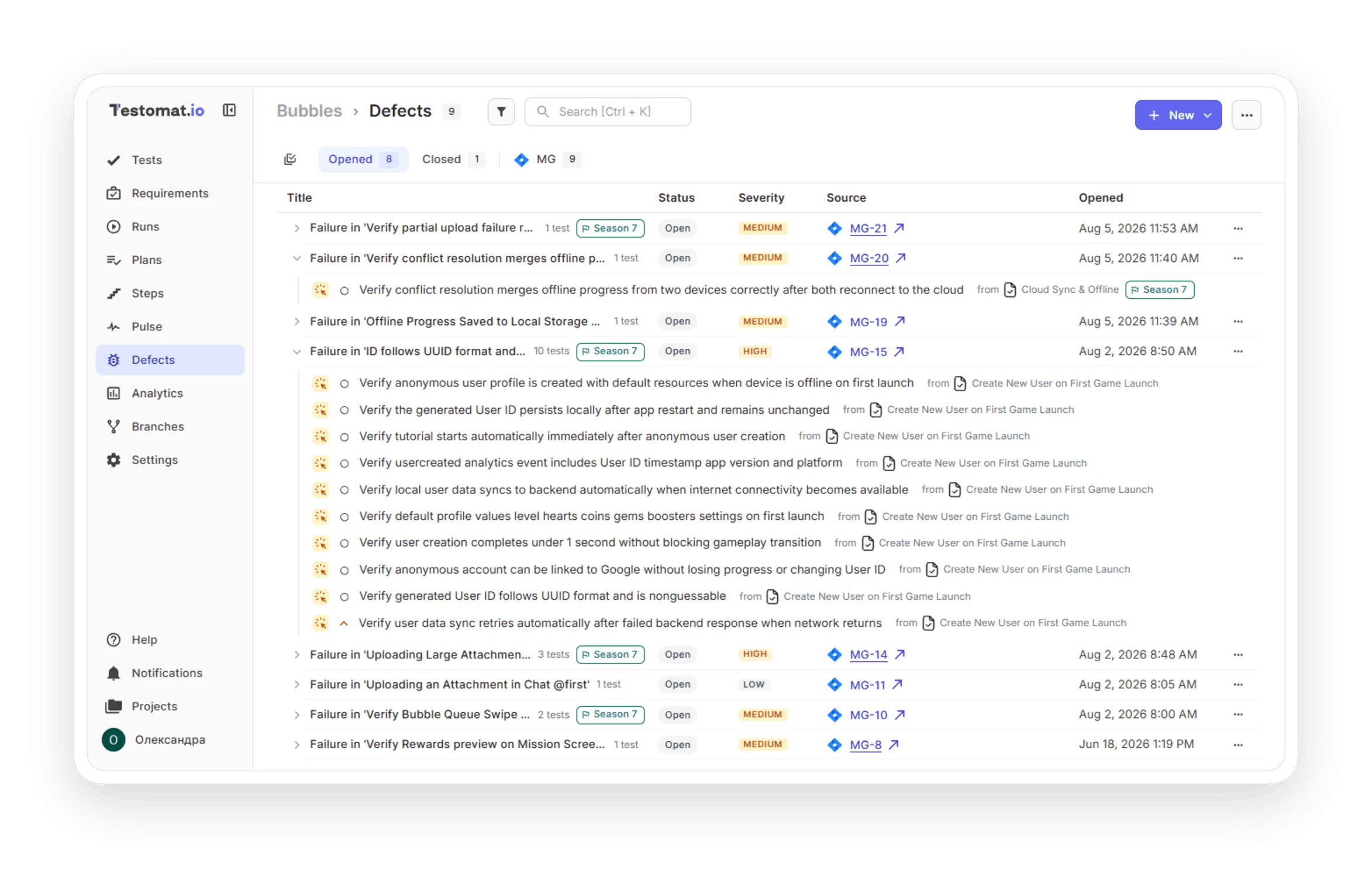
Defects board

See every open bug in one place. The defects board lists your tracker issues per project, with Opened and Closed tabs and filters. The affected test cases show inline. See what blocks a release at a glance, all in one board.


 Defects  board
Defects in analytics

Know which tests a bug is blocking. The Analytics report is test-centric: it shows which tests are blocked and by which defects. Focus your team on the bugs that block the most tests.

 Defects  in analytics
Create defect from the report

Report a bug the moment you find it. Create a tracker issue in one click, straight to Jira, GitHub, GitLab, Azure, Linear, ClickUp, YouTrack, or Shortcut. File a bug without leaving the test result, and it stays linked to what failed.

Create defect from the report
AI -suggested bug description

AI drafts the defect title and description from the test and its result, so you file a clear report in seconds. Report more bugs because filing takes seconds instead of minutes.

AI -suggested bug description
Multiple tracker sources

Keep defects in step wherever they live. Testomat.io stays aligned with Jira, GitHub, GitLab, Linear, Azure, YouTrack, and plain links. Every team tracks bugs in its own tool, and Testomat.io keeps them aligned.

Multiple  tracker  sources
Detached defects

Keep the board clean when a bug is deleted. If a tracker issue is removed, its defect is marked detached, and you clear it in one action. Your board stays trustworthy, with every link pointing to a real issue.

Learn more
 Detached  defects
Attach files to a defect

Add the evidence to the bug. Attach files to a defect, and the attachments travel back to the tracker issue. Give developers what they need to reproduce a bug fast.

Attach files to a defect
Track defects in runs

See bugs right in your runs. Linked defects appear in a Defects column on the test and suite Runs tab. See which results are already tracked as bugs, right where you review runs.

Track defects in runs
Defects on milestones

Track open bugs against a release. See open defects per project for a milestone, cross-linked to your milestones. Know whether open bugs still stand between a milestone and its release.

Defects on  milestones

Why teams choose Testomat.io defects management

https://testomat.io/wp-content/uploads/2026/08/ONE-CL1.svg
Reporting in one click
Create tracker issues in one click, straight from the report.
https://testomat.io/wp-content/uploads/2026/08/TEST-L1.svg
Test-linked defects
Every defect connects to the test cases it blocks.
https://testomat.io/wp-content/uploads/2026/08/AI-BUG1.svg
AI bug drafts
AI writes the title and description from the result.
https://testomat.io/wp-content/uploads/2026/08/MANY-T1.svg
Many trackers
Jira, GitHub, GitLab, Linear, Azure, YouTrack, and Shortcut.
https://testomat.io/wp-content/uploads/2026/08/ALWAYS1.svg
Always in step
Defects sync with your tracker, and detached ones clear fast.

Turn a failed test into a tracked bug

Turn a failed test into a tracked bug

Create a bug right from a test result and send it to Jira, GitHub, GitLab, and more. Each bug links to the test that failed, so it is easy to find.
Get bugs into Jira in one click
Turn a failed run into a tracked bug
Release with confidence
Turn a failed test into a tracked bug
What clients says

Recent reviews

“Excellent customer support”
Customer support is always prompt and high-quality. It's also great to see that user feedback is considered when developing new features. The team makes an effort to provide overviews of new features and keeps users informed about the latest updates.
4/5
Aliona Kovalchuk
Aliona Kovalchuk
General QA
“The Best TMS for Our QA Team!”
Our 15-person QA team has used Testomat.io daily for over two years. After comparing tools like TestRail, it stood out in both features and pricing. It’s affordable yet powerful. Jenkins integration works seamlessly, even manual testers can run tests easily. The clean UI speeds onboarding, improves collaboration, and saves time. We’ve recommended it widely, and others love it too.
5/5
Vladyslav M.
Vladyslav M.
General QA
“Testomat.io makes daily testing so much easier”
I’ve used Testomat.io daily for over two years, and it’s the best TMS I’ve worked with. Compared to tools like TestRail, it offers more features at a better price. Jenkins integration is seamless, even for manual testers. The UI is clean and easy to learn. It speeds up workflows, improves transparency, and makes team collaboration much smoother.
5/5
Dmytro H.
Dmytro H.
General QA
“Very convenient platform for managing test cases”
The platform is convenient and intuitive to use. I’ve been using it long enough to say it’s very user-friendly. It’s clear that the team is constantly working on and improving the platform.
5/5
Aleksey K.
Aleksey K.
General QA
“Great tool for creating and managing manual test cases efficiently”
As a Manual QA, I use Testomat.io to create and manage test cases with ease. The interface is intuitive, making onboarding simple. Test plans, runs, and results are well-structured in one place. Tagging helps organize cases efficiently. AI features speed up test creation. It keeps workflows transparent, improves collaboration, and reduces routine work.
5/5
Oksana G.
Oksana G.
General QA
“Testomat.io has been a great tool for managing both automated and manual tests in one place”
I really like how easy it is to integrate with frameworks and CI/CD tools, and the real-time reports with screenshots and analytics save a lot of time. Overall, it makes collaboration in the team much smoother and keeps testing well-organized.
5/5
Aleksey K.
Aleksey K.
Quality Assurance Engineer

Frequently asked questions

What is defect management in Testomat.io? Testomat

Defect management ties bugs to the tests they block and to your issue tracker. You create defects from a test report and see them on a per-project board. Each one shows which tests it blocks.

Which issue trackers does it support?
Testomat

You can create and sync defects with Jira, GitHub, GitLab, Azure, Linear, ClickUp, YouTrack, and Shortcut. Plain links work too, for anything else your team uses.

Can I create a bug from a failed test? Testomat

Yes. From the test report you create a tracker issue in one click, and the defect stays linked to the test case it came from.

Does the AI write the bug report? Testomat

It can. AI drafts the defect title and description from the test and its result, so you file a clear report in seconds and edit only what you need.

What happens if the tracker issue is deleted?

Testomat

The defect is marked detached, so you always know the link is gone. You then clear it from the board in one action.
Turn test failures into tracked defects with Testomat.io

Turn test failures into tracked defects with Testomat.io