

icon
icon

Jira integration

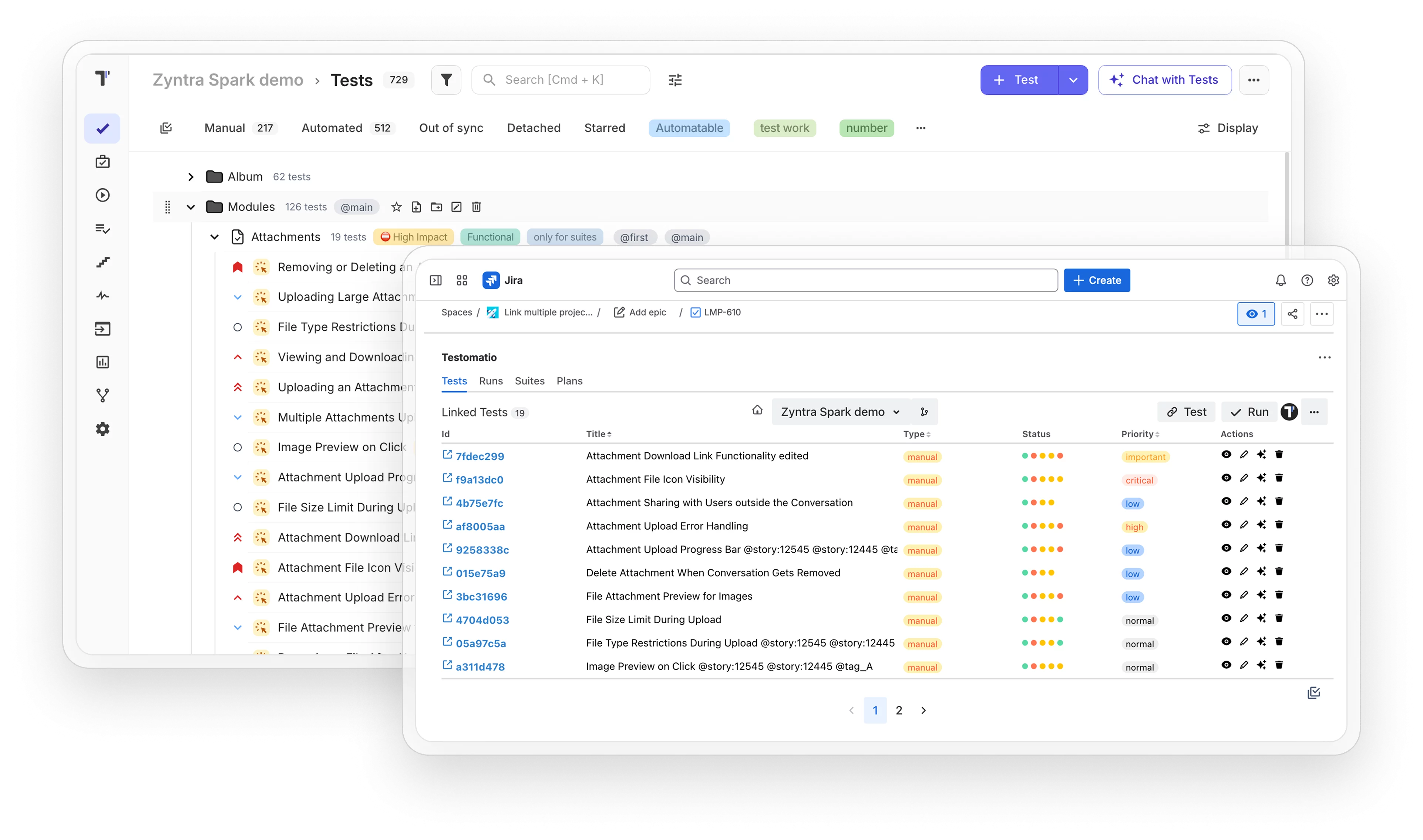
Connect testing to your bug tracker with a bidirectional Jira plugin. Link tests to user stories and manage defects without leaving Jira.
Jira integration

Trusted by over 500 forward-thinking companies

logo
logo
logo
logo
logo
logo
logo
logo
logo
logo
logo
logo
logo
logo
logo
logo
logo
logo

How Jira integration works in Testomat.io

Link tests to Jira stories and check coverage, defects and sprint progress without leaving Jira.
Link tests
1. Link tests
Connect manual and automated tests to the Jira user stories they cover.
Attach tests to stories
Map tests to issues
Connect tests and issues
Link test cases to stories
Sync
2. Sync
Test changes and run results appear in Jira and Testomat.io automatically.
Sync changes automatically
Update both tools
Share edits both ways
Keep data in sync
Track coverage
3. Track coverage
Check how many tests cover each user story and their latest status.
See coverage per story
Check automation percent
Find untested stories
Count tests per issue
Create defects
4. Create defects
Create a Jira bug from a failed test during the run.
Report bugs from failures
File bugs in Jira
Create bugs from runs
Link failed tests
Report status
5. Report status
Post run summaries to Jira and check test progress for each sprint.
Share sprint progress
Post run reports
Send results to Jira
Show sprint coverage

Testomat.io features for Jira

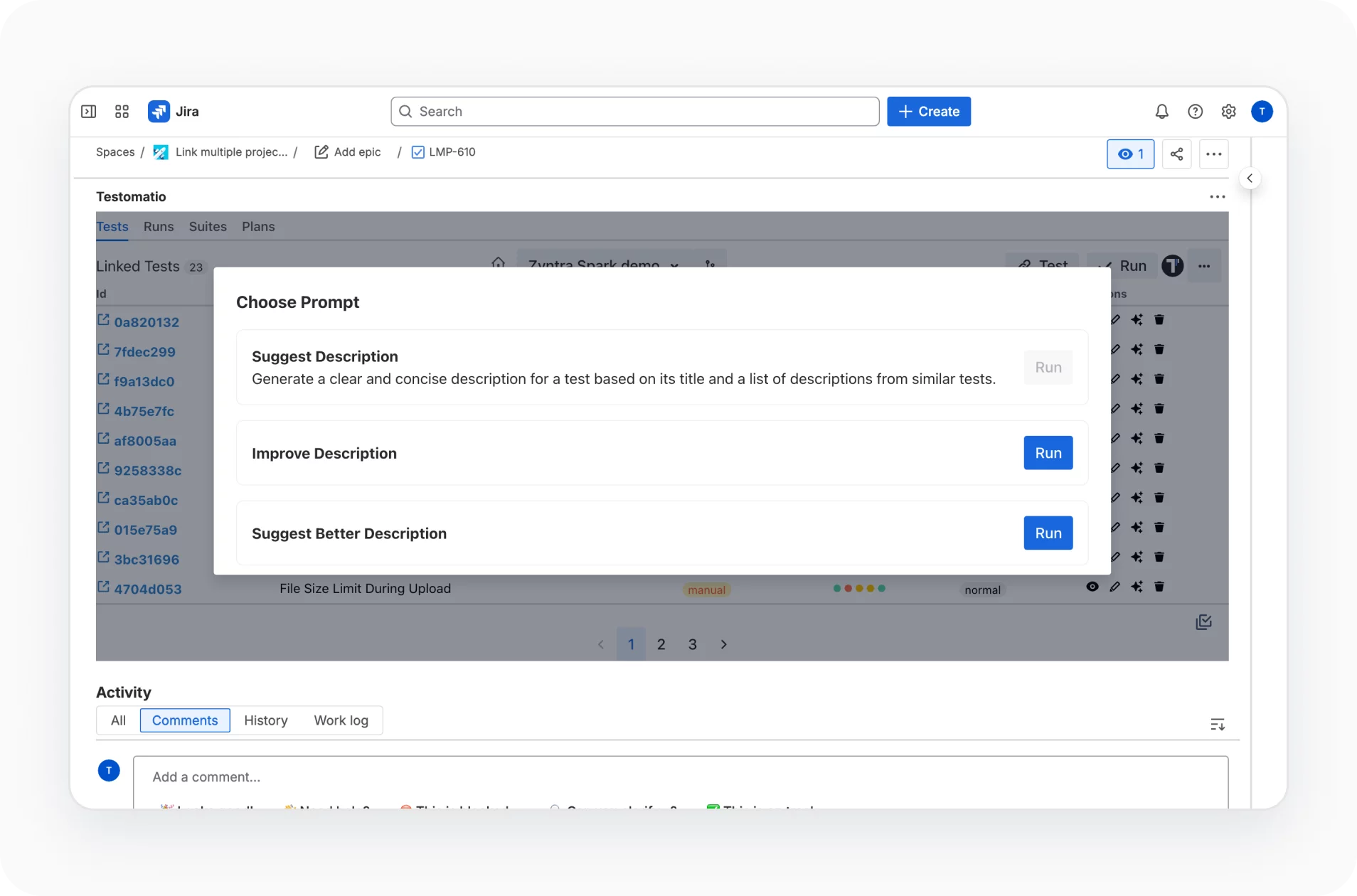
AI Jira plugin intelligence

AI-powered capabilities natively embedded into the Jira Plugin enhance your workflow, foster collaboration and increase productivity.
AI Jira plugin intelligence
Test results in Jira

Advanced Jira plugin provides bidirectional functionality to link tests to user stories. View test results, requirement coverage and edit scenarios directly from Jira.

Test results in Jira
Link auto tests to Jira

On the Coverage Page in Jira, see the count of test statuses, passed, failed, skipped, and the automation percentage of tests linked to user stories.

Link auto tests to Jira
User stories coverage

See directly from Jira on the Coverage Page quantity of tests status (Failed, Passed, Skipped) automation status of tests linked to user stories in percent. And here openly check which test cases manual which automated one.

Learn more
User stories coverage
User story tests execution

Check, are your requirements covered or no by your tests directly from Jira. Generated Run Report apart link on test results contains such useful information as run time, environment, configuration options, who had launched the run

User story tests execution
Work with branches in Jira

With Jira Plugin you can work with your project testomat.io branches directly from Jira. Namely, add new branches to the existing project, switch between branches
make changes within existing branches.

Work with branches in Jira
Create Jira issue for a failed run

Automatically create a Jira issue when a test run fails. Thus, keep on track of tests failures and keep tests results right inside Jira and Testomat.io.

Create Jira issue for a failed run
Create Jira issue for a failed test

Select a Run with a failed test. Find this test in a list and create a new issue for this test or link it to an existing issue. Created Issue will receive information on a test run and a web link to the Run report will be added inside.

Create Jira issue for a failed test
Create defect from the UI

Create a task in Jira, GitHub, or Azure when a test run fails right from the test management app in one click. Track test results and monitor defect fixes without switching between systems

Create defect from the UI
Jira test prioritization

Due to close integration, you can check test prioritization and test tagging directly into Jira from testomatio, to better optimize the order solving issues.

Jira test prioritization
Confluence integration

Easily add your tests to a Confluence page and provide more visibility to your team. Use macros to display tests linked to Jira ticket by test suite or by test case name.

Confluence integration
Living docs

Collaborate with team members based on your tests. Generate publicly available documentation from your project. Living docs are updated all the time you do something with tests in real-time

Living docs
Multi-environment manual test execution in Jira

Execute manual tests on multi-environment directly in Jira within the Jira plugin in form of checklists in Jira issue separately for each environment. When you complete the tests, results will be placed in a run group in test management bi-directionally.

Multi-environment manual test execution in Jira
Sprints coverage for Jira

Keep track of tests that link to Jira so you can follow the project’s progress and report it to your stakeholders.

Sprints coverage for Jira
Mixed test run in Jira

Execute manual and automated tests combination in the same run directly with Jira. When automated tests start on the CI/CD service, check the manual tests as a checklist in Jira simultaneously. After the Mixed Run group finishes, a link to the merged result will be created.

Mixed test run in Jira

How Jira integration can help?

Bring test results and coverage into Jira so BAs, developers, and QA work from one source, from linking cases to raising defects on failed runs.
Startups & small teams
Stay in Jira
Check results without extra tools.
One-click defects
Raise issues on failures.
Coverage view
See what is tested.
Free plan
Start without a card.
Mid-sized products
Sprint coverage
Track tests per sprint.
Jira statistics
Automation coverage and success rate.
Mixed runs
Manual and automated together.
BDD in Jira
BAs edit feature files.
Enterprises projects
Multi-project links
Many projects in Jira.
Branch control
Work with branches from Jira.
Multi-env execution
Manual tests per environment.
AI plugin
Smart capabilities inside Jira.

All Jira integration features

Linking & Traceability
Link tests, suites and plans to Jira issues
Filter by suite, plan or tag before linking
Link a test to several issues
Connect several Jira projects to a single project
Automatic unlink when an issue is deleted
Two-way sync between Jira and Testomat.io
Test authoring in Jira
Create tests and suites from an issue
Bulk-create tests from a list of titles
Edit test titles and descriptions
Edit BDD feature files
Work in branches named after the issue
Switch between branches and Main
Execution from Jira
Run manual tests from the issue
Run automated tests in CI
Mixed Run with manual and automated tests
Run linked test plans
Run automated tests as manual
Run as a checklist
Set environment, assignee and RunGroup
Defects & Bug linking
Create Jira issues from failed tests and runs
Link existing issues by key
Pre-filled steps, environment and run link
Choose issue type, priority, labels and parent
See issue title and status on each test
Re-run linked tests after the fix
Coverage & Reporting
Runs tab with status, type and environment
Passed, failed and skipped counts per run
Run summary posted to the linked issue
Tests Coverage with automation percentage
Sprints Coverage by sprint ID
AI & Access
AI test suggestions for a suite
AI suite summary
AI-written and improved test descriptions
Read-only view for all Jira users
Login by email, Google, GitHub or SSO
Jira Cloud and Jira Server support
What clients say

Recent reviews

“Excellent customer support”
Customer support is always prompt and high-quality. It's also great to see that user feedback is considered when developing new features. The team makes an effort to provide overviews of new features and keeps users informed about the latest updates.
4/5
Aliona Kovalchuk
Aliona Kovalchuk
General QA
“The Best TMS for Our QA Team!”
Our 15-person QA team has used Testomat.io daily for over two years. After comparing tools like TestRail, it stood out in both features and pricing. It’s affordable yet powerful. Jenkins integration works seamlessly, even manual testers can run tests easily. The clean UI speeds onboarding, improves collaboration, and saves time. We’ve recommended it widely, and others love it too.
5/5
Vladyslav M.
Vladyslav M.
General QA
“Testomat.io makes daily testing so much easier”
I’ve used Testomat.io daily for over two years, and it’s the best TMS I’ve worked with. Compared to tools like TestRail, it offers more features at a better price. Jenkins integration is seamless, even for manual testers. The UI is clean and easy to learn. It speeds up workflows, improves transparency, and makes team collaboration much smoother.
5/5
Dmytro H.
Dmytro H.
General QA
“Very convenient platform for managing test cases”
The platform is convenient and intuitive to use. I’ve been using it long enough to say it’s very user-friendly. It’s clear that the team is constantly working on and improving the platform.
5/5
Aleksey K.
Aleksey K.
General QA
“Great tool for creating and managing manual test cases efficiently”
As a Manual QA, I use Testomat.io to create and manage test cases with ease. The interface is intuitive, making onboarding simple. Test plans, runs, and results are well-structured in one place. Tagging helps organize cases efficiently. AI features speed up test creation. It keeps workflows transparent, improves collaboration, and reduces routine work.
5/5
Oksana G.
Oksana G.
General QA
“Testomat.io has been a great tool for managing both automated and manual tests in one place”
I really like how easy it is to integrate with frameworks and CI/CD tools, and the real-time reports with screenshots and analytics save a lot of time. Overall, it makes collaboration in the team much smoother and keeps testing well-organized.
5/5
Aleksey K.
Aleksey K.
Quality Assurance Engineer

Frequently asked questions

Does the Jira integration support bidirectional synchronization in real time? Testomat

The integration works both ways. You can create and link Jira issues from Testomat.io, and see linked tests and their status on the Jira issue itself. Links and statuses update as tests run and as issues change, so both sides stay aligned, though updates sync on each change rather than as a constant live feed.

Can non-technical stakeholders view test reports inside Jira without a Testomat.io account? Testomat

With the Testomat.io Jira app installed, stakeholders can see linked tests and run results right on the Jira issue, so they get the summary without leaving Jira. For the full report and analytics inside Testomat.io, the simplest access is a read-only account.

How does Testomat.io link automated test results to Jira user stories? Testomat

You tag each test with its Jira issue key, either in the test itself or through the plugin. When automated results report in from CI, Testomat.io matches them to that key, so the pass/fail status rolls up to the right user story.

Can we migrate our existing test cases from TestRail or Xray into Testomat.io within Jira? Testomat

Yes. Testomat.io imports test cases from both TestRail and Xray. You run the import in Testomat.io, and the migrated tests then link to your Jira issues through the plugin, so they show up next to the stories they cover.

Is it possible to execute automated tests as manual tests directly from Jira tickets? Testomat

Yes. Testomat.io can import automated tests as manual, so a tester can step through them by hand. With the Jira app, you launch those tests from the linked ticket and record the result, without opening a separate tool.
Supercharge Jira with Testomat.io

Supercharge Jira with Testomat.io







