





AI Jira plugin intelligence
Find missing test cases and fix unclear descriptions with AI, without leaving Jira. The Testomat.io Jira plugin suggests new tests and summarizes suites directly on the issue.
Trusted by over 500 forward-thinking companies
















How AI Jira plugin intelligence works in Testomat.io

1. Install plugin
Add from Atlassian Marketplace
Install the Jira app
Find it on Marketplace
Add Testomat.io to Jira

2. Connect Jira
Paste your API token
Link projects
Add your Jira project
Log in from Jira

3. Generate tests
Suggest tests with AI
Turn issues into tests
Create tests from stories
Improve descriptions with AI

4. Sync results
Run tests from tickets
Attach reports to issues
See results in Jira
Track defect status in Jira
How AI Jira plugin intelligence can help?
Keep QA, BAs, developers, and PMs working in the tools they already use while AI handles the busywork between Jira and your test suite.
Startups & small teams
Get Testomat.io running inside Jira in minutes. AI helps you write test cases and bug reports from the start.

Quick install
Atlassian Marketplace, ready in minutes

AI test ideas
Stories become test cases fast.

Smart bug reports
AI drafts the description.

Stay in Jira
BAs and PMs never leave
Mid-sized products
As your test suite grows, keep Jira and your tests in sync and find the real cause of failures faster.

Two-way sync
Edits flow in both directions.

Cluster failures
Same root cause grouped.

Trace gaps
AI flags untested requirements.

Run from Jira
Trigger tests inside the issue.
Enterprise projects
Built for security reviews and large portfolios, with SSO, SCIM, audit logs and your choice of AI provider.

Custom AI provider
OpenAI, Anthropic, Azure, default

Security flexibility
Works with Jira Cloud and Server

Bidirectional workflows
Automate design and tracking.

Compliant setup
SSO, SCIM, audit log included.
Testomat.io AI Jira plugin features
Test suggestions
AI studies the existing tests in a suite and proposes new cases that follow the same patterns. You review the suggestions and add the ones that fit. Coverage gaps close without leaving Jira.

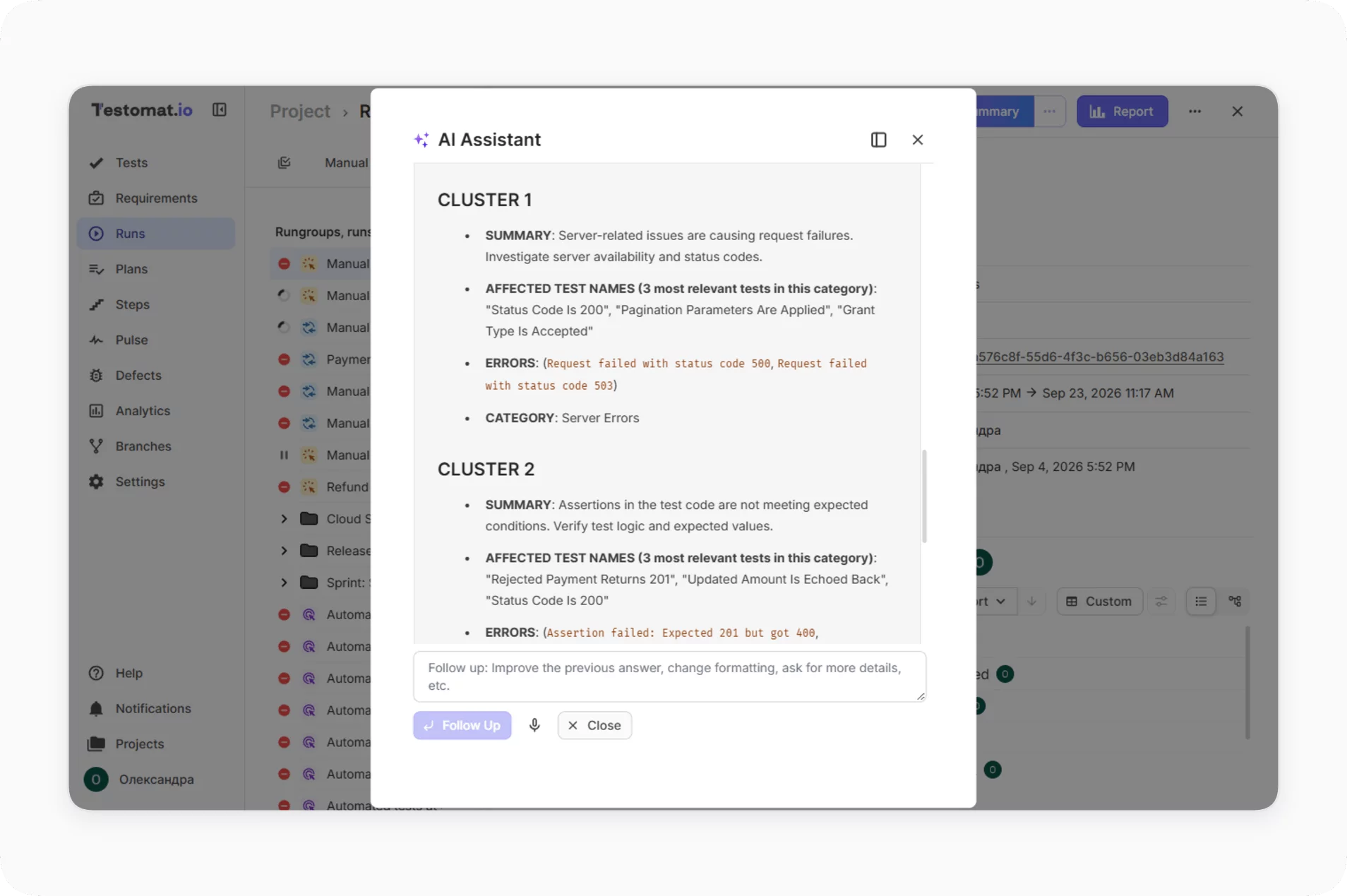
AI failure clusterization
AI analyzes automated test failures inside the plugin and groups failures with shared root cause, surfacing patterns directly in the Jira view.
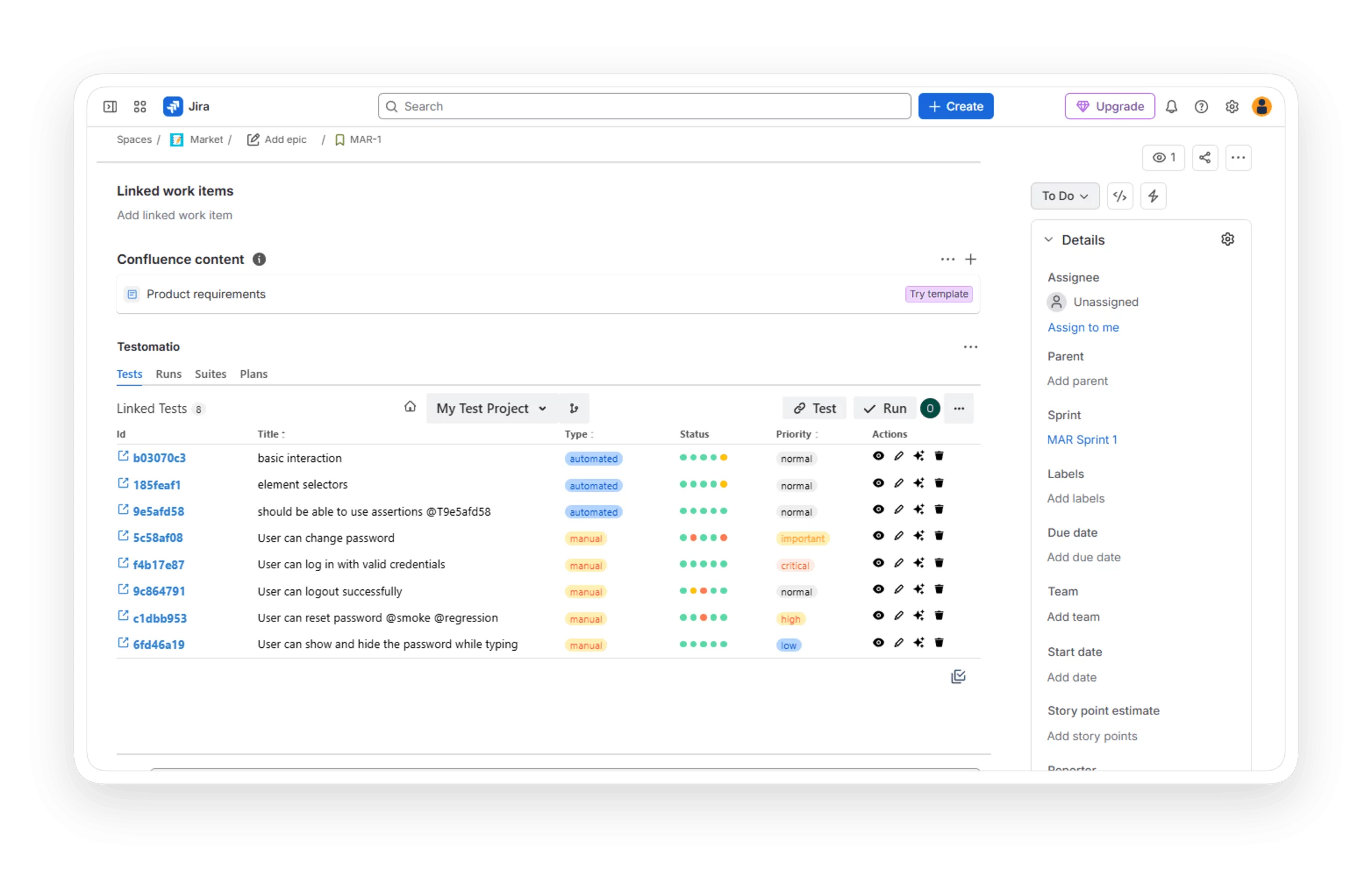
Linked test artifacts
Test cases, runs, and reports link directly to Jira issues, epics, and bugs. Full end-to-end traceability is configured per project.

Real-time visibility
View linked test data, results, and coverage inside Jira issues. QA and developers refine cases live in either interface, with edits syncing both ways.

Why teams choose Testomat.io AI Jira plugin intelligence

Native Jira plugin
Atlassian Marketplace install, no third-party AI middleware required.

Two-way sync
Issues, tests, results, and defects flow both directions in real time.

Pick your AI
Groq built in, or your own provider on Enterprise

AI-native
AI built into planning, execution, triage, and reporting across the platform.

Open ecosystem
Extend with AI skills, MCP server, and a full public REST API.
What clients say
Recent reviews

“Excellent customer support”
Customer support is always prompt and high-quality. It's also great to see that user feedback is considered when developing new features. The team makes an effort to provide overviews of new features and keeps users informed about the latest updates.
4/5

“The Best TMS for Our QA Team!”
Our 15-person QA team has used Testomat.io daily for over two years. After comparing tools like TestRail, it stood out in both features and pricing. It’s affordable yet powerful. Jenkins integration works seamlessly, even manual testers can run tests easily. The clean UI speeds onboarding, improves collaboration, and saves time. We’ve recommended it widely, and others love it too.
5/5

“Testomat.io makes daily testing so much easier”
I’ve used Testomat.io daily for over two years, and it’s the best TMS I’ve worked with. Compared to tools like TestRail, it offers more features at a better price. Jenkins integration is seamless, even for manual testers. The UI is clean and easy to learn. It speeds up workflows, improves transparency, and makes team collaboration much smoother.
5/5

“Very convenient platform for managing test cases”
The platform is convenient and intuitive to use. I’ve been using it long enough to say it’s very user-friendly. It’s clear that the team is constantly working on and improving the platform.
5/5

“Great tool for creating and managing manual test cases efficiently”
As a Manual QA, I use Testomat.io to create and manage test cases with ease. The interface is intuitive, making onboarding simple. Test plans, runs, and results are well-structured in one place. Tagging helps organize cases efficiently. AI features speed up test creation. It keeps workflows transparent, improves collaboration, and reduces routine work.
5/5

“Testomat.io has been a great tool for managing both automated and manual tests in one place”
I really like how easy it is to integrate with frameworks and CI/CD tools, and the real-time reports with screenshots and analytics save a lot of time. Overall, it makes collaboration in the team much smoother and keeps testing well-organized.
5/5
Frequently asked questions
Does AI Jira Plugin Intelligence work with Jira Cloud, Server, and Data Center?


Yes. Setup is the same for all three. Jira Cloud uses an API token, Jira Server and Data Center use credentials. Configuration happens in the Testomat.io Administration dashboard, and the plugin itself is installed from the Atlassian Marketplace.
Which AI provider powers the plugin?
The default provider is Groq, which ships with the platform. On the Enterprise plan you can switch to OpenAI, Anthropic, Azure OpenAI, or another supported provider. Pick the model that fits your security regulations and data-sharing policy. The plugin is fully native, with no dependency on third-party AI middleware.
Can non-technical teammates use this without learning Testomat.io?
Yes. That's the point. Business analysts, product managers, and other non-technical roles stay inside Jira. They see linked test cases, run results, and coverage right on the issue. QA does the test work in Testomat.io. AI keeps both sides in sync.
What data is sent to the AI provider?
Jira issue data (stories, bugs, descriptions), existing test cases linked to those issues, and execution results from runs. Embeddings cover titles and descriptions. LLM calls run on demand when a feature is invoked. AI features are off by default and turned on per project in Company Settings.
Which plan unlocks the AI Jira Plugin?
Core Jira integration is available on the Professional plan. The full AI layer (test suggestions, failure clusterization, custom AI provider, defect suggestions, custom AI workflows) sits on the Enterprise plan. The Atlassian Marketplace plugin itself is free to install once your Testomat.io account is connected.
