AI test generation from requirements

Many failures in a failed run share the same cause, and a test-by-test review takes a long time. AI failure clusterization groups similar failures of a finished run as clusters with a summary, the affected tests, the errors, and a category. You start with the cluster that blocks the most tests.
AI test generation from requirements
Trusted by over 500 forward-thinking companies

logo
logo
logo
logo
logo
logo
logo
logo
logo
logo
logo
logo
logo
logo
logo
logo
logo
logo

How AI test generation from requirements works

When requirements and tests are in separate tools, coverage gaps stay invisible. Testomat.io links requirements to your project, and AI suggests test suites for them. You choose the relevant cases and close the gaps before release.
Link
1. Link
Requirements from every source join a single workspace.
Connect Jira or Confluence.
Import a Linear issue.
Upload files or plain text.
Attach images and mockups.
Analyze
2. Analyze
AI reads the description and builds a structured summary.
Structured requirement summary.
Analyze requirements for edge cases.
AI-powered image understanding.
Chat with requirements.
Generate
3. Generate
AI suggests suites and test cases for the requirement.
Suggest suites.
Suggest more tests.
Write description.
Follow up refinement.
Approve
4. Approve
You add the relevant cases and keep coverage visible.
Explicit approval.
Automatic requirement links.
Analyze tests coverage.
Find tests for requirement.

AI test generation from requirements in action
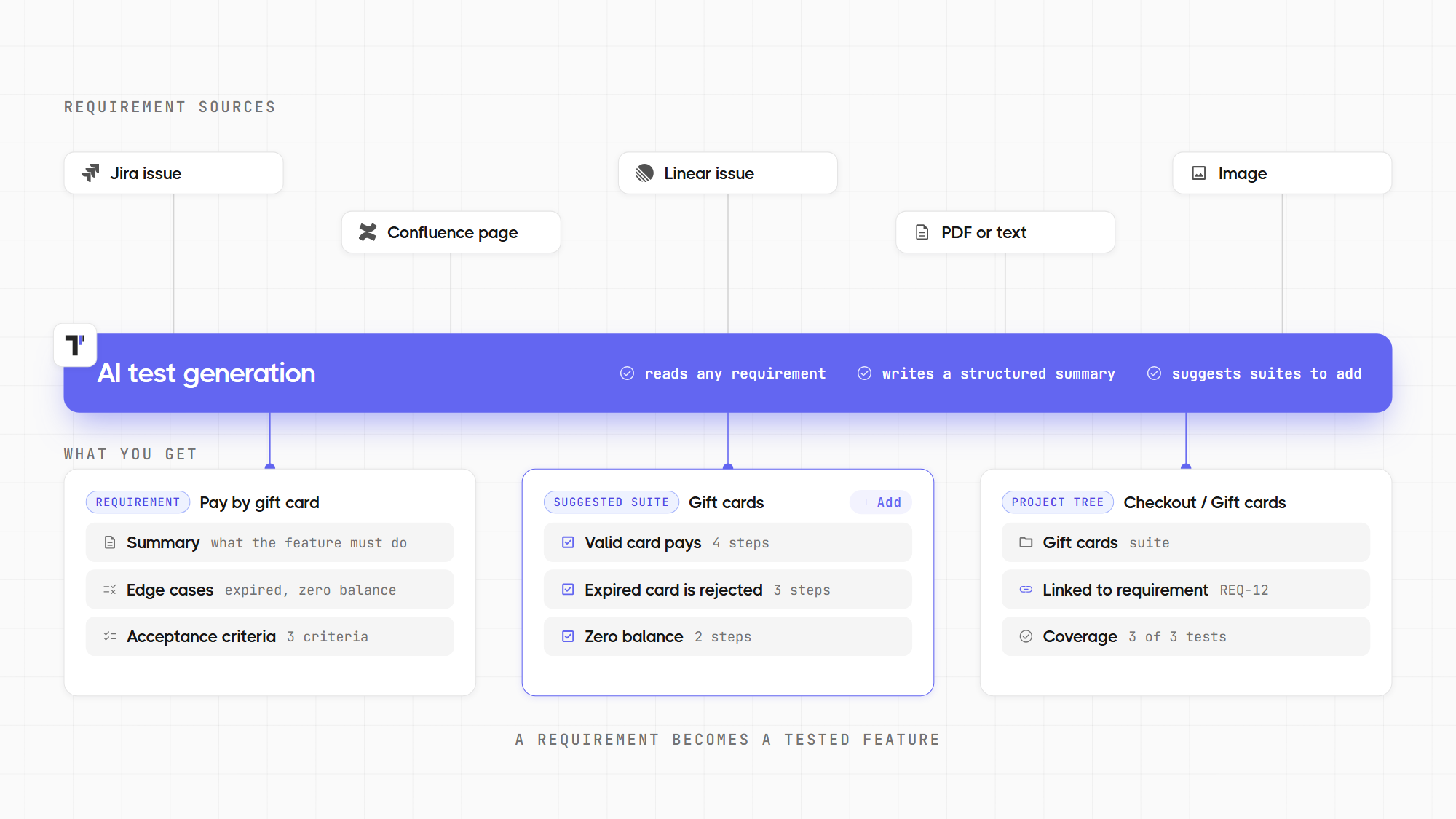
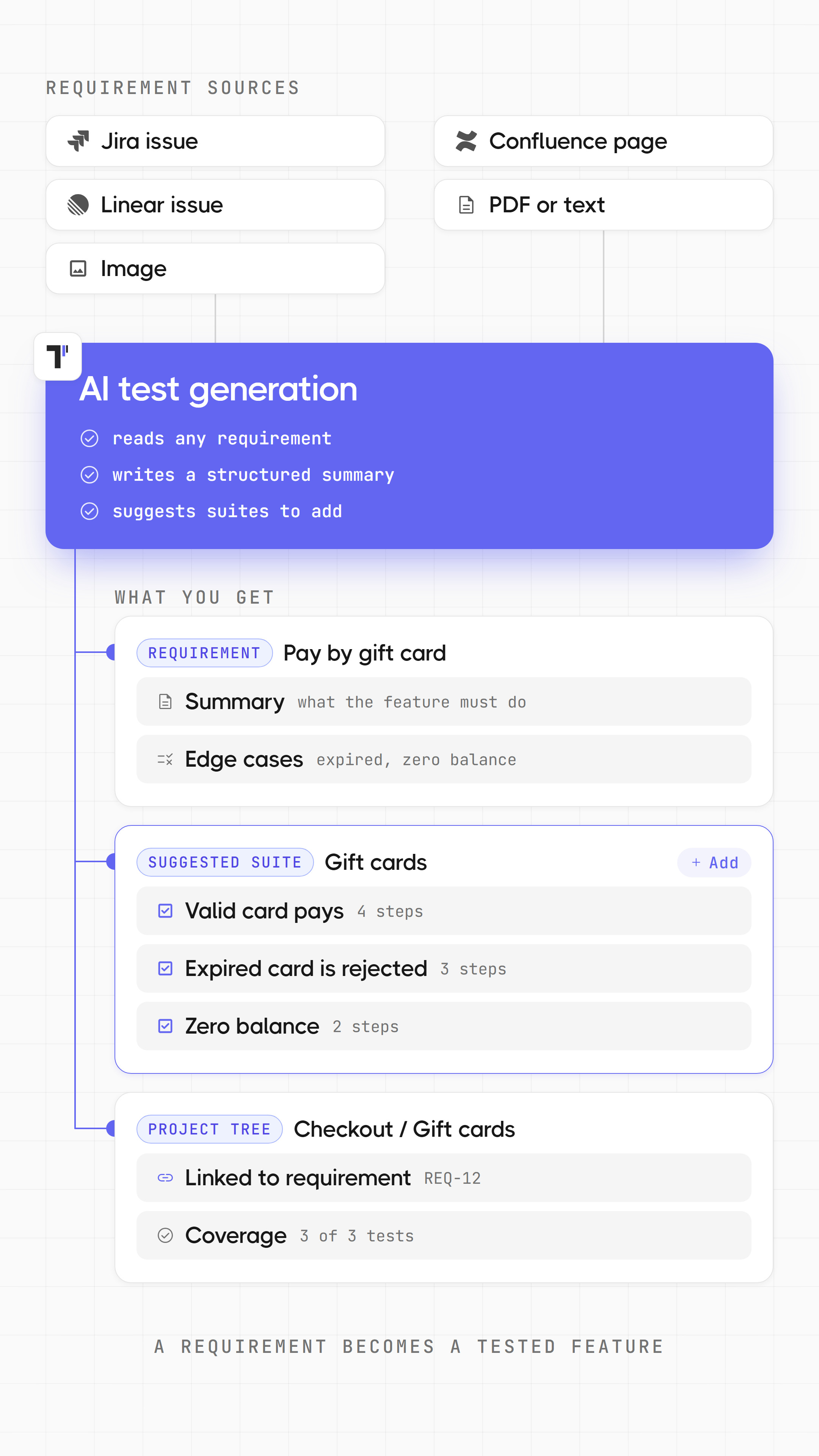
AI reads a requirement from Jira, Confluence, Linear, files, or images and suggests a suite with test cases. You approve, and the suite links to the requirement.
AI test generation from requirements in action AI test generation from requirements in action
Benefits of AI test generation from requirements

https://testomat.io/wp-content/uploads/2026/11/many-channels.svg
Many sources
Jira, Confluence, Linear, files, images, and plain text become requirements.
https://testomat.io/wp-content/uploads/2026/10/ai-suggestions.svg
Ready suites
AI suggests suites and test cases for each requirement.
https://testomat.io/wp-content/uploads/2026/10/step-link_1.svg
Automatic links
Added suites connect to the requirement.
https://testomat.io/wp-content/uploads/2026/11/ai-test-creation-more-coverage.svg
Coverage checks
AI finds missing and redundant tests.
https://testomat.io/wp-content/uploads/2026/11/ai-assistant-you-stay-in-control.svg
Full control
Suggestions reach the project after your approval.

AI test generation from requirements in Testomat.io

AI-powered requirements

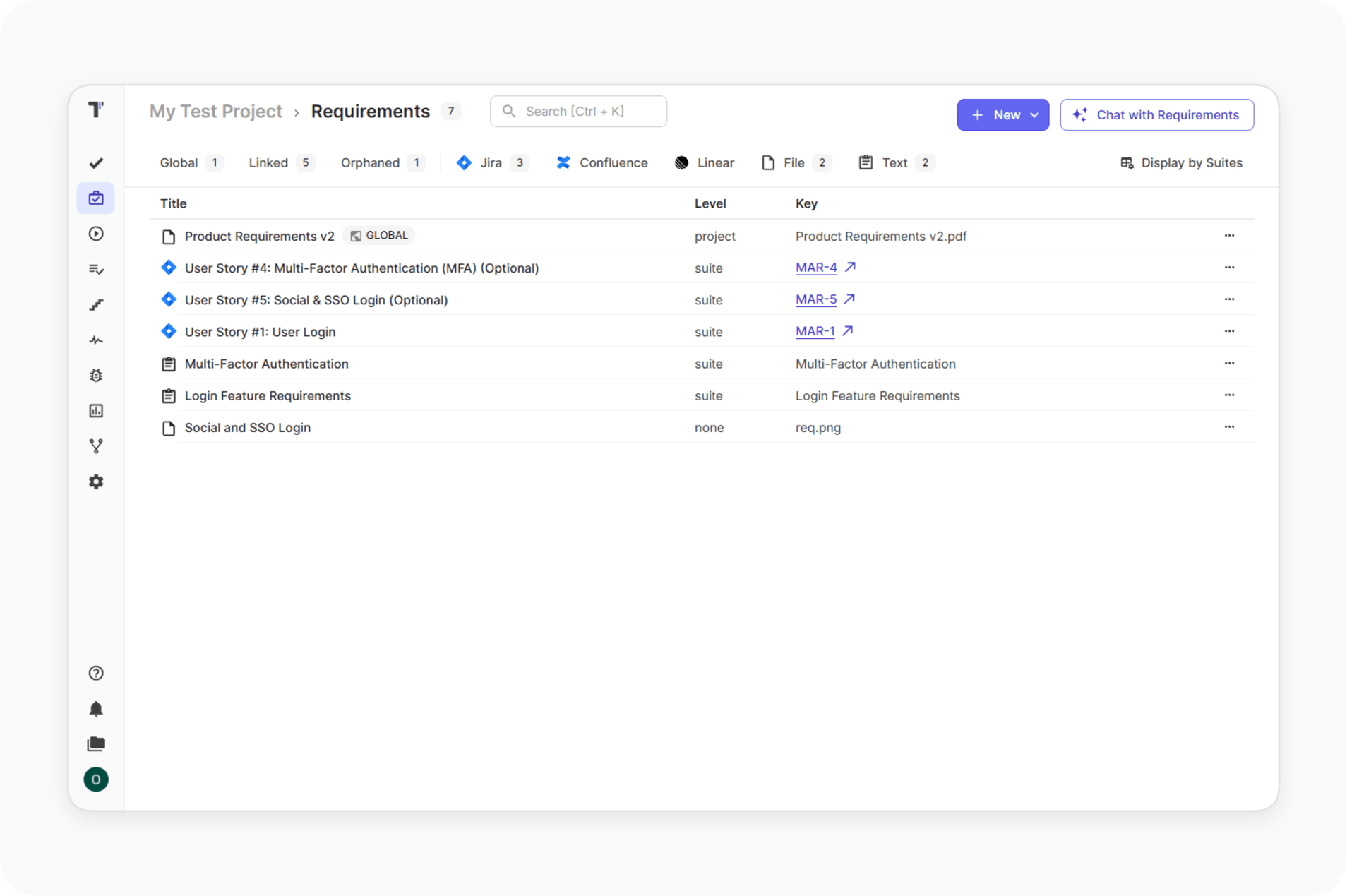
The Requirements page collects requirements from every source. You view and update them in a single workspace. The team stops jumping across tools and sees the full picture.

Learn more
AI-powered requirements
Requirement sources

Add a requirement from a Jira issue, a Confluence page, a Linear issue, a file, or plain text. AI analyzes the description and builds a structured summary. The requirement details show linked suites, the source, and attachments.

Learn more
Requirement sources
AI-powered image understanding for requirements

Attach images to a requirement, and AI includes them in the analysis. Mockups and screens become part of the requirement context. Tests cover what the design shows.

Learn more
AI-powered image understanding for requirements
Create a suite case from requirements

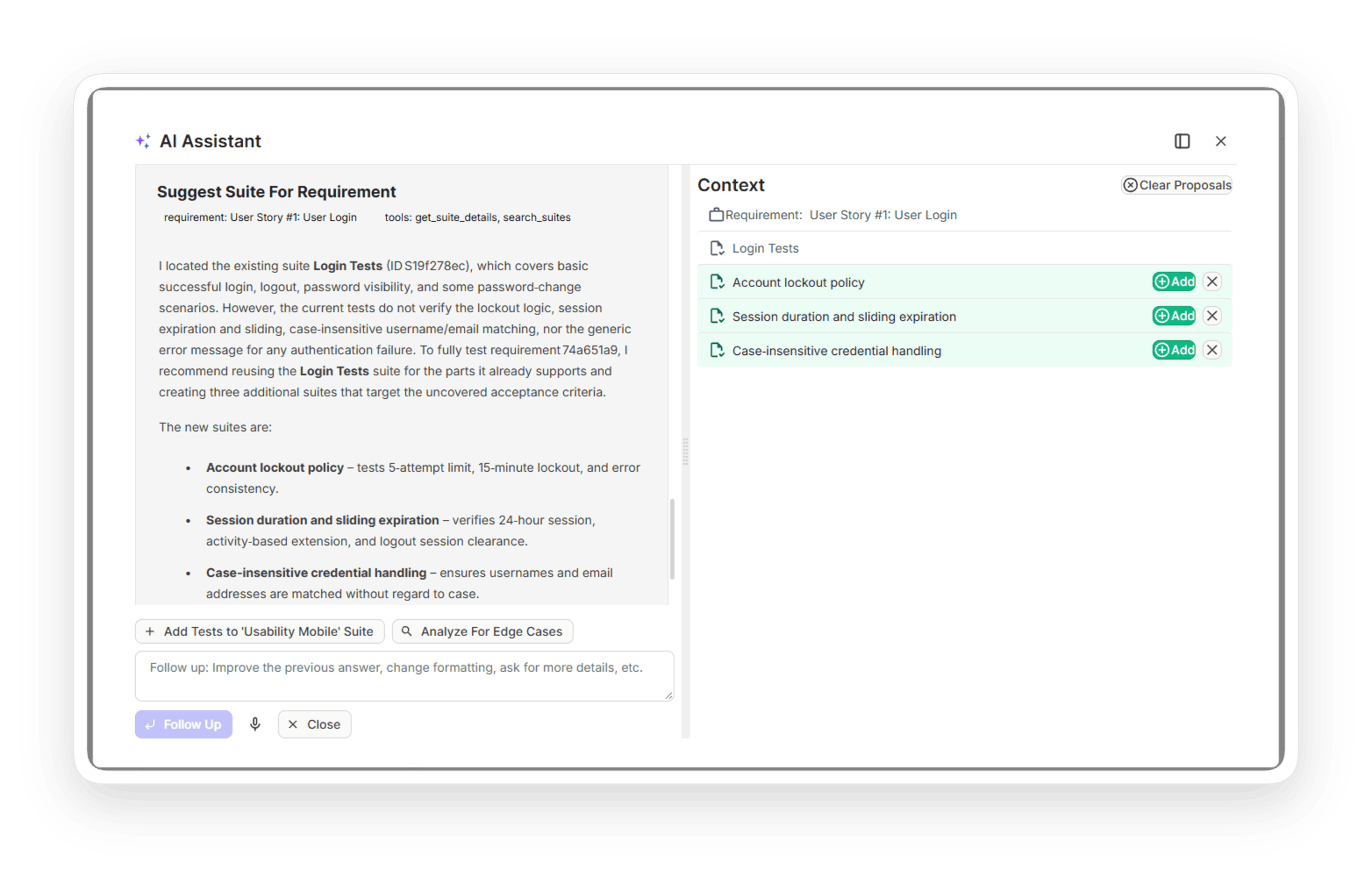
Click Analyze Requirement, and AI suggests suites for the requirement. You refine the options with Follow up and add the relevant ones. Added suites link to the requirement automatically.

Learn more
Create a suite case from requirements
Analyze tests coverage

AI compares the requirement with its linked suites. You add missing tests and remove redundant ones directly in the AI window. Coverage grows where it matters, and the suite stays clean.

Learn more
Analyze tests coverage
Clarify requirement

The Clarify Requirement action finds edge cases and possible logic resolutions. You discuss unclear points before development starts. Risky scenarios reach the test suite instead of production.

Learn more
Clarify requirement
Find tests for requirement

The Find Tests For Requirement action locates existing cases for a requirement. It also suggests cases that could relate to it. Ready tests connect without manual search.

Learn more
Find tests for requirement
Chat with requirements

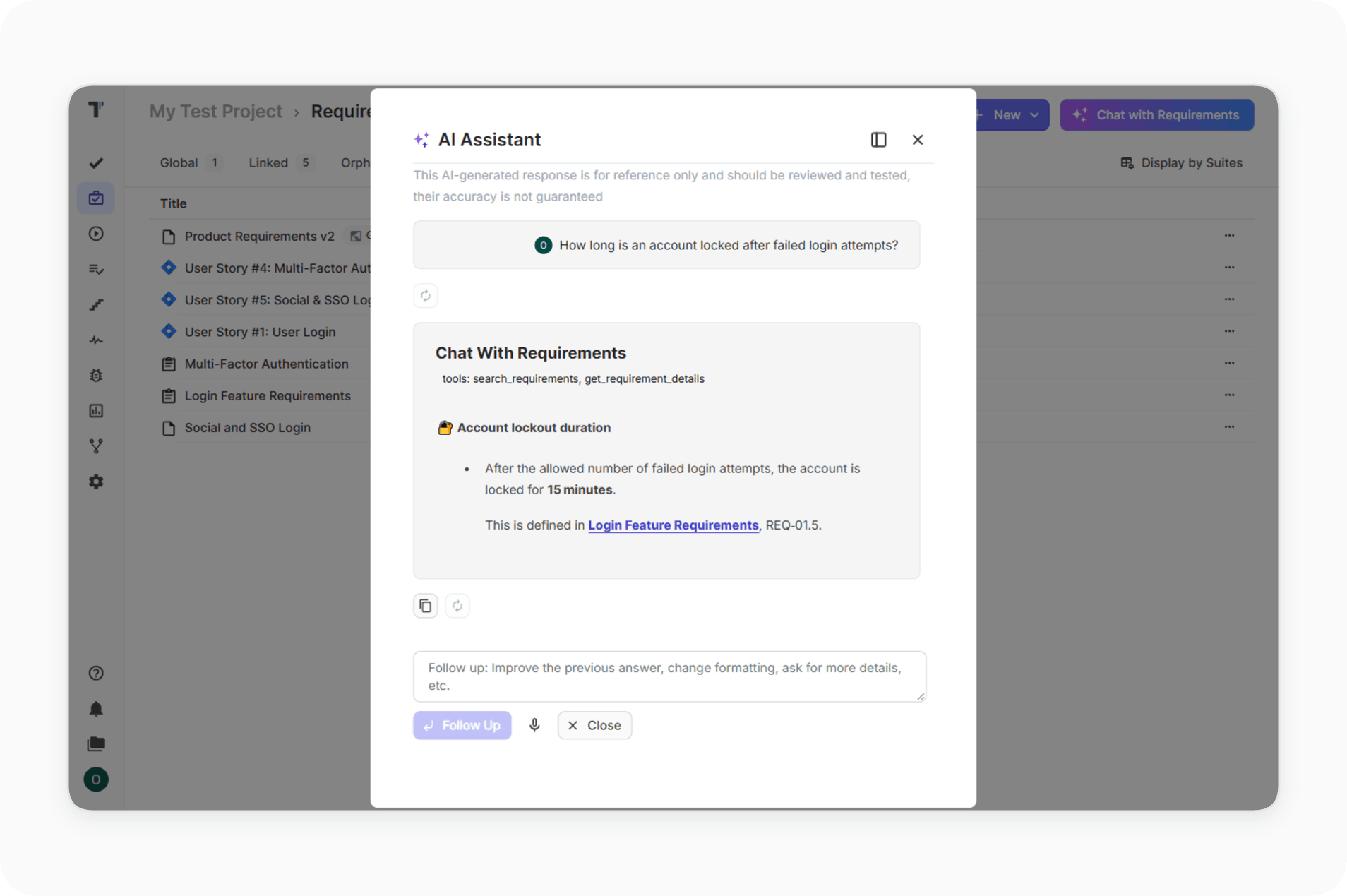
You ask questions about project documentation in plain language. The AI Assistant searches the requirements and answers with the context of your project. Knowledge stays available to the whole team.

Learn more
Chat with requirements

How AI test generation from requirements can help?

Coverage follows the product work in teams of every size.
Startups & small teams
Build coverage from specs.
Fast coverage
A requirement becomes a suite in a few clicks.
Ready descriptions
Selected cases get full text.
Edge cases early
Risks appear before development.
Single workspace
Requirements stay in a single place.
Mid-sized products
Connect Jira to testing.
Jira flow
Issues become requirements without copying.
Coverage checks
Missing tests surface in the AI window.
Fewer redundant tests
The suite stays clean.
Chat answers
Documentation responds in real time.
Enterprise projects
Keep traceability at scale.
Traceability
Suites link to requirements automatically.
Confluence and files
Specs of every format join the project.
Explicit approval
Suggestions wait for your action.
Safe rollout
A company owner enables AI in Company Settings.
What clients say

Recent reviews

“Excellent customer support”
Customer support is always prompt and high-quality. It's also great to see that user feedback is considered when developing new features. The team makes an effort to provide overviews of new features and keeps users informed about the latest updates.
4/5
Aliona Kovalchuk
Aliona Kovalchuk
General QA
“The Best TMS for Our QA Team!”
Our 15-person QA team has used Testomat.io daily for over two years. After comparing tools like TestRail, it stood out in both features and pricing. It’s affordable yet powerful. Jenkins integration works seamlessly, even manual testers can run tests easily. The clean UI speeds onboarding, improves collaboration, and saves time. We’ve recommended it widely, and others love it too.
5/5
Vladyslav M.
Vladyslav M.
General QA
“Testomat.io makes daily testing so much easier”
I’ve used Testomat.io daily for over two years, and it’s the best TMS I’ve worked with. Compared to tools like TestRail, it offers more features at a better price. Jenkins integration is seamless, even for manual testers. The UI is clean and easy to learn. It speeds up workflows, improves transparency, and makes team collaboration much smoother.
5/5
Dmytro H.
Dmytro H.
General QA
“Very convenient platform for managing test cases”
The platform is convenient and intuitive to use. I’ve been using it long enough to say it’s very user-friendly. It’s clear that the team is constantly working on and improving the platform.
5/5
Aleksey K.
Aleksey K.
General QA
“Great tool for creating and managing manual test cases efficiently”
As a Manual QA, I use Testomat.io to create and manage test cases with ease. The interface is intuitive, making onboarding simple. Test plans, runs, and results are well-structured in one place. Tagging helps organize cases efficiently. AI features speed up test creation. It keeps workflows transparent, improves collaboration, and reduces routine work.
5/5
Oksana G.
Oksana G.
General QA
“Testomat.io has been a great tool for managing both automated and manual tests in one place”
I really like how easy it is to integrate with frameworks and CI/CD tools, and the real-time reports with screenshots and analytics save a lot of time. Overall, it makes collaboration in the team much smoother and keeps testing well-organized.
5/5
Aleksey K.
Aleksey K.
Quality Assurance Engineer

Frequently asked questions

Can AI generate test cases from requirements? Testomat

Yes. Link a requirement source, and AI analyzes the description. It suggests suites and test cases, and you add the relevant ones.

Which requirement sources does Testomat.io support? Testomat

Jira issues, Confluence pages, Linear issues, files, plain text, and images attached to requirements.

How does AI check test coverage of a requirement? Testomat

Use Analyze Tests Coverage. AI compares the requirement with its linked suites, then you add missing tests and remove redundant ones.

Do suggested tests join the project automatically? Testomat

Suggestions wait for your action. You select the cases to add, and added suites link to the requirement automatically.

Which plan includes AI requirements? Testomat

AI requirement features are available on the Professional plan and above. AI is off by default; a company owner enables it in Company Settings.
Generate tests from requirements in Testomat.io

Generate tests from requirements in Testomat.io

🚀 We're live on Product Hunt!

Check us out on Product Hunt