

Automated tests reporting

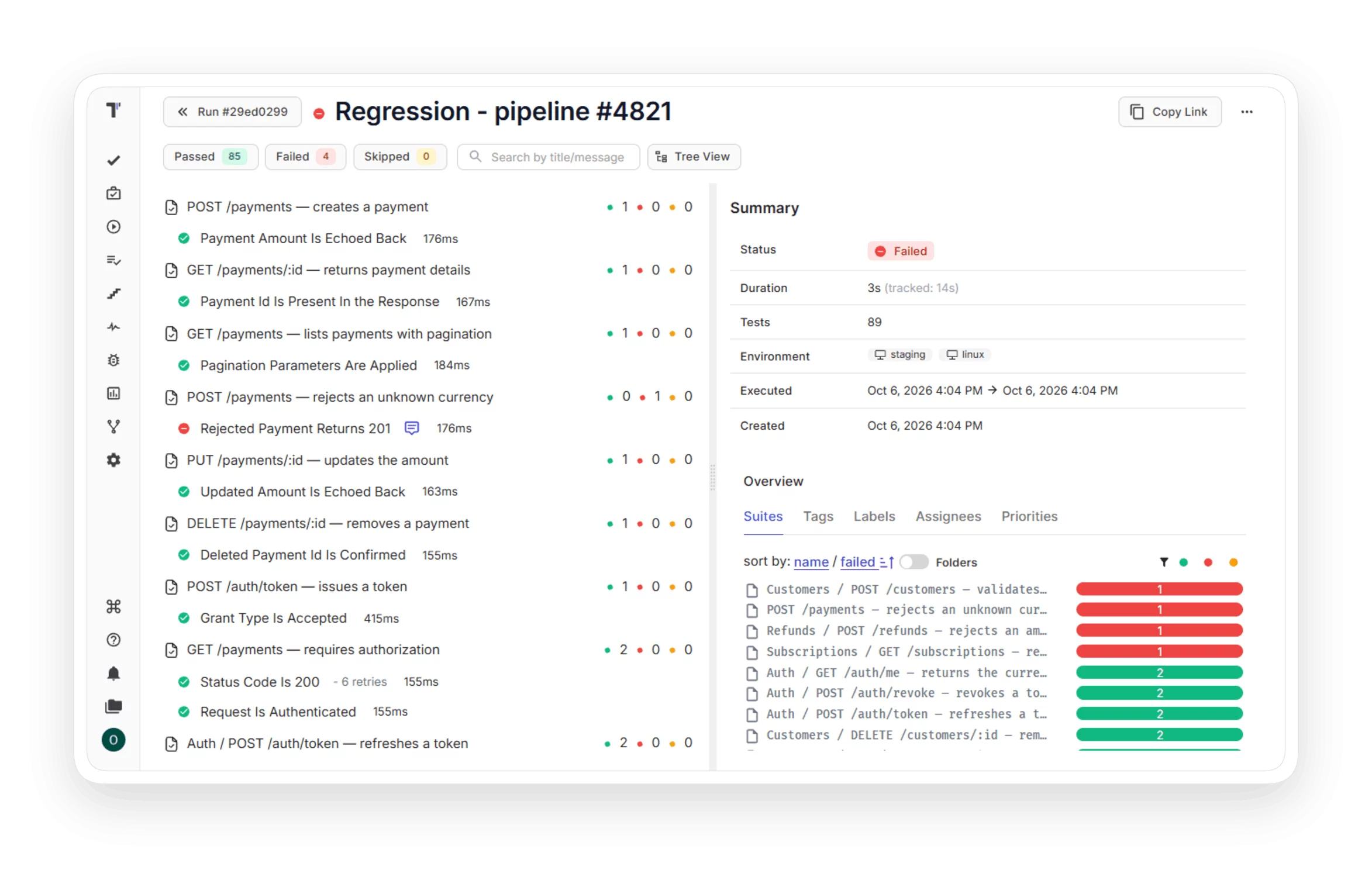
You see automated test results in real time and find the cause of each failure with screenshots, videos, stacktraces, and analytics.
Automated tests reporting
Trusted by over 500 forward-thinking companies

logo
logo
logo
logo
logo
logo
logo
logo
logo
logo
logo
logo
logo
logo
logo
logo
logo
logo

Benefits of automated tests reporting

https://testomat.io/wp-content/uploads/2026/10/real-time-results.svg
Real-time results
Results appear as tests finish.
https://testomat.io/wp-content/uploads/2026/10/failure-evidence.svg
Failure evidence
Screenshots and videos for failed tests.
https://testomat.io/wp-content/uploads/2026/10/flaky-test-detection.svg
Flaky test detection
Success rate data marks unstable tests.
https://testomat.io/wp-content/uploads/2026/10/storage-control.svg
Storage control
Artifacts stay in your S3 bucket.
https://testomat.io/wp-content/uploads/2026/10/analytics-widgets.svg
Analytics widgets
Coverage and slow tests on a dashboard.

Testomat.io automated tests reporting features

Real-time reporting

The Testomat.io reporter sends each result to the run report at the moment the test finishes, so you see the first failures while the pipeline is running. Your team starts the fix earlier and shortens the feedback time for each commit.

Learn more
Real-time reporting
Screenshots and video capturing

Reproduce any failure in seconds instead of asking the tester to rerun it. Attach screenshots or video directly to the test case, with public or private access to your S3 bucket.

Learn more
Screenshots and video capturing
Stacktraces and exceptions

Each failed test shows its exception message and stack trace, and you can search long logs by text or regular expression. You see the exact line of code that caused the error, so developers receive a precise failure report and fix the root cause sooner.

Learn more
Stacktraces and exceptions
Flaky tests

Detected flaky tests appear automatically on the widget. Configure flakiness thresholds yourself to decide which tests should be marked unstable.

Learn more
Flaky tests
Test analytics

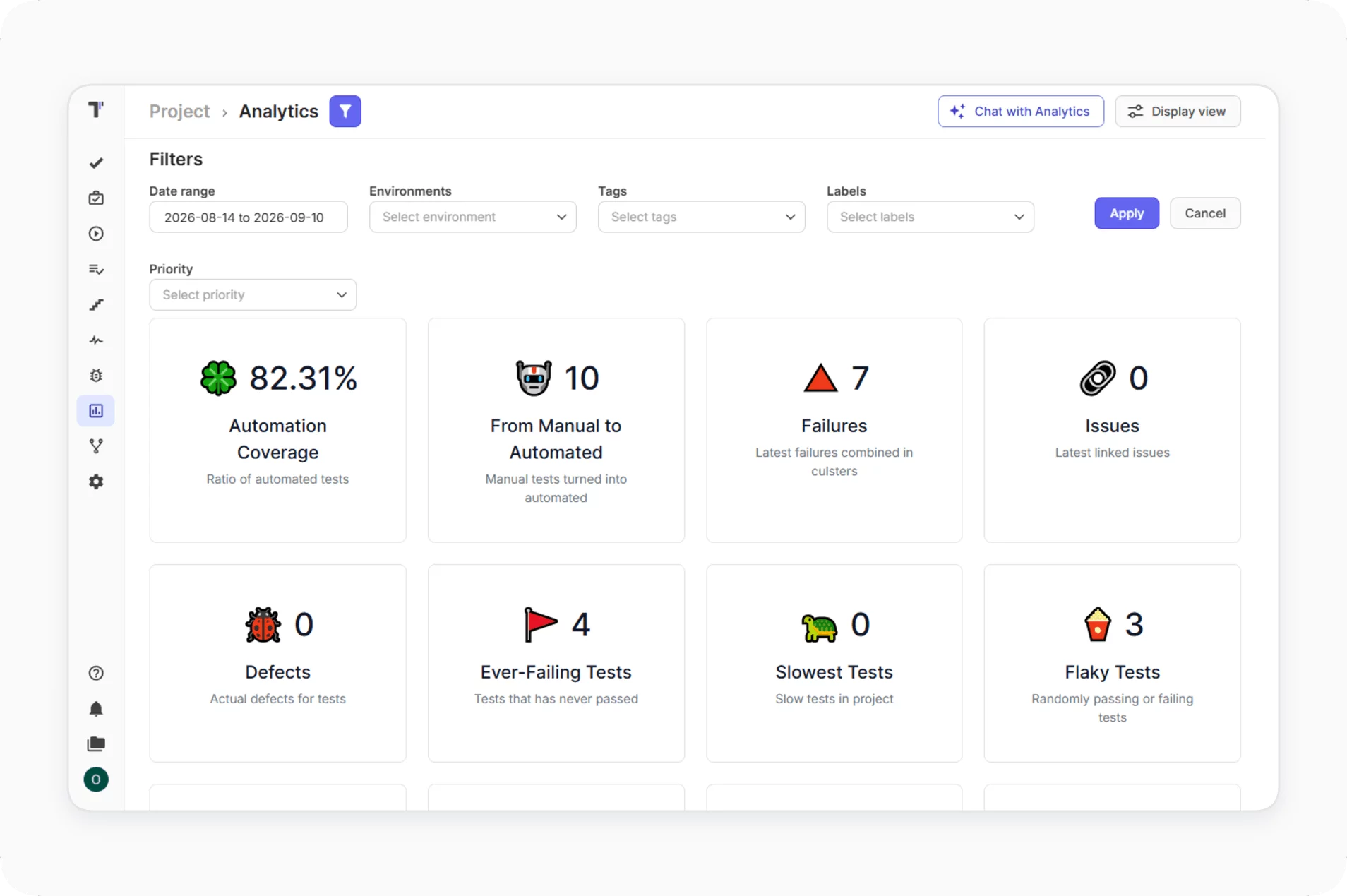
Analytics widgets track automation coverage, slowest tests, never run tests, and ever failing tests after each completed run. You see which parts of the suite need maintenance, and this data lets QA leads plan work with numbers and report progress to stakeholders.
Learn more
Test analytics
Artifact storage in S3 Bucket

The reporter uploads artifacts to your S3-compatible bucket on AWS, DigitalOcean, Google Cloud Storage, or Cloudflare R2. You decide how long to keep the files and who can open them, so test evidence stays under your control. Storage cost depends only on your cloud plan.

Artifact storage in S3 Bucket
AI failure explanation 

AI reads the logs of a failed automated test and explains the likely reason for the failure. You get a starting point for the investigation inside Testomat.io, and triage of a large failed run takes less time.

Learn more
AI failure explanation 
AI-powered run summary

Each finished run gets a summary with status breakdown and duration, and the overview groups results by tags, labels, team members, and custom statuses. You see which area of the product failed before you open single tests. This picture helps leads make release decisions faster.

Learn more
AI-powered run summary

How automated tests reporting can help?

Automated test reporting fits a startup with a single pipeline and an enterprise with hundreds of daily runs.
Startups & small teams
Quick reporter setup
Add the reporter and an API key.
Real-time results
Watch the run while CI works.
Public report links
Share results with a link.
Mid-sized products
Flaky test detection
Find unstable tests from run history.
Failure evidence
Screenshots and videos in each report.
Analytics widgets
Track coverage and slowest tests
Enterprise projects
Private artifact storage
Keep files in your S3 bucket.
PDF export
File run reports for audits.
AI failure explanation
Get failure reasons from test logs.
What clients say

Recent reviews

“Excellent customer support”
Customer support is always prompt and high-quality. It's also great to see that user feedback is considered when developing new features. The team makes an effort to provide overviews of new features and keeps users informed about the latest updates.
4/5
Aliona Kovalchuk
Aliona Kovalchuk
General QA
“The Best TMS for Our QA Team!”
Our 15-person QA team has used Testomat.io daily for over two years. After comparing tools like TestRail, it stood out in both features and pricing. It’s affordable yet powerful. Jenkins integration works seamlessly, even manual testers can run tests easily. The clean UI speeds onboarding, improves collaboration, and saves time. We’ve recommended it widely, and others love it too.
5/5
Vladyslav M.
Vladyslav M.
General QA
“Testomat.io makes daily testing so much easier”
I’ve used Testomat.io daily for over two years, and it’s the best TMS I’ve worked with. Compared to tools like TestRail, it offers more features at a better price. Jenkins integration is seamless, even for manual testers. The UI is clean and easy to learn. It speeds up workflows, improves transparency, and makes team collaboration much smoother.
5/5
Dmytro H.
Dmytro H.
General QA
“Very convenient platform for managing test cases”
The platform is convenient and intuitive to use. I’ve been using it long enough to say it’s very user-friendly. It’s clear that the team is constantly working on and improving the platform.
5/5
Aleksey K.
Aleksey K.
General QA
“Great tool for creating and managing manual test cases efficiently”
As a Manual QA, I use Testomat.io to create and manage test cases with ease. The interface is intuitive, making onboarding simple. Test plans, runs, and results are well-structured in one place. Tagging helps organize cases efficiently. AI features speed up test creation. It keeps workflows transparent, improves collaboration, and reduces routine work.
5/5
Oksana G.
Oksana G.
General QA
“Testomat.io has been a great tool for managing both automated and manual tests in one place”
I really like how easy it is to integrate with frameworks and CI/CD tools, and the real-time reports with screenshots and analytics save a lot of time. Overall, it makes collaboration in the team much smoother and keeps testing well-organized.
5/5
Aleksey K.
Aleksey K.
Quality Assurance Engineer

Frequently asked questions

Which testing frameworks can send reports to Testomat.io? Testomat

Testomat.io has native reporters for Cypress, Playwright, WebdriverIO, CodeceptJS, Jest, Mocha, TestCafe, Nightwatch, Cucumber.js, Jasmine, Vitest, pytest, Robot Framework, Behave, JUnit 4/5, TestNG, PHPUnit, Codeception, Pest, and Gauge. Frameworks outside this list can report through JUnit XML.

Where does Testomat.io store screenshots and videos? Testomat

The files stay in your S3-compatible bucket on AWS, DigitalOcean, Google Cloud Storage, Cloudflare R2, or MinIO. Testomat.io displays them through links. Private mode uses pre-signed links that expire in 10 minutes.

How does Testomat.io detect flaky tests? Testomat

Analytics calculates the success rate of each test from its last 100 runs. A test is flaky when its rate is inside the range you set, for example from 40% to 60%.

When do results appear in the report? Testomat

Results appear as each test finishes, so you can open the report during the run. Parallel workers report to a single run when they share the TESTOMATIO_RUN environment variable.

Can I share a report with people outside the QA team? Testomat

Yes. You can create a public link with an expiration date or export the run report to PDF. Company owners control the sharing options for the whole company and for each project.
See your first automated test report in Testomat.io

See your first automated test report in Testomat.io







