





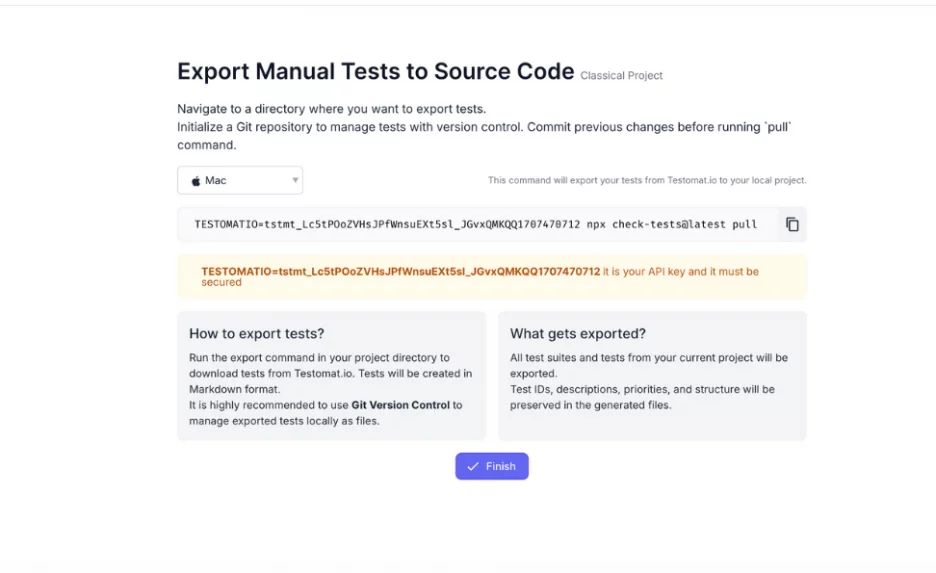
Version-controlled export and import of manual tests as Markdown files in Git provides a modern, sophisticated approach to test management, aligning with top-notch DevOps and Agile methodologies — Everything as Code. Manual test cases are stored alongside test automation code and your application code in a repository, like artifacts.
Unlike competitors that rely on APIs, plugins, custom scripts, or third-party tools, which lead to time-consuming setup and limitations, this feature is natively built into our tool. It enables bidirectional versioning, branching, pull requests, and commit history from the version-control and test management platforms.
Key Aspects of the Functionality
This workflow makes test case management fully traceable and fosters close collaboration between the QA team and developers. Seamless integration for hybrid teams, manual and automation testers. There is no need to switch back and forth between testomat.io and the code editor; everyone uses their usual tool, staying on the same page.
- Export and Import tests to Markdown are done using the CLI. To find out the command for how to do it, go to the test management system UI and copy the required command. Then you should run it in your project directory, where your API code will be displayed.
- As a result, all test suites and tests from your current project will be exported. The test IDs, descriptions, priorities, and structure are preserved in the generated files.
- In Git version control, you can manage exported tests locally as files. Sync manual tests with automated. Leave comments and suggestions directly in the Markdown files.
- Review, track and revert changes over time. Write, modify and update tests with your favorite IDE.
For instance, a practical use case: a developer spots a missing step in a test case and updates the Markdown file in their branch. The change is committed, reviewed in a pull request, and merged into the main branch. The updated test case is automatically synced back into Testomat.io via CLI.
Benefits
- Unified Workflow. This option allows you to store everything in one place. Manual, Automated and AI tests live in the same codebase. You define what should be automated vs. handled manually within the same test.
- Traceability. Links between test specs, commits, and issues ensure end-to-end traceability. When a feature branch is merged, the corresponding test cases are merged too. In addition, testomat.io integrates with issue trackers (e.g., Jira, Linear, GitHub Issues), automatically generating tickets for failed tests based on execution status.
- Portability. Markdown files can be rendered in various tools (e.g., GitHub Pages, Bitbucket, Confluence, e.g.), which enhances accessibility.
- IDE-Friendly Editing. Writing and editing test cases in the same editor as the application code is quite comfy.
- Developer-Friendly. Markdown’s simplicity and Git’s familiarity make it accessible to developers. Makes test management more transparent for both QA and Development teams. Moreover, foster a shared responsibility for testing.
- DevOps-ready. Tests evolve with code, branches, and releases.
- Version Control. Git provides a complete history of test case changes, enabling teams to rollback to previous versions or audit modifications, which is critical for compliance and debugging. It is what lacks the traditional TMS.
- Scalability. The approach scales with large test suites, leveraging Git’s branching and merging for parallel development.
How to test management software overcomes limitations
- Of course, the initial configuration requires setting Git credentials and repository structure, which may need IT support.
- Teams new to Markdown, Git and automation they not need extra training to use this feature. Non-tech professionals are guided with UI hints within CLI.
So, the learning curve for them is effortless. - Version mismatches are impossible, as each manual export or commit is tagged automatically with a version. Pull requests and code reviews in Git allow team members to collaborate on test cases, similar to code development.
- Reports that are easy to consolidate. QA and Development teams often work with different tools and reports. The test management system testomat.io provides an Advanced Analytics and Reporting widget dashboard that fully meets the needs of modern teams. One tool without extra costs.
By leveraging Git’s version control and Markdown’s flexibility, it enables robust collaboration, traceability, and scalability, making it an ideal solution for teams practicing continuous integration and delivery
