





Best ReportPortal Alternative: Full Test Management With Real-Time Reporting
Testomat.io vs ReportPortal
Comparing ReportPortal alternatives? Testomat.io combines manual and automated testing in a single platform. You get real-time reports and AI test management without infrastructure to maintain.
Migrate to Testomat.io


Ease of setup
Reporting
Integrations
Test Diversity
Based to:

Testomat.io key benefits

Unified test management
Plan, run, and track manual and automated tests in a single, centralized platform.

Configurable test execution
Target specific tests, switch environments and fine-tune execution instantly.

Flawless test performance
Handle up to 100,000 tests in a single run without performance loss.

Collaboration without limits
Share progress with stakeholders, developers, testers in a clear format.
Why Testomat.io?
As an alternative to ReportPortal, our testing solution combines automated reporting with full test management for companies of every size. Here are the most common problems and how to solve them.

Manual and automated tests together
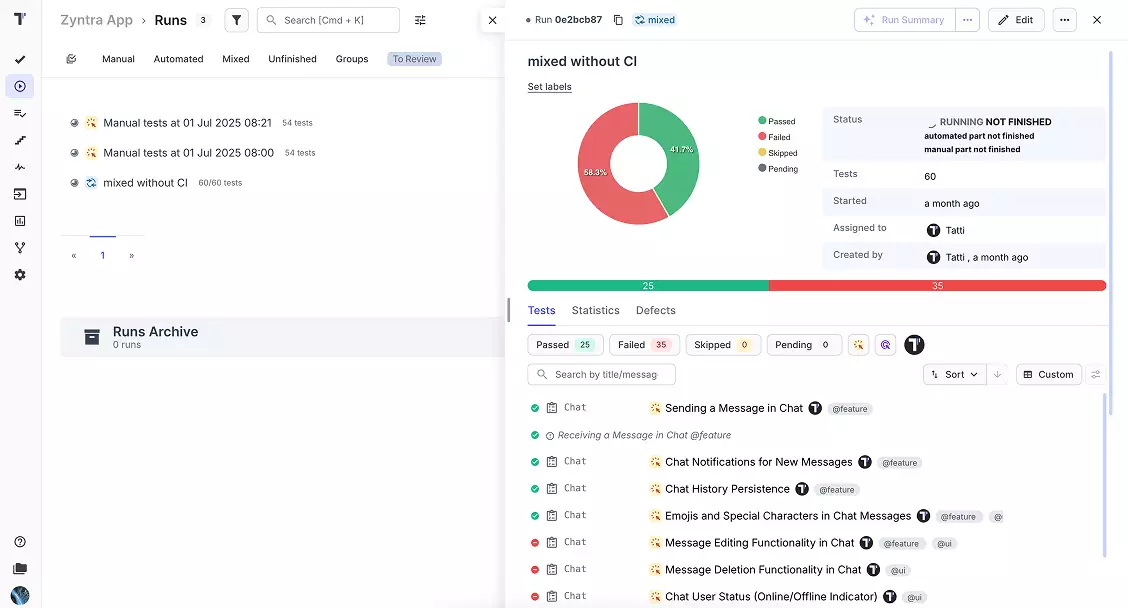
Testomat.io stores manual test cases and automated tests in the same repository. A mixed run combines both types in a single report, so a release manager sees readiness in a single view.
AI-powered test management
AI works inside the core features. You can generate test cases from requirements and remove duplicates in a few clicks. The Deep Analyze Agent reports test coverage and testing health for the whole project.
Ready after sign-up
The cloud version needs a browser and an account. You can import automated tests from source code with the check-tests CLI tool, and results arrive through the @testomatio/reporter package or JUnit XML upload.
Cost-effective
At just $30 per month for the cloud version, Testomat.io is highly cost-effective. With a 10% discount for annual subscriptions and an on-premise option, it offers great value for teams of all sizes.

Reporting without test case management
ReportPortal collects automated test results and analyzes failures. Test case storage and manual testing happen in a separate tool, so a QA team needs a second system for test design and planning.
AI for failure analysis only
AI works after the run: the ML-based Auto-Analyzer sorts failures and assigns defect types. Test creation and maintenance stay manual work in a separate tool, because test cases live outside the platform.
Infrastructure on your side
The open-source version runs on Docker or Kubernetes and needs a database, a message queue, a search index, and file storage. Your engineers spend time on deployment and updates instead of testing.
Managed cloud pricing
The managed cloud version starts at $569 per month for the Startup package. Teams that want a hosted service pay enterprise-level prices from the first day.
Testomat.io vs ReportPortal
Explore all the benefits of our product and make the right choice. Here and now!
|
|
|
|
Trial
|
30 days | Free open-source version; 30-day SaaS trial |
|
Manual test case management
|
|
Since v26.1: case library, plans, manual launches (closed beta) |
|
Test cases synced with source code
|
Yes, check-tests CLI keeps the repository up to date |
|
|
Mixed manual and automated runs
|
Yes, single report for both test types | No, combined dashboards are on the roadmap |
|
Real-time reporting
|
|
|
|
Failure analysis
|
AI test coverage analysis | ML-based auto-analyzer for failure triage |
|
BDD and Gherkin
|
Scenarios synced with code, living docs for the whole team | Result reporting from BDD frameworks |
|
Analytics dashboards
|
Yes, widget-based, shareable with stakeholders | Yes, widget-based, focused on automated launches |
|
Jira integration
|
Two-way plugin: link tests, run tests from Jira, see results in tickets | Issue creation from failed test results |
|
AI access through MCP
|
Yes, MCP server for test management, included in the Free plan | Yes, MCP server for launch and result data |
|
Deployment
|
Cloud and enterprise self-hosted | Self-hosted (Docker, Kubernetes) and managed SaaS |
|
Setup
|
Sign-up and test import | Infrastructure deployment plus agent configuration per framework |
 Failure analysis comparison
 |
Automatic failure grouping
|
Yes, analytics and clustering of failure patterns | Yes, ML-based auto-analyzer |
|
Defect type classification
|
Custom statuses and tags | Yes: product bug, automation bug, system issue |
|
Flaky test detection
|
|
|
|
Rerun mechanisms
|
Yes, rerun of failed tests | Yes, retry reporting |
|
AI coverage and health analysis
|
Yes, Deep Analyze Agent |
|
|
Manual test failures in the same report
|
|
No, manual launches are a separate beta module |
|
Jira issue from a failed test
|
|
|
 Pricing comparison
 |
Free option
|
Free plan for 2 users and 2 projects | Open-source version, self-hosted |
|
Paid cloud
|
From $30 per month | Startup package from $569 per month |
|
Enterprise options
|
Enterprise plan with an on-premise option | Business at $2,659 per month; Enterprise with custom pricing |
|
Hidden costs
|
Hosting included in cloud plans | Server infrastructure and engineer time for the self-hosted version |

Key highlights compared
Testomat.io covers the same real-time reporting job as ReportPortal and adds full test management for manual and automated testing in one platform.
Real-time test reporting
Automated results arrive in real time through the @testomatio/reporter package and attach to test cases synced with source code. Manual tests join the same run, so the report shows full release readiness, and a public link opens it for stakeholders without an account.
Results stream in real time through framework agents and form a launch. The launch stays a standalone record, separate from test cases. Manual checks stay outside, so the report covers the automated part of the release only. 
MCP server for AI agents
 The Testomat.io MCP server connects an agent to the project itself. It creates and updates test cases with their steps, and it starts or reruns a run in the same session. A read-only profile limits the agent to queries when a team wants that.
The ReportPortal MCP server works at launch level. An agent reads test items and logs, and triggers auto-analysis on a failure. Runs start from CI, because the server has no tool to create or launch one.
The Testomat.io MCP server connects an agent to the project itself. It creates and updates test cases with their steps, and it starts or reruns a run in the same session. A read-only profile limits the agent to queries when a team wants that.
The ReportPortal MCP server works at launch level. An agent reads test items and logs, and triggers auto-analysis on a failure. Runs start from CI, because the server has no tool to create or launch one. 
Failure analysis & flaky tests
Each failure connects to its test case: you see the run history of the exact test and its flaky label. A linked Jira issue opens in one click. Deep Analyze adds a project audit with coverage gaps and testing health.
The ML-based auto-analyzer compares a new failure with past results and assigns a defect type: product bug, automation bug, or system issue. This speeds triage of large suites, and the analysis lives inside a single launch, without a test case history behind it. 
Widget dashboards
Widget-based dashboards combine manual and automated metrics, from run trends to automation coverage. Run reports share through a public link, with an optional passcode, so a PM can read release readiness without an account.
A ReportPortal dashboard covers automated launches only: pass rate trends, flaky tests, longest tests. Manual results stay outside it, so release readiness needs a second source of data. 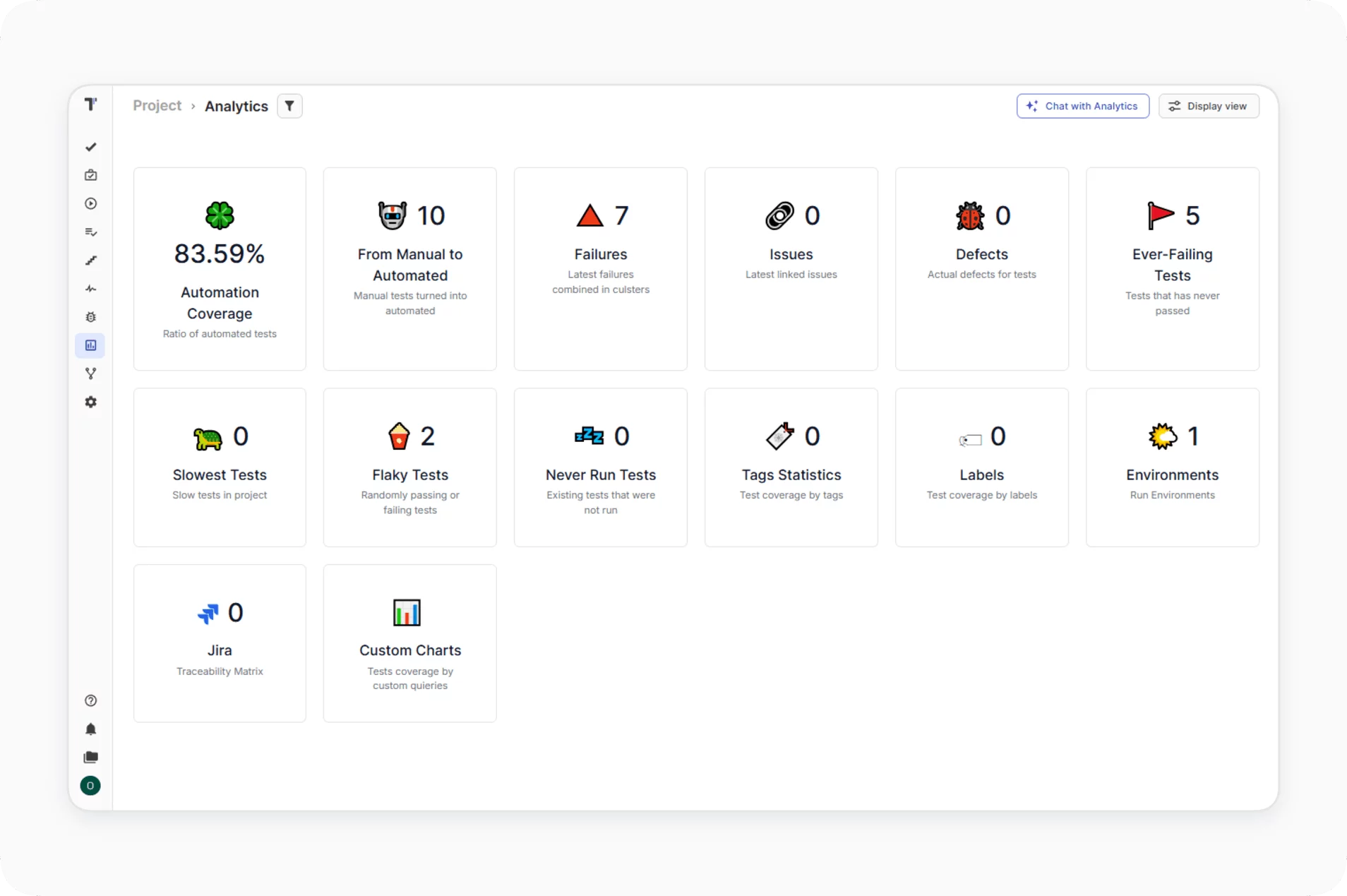
Everything you need
Features that make Testomat.io stand out
With a wide array of features designed to streamline workflows, improve collaboration, and enhance test efficiency, Testomat.io helps teams deliver high-quality software faster.

All-in-one test management
Manage both automated and manual tests seamlessly in one platform, streamlining your testing workflow.

Test case management
Plan and manage automated and manual test cases under one roof for a unified testing experience.

Analytics & reporting
Get real-time reports and share test results with teammates and stakeholders for enhanced visibility.

Project organization
Efficiently manage projects and perform regression testing through a simple, intuitive interface.

Integrations
Integrate with popular testing frameworks, CI/CD tools, and third-party apps like Jira for seamless workflows.

Automated tests
Easily upload, execute, and monitor automated tests, tracking results instantly for faster feedback.

BDD & Gherkin Support
Enable the whole team to write BDD scenarios, letting non-technical teammates run tests via TMS interface.
Test execution
Group tests logically and run them all at once, reviewing results with easy access to run history.
Team collaboration
Collaborate efficiently with teammates through notifications and share reports/documents publicly.
 JIRA Integration
 JIRA Integration
Seamlessly connect Jira with your testing workflow. Advanced Jira Plugin brings full two-way synchronization between Testomat.io and Atlassian products like Jira, Confluence, and Bitbucket.
Bidirectional synchronization
Bi-directional updates between Jira and Testomat.io keep issues, statuses, and test results aligned, enhancing team collaboration and visibility.
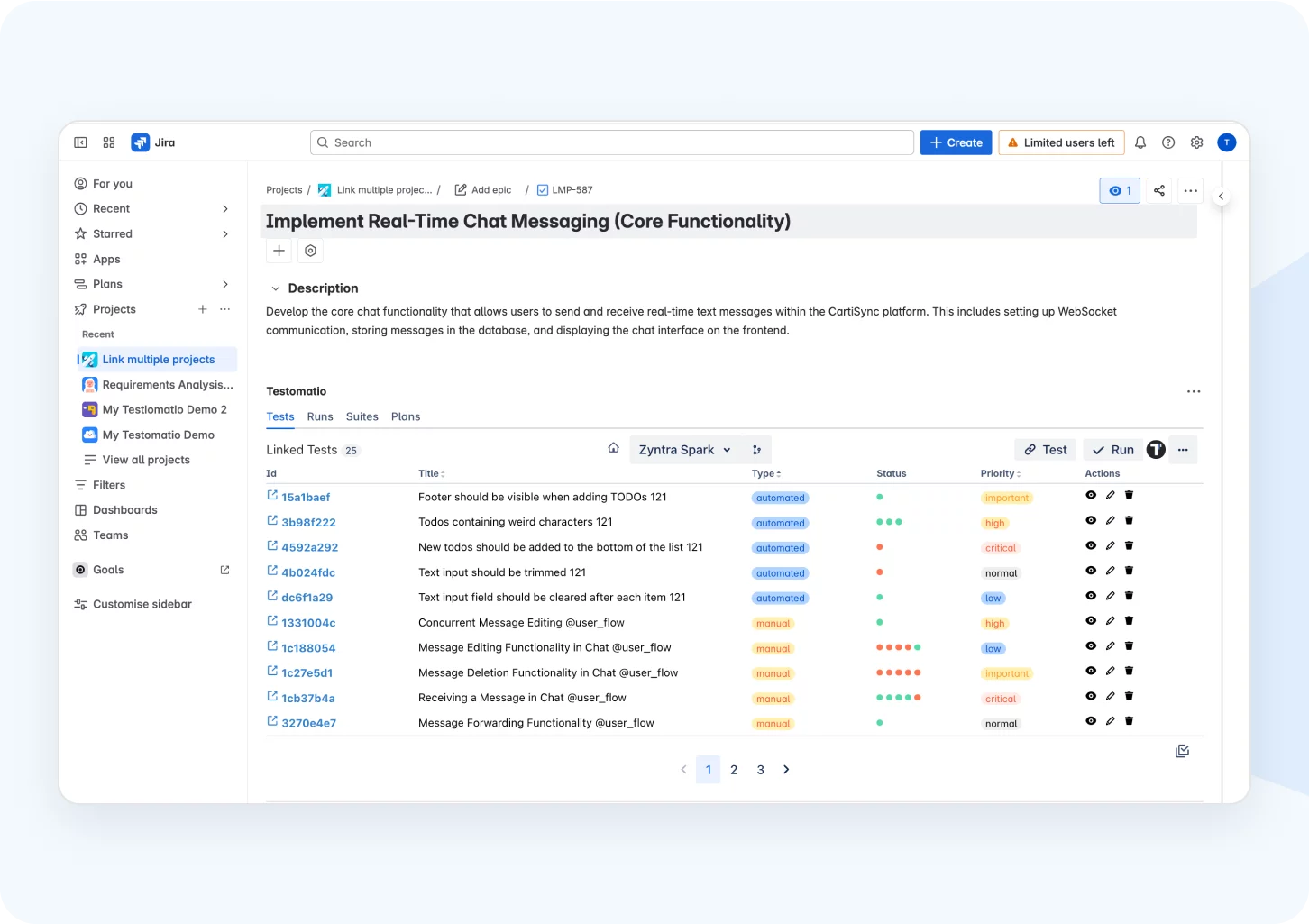
Run your tests directly from Jira
Run your tests directly from Jira to streamline your testing process, improve collaboration, and ensure seamless integration between development and quality assurance.
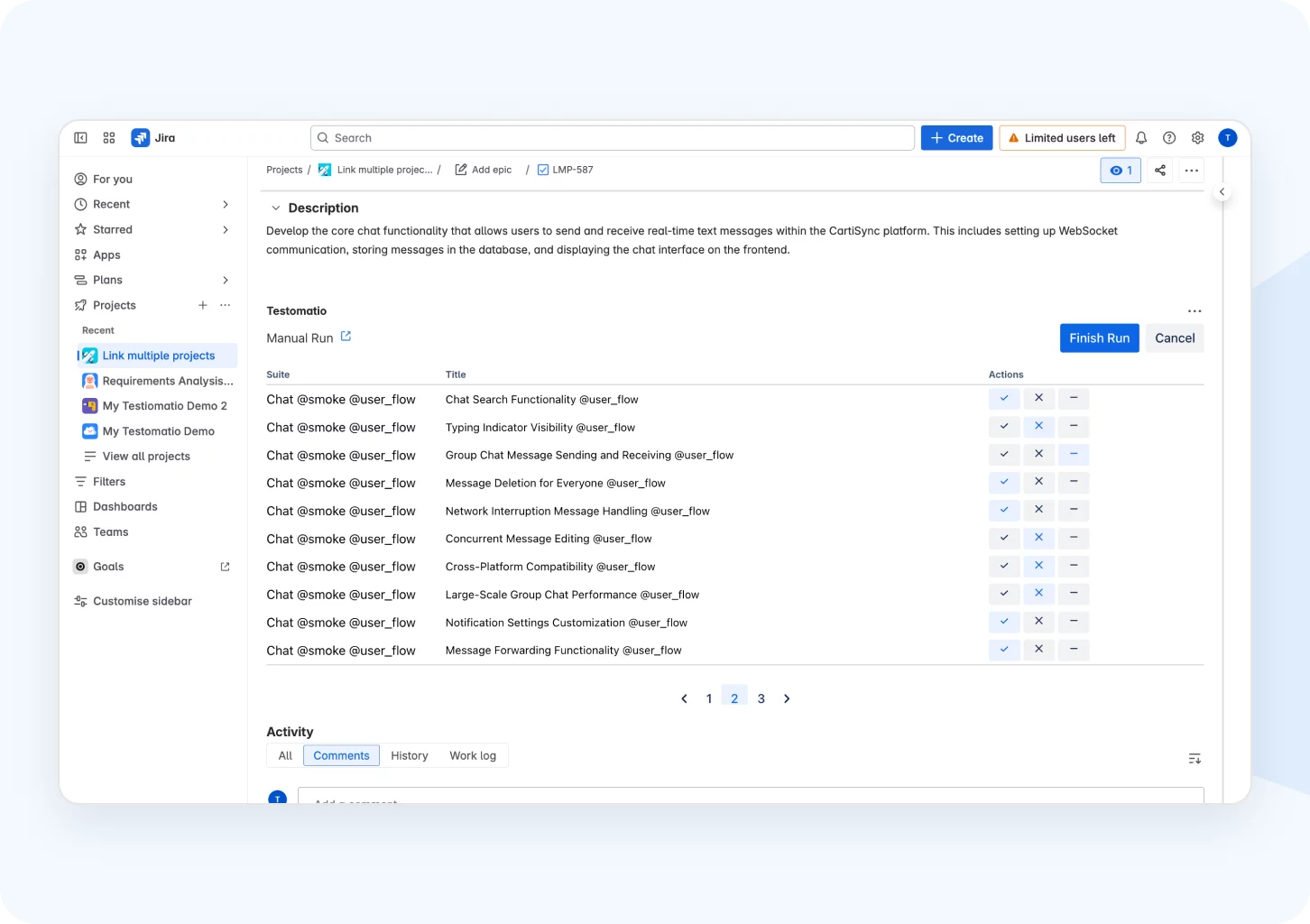
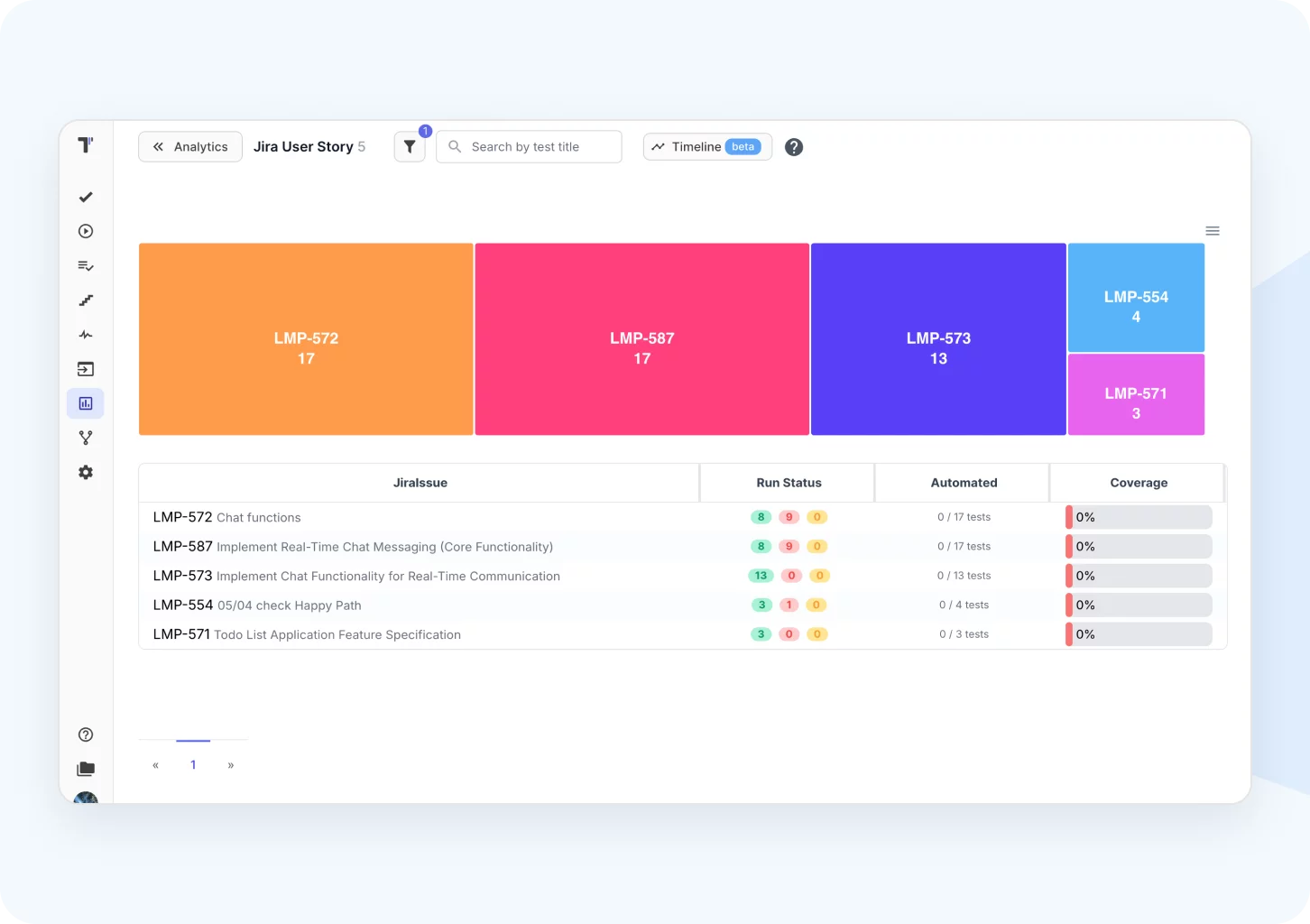
Jira statistic & defects widgets
Get real-time insights into testing progress and defect tracking to effortlessly monitor and improve your project’s health.


Everything you need
Testomat.io focuses
on security & compliance
Our team is committed to maintaining the highest security standards, we’re doing our best to make sure our users can trust us to keep data with our platform:

Data security
Secure authentication, role-based access control permissions and data encryption safeguard unauthorized access to your data and their outside transit.
Data integrity
The platform’s widget dashboard delivers comprehensive insights about test performance, test coverage and eventually software product market readiness.
Data loss prevention
Audit logs, automated backups and Rollback mechanisms maintain a history of modifications to exclude data loss. Measures are in place to monitor and block unauthorized data ruins.
What clients says
Recent reviews

“User-focused approach.”
I think you guys have struck an amazing balance... I'm really excited to use the product and I'm really happy for you guys that you were able to create a solution that has a lot of new features/ideas that I haven't seen in the other test management tools that are out there.
5/5

“Perfect way to manage test reports and runs.”
We use Testomat in day-to-day use case, for all our test reports, test cases and test analytics. It gives us analysis of the automation coverages across the product. We easily did integration with our existing automation framework on Cypress and Jest.
5/5

“Gherkin-files end-2-end.”
We've embraced the BDD design and use Gherkin extensively to define acceptance criteria for all user stories and enablers in AzureDevOps. This works excellent in conjunction with Testomat.io, where we have automated the sync of Gherkin files (from Azure Repos) and can use the exact same files for testing all user stories.
5/5

“Excellent customer support.”
Customer support is always prompt and high-quality. It's also great to see that user feedback is considered when developing new features. The team makes an effort to provide overviews of new features and keeps users informed about the latest updates.
5/5

“Flexible Test Automation Service”
Customer support is always prompt and high-quality. It's also great to see that user feedback is considered when developing new features. The team makes an effort to provide overviews of new features and keeps users informed about the latest updates.
5/5

“Best TMS I've ever used.”
Testomat.io is a really powerful automated testing tool. Its integration with various frameworks and CI/CD tools makes it very convenient for developers and testers. I am impressed with its analytics, reporting and support for an agile approach. 🚀👍
5/5

“Helpful feature in the Test Manager Tool.”
I was surprised by the existing branches as a tool. I was thrilled when I learned that using branches to create cases in certain branches doesn't disturb the master. I work on a fast-changing project and collaborate with teammates, and using branches turned out to be the best way to keep our test documentation clear and stable.
5/5

“Very convenient platform for managing test cases.”
The platform is convenient and intuitive to use. I’ve been using it long enough to say it’s very user-friendly. It’s clear that the team is constantly working on and improving the platform.
5/5

“ It is the swiss army knife for manual and automation QA's”
Having a single pane of glass for our automated testing has brought a ton of value to our team. Not only does it allow us to access everything we need related to manual and automated testing, but it also provides us this data in realtime, which none of the other products we demoed provided
5/5


Smarter QA Migration
Switching from ReportPortal takes four steps: create a project, import your tests, connect the reporter in CI, and configure Jira. The pipeline stays untouched and our support team helps at every step.

CI reporters: @testomatio/reporter, JUnit XML
Files: .xls .csv
With the assistance of our support team
Frequently asked questions
How does the free trial work?


The Testomat.io team provides two trials for you to evaluate all features of the test management tool: a 30 Days Trial and an additional extra 14 Days Trial.
The first trial period starts automatically with a sign-up. The second trial will start by clicking on the button Request trial.
At the end of the second trial period, advanced features will being disabled and you will be able to use the Free plan for as long as you need or make a subscription upgrade.
The first trial period starts automatically with a sign-up. The second trial will start by clicking on the button Request trial.
At the end of the second trial period, advanced features will being disabled and you will be able to use the Free plan for as long as you need or make a subscription upgrade.
How do I select a Plan suitable to my teams’ needs?
If you're weighing Testomat.io as an Xray alternative for large teams, look at the detailed feature description of each plan and decide based on feature availability, user and project limits, and security preferences for your testing needs.
Can I see the product before I buy?
You can Request a Demo here and schedule a demo with us at your convenient date and time. Our product experts will take you through the entire product in a one-on-one or together with your team. Also, you will be free to ask any questions and receive answers on them immediately.
What if I already use a different test case management tool?
You might continue the development of your existing testing project.
Built-in importer lets on import all your tests from csv/xls files, Test Rail, Zephyr, qTest automatically. Or use our API to import test sets from other test management tools in your interface.
Built-in importer lets on import all your tests from csv/xls files, Test Rail, Zephyr, qTest automatically. Or use our API to import test sets from other test management tools in your interface.
How can I contact you in case of any queries?
We have a Contact Us page where are described all our contact channels. Also, you can immediately direct mail us to contact@testomat.io for any assistance.
What are the alternatives to ReportPortal?
The main alternatives to ReportPortal are test management platforms that also report on runs, such as Testomat.io and Xray, plus Allure Report as a results viewer. Teams that need manual test cases beside automated results choose a platform with a test case repository. Testomat.io holds both in one project and needs no self-hosted infrastructure.
