

AI test reporting and analytics

Know when you're ready to release. AI agents analyze every run and flag what's risky, so your team releases with confidence.
AI test reporting and analytics
Trusted by over 500 forward-thinking companies

logo
logo
logo
logo
logo
logo
logo
logo
logo
logo
logo
logo
logo
logo
logo
logo
logo
logo

Benefits of AI test reporting and analytics

https://testomat.io/wp-content/uploads/2026/07/instant-run-summary-type1.svg
Instant run summary
One-glance status across every run.
https://testomat.io/wp-content/uploads/2026/07/failure-clustering-type1-1.svg
Failure clustering
Group similar errors, find root cause.
https://testomat.io/wp-content/uploads/2026/07/ai-test-agent-type1.svg
AI test agent
Built-in helper across the workflow.
https://testomat.io/wp-content/uploads/2026/07/flaky-test-detection-type1.svg
Flaky test detection
Spot unstable tests without manual review.
https://testomat.io/wp-content/uploads/2026/06/duplicate-finder.svg
Duplicate & unused tests
Keep your suite lean and accurate.

Testomat.io AI test reporting and analytics features

AI project runs status report

Get a quick snapshot of test stability and performance trends across your latest runs. Stop digging through logs when you need to know if you are ready to release.

Learn more
AI project runs status report
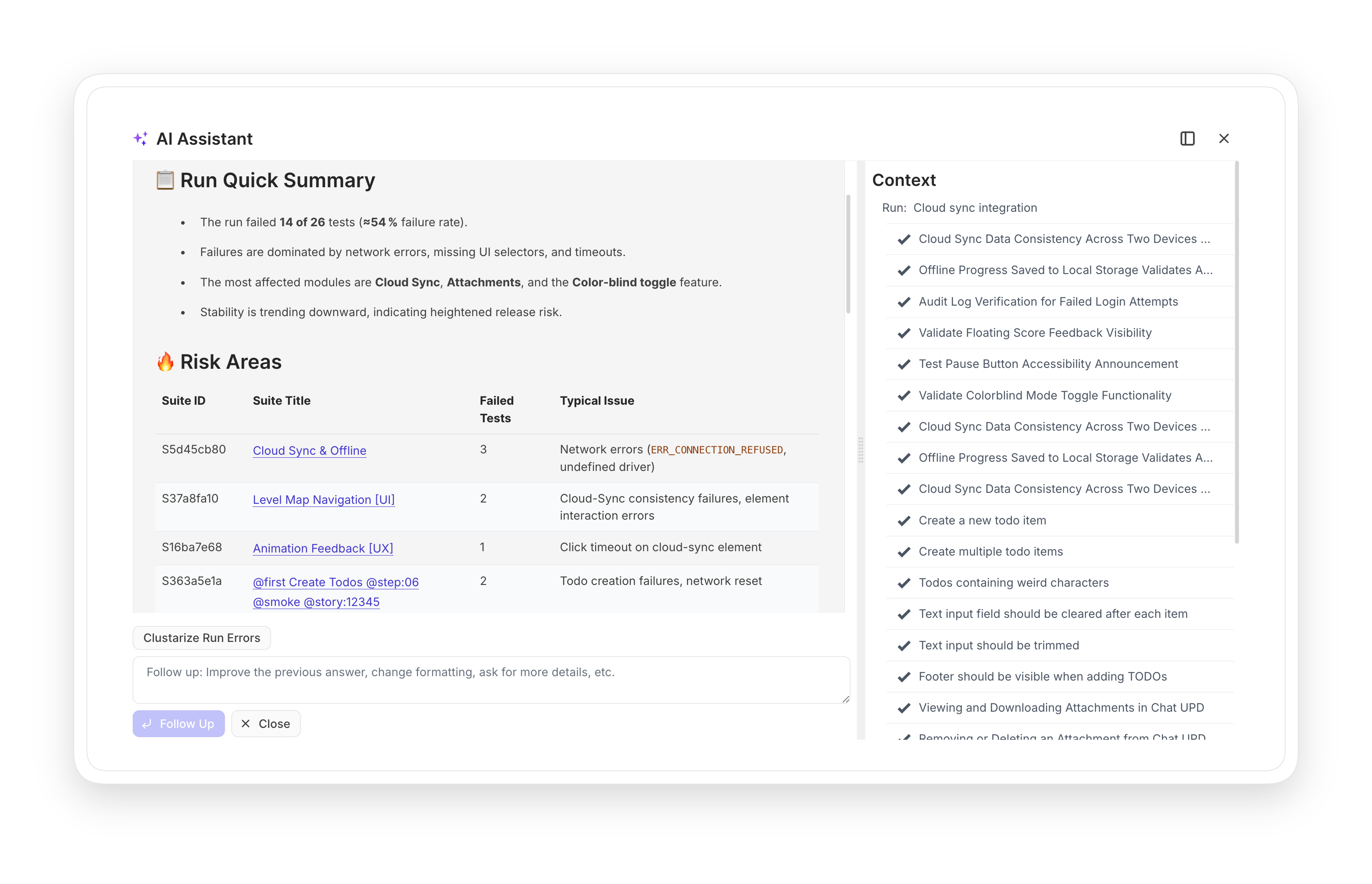
AI-powered run summary overview

Complex reports from a simple prompt. AI processes large volumes of test data and shows your team only the relevant parts: risk areas and what changed since the last run.

Learn more
AI-powered run summary overview
AI agent test assistant

An intelligent assistant embedded into your testing workflow. It helps you spot details and summarize results at every stage of the test cycle.
Learn more
AI agent test assistant
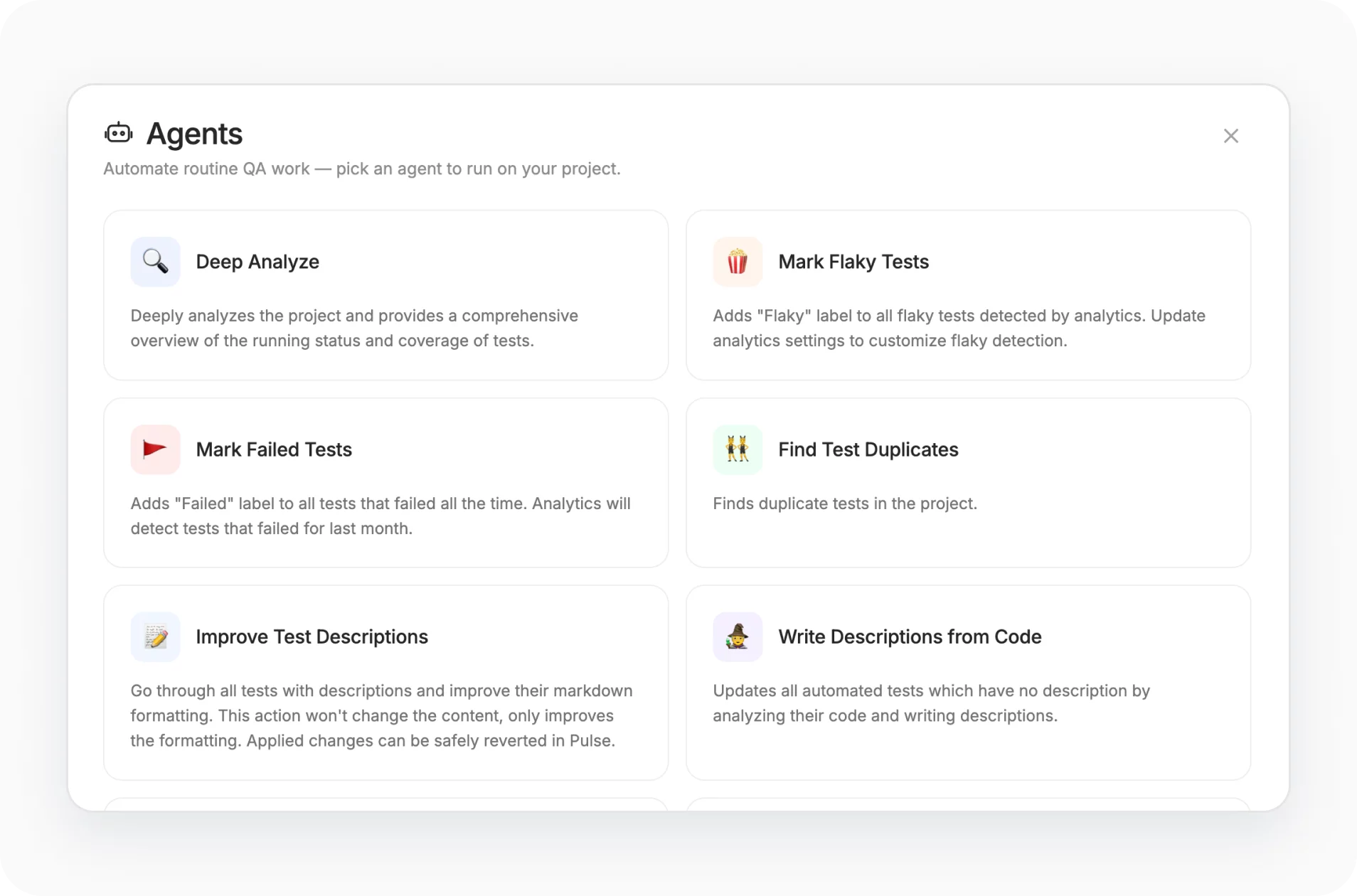
Deep analyze with AI agents

A project-level AI audit. The agent scans your entire project to assess coverage and release readiness, then flags untested or risky areas so your team can plan with data instead of guesswork.

Learn more
Deep analyze with AI agents
Analyze suite

The same intelligence at suite level. The tool maps functional area coverage and produces a Suite Stability Report for critical product modules.

Learn more
Analyze suite
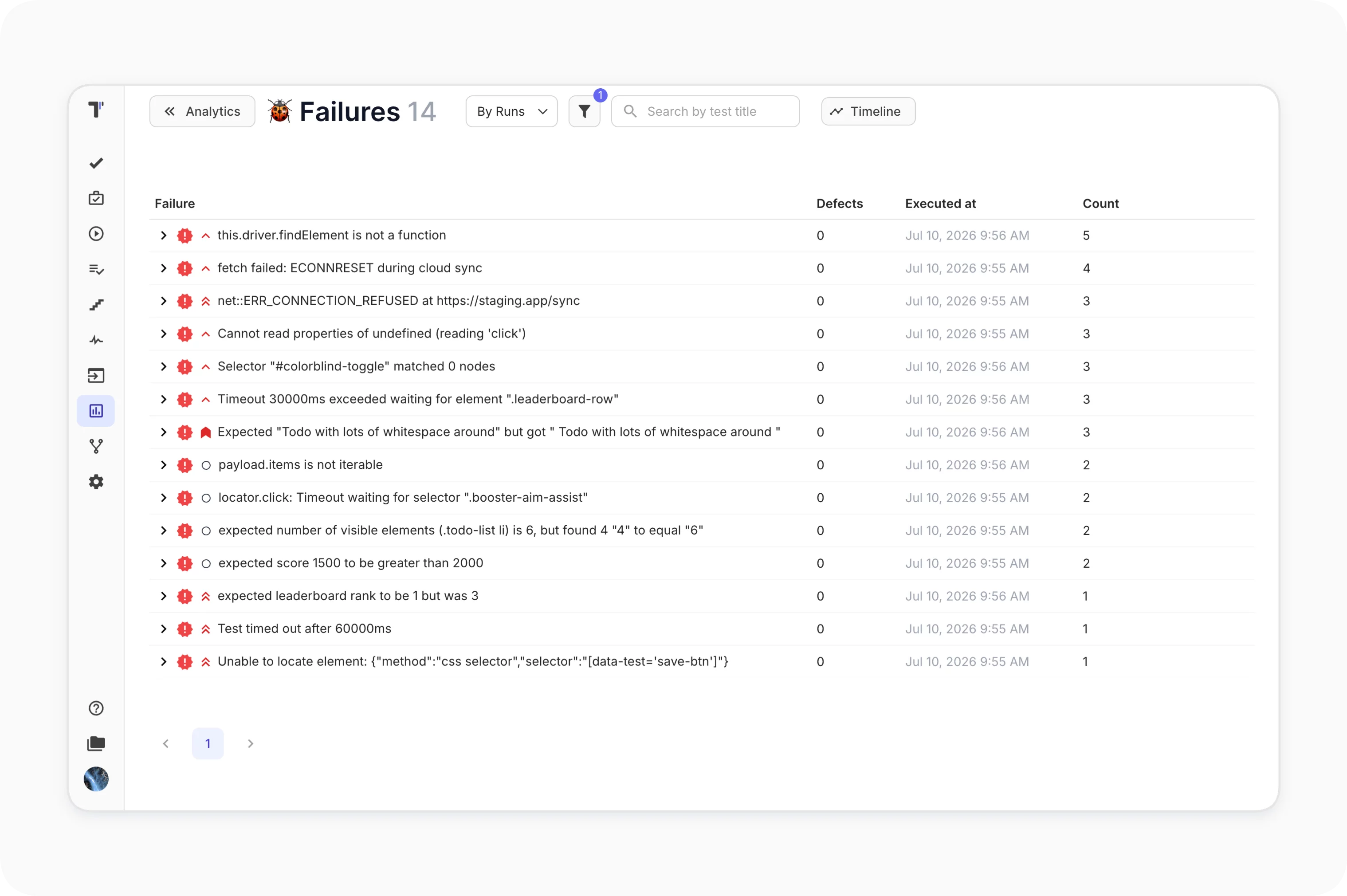
Analyze failed automated test cases

Built-in AI analytics for failed runs. Instead of reading logs line by line, the agent identifies which tests broke and clusters errors so you fix one root cause at a time.
Learn more
Analyze failed automated test cases
Explain autotest failures based on logs

AI reads the failure logs together with the test code to explain why a test failed. It also suggests possible fixes, cutting debugging time directly in the Testomat.io UI.

Learn more
Explain autotest failures based on logs
Test case and code quality review

AI analyzes manual descriptions and automated code against five quality dimensions. Returns a Test Case Score plus actionable improvement recommendations.

Learn more
Test case and code quality review
Flaky tests

Flaky tests appear automatically on the widget. Configure your own flakiness rules so the tests flagged match the way your team actually works.

Learn more
Flaky tests
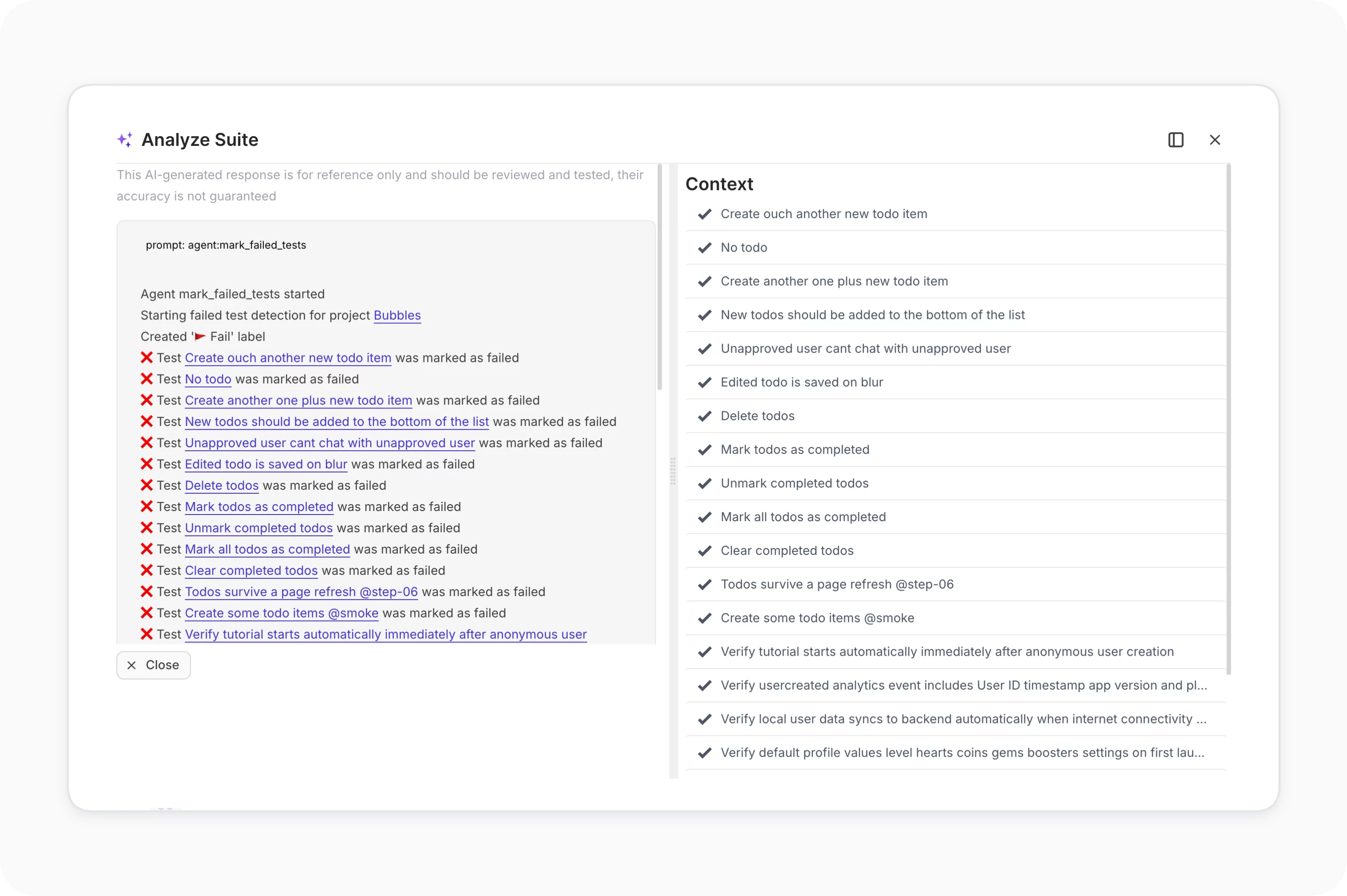
Mark failed tests

Mark Failed Tests labels every test that failed 100% of the time over the past month. Persistent breakage surfaces to the top of the list instead of hiding in the noise.
Learn more
Mark failed tests
AI detection of duplicated and unused tests

Chat with the AI field to find unused or unlinked tests. Remove duplicates and simplify bloated test sets before they slow your team down.

Learn more
AI detection of duplicated and unused tests
Auto detach automated tests

Auto Detach Automated Tests finds automated tests that have not run in the last 45 days and marks them as Detached. Your dashboards stay focused on what is actually active.

Learn more
Auto detach automated tests
AI failure clusterization

AI groups automated test failures by pattern, so you fix one root cause instead of triaging fifty separate errors.
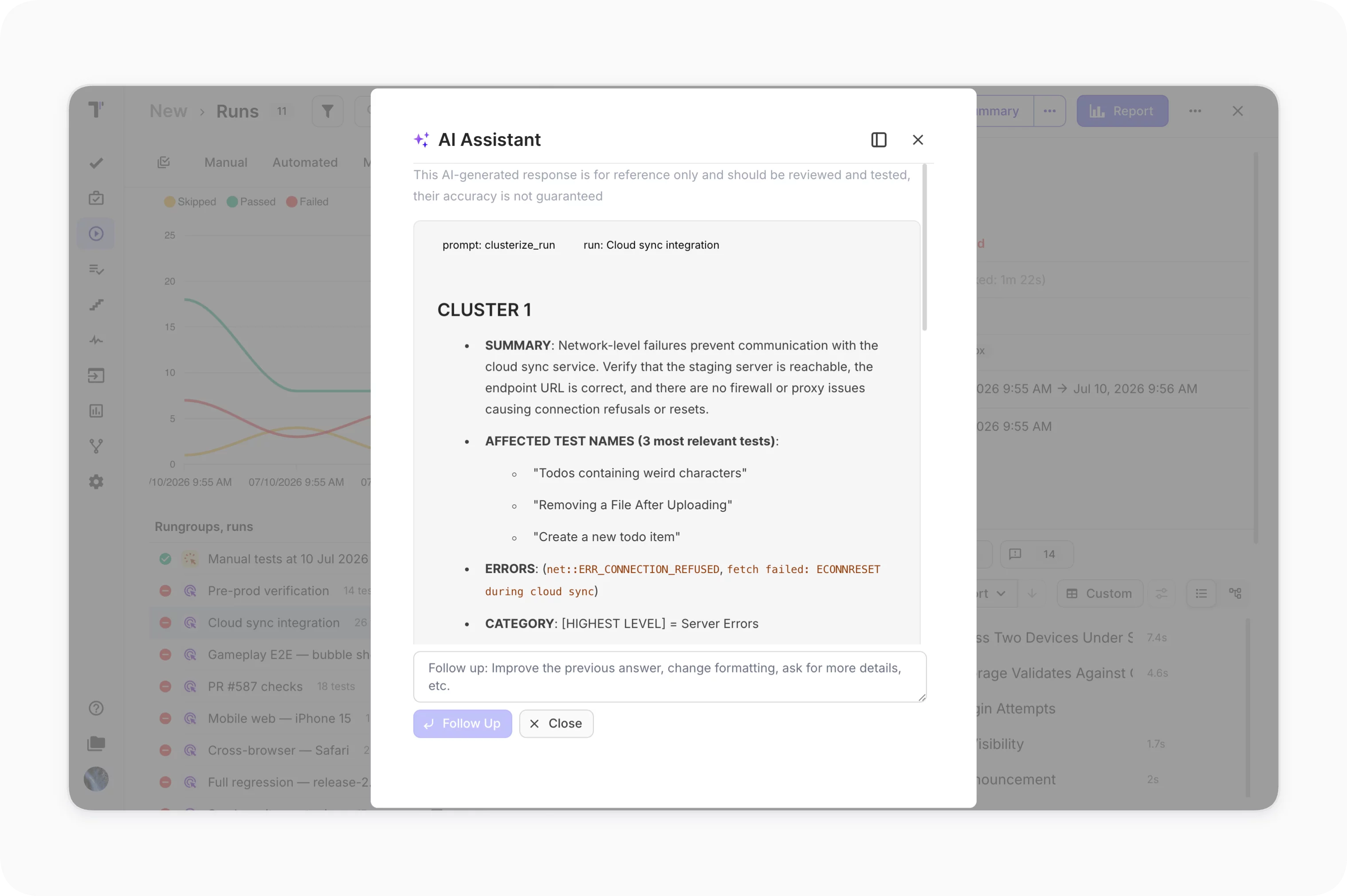
Learn more
AI failure clusterization
Insights for AI-generated reports

Every AI-generated report is saved automatically to the Insights section. Export any report as a PDF and share it with stakeholders during sprint reviews or release planning.
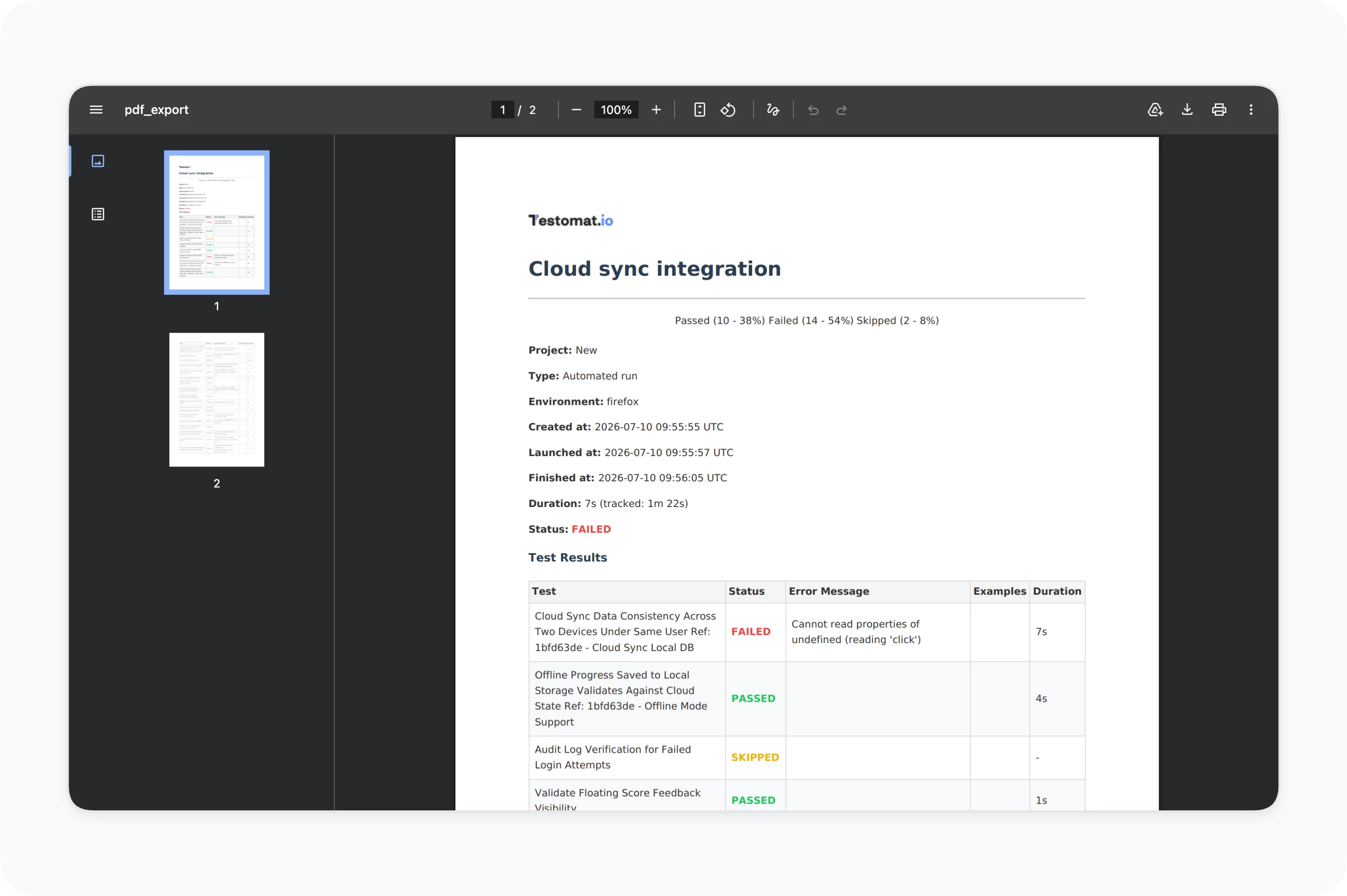
Learn more
Insights for AI-generated reports
Analyze tests coverage

AI checks how well your test cases cover linked requirements. The report highlights missing coverage to add and redundant tests to remove, keeping your suite aligned with what the product actually does.

Learn more
Analyze tests coverage

How AI test reporting and analytics can help?

Cut the time between a failed run and a confident decision with AI reporting and analytics.
Startups & small teams
Faster triage
Skip log digging.
Less manual work
AI writes reports.
Clear release signal
Know when to release.
Mid-sized products
Failure clustering with AI
Group errors fast.
Flaky test control
Catch unstable tests.
Cleaner suites
Drop duplicate tests.
Enterprise projects
Stakeholder visibility
Non-QA can read reports.
Cross-run trends
Track stability over time.
Audit-ready insights
Risk areas at a glance.
What clients says

Recent reviews

“Excellent customer support”
Customer support is always prompt and high-quality. It's also great to see that user feedback is considered when developing new features. The team makes an effort to provide overviews of new features and keeps users informed about the latest updates.
4/5
Aliona Kovalchuk
Aliona Kovalchuk
General QA
“The Best TMS for Our QA Team!”
Our 15-person QA team has used Testomat.io daily for over two years. After comparing tools like TestRail, it stood out in both features and pricing. It’s affordable yet powerful. Jenkins integration works seamlessly, even manual testers can run tests easily. The clean UI speeds onboarding, improves collaboration, and saves time. We’ve recommended it widely, and others love it too.
5/5
Vladyslav M.
Vladyslav M.
General QA
“Testomat.io makes daily testing so much easier”
I’ve used Testomat.io daily for over two years, and it’s the best TMS I’ve worked with. Compared to tools like TestRail, it offers more features at a better price. Jenkins integration is seamless, even for manual testers. The UI is clean and easy to learn. It speeds up workflows, improves transparency, and makes team collaboration much smoother.
5/5
Dmytro H.
Dmytro H.
General QA
“Very convenient platform for managing test cases”
The platform is convenient and intuitive to use. I’ve been using it long enough to say it’s very user-friendly. It’s clear that the team is constantly working on and improving the platform.
5/5
Aleksey K.
Aleksey K.
General QA
“Great tool for creating and managing manual test cases efficiently”
As a Manual QA, I use Testomat.io to create and manage test cases with ease. The interface is intuitive, making onboarding simple. Test plans, runs, and results are well-structured in one place. Tagging helps organize cases efficiently. AI features speed up test creation. It keeps workflows transparent, improves collaboration, and reduces routine work.
5/5
Oksana G.
Oksana G.
General QA
“Testomat.io has been a great tool for managing both automated and manual tests in one place”
I really like how easy it is to integrate with frameworks and CI/CD tools, and the real-time reports with screenshots and analytics save a lot of time. Overall, it makes collaboration in the team much smoother and keeps testing well-organized.
5/5
Aleksey K.
Aleksey K.
Quality Assurance Engineer

Frequently asked questions

Do I need to write prompts to use AI reporting?
Testomat

No. AI run summaries and project status reports work with one click. You can refine the output with prompts, but the default is ready to use.

Which AI provider powers the reports? Testomat

Testomat.io uses Groq as the default provider, with open-source models like Llama and Mixtral. You can also connect your own provider, such as OpenAI or Azure, via API key.

Will AI features expose our test data to third parties? Testomat

AI features are off by default. No data is sent in the background. A user must manually select a specific test or run and click an AI button to send the data for analysis. Full details are in the security documentation.

Can AI handle large test runs? Testomat

Yes. Reports stream in real time and work with suites of 1,000+ tests. AI run summaries condense thousands of results into a readable report.

Are AI features available on all plans? Testomat

AI agents like Deep Analyze and Mark Failed Tests are part of the Enterprise plan. Other AI-powered features such as the run summary and Find Duplicates are available across paid plans.
Try AI test reporting and analytics

Try AI test reporting and analytics







