

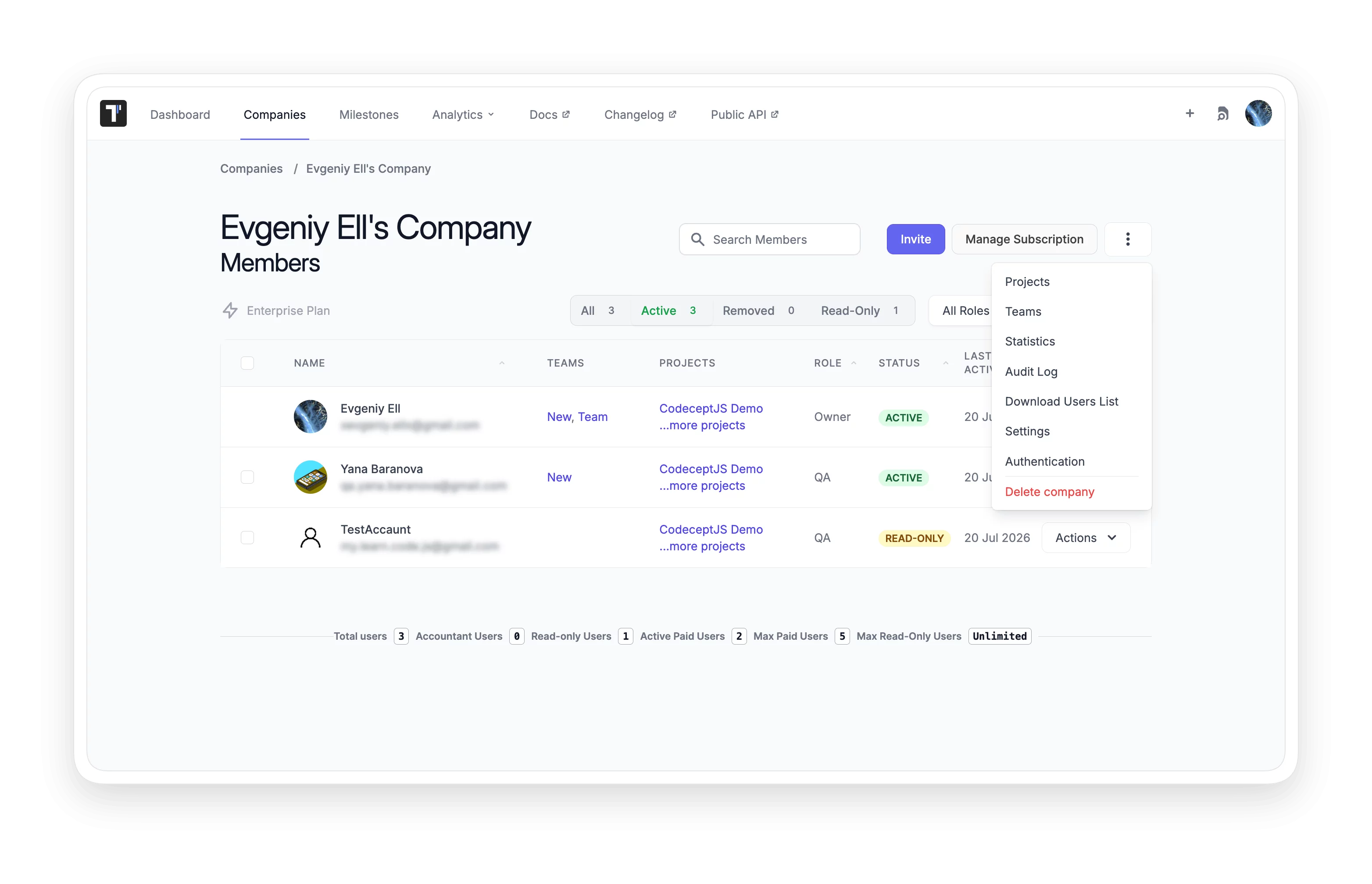
Team management

Give every team member the right access and visibility, so your whole team can test together without the need for extra coordination.
 Team  management

Benefits of Team management

https://testomat.io/wp-content/uploads/2026/06/clear-role-boundaries.svg
Clear role boundaries
Every member gets access that fits their responsibility.
https://testomat.io/wp-content/uploads/2026/06/faster-test-execution.svg
Faster test execution
Assignments route the right tests to the right person.
https://testomat.io/wp-content/uploads/2026/06/full-change-history.svg
Full change history
Diff view shows exactly what changed and when.
https://testomat.io/wp-content/uploads/2026/06/stakeholder-visibility-without-risk.svg
Stakeholder visibility without risk
Read-only access keeps data safe for non-editors.
https://testomat.io/wp-content/uploads/2026/06/real-time-team-alerts.svg
Real-time team alerts
Slack notifications keep everyone informed instantly.

Testomat.io Team management features

Project dashboard

Plan and implement your testing strategy in one shared space. Design and maintain manual or automated tests, assign who will execute them, and review results and analytics, all without switching tools.

Learn more
 Project  dashboard
Manage users and roles

Configure team members, set access levels, and assign tests from a single dashboard. Track the progress of each person on the team and coordinate with stakeholders without leaving the tool.

Learn more
Manage  users and roles
Teams

Group users into teams and assign them to multiple projects at once. Add a person to a team and they get access to all relevant projects immediately, no user-by-user setup needed. Use teams to reflect department structure and onboard new members quickly.

Learn more
 Teams
Assignments

Speed up test execution by assigning specific tests to specific team members. Assigned users receive email notifications and can focus on their defined scope during a run.

Learn more
 Assignments
Features and scenarios history

Review changes to feature files and scenarios with a visual side-by-side diff. See exactly what was deleted and what was saved, including changes inside feature files.

Learn more
Features and scenarios   history
Manager role capabilities

Invite new users, assign roles, change membership status, and grant project access, all from the manager view. Team coordination stays in one place without admin overhead.

Learn more
Manager  role capabilities
Branching and versioning

Each team member can create a separate branch, make changes, and merge to main when ready. Multiple people can work on the same project at the same time without blocking each other.

Learn more
  Branching and versioning
Slack integration notifications

Send real-time test updates to your Slack channel to ensure important information about finished runs is not missed.

Learn more
 Slack  integration notifications
Read-only users access

Give non-technical stakeholders access to tests, run reports, and analytics without letting them edit any data. Read-only mode keeps the project intact while keeping everyone informed.

Learn more
  Read-only  users access
User stories coverage

Connect AI assistants like Cursor and Claude to your Testomat.io project. The official open-source MCP server reads test data and creates suites through any MCP client.

Learn more
 User  stories coverage

How team management can help?

Give every person the right access and keep work moving without delays.
Startups & small teams
Assign work fast
Tests distributed to team members in seconds.
Share results easily
Read-only access keeps stakeholders informed.
Stay notified
Slack alerts replace manual status checks.
Mid-sized products
Control access precisely
Role configuration fits every team structure.
Track coverage per story
Jira integration shows the test status for each user story.
Onboard members in one step
Add to a team, access all projects immediately.
Enterprise projects
Branch without conflicts
Parallel workstreams stay isolated until merged.
Manage departments as teams
One team assignment covers all relevant projects.
Control contractor access separately
Dedicated teams keep external access scoped and clean.
What clients says

Recent reviews

“Excellent customer support”
Customer support is always prompt and high-quality. It's also great to see that user feedback is considered when developing new features. The team makes an effort to provide overviews of new features and keeps users informed about the latest updates.
4/5
Aliona Kovalchuk
Aliona Kovalchuk
General QA
“The Best TMS for Our QA Team!”
Our 15-person QA team has used Testomat.io daily for over two years. After comparing tools like TestRail, it stood out in both features and pricing. It’s affordable yet powerful. Jenkins integration works seamlessly, even manual testers can run tests easily. The clean UI speeds onboarding, improves collaboration, and saves time. We’ve recommended it widely, and others love it too.
5/5
Vladyslav M.
Vladyslav M.
General QA
“Testomat.io makes daily testing so much easier”
I’ve used Testomat.io daily for over two years, and it’s the best TMS I’ve worked with. Compared to tools like TestRail, it offers more features at a better price. Jenkins integration is seamless, even for manual testers. The UI is clean and easy to learn. It speeds up workflows, improves transparency, and makes team collaboration much smoother.
5/5
Dmytro H.
Dmytro H.
General QA
“Very convenient platform for managing test cases”
The platform is convenient and intuitive to use. I’ve been using it long enough to say it’s very user-friendly. It’s clear that the team is constantly working on and improving the platform.
5/5
Aleksey K.
Aleksey K.
General QA
“Great tool for creating and managing manual test cases efficiently”
As a Manual QA, I use Testomat.io to create and manage test cases with ease. The interface is intuitive, making onboarding simple. Test plans, runs, and results are well-structured in one place. Tagging helps organize cases efficiently. AI features speed up test creation. It keeps workflows transparent, improves collaboration, and reduces routine work.
5/5
Oksana G.
Oksana G.
General QA
“Testomat.io has been a great tool for managing both automated and manual tests in one place”
I really like how easy it is to integrate with frameworks and CI/CD tools, and the real-time reports with screenshots and analytics save a lot of time. Overall, it makes collaboration in the team much smoother and keeps testing well-organized.
5/5
Aleksey K.
Aleksey K.
Quality Assurance Engineer

Frequently asked questions

What is the difference between a team and a user role? Testomat

A user role defines what an individual can do inside a project. A team is a group of users that can be assigned to multiple projects at once. Roles control permissions. Teams control which projects a group of people can access, without managing each person individually.

What is the difference between a manager role and a company owner? Testomat

A company owner has full control over the project or projects inside one company. The manager role is scoped to team coordination: inviting users, changing their status, and granting project access. This lets you delegate day-to-day team management without sharing owner-level permissions.

Can stakeholders see test results without being able to edit anything? Testomat

Yes. Read-only access gives non-technical team members or external stakeholders visibility into tests, run reports, and analytics. They cannot change any data, so the project stays safe while keeping everyone informed.

How does branching work for parallel team collaboration? Testomat

Each team member creates a separate branch, makes their changes, and merges back to main when ready. Branches are fully isolated, so simultaneous work on the same project does not cause conflicts or overwrite anyone else's changes.

How do I handle access when someone changes their role in the company? Testomat

Remove them from their current team and add them to the new one. Their project access updates instantly based on the permissions of the new team. No manual reassignment of individual projects is needed.
Get your team testing in minutes with Testomat.io.

Get your team testing in minutes with Testomat.io.








